
ugee Funbox 3D Printer Review: Safe Household Making
By AValidReview. An AI-assisted summary of customer feedback, not a hands-on test.
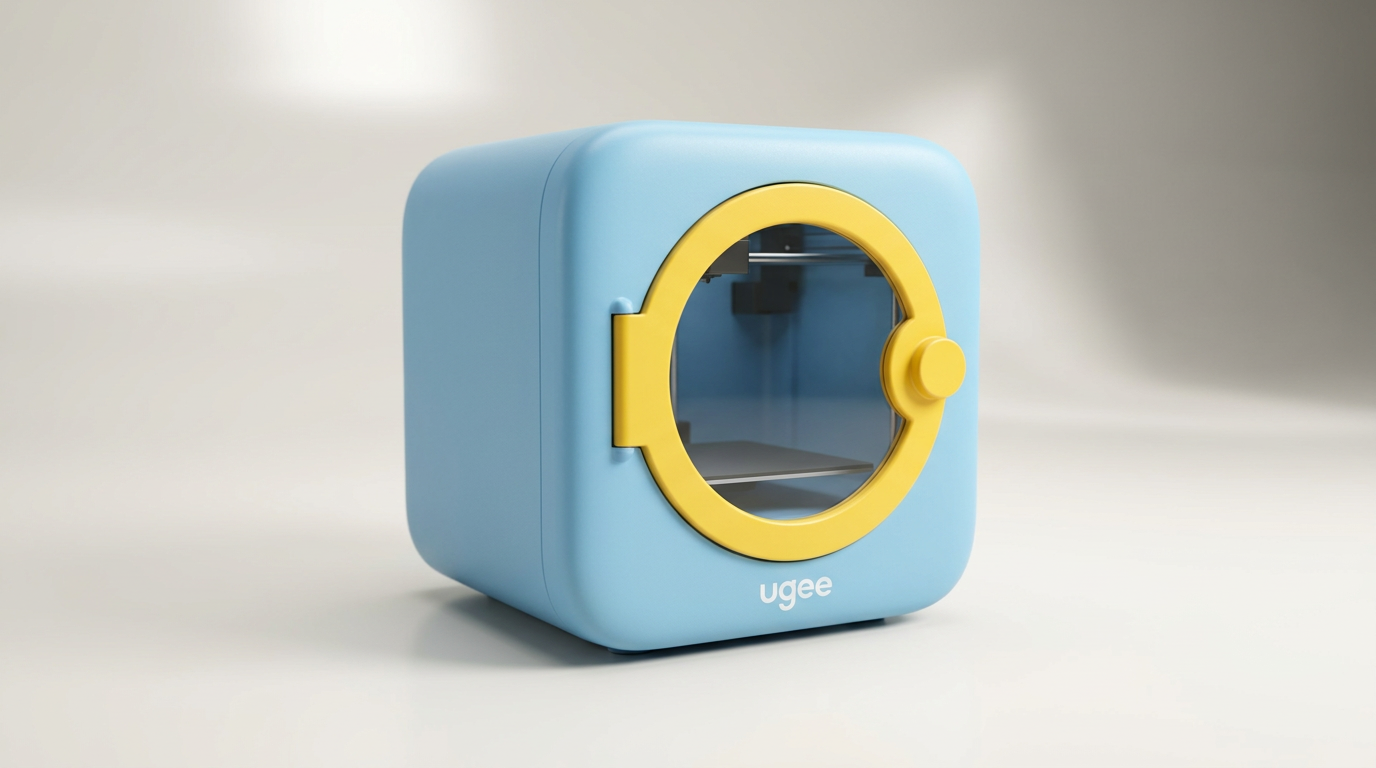
Traditional desktop 3D printing has long extracted what we call the garage tax: a barrier to entry requiring dedicated workbenches, noxious melted-plastic fumes, exposed 200-degree nozzles, and temperamental bed-leveling routines that keep children at arm's length. The ugee Funbox approaches additive manufacturing from a distinctly domestic angle, stripping away industrial mechanics in favor of passing the kitchen-table test. It is engineered to operate safely beside homework notebooks without parental anxiety.
Priced in the $300 range, the Funbox packages a sealed enclosure, HEPA filtration, and an internal monitoring camera into an app-driven prompt-to-plastic pipeline. Instead of forcing young users through slicing software and support densities, the machine accepts spoken requests or photographed paper sketches and translates them into physical objects with a single tap.
That architectural pivot brings real trade-offs. By replacing open-source tinkering with a curated, walled sandbox, the Funbox limits deep mechanical learning in exchange for immediate creative gratification. For families seeking an entry point into additive fabrication that will not turn into a maintenance project, however, this balance represents a thoughtful recalibration of what a beginner printer should be.
What owners love
- + Ready out of the box with zero mechanical assembly required
- + Fully enclosed body stays cool to the touch during operation
- + Integrated HEPA and carbon filtration keeps indoor air odor-free
- + App-based AI sketch and voice conversion keeps children engaged
- + Dependable bed adhesion and auto-leveling produce clean prints
Common complaints
- − Filament-loading lever features stiff spring tension that tests adult hands
- − Walled-garden app limits advanced slicing and custom print tuning
- − Includes only a small single-color starter spool in the box
- − Compact build volume restricts ambitious, larger-scale projects
Design & Build
The Funbox rejects the exposed aluminum extrusions and loose ribbon cables common to entry-level printers. Instead, it arrives as a unified cube with rounded corners and transparent inspection windows. The build chamber is sealed behind a physical door that isolates the heated print head and moving gantry from curious fingers. Even during extended runs, the exterior housing remains cool to the touch, satisfying the safety demands of shared family spaces. An integrated internal camera provides a continuous live stream to the companion app, letting parents and kids monitor progress without standing over the machine. Internally, a dual-stage filtration system combines an H12 HEPA filter with activated carbon pellets. This air system actively captures ultrafine particulate matter and neutralizes thermal odors. The design choice signals a fundamental shift: Ugee treats the Funbox as a domestic consumer appliance rather than a scaled-down machine shop lathe, prioritizing passive safety over modular repairability.
Setup & Ease of Use
Unboxing the Funbox takes the standard additive setup curve and compresses it to ten minutes. Because the chassis ships fully assembled and pre-calibrated, owners avoid the hour-long frame squaring and belt tensioning typical of budget machines. You plug in power, initiate an automated calibration sequence, connect to Wi-Fi, and load material. The automated bed leveling removes the manual paper-slide ritual entirely, creating a uniform foundation across the build plate on the first try. The primary physical friction point is the manual filament feed. Inserting new material requires depressing a release lever with unusually heavy spring tension. Several owners note that this mechanical latch is stiff enough to strain adult fingers and completely out of reach for an eight-year-old. Once the filament engages the extruder gears, however, subsequent operation transitions entirely to the software.
Performance in Real Use
In daily operation, the Funbox delivers surprising dimensional accuracy on small figurines, keychains, and geometric toys. Edges emerge smooth, overhangs hold form, and layer lines remain subtle on default settings. The print bed features a textured coating that grips molten plastic tenaciously while warm, then releases finished parts without scraping once cooled to room temperature. Acoustic discipline is another strength. The stepper motors and internal air circulators produce a low hum that blends into household background noise, avoiding the sharp high-frequency resonance of budget open-frame printers. The internal air filter proves its worth here as well, eliminating the sweet, heavy scent of melting PLA. While the print speed is modest compared to modern high-speed CoreXY platforms, reliability on pre-sliced models is high, avoiding the bird-nest filament jams that usually alienate beginners.
Software & Ecosystem
The UFun app acts as the command center for the Funbox, replacing traditional slicing suites like Cura or PrusaSlicer with what we call the prompt-to-plastic pipeline. Children can speak a description into their tablet or point the camera at a hand-drawn monster on paper. The onboard AI converts that two-dimensional input into a dimensional mesh and sends it directly to the printer with a single tap. For less adventurous sessions, an expanding catalog of pre-supported toys, puzzles, and mini vehicles provides instant gratification. The editorial reality of this setup is what we term the closed-chamber ceiling. By burying layer heights, infill patterns, and print speeds beneath an automated curtain, the software insulates young users from technical failure, but it also prevents them from learning genuine spatial engineering. It is an entertainment engine first and an educational CAD pathway second.
Value & Reliability
Selling in the $300 range, the Funbox occupies a narrow middle ground between bare-bones budget gantries and industrial workhorses. On raw hardware specifications, open-frame competitors offer larger print volumes and faster movement speeds for similar money. Yet evaluating this machine strictly on cost-per-cubic-millimeter misses its target utility. The value of the Funbox lies in friction elimination: zero assembly time, passive thermal protection, automated leveling, and built-in air filtration. For parents who have watched complex tech gifts gather dust due to software hurdles or setup snags, the Funbox demonstrates high operational reliability on small, repetitive toy prints. It operates reliably enough that children can run it with minimal adult intervention, which is where its true household value resides.
Verdict
Buy - A remarkably safe, enclosed entry into 3D printing that turns creative play into physical objects without the usual workshop headaches.
The Funbox is an ideal match for families with elementary and middle-school children who want an appliance-grade creative tool that bypasses the technical friction of slicers, bed leveling, and exposed wiring. If your goal is to let children turn drawings and voice ideas into toys without hovering over them with safety goggles, this machine delivers on its promise.
Skip the Funbox if you are a traditional maker, engineering student, or hobbyist seeking open-source G-code control, high-temperature filaments, or large build volumes. Its walled-garden app and compact build plate will quickly frustrate anyone who wants to fine-tune layer parameters.
Most entry-level 3D printers fail in family homes because they demand that parents act as unpaid machine technicians. The ugee Funbox succeeds by accepting its identity as a creative household appliance rather than a miniature factory tool. It will not teach your child how to calibrate stepper motors, but it will consistently deliver their imagination into physical reality before dinner is served.
FAQ
More 3D Printers reviews
Original Prusa CORE One+ Kit Review: The Maker's CoreXY
ANYCUBIC Photon P1 Max Review: Scale Meets Detail
Anycubic Kobra S1 ACE 2 Pro Combo 3D Printer Review
Toybox Alpha Two 3D Printer Review: The Zero-Fuss Toy Factory
Creality K2 SE 4C Review: Budget Multicolor CoreXY
Anycubic Kobra S1 Max Combo Review: High-Volume Ambition
This review is based on real experiences shared by owners in online communities.