
Toybox Alpha Two 3D Printer Review: The Zero-Fuss Toy Factory
By AValidReview. An AI-assisted summary of customer feedback, not a hands-on test.
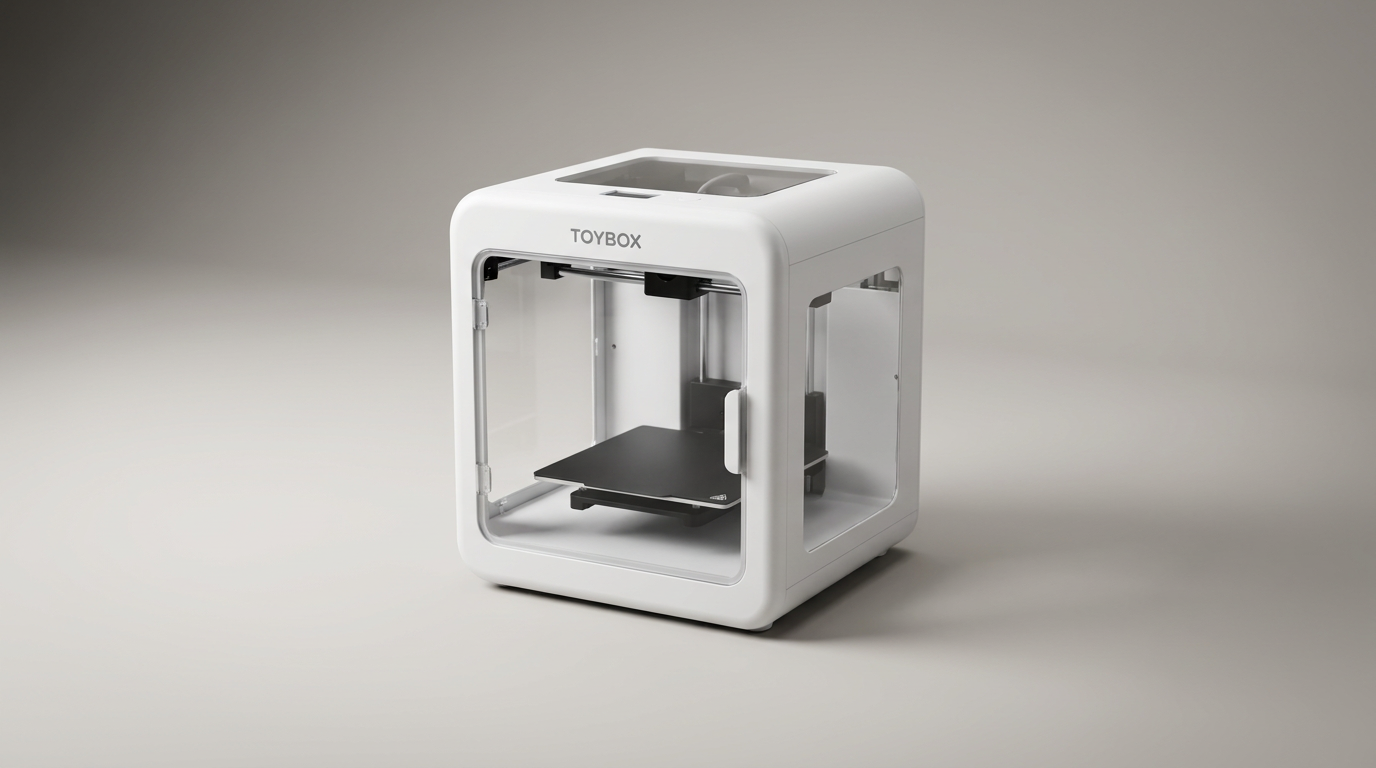
Most 3D printers sold to parents are thinly disguised technical hobbies that inevitably turn adults into unpaid laboratory technicians. The Toybox Alpha Two rejects that reality entirely. It is engineered not as a piece of additive manufacturing equipment, but as a desktop toy vending machine. By stripping away slicer software, manual calibrations, and technical friction, it allows pre-teens to turn digital icons into physical plastic objects entirely on their own.
That autonomy carries what we call the friction-free premium. Selling in the $300 to $400 range, the Alpha Two charges hardware prices that compete directly with far more capable full-size desktop printers. In return, it promises that you will never have to spend an afternoon explaining bed leveling or nozzle temperatures to an eight-year-old.
The result is a sharply focused product that solves the category's biggest usability hurdle while asking buyers to accept severe mechanical compromises in output size and raw print fidelity.
What owners love
- + Genuine out-of-the-box readiness with zero assembly required
- + Independent operation that kids can run without adult supervision
- + Extensive catalog of ready-to-print licensed characters
- + Intuitive companion app with built-in drawing and modeling tools
- + Small footprint that fits comfortably on a child desk
Common complaints
- − Cramped build volume strictly limits prints to tiny trinkets
- − Mediocre print fidelity with visible layer lines and stringing
- − High price relative to significantly more capable entry-level printers
- − Manual bed adjustment screw can be frustrating if factory leveling drifts
Design & Build
The Toybox Alpha Two features a deliberately toy-like aesthetic: an open-frame, compact metal chassis with a footprint barely larger than a toaster. The machine arrives fully assembled, requiring nothing more than pulling out transport foam and plugging in a power cord. The print area itself is tiny, with a build plate roughly the width of an adult hand. While this small envelope keeps the machine stable and kid-friendly, it immediately establishes what we call the scale wall. Children can churn out rings, figures, and fidget spinners, but anything requiring utility or scale is out of reach. The build surface uses a flexible, non-heated print bed that lets kids peel finished toys off by hand, avoiding dangerous scrapers or sharp tools.
Setup & Ease of Use
Setup is among the fastest in consumer electronics. Once connected to domestic Wi-Fi via the mobile app, the Alpha Two is ready to extrude plastic within ten minutes. There is no software slicing workflow or G-code export step. A user taps an item in the app, and the cloud handles the conversion silently. Owners consistently confirm that eight-to-twelve-year-olds manage the entire printing loop without assistance. The lone mechanical vulnerability is bed leveling: most units ship calibrated from the factory, but when a unit drifts out of alignment, the manual screw adjustment under the bed lacks the digital feedback beginners need, creating initial adhesion headaches.
Performance in Real Use
Real-world print performance reveals the cost of extreme simplicity. Print speeds are modest, and surface finishes fall well behind modern entry-level hobby standards. While prints are structurally sound enough for play, owners frequently note visible seam blemishes, mild stringing, and poor definition on tiny features. Because the printer lacks an enclosed heated chamber and uses basic cooling, fine details on miniature figurines often turn into soft blobs. The machine runs on standard 1.75mm PLA filament, but Toybox formats its spools into small 250-gram rolls that hang directly on the chassis. For young users focused on instant play, the finish is acceptable; for anyone seeking precision, it is noticeably rudimentary.
Software & Ecosystem
The software is where Toybox justifies its existence. Rather than dropping users into open-source repositories, the app presents a walled toy garden. It features thousands of ready-to-print models, highlighted by officially licensed designs from Nickelodeon, Cartoon Network, and DC Comics. Beyond the static library, the app includes an integrated mini-CAD drawing tool that transforms rough tablet doodles directly into extruded models. While experienced makers can upload their own STL files through a web portal, the platform clearly prioritizes its curated, one-touch pipeline. Users should note that Toybox pushes an optional Toybox Plus subscription for premium catalog items, though ample free content remains available.
Value & Reliability
At a price point between $300 and $400, the Alpha Two represents poor value on pure hardware metrics. Modern multi-color hobby printers in the same price tier offer three times the build volume, faster output, and vastly superior print quality. However, evaluating the Toybox purely on hardware misses the point. You are paying for software integration that insulates you from maintenance calls. Long-term reliability is largely steady, with few reports of nozzle clogs, though some owners report print shifts when the print head calibration drifts. The true longevity risk is interest decay: once a child prints a dozen trinkets, the tiny build volume limits what they can explore next.
Verdict
Consider - An exceptional zero-friction toy maker for younger children that commands too steep a price for its modest hardware.
Buy the Toybox Alpha Two if you want a low-stress introduction to 3D creation for an elementary or middle schooler who will use it independently. It excels as an educational appliance that demands zero technical support from parents, letting kids design and print within minutes of unboxing. Skip it if you are buying for a teenager, a tinkerer, or anyone wanting to learn actual computer-aided design and printer maintenance. Far more versatile, larger, and faster machines exist in the $200 to $400 price band if an adult is willing to help with the learning curve.
The Toybox Alpha Two demonstrates that the real barrier to home 3D printing was never hardware cost, but software friction. It succeeds brilliantly by masquerading as a toy appliance rather than a fabrication tool, but parents must decide whether total independence is worth paying hobbyist-level money for novelty-scale results.
FAQ
More 3D Printers reviews
Creality K2 SE 4C Review: Budget Multicolor CoreXY
Anycubic Kobra S1 Max Combo Review: High-Volume Ambition
Anycubic ACE 2 Pro Review: Heated Multi-Material Feeding
Magic Jimmy AI 3D Printer for Kids Review
Bambu Lab AMS lite Review: The Multi-Color Upgrade Dilemma
AOSEED AI 3D Printer for Kids Review: Capable Fun
This review is based on real experiences shared by owners in online communities.