
Snapmaker U1 Review: A New Benchmark for Multi-Color 3D Printing
By AValidReview. An AI-assisted summary of customer feedback, not a hands-on test.
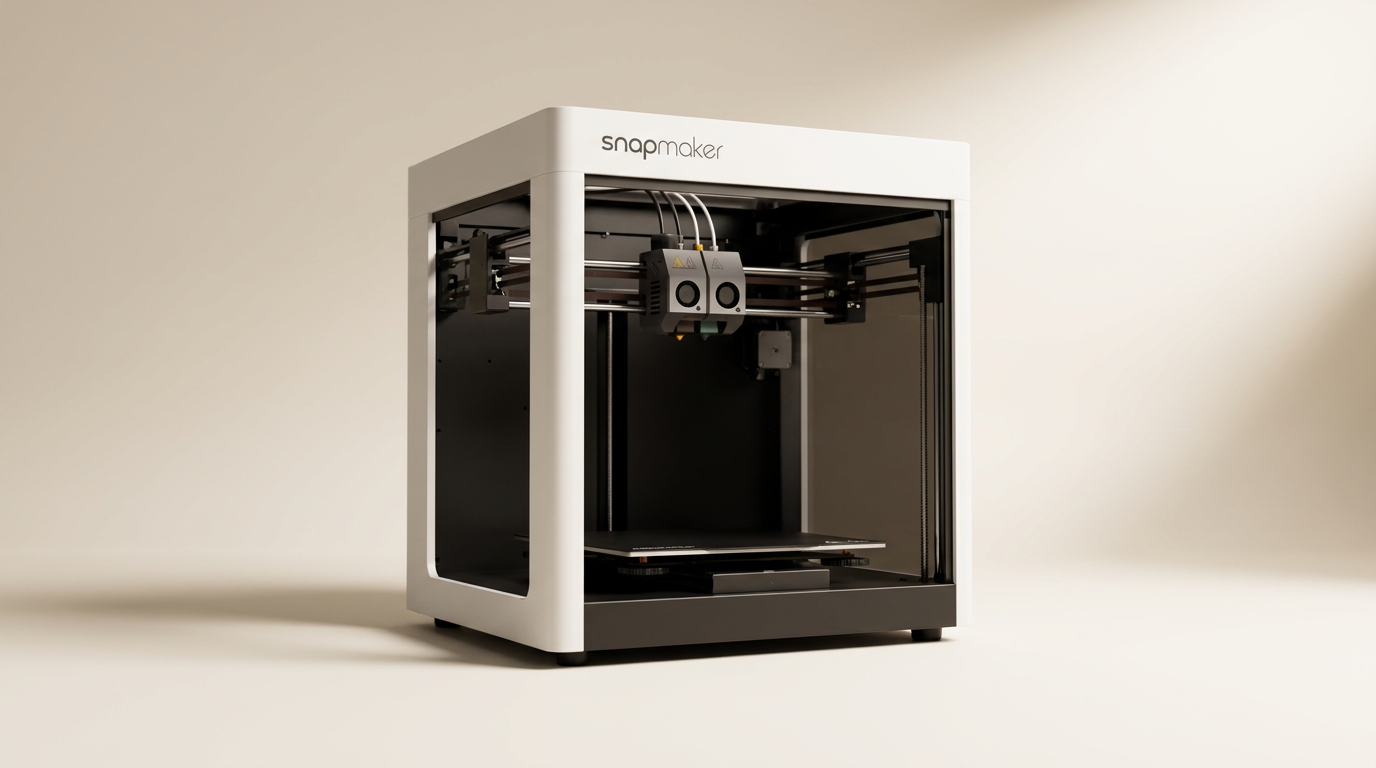
In a 3D printing landscape increasingly dominated by single-nozzle speed demons and complex multi-material systems, the Snapmaker U1 enters as a distinct contender, championing a specific solution for multi-color and multi-material output. Its core proposition isn't merely more speed or a larger build volume, but a strategic re-engineering of how multi-filament prints are executed: dedicated toolheads for each color or material.
This approach directly addresses the inherent inefficiencies of traditional multi-material units that rely on extensive purging or single-nozzle swapper systems. By fundamentally altering the mechanism for filament change, the U1 aims to deliver on the long-sought promise of truly efficient and less wasteful multi-color production. The question for many discerning buyers has shifted from whether multi-color is possible, to whether it can be practical. The Snapmaker U1 suggests a compelling answer to that question, repositioning the high-end multi-material category by emphasizing operational efficiency over sheer feature count.
Owners consistently report that the U1 lives up to its core promises, particularly its efficient multi-color capabilities and high print quality, often drawing favorable comparisons to established printers from Prusa and Bambu Lab.
What owners love
- + Efficient multi-color and multi-material printing with minimal waste
- + Fast tool changing via SnapSwap system
- + High print quality and consistency reported by owners
- + Robust CoreXY system supports high print speeds
- + User-friendly setup and clear instructions
- + Excellent packaging and included accessories
Common complaints
- − Initial setup can be time-consuming due to its size and complexity
- − Mobile software could use refinement
- − Potentially sensitive to wet filament for some users
- − Learning curve for those new to multi-toolhead systems
Design & Build
The Snapmaker U1 distinguishes itself with a robust physical design. Owners frequently highlight the machine's substantial build quality, describing it as 'well engineered' and 'rock-solid.' This impression starts with the packaging itself, which is meticulously organized and protected, signaling a premium product experience from unboxing. The CoreXY motion system, featuring lightweight carbon fiber X-axis rails, forms the backbone of its stability. This design choice contributes to both the printer's high speed capabilities and its ability to maintain accuracy across its 270x270x270mm build volume. The physical presence of four distinct toolheads, each pre-loaded and preheated, visually reinforces the U1's core advantage: parallel readiness. This hardware architecture is a deliberate design decision, prioritizing dedicated, prepared printing paths over a single, reconfigurable head. The physical mechanism for tool changes has been rigorously tested, with the manufacturer claiming over a million swaps without failure, a figure supported by initial owner reports of reliable operation.
Setup & Ease of Use
Setting up the Snapmaker U1 draws mixed, though generally positive, feedback. While the physical assembly requires some time due to the printer's size and the amount of protective packaging, owners commend the clarity and detail of the instruction manual. Many describe the process as straightforward, with the included touchscreen guiding users through initial calibration steps. This emphasis on clear, step-by-step guidance, avoiding reliance on QR codes or online videos, is a significant ease-of-use factor. The 'beginner-friendly' experience is a recurring theme, with new 3D printing enthusiasts finding the automated calibration and guided processes accessible. The inclusion of four 500g filament spools allows immediate printing post-setup. However, the machine’s inherent complexity as a multi-toolhead system means a certain level of technical engagement is still necessary, a concept we term the 'multitoolhead proficiency curve.' While intuitive for initial prints, mastering its full capabilities requires user investment beyond a basic single-nozzle machine.
Performance in Real Use
The Snapmaker U1 consistently delivers on its performance promises, particularly in multi-color and multi-material applications. Owners are impressed by the speed and quality of prints, often noting the machine's ability to produce crisp, clean, and vibrant results. The pivotal feature, the 5-second tool change facilitated by the SnapSwap system, receives universal praise. This rapid swapping dramatically reduces filament change time and significantly minimizes material waste compared to traditional purge-heavy systems. Several users specifically highlight the absence of purge towers or extensive purging, which contributes to both material savings and faster overall print times. The ability to combine rigid and flexible materials, such as PETG and TPU, expands creative possibilities. This operational efficiency in multi-color printing stands out as the U1's primary achievement, distinguishing it from competitors who may offer multi-color but with a heavier material and time penalty. The 'zero-waste multi-color' promise is a key differentiator, translating directly into tangible savings and improved workflow for users.
Software & Ecosystem
The Snapmaker U1 operates within its own software ecosystem, primarily utilizing Snapmaker Orca, a custom open-source slicing software. Owners report that Orca functions effectively, allowing users to import models and prepare print jobs with relative ease. The printer also supports LAN mode, enabling direct print job transmission from a computer. While the software is generally functional, some advanced users coming from other platforms, such as PrusaSlicer, note that the mobile app experience could be improved. The open-source nature of Orca suggests potential for community-driven enhancements over time. The U1 also benefits from an active online community, with owners mentioning a growing body of information and modifications available. This 'community-augmented ecosystem' is crucial, as it provides ongoing support and extends the printer's utility beyond its factory configurations, a hidden upside that many initial buyers may not fully appreciate. Firmware updates are also noted as a regular occurrence, indicating active development and continuous refinement by Snapmaker.
Value & Reliability
The Snapmaker U1 presents a compelling value proposition, particularly for those seeking advanced multi-color and multi-material capabilities. Priced around $900, it is frequently compared favorably against more expensive alternatives like the Prusa XL, which can be well north of $5000, or even against Bambu Lab printers when considering multi-color efficiency. Owners often describe it as 'phenomenal' and a 'great printer for the price.' Reliability is a consistent strong point, with many users reporting continuous, trouble-free operation and 'no failed prints' since acquisition. This out-of-the-box performance, often surpassing expectations set by previous printers requiring extensive calibration, underscores its design for consistency. The included accessories, such as multiple filament spools and a comprehensive tool kit, add to the overall value. Its 'set it and forget it' calibration and consistent output contribute to a low operational anxiety, minimizing the hidden cost of constant user intervention common with less refined machines.
Verdict
Strong Buy - The Snapmaker U1 delivers exceptional multi-color and multi-material printing efficiency at a competitive price point.
This printer is an excellent choice for anyone prioritizing efficient, high-quality multi-color 3D printing without the excessive filament waste common in other systems. Hobbyists, designers, and small businesses looking to produce functional parts, detailed prototypes, or complex models with varied colors and materials will find its dedicated toolhead system and rapid swapping highly beneficial. It offers a sophisticated experience that appeals to both relative beginners due to its ease of setup and experienced users seeking advanced capabilities under $1000.
Those who primarily print single-color objects and do not foresee a need for multi-material output may find the U1's specialized features overkill, and could opt for simpler, faster single-nozzle CoreXY machines in a lower price band. While the setup is manageable, users expecting an absolutely plug-and-play experience without any learning curve for multi-toolhead systems might initially feel overwhelmed. Individuals solely focused on raw speed for single-color production might also find other options more suited to their specific needs.
The Snapmaker U1 represents the 'pragmatic multi-color' paradigm shift in consumer 3D printing. Rather than merely adding colors, it redefines the underlying economics of multi-material production by minimizing waste and dramatically reducing changeover times. This focus on efficiency and predictability positions it not just as a printer, but as a production tool, quietly changing expectations for how accessible advanced multi-color capabilities can be.
FAQ
More 3D Printers reviews
Toybox Alpha Two 3D Printer Review: The Zero-Fuss Toy Factory
Creality K2 SE 4C Review: Budget Multicolor CoreXY
Anycubic Kobra S1 Max Combo Review: High-Volume Ambition
Anycubic ACE 2 Pro Review: Heated Multi-Material Feeding
Magic Jimmy AI 3D Printer for Kids Review
Bambu Lab AMS lite Review: The Multi-Color Upgrade Dilemma
This review is based on real experiences shared by owners in online communities.