
Revopoint MINI 2 Review: Precision for Small-Scale Scans
This review is based on real experiences shared by owners in online communities.
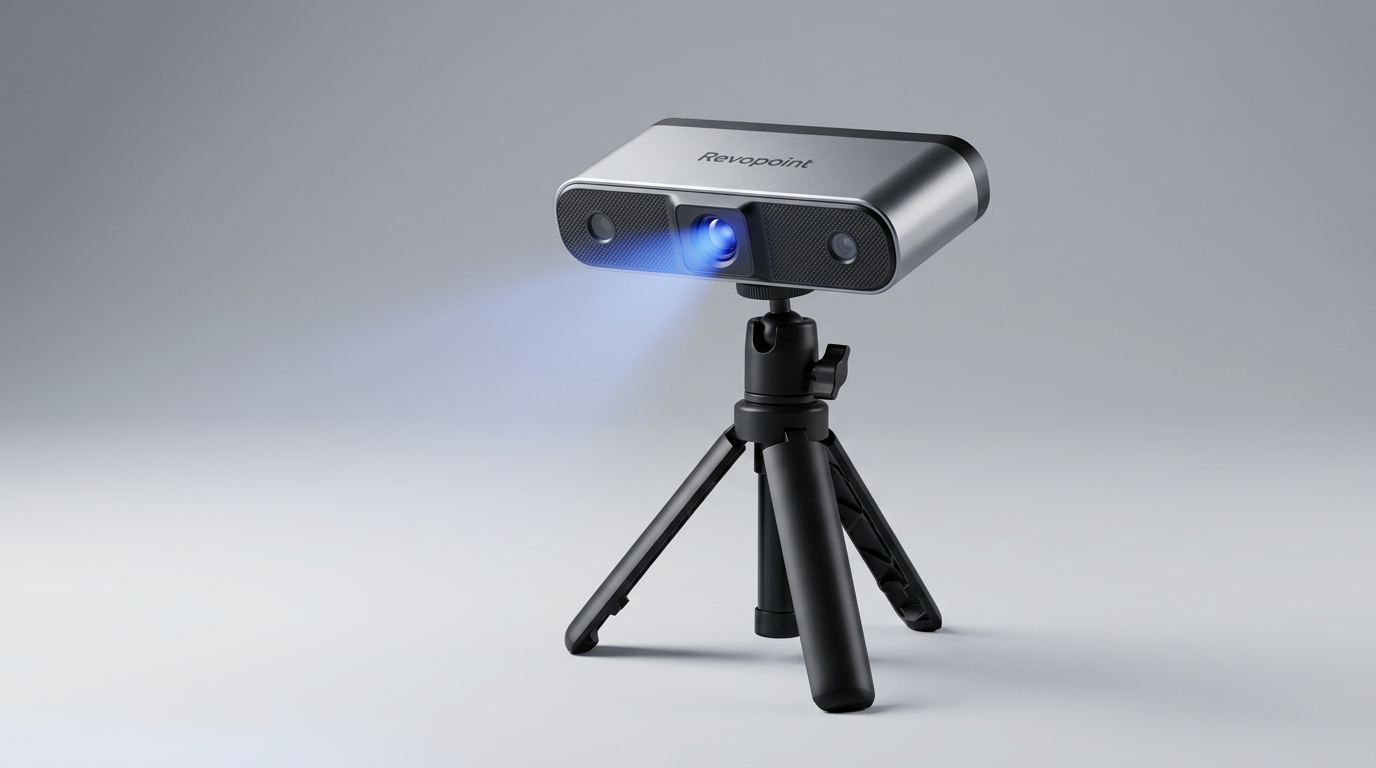
The Revopoint MINI 2 enters a specific segment of the 3D scanning market, one often characterized by compromise between precision and accessibility. While many scanners offer broad versatility, the MINI 2 stakes its claim on a singular promise: exceptionally detailed capture for small components. This narrow focus suggests a design philosophy centered on mastering the micro rather than merely accommodating it, a distinction critical for users operating in high-tolerance fields.
Its industrial blue light technology and stated 0.02mm precision align it with tools typically reserved for specialized applications. However, Revopoint aims to make this capability available to a broader audience. The crucial question is whether this industrial-grade performance translates into practical, repeatable results for diverse users, or if its specialized nature creates a 'precision paradox' where high specs require equally high user skill or specific environmental controls.
This review delves into whether the MINI 2 delivers on its precise mandate, examining its real-world performance, user experience, and overall value proposition for those who demand minute detail from their 3D models.
What owners love
- + Delivers exceptional precision for small objects and intricate details
- + Intuitive software and helpful tutorials ease the learning curve
- + Suitable for specialized applications like dental or miniature scanning
- + Fast scanning speeds enhance workflow efficiency
- + Portable and lightweight design supports various use cases
Common complaints
- − Requires careful object preparation, such as scanning spray, for optimal results
- − Limited to small object sizes, making it unsuitable for larger items
- − Blue light technology can introduce material and color-dependent scanning variations
- − Proprietary software for CAD conversion is an additional, separate purchase
Design & Build
The Revopoint MINI 2 presents a compact and ergonomic design. Weighing just 175g, it is comfortable for extended handheld use, aligning with its portable utility. The integration of three tactile buttons on the device for exposure adjustment and scan initiation represents a thoughtful refinement for operational immediacy, reducing reliance on software during active scanning. The device's Class 1 blue light technology, while effective for precision, necessitates careful handling to avoid direct eye exposure, a standard precaution for this class of optical hardware. The overall build quality suggests a tool designed for repeated use within its intended professional or advanced hobbyist contexts.
Setup & Ease of Use
Owners consistently report a straightforward setup experience. The included Revo Scan software is described as intuitive, with numerous YouTube tutorials available to guide new users. This support infrastructure is crucial for mitigating the typical complexity associated with high-precision scanning. The MINI 2's upgraded connectivity options, including Type-C USB and Wi-Fi 6, provide flexibility for both tethered and mobile scanning, contributing to its overall ease of integration into various workflows. However, achieving the stated precision often requires adherence to specific scanning protocols, such as using scanning spray, indicating that while setup is simple, mastering the craft demands diligence.
Performance in Real Use
The MINI 2 excels in capturing intricate details on small objects. Owners report success in tasks like scanning out-of-print miniatures and plaster molds for custom dental work, highlighting its utility in fields demanding fine resolution. The 0.02mm single-frame precision is a core capability, enabling the accurate reproduction of minute features. Its larger single-capture range and enhanced RGB camera with Flash LEDs improve both tracking stability and texture capture, addressing common pain points in previous generations. However, this high precision comes with what we term 'the material negotiation' cost; the blue light technology is highly sensitive to object material and color, requiring specific preparation methods like scanning spray to achieve consistent, high-quality results. This is not a set-and-forget device; optimal outcomes depend heavily on operator technique and object preparation.
Software & Ecosystem
The Revo Scan software package is integral to the MINI 2's appeal, handling scanning, alignment, and post-processing. Its ability to export models in multiple standard formats (PLY, OBJ, STL, ASC, 3MF, GLTF, FBX) ensures broad compatibility with existing 3D printing and modeling ecosystems. This open format support is a significant advantage, avoiding vendor lock-in for critical output. For advanced CAD conversion, the separate Revo Design software, powered by Quicksurface, offers a professional workflow for reverse engineering, though it is a paid add-on and Windows-only. This bifurcated software approach implies that basic scanning is well-supported out-of-the-box, but specialized CAD workflows entail an additional investment and platform restriction.
Value & Reliability
Priced in the higher hundreds, the Revopoint MINI 2 represents a significant investment for a desktop 3D scanner, yet owners who require its specific precision often find the cost justified. Its build quality and robust performance in capturing small, complex geometries contribute to its perceived value. The high precision and consistent performance for its niche applications suggest a reliable tool for professionals and advanced hobbyists. For users engaged in tasks like miniature duplication or custom dental appliances, the MINI 2 offers a 'precision-to-effort ratio' that many general-purpose scanners cannot match. Its reliability stems from consistent output quality when used within its operational parameters, making it a dependable choice for those whose projects depend on extreme detail.
Verdict
Buy - The Revopoint MINI 2 delivers exceptional precision for small, intricate objects, making it a valuable tool for specialized applications.
This scanner is an excellent acquisition for professionals, dental technicians, and serious hobbyists focused on capturing minute details in small objects, such as miniatures, jewelry, or custom components. Its high precision and robust software support justify its price, which falls in the higher hundreds. Users who understand the necessity of object preparation and are comfortable with a dedicated workflow will find it highly effective. Those needing to reverse engineer directly into CAD should budget for the additional Revo Design software.
Conversely, users needing to scan large objects, or those seeking a 'point-and-shoot' general-purpose scanner without requiring extreme precision, should look elsewhere. Its specialized nature makes it less suitable for casual use or broad-spectrum scanning tasks. The MINI 2 embodies the principle of 'purpose-built excellence,' offering deep capability in a narrow field rather than broad, shallow utility.
FAQ
More 3D Scanners reviews

Revopoint INSPIRE 2 3D Scanner Review: Unpacking the Accessory Echo Chamber

Creality 6mm 3D Scanning Markers Review: Essential Tracking Aid

TOSUKKI 6mm Positioning Targets Review: The Refined Generic Choice

AESUB 3DTOOLS 3D Scanner Spray Review: The 'Evaporative Enabler'

Creality 8-inch Rotating Turntable: A Solid Scanner Accessory

Generic 12 Piece Multi-Angle Markers Review: Essential 3D Scanning Dots
This review is based on real experiences shared by owners in online communities.