
Shining 3D EINSTAR 2 Review: Wireless Freedom at a Compute Cost
By AValidReview. An AI-assisted summary of customer feedback, not a hands-on test.
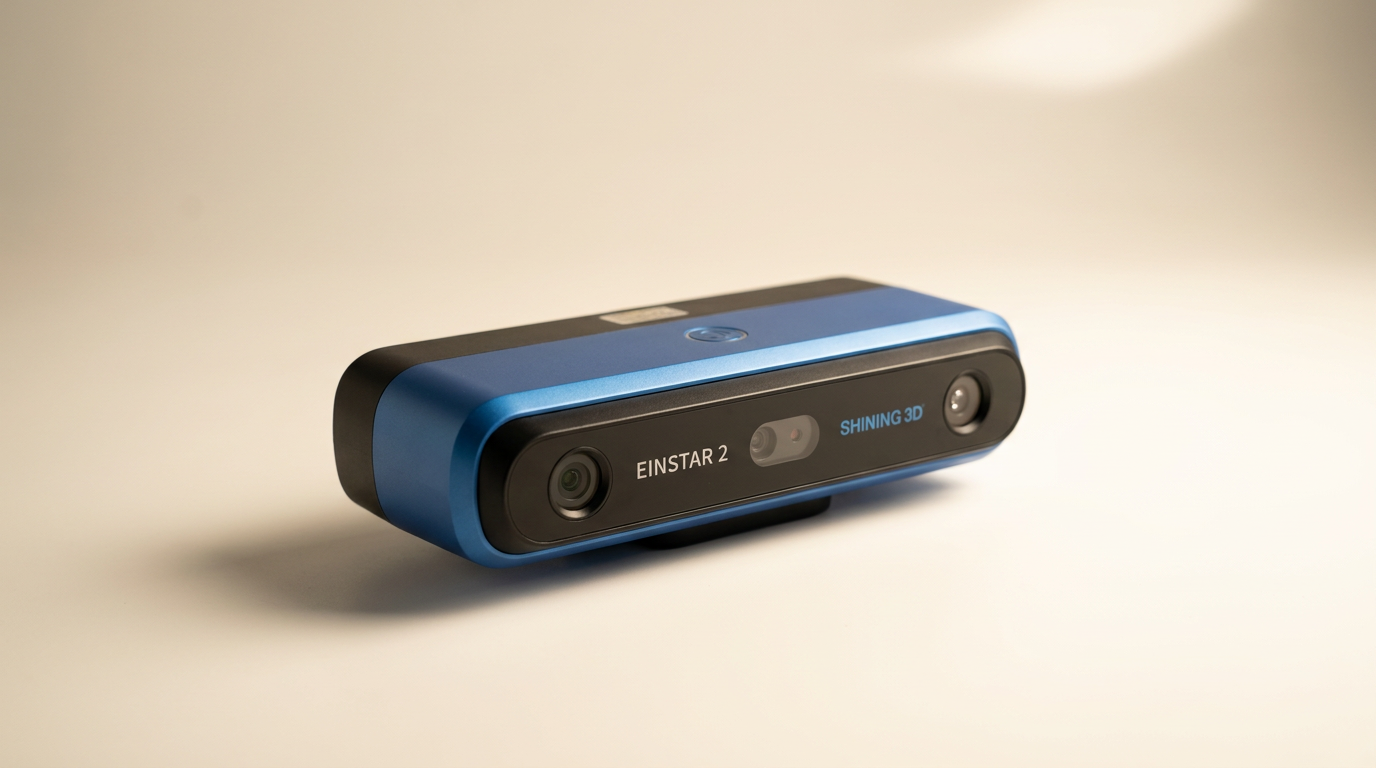
Wireless handheld scanning is routinely marketed as consumer-friendly convenience, but the Shining 3D Einstar 2 exposes the central friction in prosumer digitizing: severing the physical cable does not eliminate the computational anchor. Buyers stepping into this bracket expecting a breezy, point-and-shoot appliance immediately collide with the compute tax. While the scanner itself moves freely, processing its high-density data requires the kind of workstation iron rarely found on standard desks.
Building on Shining 3D's established industrial pedigree, the Einstar 2 pairs 17 blue laser lines with an infrared VCSEL array, claiming 0.05mm detail and up to 90 frames per second. On paper, it bridges the wide chasm between entry-level optical toys and metrology rigs costing well into five figures. It promises outdoor capability in direct sunlight and the ability to scan dark or reflective surfaces without messy developer sprays.
In practice, lived experience reveals a sharp divide. Operators with metrology experience and high-end desktop rigs can extract clean, production-ready meshes. However, complete newcomers and under-equipped creators run headfirst into an unforgiving learning curve, virtually non-existent out-of-the-box guidance, and software that will choke even well-specified mobile hardware.
What owners love
- + True wireless operation eliminates restrictive umbilical cable drag
- + Dual-source blue laser and infrared optics handle tricky surfaces
- + Sharp 0.05mm resolution captures fine mechanical geometry
- + Scans dark and reflective surfaces without aerosol sprays
- + Smooth frame rates once tracking alignment is secured
Common complaints
- − Massive host RAM appetite; 32GB can trigger out-of-memory errors
- − Virtually non-existent out-of-the-box documentation
- − Weak Apple Silicon support; effectively demands a dedicated Nvidia GPU
- − Steep tracking learning curve can lead to abandoned scans
Design & Build
The physical architecture of the Einstar 2 is centered around breaking free from the traditional umbilical cord. Older handheld scanners forced operators to manage a bundled USB and power line that caught on chair arms, vehicle doors, and turntable bases. The Einstar 2 integrates Wi-Fi data transmission and an internal battery rated for up to three hours of field operation. In the hand, the chassis feels balanced, though prolonged one-handed passes still generate fatigue. The dual-optical window houses both the 17 blue laser line projector for fine surface capture and the infrared VCSEL array for wider volumetric tracking, giving the unit an industrial, purposeful stance.
Setup & Ease of Use
The unboxing experience suffers from what can only be called the onboarding void. Multiple owners report opening the packaging to find nothing beyond a basic packing slip, with zero quick-start documentation, zero software installation media, and no pointers on where to download the necessary EXStar Hub suite. For an advanced optomechanical instrument, this unguided start creates immediate friction. Once the software is located online, operators must perform a manual calibration routine before capturing geometry. Beginners who attempt a casual scan within an hour of unboxing routinely find themselves stalled by orientation mistakes and calibration missteps.
Performance in Real Use
When pointed at real-world components, the Einstar 2 demonstrates why Shining 3D commands respect in additive manufacturing circles. The blue laser projector manages black plastics, engine castings, and moderately reflective stamped metal without requiring chalky sublimation spray. Capture speed feels rapid, maintaining fluid tracking when moved at a steady sweep. However, the scanner does not forgive erratic sweep mechanics. Move too quickly across featureless planes and tracking slips, creating fragmented point clouds. Experienced operators who understand feature alignment and surface registration will pull clean, accurate meshes, while novices risk spending days wrestling with disjointed geometries.
Software & Ecosystem
The EXStar Hub software exposes what we call the compute tax. While the scanner transmits data wirelessly, the real-time processing of high-resolution point clouds places an astronomical burden on the host computer. Users operating 32GB of system RAM report immediate out-of-memory errors during high-resolution scans, forcing them to downgrade mesh density simply to complete an export. Furthermore, the platform heavily favors dedicated Nvidia graphics hardware on Windows. Mac users face an uphill battle: even modern M-series architectures struggle with stability, and setup issues on Apple hardware are a recurring friction point. If your PC lacks workstation-grade muscle, the scanner simply will not perform.
Value & Reliability
Positioned in the serious prosumer price tier, well north of basic hobbyist gadgets, the Einstar 2 represents a significant financial commitment. The hardware build is robust, and global technical support resources from Shining 3D are responsive when invoked. Yet value in this bracket is entirely contingent on the buyer's existing infrastructure. If you must budget for a high-end desktop workstation with an Nvidia GPU and 64GB of RAM alongside the scanner itself, the true entry barrier doubles. Those who clear the hardware hurdle receive an agile, industrial-grade digitizer, but underestimating its overhead leads straight to buyer remorse.
Verdict
Consider - A formidable wireless handheld scanner burdened by punishing host hardware demands and a steep operator learning curve.
Buy the Einstar 2 if you are a reverse engineer, fabricator, or experienced 3D printing specialist who already owns a high-end Windows workstation with a beefy Nvidia graphics card and at least 32GB to 64GB of RAM. The cord-free mobility and ability to scan dark, reflective mechanical parts without spray make it an exceptional tool for workshop digitizing.
Skip this unit if you plan to run scans on a standard thin-and-light laptop, work primarily inside the Apple ecosystem, or want an intuitive, guided consumer unboxing experience. The lack of paper documentation and the immediate memory cliffs will turn casual hobbyist projects into expensive tech-support sessions.
The Einstar 2 perfectly illustrates the tether illusion of modern 3D digitizing: while Shining 3D successfully removed the cable from your wrist, they replaced it with an invisible, heavy computational leash to a high-powered workstation. Treat this not as a standalone wireless gadget, but as an untethered sensor appendage to an industrial PC, and its outstanding scan resolution will finally make sense.
FAQ
More 3D Scanners reviews
Creality Pika Review: High Precision in a Pocket Form Factor
LIANGYUNZE 500 Magnetic 3D Scanner Markers Review

AESUB Violet 3D Scanning Spray Review
3DMakerpro Moose Review: Precision Scanning Meets a Real Learning Curve
Creality Otter Lite Basic 3D Scanner Review: Reality Capture
Creality Pika 3D Scanner Review: Precision Meets The Compute Cliff
This review is based on real experiences shared by owners in online communities.