
Creality Otter Lite Basic 3D Scanner Review: Reality Capture
By AValidReview. An AI-assisted summary of customer feedback, not a hands-on test.
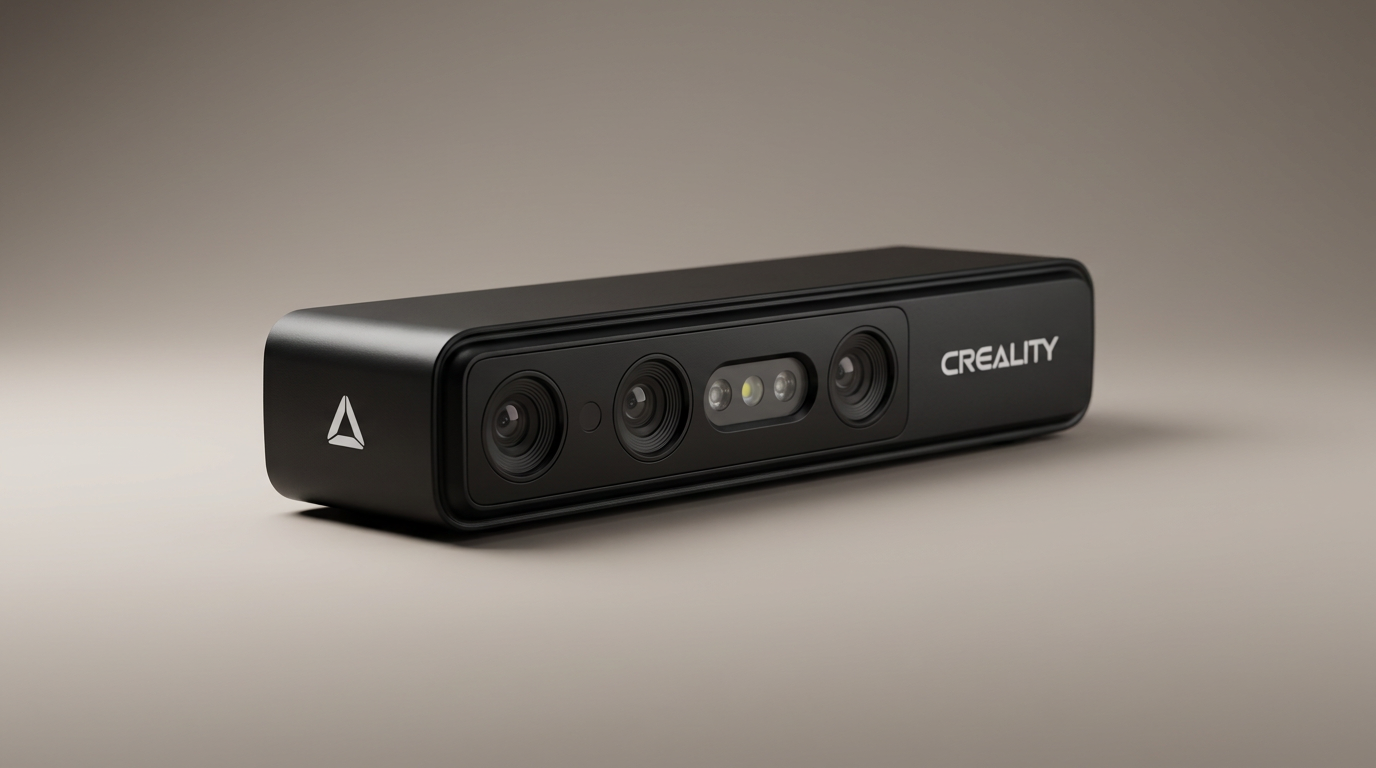
For years, consumer 3D scanning suffered from what we call the tracking-loss tax. Affordable handheld units promised effortless digital duplication, only to stall out every few seconds as their sensors lost spatial orientation across flat planes or dark plastic. Makers spent more time wrestling with calibration dots and powdery developer sprays than actually printing usable meshes. The Creality Otter Lite Basic aims directly at that bottleneck, using a quad-camera array to bring reliable geometry lock to a tool priced firmly for home workshops.
Priced in the $400 to $500 range, the Otter Lite Basic enters an additive manufacturing space that is rapidly shifting from manual CAD recreation to direct reality cloning. Rather than positioning itself as a cut-price metrology device, it serves as an input peripheral specifically tuned for the modern high-speed 3D printing pipeline. It targets the practical fabricator who needs to scan an automotive bracket, a broken gear, or an artistic sculpture without pausing for surface prep.
Yet adopting the Otter Lite requires navigating what we term the mobility tax. While the hardware excels when anchored to a capable desktop workstation, unlocking true cordless scanning requires optional hardware that changes the cost equation. Understanding where the tethered baseline ends and the add-on ecosystem begins is essential before clearing space on your workbench.
What owners love
- + Quad-camera array maintains stable geometry tracking without constant dropouts
- + Scans dark, black, and metallic surfaces directly without contrast sprays
- + Straightforward guided on-screen calibration suitable for beginners
- + Lightweight, ergonomic handheld chassis prevents wrist fatigue
- + CrealityScan 4 software provides clean mesh generation and native export formats
Common complaints
- − Requires high-power USB ports, failing to initialize on lower-spec connections
- − Wireless mobile scanning requires purchasing an expensive separate bridge handle
- − Inherent learning curve for processing and aligning complex multi-angle scans
Design & Build
The Otter Lite Basic trades the industrial metal housings of high-end metrology tools for a dense, high-grade composite enclosure. In the hand, the device feels balanced rather than cheap. The low overall weight is a deliberate ergonomic choice; handheld scanning requires slow, repetitive orbits around stationary targets, and a heavy chassis rapidly induces forearm fatigue. The physical layout centers on its front-facing optical cluster, which houses dual long-focal lenses for fine contouring alongside dual short-focal lenses for wide-area tracking. Integrated white LED fill lights flank the central RGB sensor, providing balanced illumination for color texture mapping. Physical cabling connects securely, though owners should note that the base package is fundamentally designed around a wired workstation setup.
Setup & Ease of Use
Unboxing to first scan takes roughly ten minutes, provided your PC hardware meets specific power thresholds. Owners report that setup centers on installing CrealityScan 4 and stepping through a guided calibration sequence, which visually prompts you to orient the scanner across various preset angles. However, hardware connectivity exposes an early pitfall. Several users encountered boot and firmware update failures when connected to standard 5Gbps USB 3.0 ports that failed to deliver adequate bus power. Moving to a dedicated 10Gbps USB port resolved the issue immediately. Once powered correctly, the software interface avoids buried menus, relying on visual indicator bars that coach the user on optimal scanning distance in real time.
Performance in Real Use
In day-to-day scanning, the Otter Lite separates itself from previous entry-level hardware through tracking resilience. Handheld structured-light scanners notoriously lose their spatial lock when traversing uniform or featureless surfaces, forcing painful restarts. The Otter Lite holds onto geometry with remarkable tenacity, even during minor hand tremors or rapid angle transitions. Its structured-light projector handles dark and metallic items without requiring chalky sublimation sprays, a persistent frustration in automotive and mechanical prototyping. Detail resolution across moderate-sized mechanical components is sharp enough to replicate mounting holes, snap-fits, and surface contours directly into slicer software, meaningfully speeding up the reverse-engineering cycle.
Software & Ecosystem
CrealityScan 4 represents a notable step forward from earlier, clunkier iterations of the suite. The application handles point cloud generation, noise decimation, and final watertight meshing with minimal manual intervention. It exports standard STL, OBJ, and 3MF files ready for CAD modification or immediate slicing on machines like the Creality K2 Plus. The software also clarifies a major point of confusion that has burned frustrated buyers. The scanner operates out of the box as a tethered PC peripheral. Users wishing to run untethered phone-based scanning out in the field must add Creality's optional Scan Bridge handle. Buyers who misunderstand this hardware divide often mistakenly assume their base unit is broken, when in reality it simply requires a workstation umbilical.
Value & Reliability
In the broader landscape of additive manufacturing, functional sub-millimeter 3D scanners once demanded thousands of dollars and specialized training. Sitting comfortably in the mid-hundreds bracket, the Otter Lite Basic establishes high utility per dollar for home shops and small fabrication studios. Reliability hinges largely on user technique and host computing power rather than mechanical flaws. It will not replace a certified five-figure coordinate measuring machine for ISO-grade tolerance verification, but for functional fabrication, replacement part cloning, and hobbyist design, it eliminates the vast majority of traditional scanning headaches at an accessible price point.
Verdict
Buy - An accessible, highly capable structured-light scanner that finally eliminates entry-level tracking dropouts for desktop makers.
FAQ
More 3D Scanners reviews
Creality Pika 3D Scanner Review: Precision Meets The Compute Cliff
Revopoint POP 4 Magnetic Outdoor Filter Review
3DMakerpro Moose Lite Premium 3D Scanner Review
3DMakerpro Seal Lite Review: Precision at a Strict Distance
3DMakerpro 6mm 3D Scanning Marker Dots Review
Creality Scan Bridge for CR-Scan Otter Review: Wireless Freedom
This review is based on real experiences shared by owners in online communities.