
Magic Jimmy AI 3D Printer for Kids Review
By AValidReview. An AI-assisted summary of customer feedback, not a hands-on test.
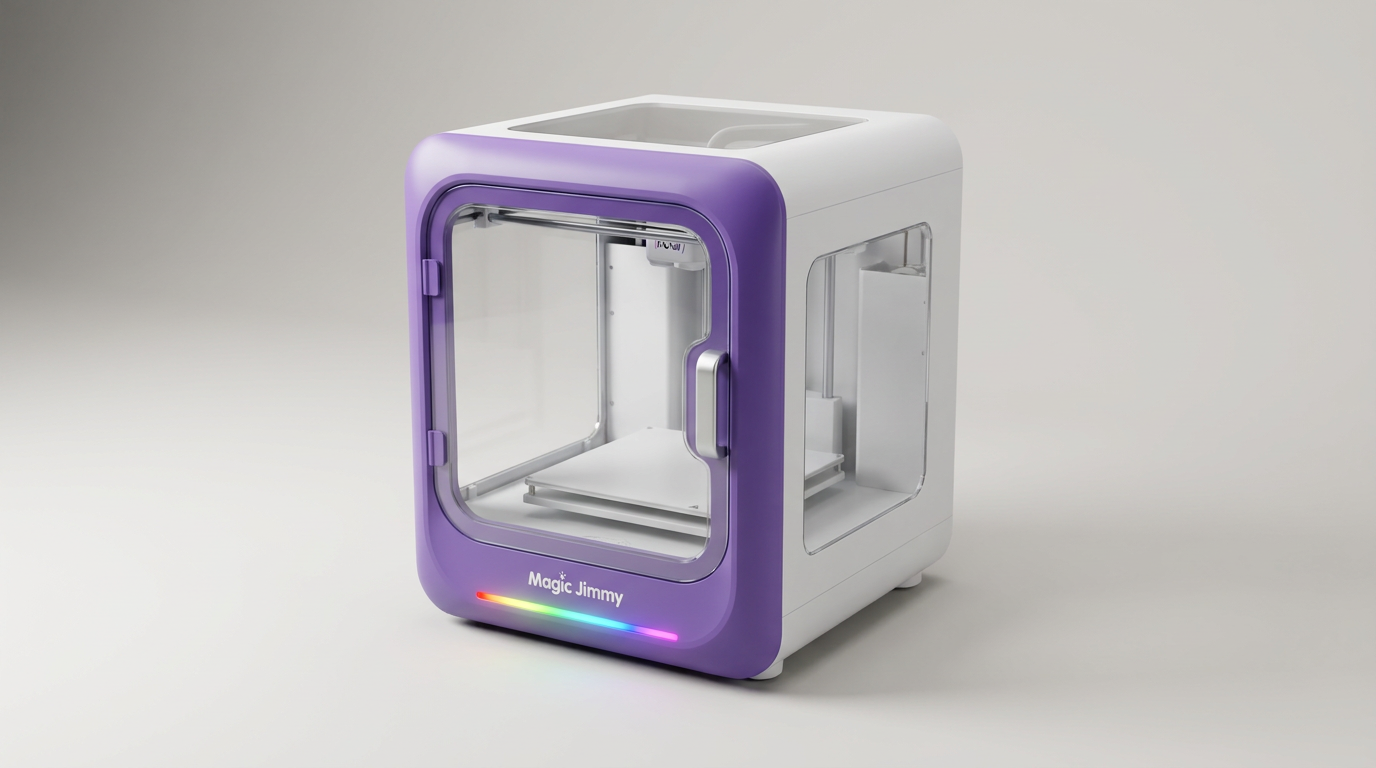
Most entry-level 3D printers fail in family living rooms because traditional desktop fabrication expects children to behave like junior mechanical engineers. The hobby still carries a steep barrier to entry: manual bed tramming, finicky Z-offset adjustments, slicer profiles, and exposed hotends that reach 200 degrees Celsius. Magic Jimmy attempts what can best be termed the appliance shift. It strips away the mechanical intimidate-and-calibrate routine in favor of a sealed, child-safe box operated entirely from a tablet.
What owners love
- + Fully enclosed chassis keeps hot components and moving parts away from children
- + True out-of-the-box readiness with zero frame assembly or manual bed leveling
- + Internal camera provides clear remote monitoring and fun time-lapse recordings
- + Flexible magnetic build plate makes model removal safe and straightforward
- + Exceptionally quiet operating volume suitable for bedrooms and living spaces
Common complaints
- − Promoted AI design tools rely on paid in-app coins after initial credits run dry
- − Single-spool setup cannot print multi-color designs in one pass
- − Proprietary app prevents users from exporting their generated 3D files
- − Poor hardware repairability turns severe nozzle jams into support headaches
Design & Build
Magic Jimmy avoids the industrial aesthetic of typical hobbyist gear. Instead, it presents as a polished, rounded appliance with an enclosed printing chamber and a clear front access door. That enclosure is not cosmetic. It isolates the high-temperature nozzle and moving gantry from wandering hands, while keeping drafts away from the print bed. The exterior stays cool during long print runs, and the machine relies exclusively on non-toxic PLA filament. A magnetic, flexible build plate allows children to pop finished prints off without scraping tools, preserving the safe perimeter parents want. The structural trade-off is serviceable access. By sealing the mechanics behind molded plastic, the printer treats its motion system as a sealed black box, which prioritizes immediate child safety over long-term mechanical serviceability.
Setup & Ease of Use
Getting the machine operational takes roughly ten minutes, bypassing the traditional first-layer cliff that discourages newcomers. You remove the packaging, connect power, install the mobile app, and hook the printer to your home Wi-Fi network. Loading filament is automated through the software interface, and automatic bed leveling eliminates the sheet-of-paper leveling ritual entirely. For households with young makers, this removes the technical friction that often leaves hobbyist printers abandoned in closets. Some owners encounter minor friction during the initial Bluetooth pairing step or Wi-Fi handshake, but once the connection stabilizes, sending a job to the machine requires only a couple of taps on an iPad or phone screen.
Performance in Real Use
Print quality on small decorative models, articulated animals, and cartoon figurines is surprisingly crisp for an entry-level toy printer. Layer lines on small PLA models are tidy, overhangs print cleanly without excessive stringing, and bed adhesion to the textured magnetic plate is dependable. Speed is also respectable: simple figurines finish in under an hour, keeping a child's attention span intact. The internal camera is a standout addition. It streams live progress directly to the companion app, letting children monitor their prints from across the house and watch automated time-lapses of their creations taking shape. Operating noise is low enough to blend into the background of a playroom, though users should remember this is strictly a single-color extruder. Multi-color effects require buying segmented rainbow filament rather than true multi-material switching.
Software & Ecosystem
The user experience lives and dies by the Magic Jimmy mobile application. The interface offers a large catalog of ready-to-print toys, animals, and household trinkets. However, the software reveals what can be termed the tokenized imagination tax. While marketing emphasizes AI tools that convert doodles, selfies, and text prompts into physical 3D objects, these generative features consume digital credits. Once the starter balance is gone, families must purchase additional coin packs to keep generating new AI models. Furthermore, models generated in the app cannot be exported as standard STL files for use elsewhere. The app does accept imported open-source files from repositories like Thingiverse, but the walled-garden approach to its native AI tools diminishes what should have been a creative showcase.
Value & Reliability
Selling in the $250 to $300 range, Magic Jimmy enters an aggressive pricing tier. Traditional open-frame printers in this price band offer larger build volumes, standard G-code slicing, and inexpensive modular replacement parts. Magic Jimmy trades those enthusiast perks for turnkey operation, safety, and integrated camera monitoring. Reliability during routine PLA printing is solid across dozens of hours, but the machine reveals what can be termed the black box bottleneck when hardware issues arise. If a severe nozzle clog occurs or filament tangles tightly inside the feed path, the lack of accessible replacement hotends or repair documentation can leave frustrated parents with an expensive paperweight. For families who prioritize child autonomy over DIY maintenance, the premium is defensible, but long-term durability remains closely tied to manufacturer support.
Verdict
Consider - An approachable appliance-style 3D printer for young children, undercut by paid AI tokens and limited hardware repairability.
Magic Jimmy is best suited for families with children aged 7 to 12 who want a safe, self-contained creative tool that works right out of the box without adult engineering intervention. If your goal is to turn digital screen time into tactile making with minimal setup friction, it delivers reliable early success.
Enthusiasts, older teenagers, and parents comfortable with basic mechanics should look elsewhere. In the $250 to $300 price bracket, open-platform alternatives offer greater build volumes, cheaper replacement parts, and freedom from proprietary software constraints.
Magic Jimmy succeeds at the hardest consumer challenge in desktop manufacturing by transforming an intimidating mechanical chore into an accessible household appliance. But by wrapping its signature AI creative tools in a mobile freemium model, it turns what ought to be an open gateway to engineering into a closed digital playground.
FAQ
More 3D Printers reviews
Bambu Lab AMS lite Review: The Multi-Color Upgrade Dilemma
AOSEED AI 3D Printer for Kids Review: Capable Fun

Anycubic Kobra S1 ACE 2 Pro Combo Review: Enclosed Multicolor Value

FLASHFORGE AD5M Pro Review: High Speed Enclosure on a Budget

FLASHFORGE Creator 5 Pro Review: Multi-Toolhead Utility

QIDI Q2 3D Printer Review: High-Temp Power at a Consumer Price
This review is based on real experiences shared by owners in online communities.