
HP OfficeJet Pro 9135 Review: Two Trays and a Tight Leash
This review is based on real experiences shared by owners in online communities.
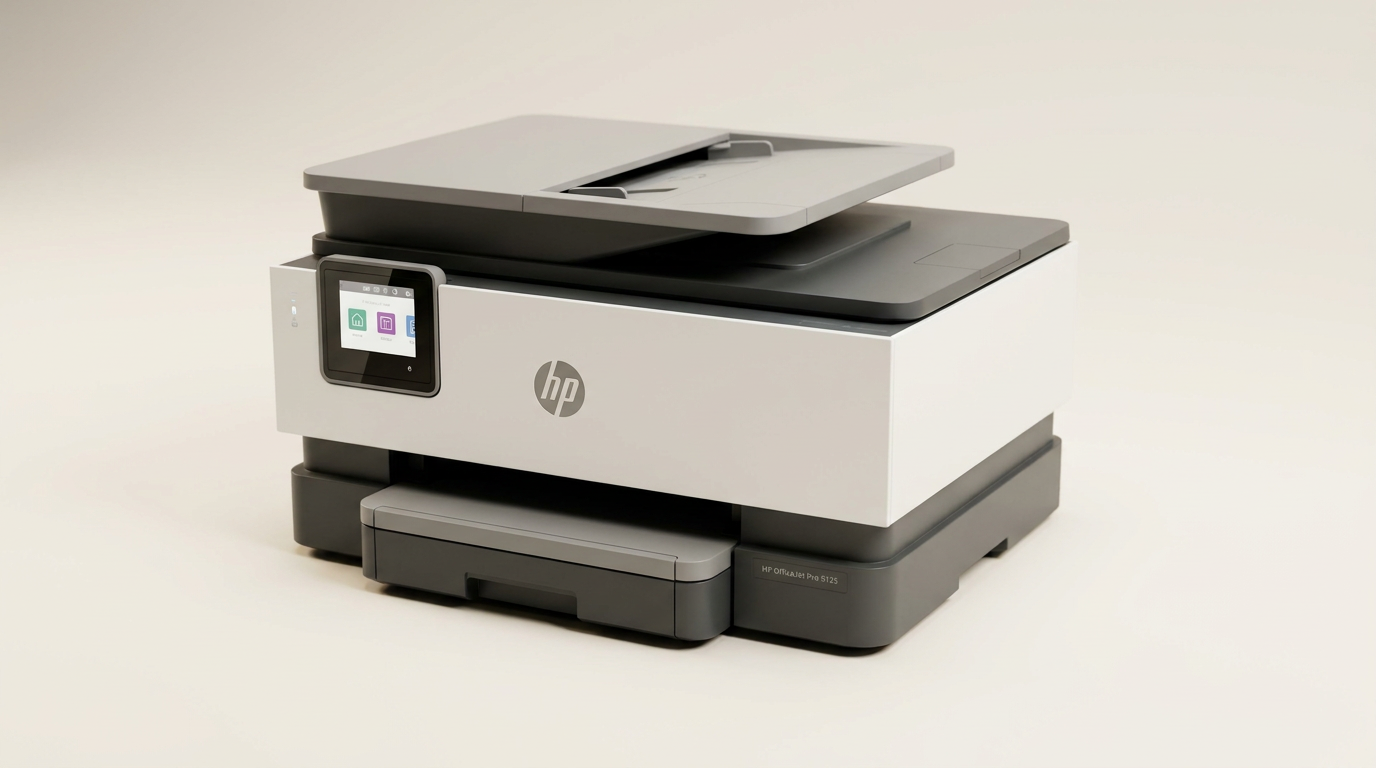
The modern office printer market suffers from what can best be called the Legacy Paradox. For nearly a decade, machines like the venerable HP OfficeJet Pro 8600 occupied home offices across the country, running reliably with minimal maintenance and few demands on the user. Modern replacements do not just offer hardware upgrades; they introduce a completely different relationship between manufacturer and customer, one built around continuous connectivity, dynamic chip security, and subscription models.
The HP OfficeJet Pro 9135 lands directly in this transition zone. Built for small offices and demanding home environments, it answers modern productivity needs with a 500-sheet total capacity split across two distinct trays, single-pass duplex scanning, and responsive touchscreen navigation. It is designed to act as an unyielding administrative anchor for high-volume paperwork.
Yet beneath its competent exterior sits HP's tightly guarded software ecosystem. To extract the best from this machine, buyers must accept constant subscription prompts and aggressive dynamic security that bars third-party ink. The 9135 is a capable, highly functional office workhorse, but it demands that you play entirely by HP's rules.
What owners love
- + Dual 250-sheet paper trays allow simultaneous letter and legal loading
- + Fast, crisp document output with clean 300 DPI scanner fidelity
- + Touchscreen interface includes clear, visual on-device video guides
- + Single-pass two-sided scanning speeds up multi-page document capture
- + Reliable dual-band wireless and mobile printing once configured
Common complaints
- − Persistent on-screen and app marketing for Instant Ink subscriptions
- − Firmware actively locks out non-HP chipped ink cartridges
- − Duplex printing paper path is more prone to jams than older HP tank designs
- − Initial wireless handshake occasionally requires router or system reboots
Design & Build
The OfficeJet Pro 9135 makes zero apologies for its physical presence. It is a substantial machine designed to anchor a dedicated credenza or file cabinet rather than share a crowded desk. That bulk, however, serves a functional purpose through what we call the Two-Tray Workflow Divide. Instead of forcing users to swap out standard letter paper whenever a legal document or invoice run needs processing, the 9135 houses two independent 250-sheet cassettes. For legal practitioners, real estate agents, and administrative contractors, this dual-feed system alone eliminates daily paper-handling friction.
The exterior chassis is composed of over 40 percent recycled plastic, presenting a clean, slate-like aesthetic that resists fingerprints. At the top sits an automatic document feeder capable of single-pass duplex scanning, paired with a glass flatbed. The primary interface is a 4.3-inch color touchscreen. Rather than burying instructions in obscure submenus or relying on paper manuals, HP built short, silent instructional animations directly into the display firmware. When paper needs clearing or cartridges need seating, the screen demonstrates the exact physical motions required. The only real design concession is internal clearance: the paper path for automatic duplex printing feels tighter than in older generations, making clearing the rare jam a slightly more delicate task.
Setup & Ease of Use
Setting up the OfficeJet Pro 9135 follows HP's contemporary app-first workflow. While traditional USB connectivity exists, HP clearly steers buyers toward network installation via dual-band Wi-Fi and the HP software utility. For most users, this process finishes within ten to fifteen minutes, automatically discovering the machine and registering it across mobile and desktop endpoints. Mobile printing from phones and tablets is consistently responsive once the handshake is established.
However, network integration is not universally frictionless. In mixed-device environments or when pairing to select desktop workstations, the digital handshake can stall, occasionally requiring host reboots or router restarts to lock in a static IP. Once connected, routine maintenance is exceptionally straightforward. Loading media into the dual cassettes requires no force, and the cartridge bay is immediately accessible from the front fold-down door. The touchscreen UI is fast, phone-like, and logically organized, keeping copy, scan, and cloud tasks within two taps of the home screen.
Performance in Real Use
In daily operation, the OfficeJet Pro 9135 delivers the crisp, high-contrast text expected from professional office hardware. Black text prints with razor-sharp edges that resist smearing, while color business graphics, presentation decks, and charts emerge with balanced saturation. Typical document delivery takes approximately six to eight seconds per page during continuous single-sided runs, keeping pace with moderate office workloads. Scanning via the ADF is equally swift, reliably producing clean 300 DPI captures without skewing.
The machine reveals minor performance quirks under heavier stress. A few owners note that single print runs containing high page counts can occasionally stutter or hit an internal buffer ceiling around 25 pages. More notably, duplex printing performance represents a slight regression from older legends like the OfficeJet 8600. While the 9135 completes double-sided tasks adequately, the tight mechanical flip mechanism is more sensitive to paper weight and curl, occasionally causing misfeeds if standard budget stock is humid or wrinkled. Startup acoustic levels are also pronounced; the printer engages in an assertive mechanical alignment ritual when powering on, though it operates with reasonable discretion once printing begins.
Software & Ecosystem
The digital experience surrounding the 9135 brings HP's ecosystem strategy into sharp relief. The machine represents the Subscription Tollgate concept: hardware that performs admirably but exists partially as a conduit for recurring revenue. During initial configuration and routine operation, the HP software frequently prompts the user to enroll in the Instant Ink subscription program. While Instant Ink can genuinely reduce operating costs for predictable, high-volume color printing, the persistent marketing inside the desktop utility and mobile app will irritate buyers who prefer to purchase cartridges on their own schedule.
Equally contentious is HP's dynamic security system. The 9135 relies on embedded authentication to reject ink cartridges lacking genuine HP circuitry. Firmware updates delivered over Wi-Fi regularly refresh this lockout mechanism. For small business owners who rely on third-party remanufactured cartridges to keep overhead low, this policy creates a non-negotiable ongoing operating expense. On the positive side, HP Wolf Pro Security integration provides robust network defense against unauthorized port access, and the remote cloud-print infrastructure allows secure job transmission from offsite locations without configuring complex VPN tunnels.
Value & Reliability
Selling in the $250 to $300 range, the OfficeJet Pro 9135 occupies the competitive middle tier of office inkjets. Its hardware feature set, particularly the 500-sheet dual-tray capacity and single-pass duplex ADF, matches or exceeds most similarly priced competitors. For home offices where legal and letter documents must print on demand without manual tray swaps, the hardware alone justifies the investment.
Long-term value, however, hinges entirely on your tolerance for consumable costs. Because HP restricts the unit strictly to genuine cartridges, calculating total cost of ownership must factor in manufacturer-priced consumables or an ongoing Instant Ink tier. Long-term reliability reports from owners indicate durable printheads and stable Wi-Fi retention over months of continuous use. It may not possess the tank-like mechanical indestructibility of HP's decade-old product lines, but it handles the operational rhythm of a modern three-person office without structural fatigue.
Verdict
Buy - A robust, dual-tray document engine that trades open consumable flexibility for high-capacity office productivity.
The HP OfficeJet Pro 9135 is ideally suited for small businesses, legal professionals, and home-office administrators who require simultaneous two-format paper handling, clean duplex scanning, and dependable wireless connectivity. If your operation prints hundreds of pages of correspondence and multi-page forms every month, the dual 250-sheet trays and fast ADF will save meaningful time.
High-volume bargain hunters who rely on cheap third-party ink should look elsewhere. HP makes no secret of its dynamic security measures, and the ongoing consumable costs will frustrate anyone unwilling to pay first-party cartridge prices or subscribe to Instant Ink.
The OfficeJet Pro 9135 exemplifies the modern corporate trade-off in business hardware. HP has engineered an exceptional paper-handling and document-capture machine, but it comes tethered to a managed-service ecosystem. If you treat the printer as a managed utility and accept the recurring ink model, the 9135 rewards you with seamless administrative speed; if you want unencumbered standalone hardware, the platform will constantly push back.
FAQ
More 3D Printers reviews

FLASHFORGE Creator 5 Pro Review: Multi-Toolhead Efficiency
Flashforge Creator 5 Pro Review: Multi-Material Toolchanger
Bambu Lab P2S Combo Review: The 3D Printer Appliance
Hephi3d Tina2C Review: An Entry-Level 3D Printer for Kids
Creality SPARKX i7 Nano Combo Review: Multi-Color Printing for Novices
Entina Tina2 Plus Review: A Gateway to 3D Printing for Beginners
This review is based on real experiences shared by owners in online communities.