
Anycubic Kobra S1 Max Combo Review: Industrial Scale for Less
By AValidReview. An AI-assisted summary of customer feedback, not a hands-on test.
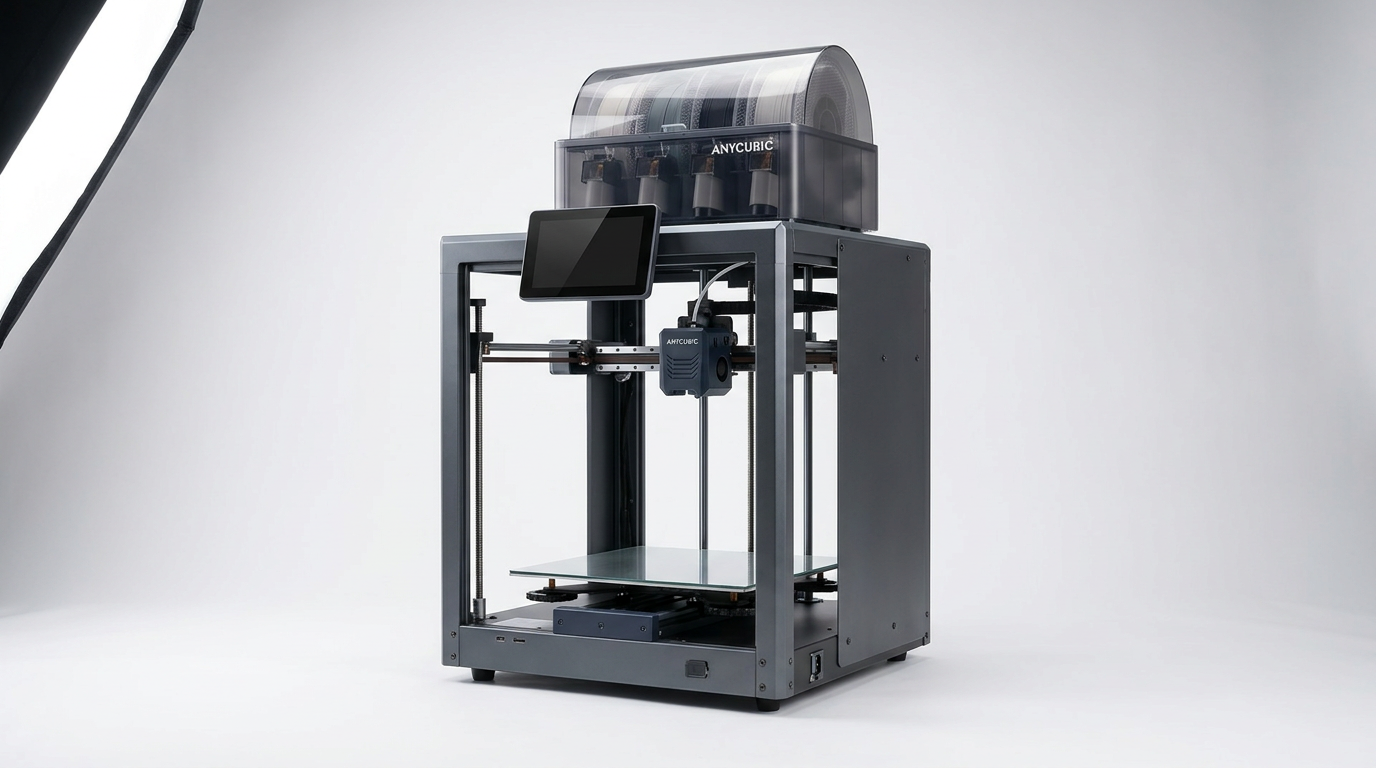
For years, large-format desktop 3D printing has been trapped by what engineers know as the volumetric warp tax. As print volumes scale past 300 millimeters, the internal thermal stress on cooling plastics multiplies exponentially. Budget manufacturers traditionally tackled this by simply stretching the aluminum extrusions on open-air bed slingers, leaving users to battle warped ABS corners and layer splits on 20-hour jobs. The Anycubic Kobra S1 Max Combo takes a fundamentally different path by bringing industrial architecture down to the consumer workshop.
Rather than offering another oversized bed-flinger, Anycubic pairs a 350 x 350 x 350 mm build volume with an enclosed CoreXY kinematic system and an actively heated 65-degree Celsius chamber. Coupled with the ACE 2 Pro multi-color feeding unit, it promises both high-speed production and technical filament capability in a single package. It aims directly at cosplay fabricators, prototyping engineers, and small-batch manufacturers who need continuous output without splitting digital files into glued fragments.
Living with a machine of this scale, however, shifts the ownership experience from typical desktop hobbyism into light industrial operation. This printer demands dedicated space, mechanical respect, and an awareness of material consumption that marketing specifications rarely advertise.
What owners love
- + Massive 350 x 350 x 350 mm enclosed build volume eliminates part splitting
- + Active 65-degree chamber heating mitigates warping on ABS and technical filaments
- + Rigid CoreXY frame delivers stable extrusion at high speeds
- + ACE 2 Pro unit handles automated four-filament management reliably
- + Hardened steel drive gears and 350-degree hotend come standard
Common complaints
- − Substantial 60-pound weight requires dedicated, heavy-duty workshop furniture
- − Internal unboxing is tedious due to black shipping hardware on black framing
- − Multi-color purge towers create substantial material waste on tall prints
- − Swapping nozzle diameters requires manual recalibration and slicer re-tuning
Design & Build
The Kobra S1 Max makes an immediate impression through sheer bulk. Weighing roughly 60 pounds, the machine embodies what we call shop floor gravity: this is not a printer that can share a wobbly office desk with a laptop. It requires a dedicated, vibration-resistant workbench or a reinforced floor station. The chassis relies on heavy aluminum extrusions enclosed by a front glass door and a removable top panel, creating a sealed environment capable of reaching and maintaining a 65-degree Celsius internal temperature. Anycubic equipped the motion system with a high-speed CoreXY gantry driven by hardened steel extruder gears and a titanium alloy throat tube rated for temperatures up to 350 degrees Celsius. This hardware choice indicates that engineering materials like ASA, polycarbonate blends, and carbon-fiber filled filaments were central to the design brief rather than afterthoughts. While the external shell looks refined, small ergonomic shortcuts exist inside the enclosure, where cramped clearance around the toolhead can make manual service tighter than expected.
Setup & Ease of Use
Unboxing the S1 Max is a physical workout. The manufacturer packs the machine thoroughly to prevent transit damage, but the initial commissioning process is marred by questionable packaging choices. Multiple owners report that Anycubic secured internal components using black zip ties and black shipping screws set directly against the matte black interior frame, making them frustratingly difficult to spot without a directed flashlight. Once freed from its shipping anchors, however, the software onboarding is remarkably quick. The automated LeviQ 3.0 bed leveling system utilizes sensor-based offset detection to eliminate manual paper leveling, allowing most users to complete calibration and run a first test print within twenty minutes. Anycubic includes an integrated touch display with an intuitive interface, though users who switch between different nozzle sizes will find that the automated routines do not fully compensate for flow rate differences without careful software re-tuning.
Performance in Real Use
In real-world printing, the Kobra S1 Max shines when tasked with continuous, large-scale geometry. Prop makers and technical fabricators consistently report success printing full-scale helmets and mechanical brackets in a single run, maxing out the Z-axis without layer shifts. The CoreXY gantry handles rapid directional changes with minimal ringing thanks to active vibration compensation, though the sheer mass of the printhead and frame does induce noticeable physical shaking on lighter tables. More importantly, the active chamber heating pays massive dividends with materials like PETG and ABS. By neutralizing the volumetric warp tax, the heated air prevents the ambient cooling deltas that normally pull large prints away from the edges of the build plate. For standard PLA work the chamber can be vented, but the machine is clearly over-engineered for basic decorative prints, functioning at its best when running dense, functional parts over days of continuous operation.
Software & Ecosystem
The S1 Max Combo package integrates the ACE 2 Pro unit, an automated filament management box that feeds four spools simultaneously and can daisy-chain to handle up to sixteen. The unit functions both as a dry box and a multi-material switcher, successfully loading and retracting filament without user intervention. However, running multi-color prints on a 350mm build plate surfaces what we term the purge penalty. Because the print head must purge and wipe filament on every layer change across a tall vertical model, multi-color jobs accumulate substantial filament waste and dramatically extend print times. Anycubic slicer software has improved noticeably over past generations, incorporating profile presets for rapid deployment, yet dialing in custom engineering resins and third-party filaments still requires users to manually tweak retraction and thermal settings. Network connectivity and remote monitoring are functional, but power users may still lament the walled-garden aspects of the proprietary operating system.
Value & Reliability
Positioned in the upper three-figure price category, the Kobra S1 Max Combo occupies a uniquely competitive niche. Traditional open-air bed slingers of this size are cheaper, but they cannot reliably process engineering materials. Conversely, industrial-grade enclosed CoreXY printers with active chamber heaters generally demand four-figure commercial budgets well outside the reach of independent makers. While early adopters experienced minor component failures out of the box, such as faulty extruders or initial sensor errors, Anycubic support has demonstrated a rapid turnaround in shipping replacement hardware without protracted bureaucratic delays. The long-term value equation favors creators who actively monetize their print beds: the ability to run 350mm batches of engineering components or full-scale props without manual assembly saves hours of post-processing labor.
Verdict
Buy - A remarkably capable large-format workhorse that delivers industrial-scale volume and heated-chamber utility without the four-figure commercial markup.
The Anycubic Kobra S1 Max Combo is specifically tailored for prop makers, prototyping engineers, and small-scale production workshops that have outgrown standard 256mm desktop enclosures. If your workflow requires printing full-sized wearable armor, large architectural models, or warping-prone ABS parts in a single piece, this machine solves logistical headaches that cheaper printers cannot touch. However, casual hobbyists printing miniature figures or small PLA toys should skip it; its 60-pound workshop footprint, intense multi-color purge cycles, and high thermal demands are entirely wasted on small-format crafting.
What most buyers miss is that the Kobra S1 Max is not just a larger consumer printer; it represents the quiet democratization of active thermal control. By proving that a reliable 65-degree heated chamber and rigid CoreXY kinematics can exist below the four-figure commercial barrier, Anycubic has rendered the open-frame large-format printer obsolete for serious fabrication.
FAQ
More 3D Printers reviews
ugee Funbox 3D Printer Review: Safe Household Making
Original Prusa CORE One+ Kit Review: The Maker's CoreXY
ANYCUBIC Photon P1 Max Review: Scale Meets Detail
Anycubic Kobra S1 ACE 2 Pro Combo 3D Printer Review
Toybox Alpha Two 3D Printer Review: The Zero-Fuss Toy Factory
Creality K2 SE 4C Review: Budget Multicolor CoreXY
This review is based on real experiences shared by owners in online communities.