
HP OfficeJet Pro 8135 Review: The Cloud-Tethered Workhorse
By AValidReview. An AI-assisted summary of customer feedback, not a hands-on test.
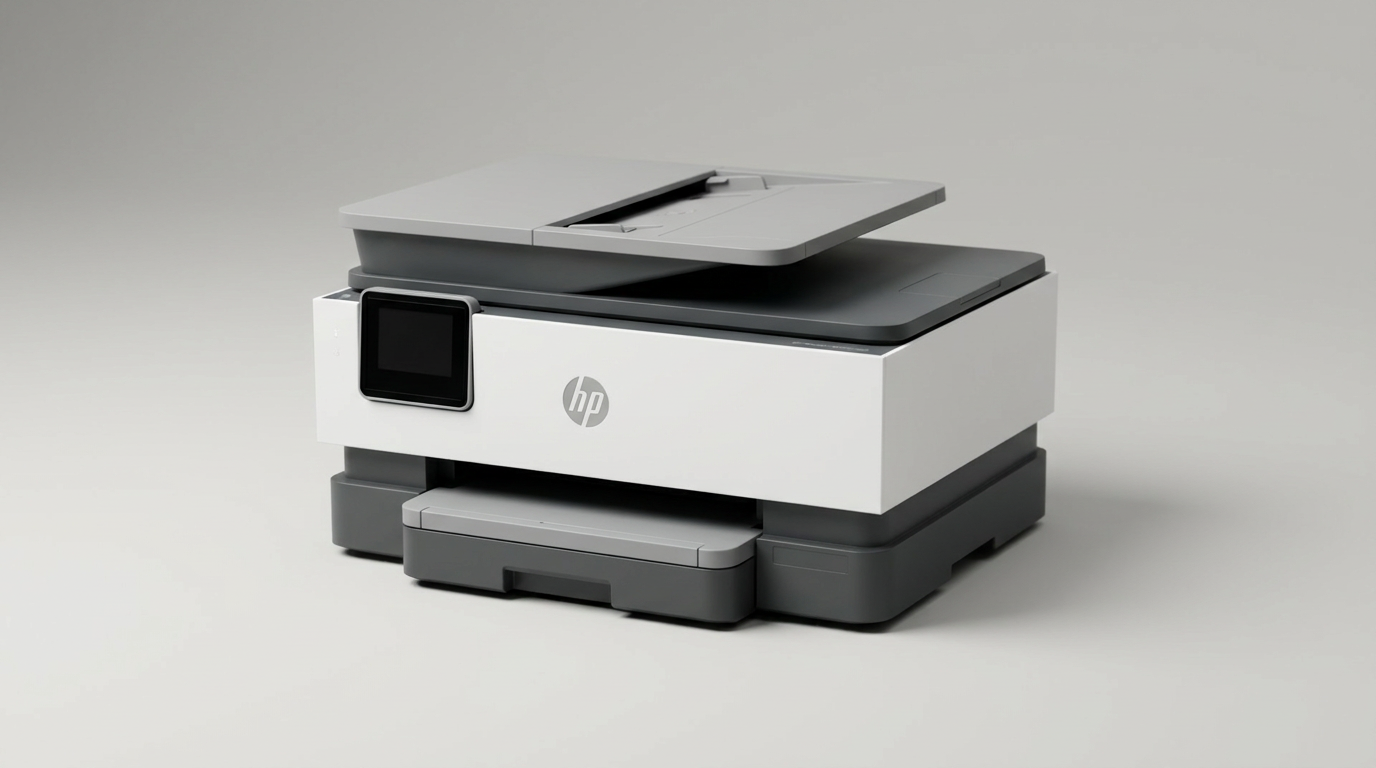
Most home-office printing problems are no longer mechanical. Paper jams and mangled rollers have largely given way to software friction and consumable management. The HP OfficeJet Pro 8135 sits squarely in this modern reality. Rather than functioning as a dumb peripheral that accepts instructions from whatever device happens to be on your local network, this all-in-one acts as an app-tethered terminal designed to pull you directly into HP's cloud ecosystem.
That dynamic creates an interesting tension. Mechanically, the OfficeJet Pro 8135 is one of the tidiest, most competent desk appliances HP has built in years. It shrinks the footprint of an office-grade duplex workhorse down to home-office dimensions, loads paper from the front, and operates with surprising quietness. Yet it also extracts what we call the account friction tax: mandatory app workflows, immediate firmware updates, and aggressive chip-locking measures that shut out third-party ink.
For households running light businesses, homeschooling, or daily paperwork, the balance between convenience and control is the central question. Understanding where this hardware shines, and where its corporate software boundaries get in the way, is essential before clearing a spot on your desk.
What owners love
- + Front-loading paper tray allows flush-to-wall placement
- + Fast, quiet automatic two-sided printing
- + Reliable dual-band wireless that maintains its connection
- + Convenient direct printing from a front-facing USB port
- + Sharp text output with vibrant color rendition for documents
Common complaints
- − Strict hardware lock-in blocks non-HP ink cartridges
- − Requires the HP mobile app and account registration to configure
- − Touchscreen controls suffer from noticeable input lag
- − Mandatory firmware updates prolong the initial out-of-box setup
Design & Build
At roughly 18 inches wide, 13 inches deep, and just over 9 inches tall, the OfficeJet Pro 8135 addresses what we call the desk-footprint paradox. Most multi-function printers equipped with an automatic document feeder demand massive perimeter clearance for rear trays or swinging doors. HP engineered this chassis with rounded corners and a fully front-loading 225-sheet cassette, allowing you to back it right against a wall. The plastics include substantial post-consumer recycled material without feeling flimsy. A dedicated front USB port offers direct flash drive printing, a practical touch that many competitors in this tier have quietly abandoned. The primary interface compromise is the 2.7-inch color touchscreen: while readable, the icons are diminutive, and owners frequently report a one-second touch latency that demands deliberate input.
Setup & Ease of Use
Gone are the days of plugging in a standard USB cable and relying on native operating system drivers. Onboarding the 8135 requires the HP Smart app on a phone or computer, turning unboxing into a guided software installation. For non-technical users and seniors, this structured walk-through proves remarkably frictionless, with step-by-step animations explaining tape removal and cartridge seating in minutes. However, users expecting a traditional driver install will find the mandatory account creation frustrating. The setup process also enforces an immediate out-of-box firmware update. If your Wi-Fi environment is unstable, this initial cloud dependency will stall the entire hardware initialization before you print a single page.
Performance in Real Use
Once configured, the mechanical performance punches above its category weight. Text comes off the glass crisp and dense, easily matching entry-level monochrome laser clarity for standard business correspondence. Color saturation is lively and uniform on standard multipurpose paper, making it well-suited for reports, flyers, and school materials, even if fine color copy reproduction occasionally softens photographic gradients. The automatic duplexer operates with brisk mechanical timing and remarkably low acoustic noise, an essential trait for small work-from-home spaces. The dual-band wireless radio avoids the frequent dropouts that plagued previous OfficeJet generations, remaining instantly discoverable across Windows, macOS, Linux, and mobile devices on the same subnet.
Software & Ecosystem
The software layer represents both the 8135's greatest strength and its most rigid constraint. HP has transitioned this machine into an appliance run by dynamic security. The printer will actively reject third-party cartridges lacking genuine HP circuitry, and subsequent firmware patches will ensure that lock remains intact. For users who subscribe to the Instant Ink system, the automated replenishment feels effortless and budget-friendly during initial trial periods. But users wanting complete autonomy over their consumables will find the environment hostile. Additionally, basic scanning and mobile faxing are routed through the proprietary HP app ecosystem, meaning daily productivity remains permanently tethered to HP servers.
Value & Reliability
Positioned in the $200 to $250 range, the OfficeJet Pro 8135 balances upfront hardware value against predictable long-term operational costs. For users replacing older, low-capacity units like the OfficeJet 3830 series, the upgrade to a 225-sheet tray, swift automatic document feeder, and rock-solid Wi-Fi represents a massive practical leap. Reliability reports over the initial ownership curve show almost zero paper feed jams or dropped network states. The true financial calculus rests on your print volume. If you print enough pages monthly to justify a structured ink subscription, the economics remain attractive. If you let the machine sit idle for months, the ongoing cartridge overhead shifts the value balance rapidly against you.
Verdict
Buy - A polished, remarkably quiet home-office engine that trades consumable freedom for exceptional mechanical convenience.
The HP OfficeJet Pro 8135 is built for busy remote professionals, homeschooling parents, and small craft operations who value dependable wireless connectivity, sharp two-sided document speed, and a compact front-loading footprint. If you are comfortable managing your printer through a mobile app and either plan to use Instant Ink or commit to original manufacturer cartridges, this unit delivers an exceptionally smooth day-to-day experience.
Power users who insist on third-party refillable cartridges, offline driver installations, or zero cloud dependencies should skip this machine entirely. It will fight your workflow at every turn.
Ultimately, the OfficeJet Pro 8135 shows that consumer printers have ceased being open computer peripherals; they are now managed cloud appliances. If you accept the ecosystem rules, HP has built one of the most reliable and unobtrusive desktop workhorses in its class.
FAQ
More 3D Printer Parts & Accessories reviews
HzdaDeve Bambu P1S Hotend 3-Pack Review: Value Meets Risk
Fannova 23.6" Large Printer Stand Review

Ultrafashs 3D Printer Cleaning Rope Review

ELEGOO 3D Printer Adhesive Glue Review: Reliable Bed Adhesion
SAHVAIM AMS Lite Filament Hub Review: Quick Fix for Bambu A1
IdeaFormer-3D Bambu Lab Textured PEI Plate Review
This review is based on real experiences shared by owners in online communities.