
Geeetech Smart 3D Printer Review: A Managed Entry Point
This review is based on real experiences shared by owners in online communities.
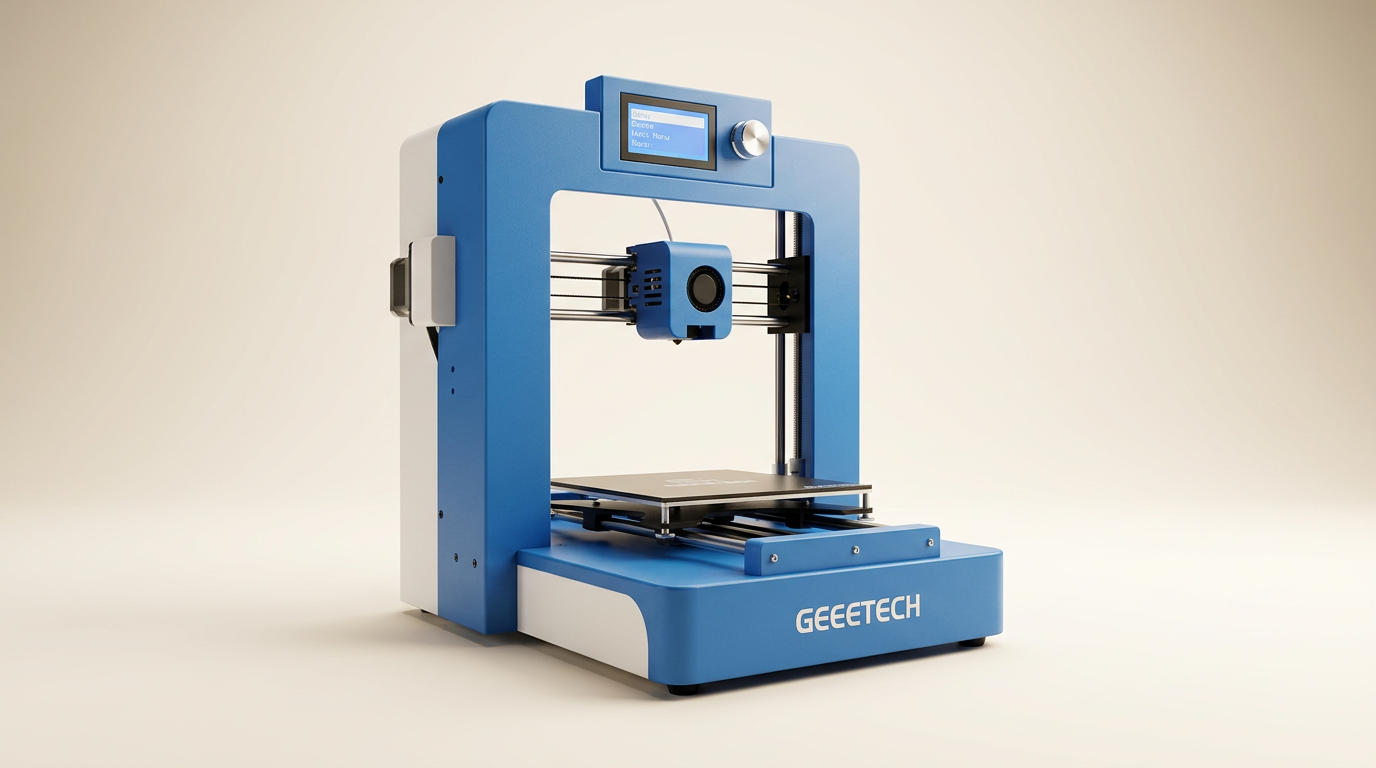
The Geeetech Smart 3D Printer arrives as a proposition for the novice, particularly children, aspiring to enter the complex world of additive manufacturing. It promises an experience stripped of the common setup headaches, delivered through features like full assembly, auto-leveling, and app-driven control. The inherent tension in marketing a 3D printer as 'kid-friendly' often lies between accessibility and the fundamental troubleshooting inherent to the technology. This model attempts to bridge that gap with a managed, streamlined approach.
Most entry-level 3D printers present a steep learning curve, demanding patience for assembly, calibration, and software configuration. The Geeetech Smart Printer positions itself as a deliberate counter-narrative, aiming to minimize friction points for new users. Its design choices, from pre-assembly to integrated app functionality, suggest a focus on the immediate gratification of printing rather than the deeper understanding of printer mechanics. This strategy carries both benefits for initial engagement and potential limitations for long-term user growth within the hobby.
The critical question for this segment is whether the simplified interface truly translates to a consistent, frustration-free printing experience, or if it merely defers inevitable complexities. Owners consistently highlight an overarching theme that defines this product: the 'support-first dependency.' Its success for many hinges less on flawless out-of-box operation and more on the responsive, effective assistance provided when issues inevitably arise. This dynamic shapes its overall value proposition, distinguishing it from competitors that rely solely on hardware robustness.
What owners love
- + Excellent, highly responsive customer support cited by many
- + Comes fully assembled, simplifying initial setup
- + Intuitive app control and WiFi connectivity for printing
- + Solid print quality reported for an entry-level machine
- + Sturdy construction with good visibility of the print area
- + Suitable and appealing for children and absolute beginners
Common complaints
- − Included filament is often insufficient for initial projects
- − Some units exhibit initial hardware or software malfunctions
- − Update process can be opaque, lacking progress indicators
- − App or WiFi connectivity issues reported by a few users
- − Not entirely 'kid-friendly' without adult guidance for core tasks
Design & Build
The Geeetech Smart 3D Printer features a compact, enclosed design that appeals visually and functionally. Owners report the unit arrives well-packaged with ample protective foam, indicating attention to transit safety. The fully assembled nature is a significant draw, eliminating the initial build phase common with many budget printers. The frame is described as sturdy, contributing to print stability. Visibility into the print chamber is good, thanks to effective internal lighting, a detail appreciated by those supervising younger users. This robust, pre-assembled construction reflects a deliberate effort to lower the barrier to entry, minimizing the initial tinkering often associated with 3D printing. However, this 'black box' approach, while convenient, also limits user access for deeper maintenance or modifications, a trade-off inherent in its design philosophy.
Setup & Ease of Use
Setup is generally straightforward, largely due to the printer arriving fully assembled. Users need only remove protective zip ties and power on the unit. The auto-leveling function is a convenience, though one owner noted a unit failing this critical step initially. The accompanying app, designed for WiFi control, is highlighted as intuitive, allowing users to print directly from a curated library. However, some users encountered difficulties downloading the app in their region or experienced connection issues with the printer's WiFi. These isolated instances underscore the 'first-layer cliff' effect common in consumer tech: while the initial steps are simplified, connectivity or app availability can still present unexpected hurdles for a few, even if the majority experience smooth onboarding. The included manual requires careful reading, suggesting that 'plug-and-play' is not absolute, even with extensive pre-assembly.
Performance in Real Use
Print quality receives positive feedback, with owners noting clean and consistent output suitable for both functional parts and detailed models. The printer's speed is also mentioned favorably. The enclosed design and stable frame contribute to minimizing vibrations, translating into more accurate prints. The larger build volume is appreciated for accommodating a wider range of projects without necessitating model segmentation. While generally praised, some users had issues that prevented printing altogether, such as an inability to balance the machine or printhead clogs, indicating that individual unit variability exists. The ‘kid-friendly’ aspect is debated, with some parents reporting their children operate it independently, while others find adult guidance remains essential for tasks like filament loading or troubleshooting print failures. This highlights that 'ease of use' is relative to a user's prior experience and aptitude, not a universal guarantee of autonomous operation.
Software & Ecosystem
The printer's software ecosystem centers around its WiFi connectivity and companion app. The ability to control the printer and select models via the app is a significant convenience, particularly for beginners and children. The option to print via SD card provides an alternative when app or WiFi issues arise. However, some users reported issues with app availability in specific regions or intermittent WiFi connection problems, which can disrupt the intended seamless experience. The update process for the printer's firmware is another area of contention, described as opaque with no progress indicator, leaving users uncertain about the update's status. While the app integration aims to simplify the user journey, these occasional software and connectivity glitches introduce what could be termed a 'digital friction tax,' where an intended convenience sometimes demands unexpected troubleshooting effort.
Value & Reliability
Priced in the upper $200s, the Geeetech Smart 3D Printer offers a compelling package, especially given its pre-assembly and smart features. However, its true value is often derived from the exceptional customer support. Multiple owners reported faulty units, printhead clogs, or app issues, but consistently praised the rapid, thorough, and effective assistance from the support team, often resulting in replacement units. This strong support mitigates initial reliability concerns, transforming potential negative experiences into positive ones. This heavy reliance on post-purchase support creates a 'service safety net,' which is critical for a product aimed at beginners where initial frustration could lead to abandonment. The value proposition thus extends beyond the hardware to encompass the entire customer experience, particularly the assurance of resolution when problems occur.
Verdict
Buy - This printer delivers on its promise of a streamlined entry into 3D printing, backed by outstanding support.
This is an excellent option for beginners, families, or educators seeking an accessible 3D printer for casual use and learning. Its pre-assembled design, intuitive app control, and reported solid print quality make it suitable for those who prioritize ease of use over deep technical customization. Buyers looking for an initial taste of 3D printing without significant upfront setup hassle, particularly those interested in printing small to medium-sized models, will find it rewarding. Those who anticipate frequent material changes, advanced modifications, or deep troubleshooting without external assistance might find the enclosed nature and simplified interface limiting in the long run.
The Geeetech Smart 3D Printer embodies the 'managed simplicity' paradigm. It isn't just selling a device; it's selling an *experience* of 3D printing where the company takes on much of the burden of complexity and troubleshooting. For a category often defined by its steep learning curve, this model represents a calculated move towards broader accessibility, proving that robust customer service can be a core product feature, not merely a reactive afterthought, especially when targeting the novice user.
FAQ
More 3D Printers reviews

FLASHFORGE Creator 5 Pro Review: Multi-Toolhead Utility

QIDI Q2 3D Printer Review: High-Temp Power at a Consumer Price
Flashforge Adventurer 5M Smooth PC Plate Review

FLASHFORGE Creator 5 Pro Review: Multi-Toolhead Efficiency
HP OfficeJet Pro 9135 Review: Two Trays and a Tight Leash
Flashforge Creator 5 Pro Review: Multi-Material Toolchanger
This review is based on real experiences shared by owners in online communities.