
Geeetech M1 Mini 3D Printer Review: A Capable Entry-Level Machine
By AValidReview. An AI-assisted summary of customer feedback, not a hands-on test.
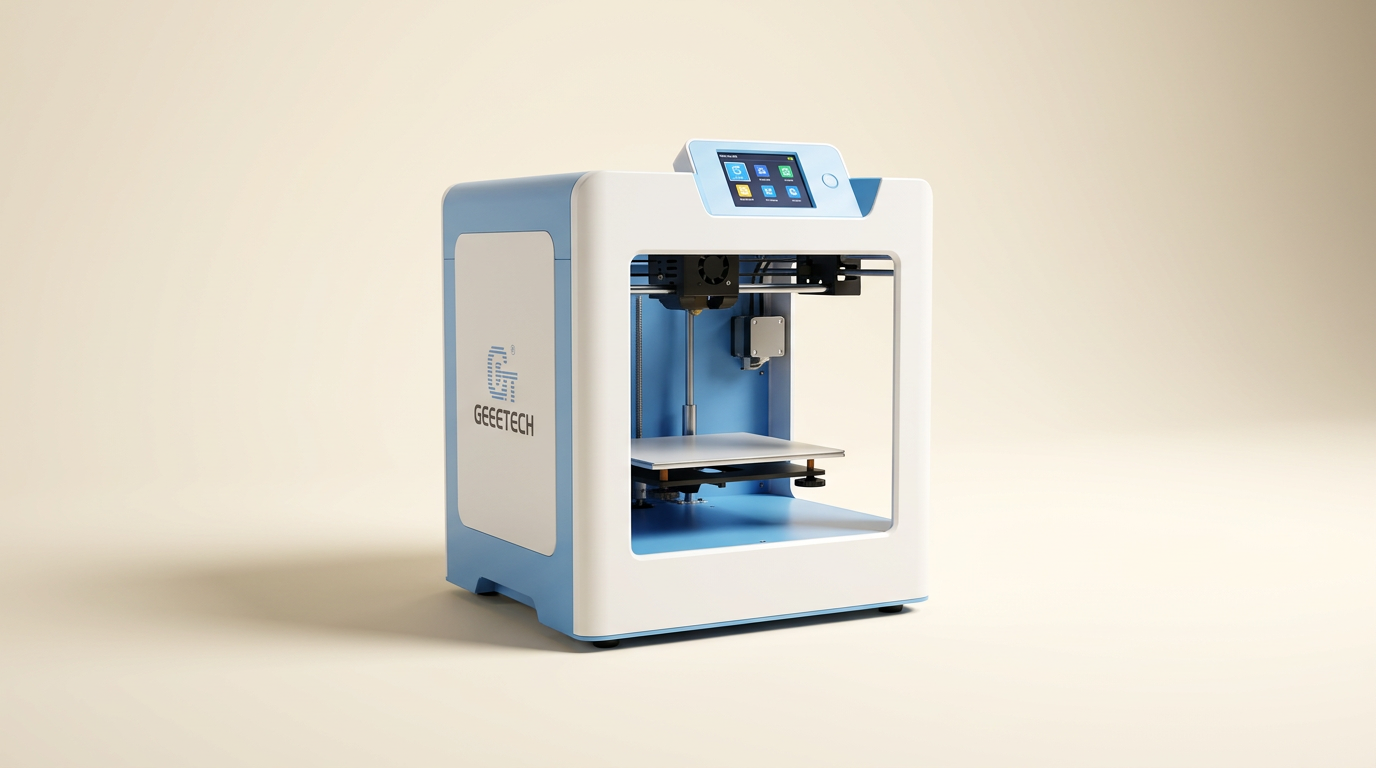
The Geeetech M1 Mini 3D printer positions itself as an accessible entry point into additive manufacturing, particularly for children and adult beginners. Marketed for its compact size and user-friendly features, it aims to demystify 3D printing with a pre-assembled design and automated functions.
This review evaluates the M1's performance, build quality, and overall value, drawing insights directly from user experiences. We assess how effectively it delivers on its promise as an educational tool and a capable small-format printer.
Owners frequently praise its straightforward setup and consistent output, contrasting it with more complex budget alternatives. However, its small build volume dictates its practical applications, making it suitable for specific printing needs.
What owners love
- + Arrives fully assembled and ready to print quickly
- + Generates surprisingly fast and high-quality prints
- + Features effective auto-leveling and a heated bed
- + Compatible with standard slicers like Orca and Cura
- + Compact footprint fits easily into small spaces
- + Responsive and supportive customer service
Common complaints
- − Limited build volume restricts project size
- − Standard 1kg filament spools do not fit well without modification
- − Lacks Wi-Fi connectivity
- − Initial parts fan noise reported in some units
- − Slighly higher price point for its size
Design & Build
The Geeetech M1 presents as a compact and robust machine. Owners consistently highlight its small form factor, noting it fits easily on bookshelves or small desks. The printer incorporates a direct drive extruder with a dual-drive metal gear system, contributing to reliable filament feeding, including flexible materials. A heated, flexible magnetic build plate facilitates print adhesion and easy removal. While the design accommodates a full 1kg filament spool, several users note that fitting these larger spools can be awkward, often requiring the printing of a custom holder for optimal stability. The machine also includes a bright integrated light and an accessible color LCD screen, aiding in operation and monitoring.
Setup & Ease of Use
The M1 distinguishes itself through its minimal setup requirement. It ships fully assembled; users generally need only to remove packing materials, cut a few zip ties securing the print head, and connect the PTFE tube. This significantly reduces the barrier to entry for new users. Owners frequently report being able to initiate their first print within minutes of unboxing. Features like 16-point full-auto leveling and one-button filament loading further streamline the process. The knob operation and clear display contribute to an intuitive user experience. Even young users, such as an 8-year-old, can manage setup and initiate prints independently.
Performance in Real Use
Despite its small stature, the M1 delivers commendable print speed and quality. Users are often surprised by how quickly it produces models, with a benchy test print completing in approximately 30 minutes from the included SD card. Print quality is frequently described as impressive, with detailed outputs. Some owners, including those with extensive multi-printer experience, remark that its print quality rivals even more expensive machines. It handles PLA and TPU filaments effectively, with one user specifically praising its performance with 95A TPU. Long-term reliability is also noted, with one machine operating almost continuously for weeks without maintenance. While print surfaces are typically smooth, a few users observed some rougher edges or seams on initial prints.
Software & Ecosystem
The M1 integrates well with industry-standard slicing software. Owners confirm its compatibility with both Orca Slicer and Cura, often finding pre-configured profiles available. This open-source compatibility provides flexibility and access to advanced settings for more experienced users, despite the printer's beginner-friendly positioning. The included SD card usually contains sample models and a test benchy profile to get started immediately. While the printer does not offer Wi-Fi connectivity, relying on TF card for file transfer, this is not considered a significant drawback by most owners, who prioritize its core printing functionality.
Value & Reliability
The Geeetech M1 is positioned as a strong value proposition, particularly for its target audience. Many owners describe it as a 'great printer for the price,' especially considering its out-of-the-box performance compared to other printers in a similar price range that may require extensive modifications. The heated bed and auto-leveling features, often found on more expensive models, add to its perceived value. Reliability appears high, with several instances of continuous operation and only isolated reports of component failures, such as a noisy parts fan. Geeetech's customer support receives praise; in cases of initial issues, the company has provided prompt assistance and replacements, ensuring customer satisfaction. The printer’s durability and consistent performance build confidence in its longevity.
Verdict
Buy - The Geeetech M1 Mini 3D printer offers exceptional ease of use and surprising print quality for its compact size and price point.
This printer is an excellent choice for first-time users, children, or anyone seeking a secondary, small-format machine where space is a constraint. Its quick setup, auto-leveling, and compatibility with robust slicers make it a hassle-free introduction to 3D printing without a steep learning curve. It consistently delivers quality prints suitable for smaller projects, educational purposes, or rapid prototyping.
However, those who prioritize a large build volume, integrated Wi-Fi, or require printing of exceptionally large objects should consider alternatives, as its print bed size limits its utility for bigger ventures. Its price, while justified by its features and performance, is not in the very lowest tier of mini printers.
FAQ
More 3D Printers reviews

Anycubic Kobra S1 ACE 2 Pro Combo Review: Enclosed Multicolor Value

FLASHFORGE AD5M Pro Review: High Speed Enclosure on a Budget

FLASHFORGE Creator 5 Pro Review: Multi-Toolhead Utility

QIDI Q2 3D Printer Review: High-Temp Power at a Consumer Price
Flashforge Adventurer 5M Smooth PC Plate Review

FLASHFORGE Creator 5 Pro Review: Multi-Toolhead Efficiency
This review is based on real experiences shared by owners in online communities.