
Flashforge Adventurer 5M Smooth PC Plate Review
This review is based on real experiences shared by owners in online communities.
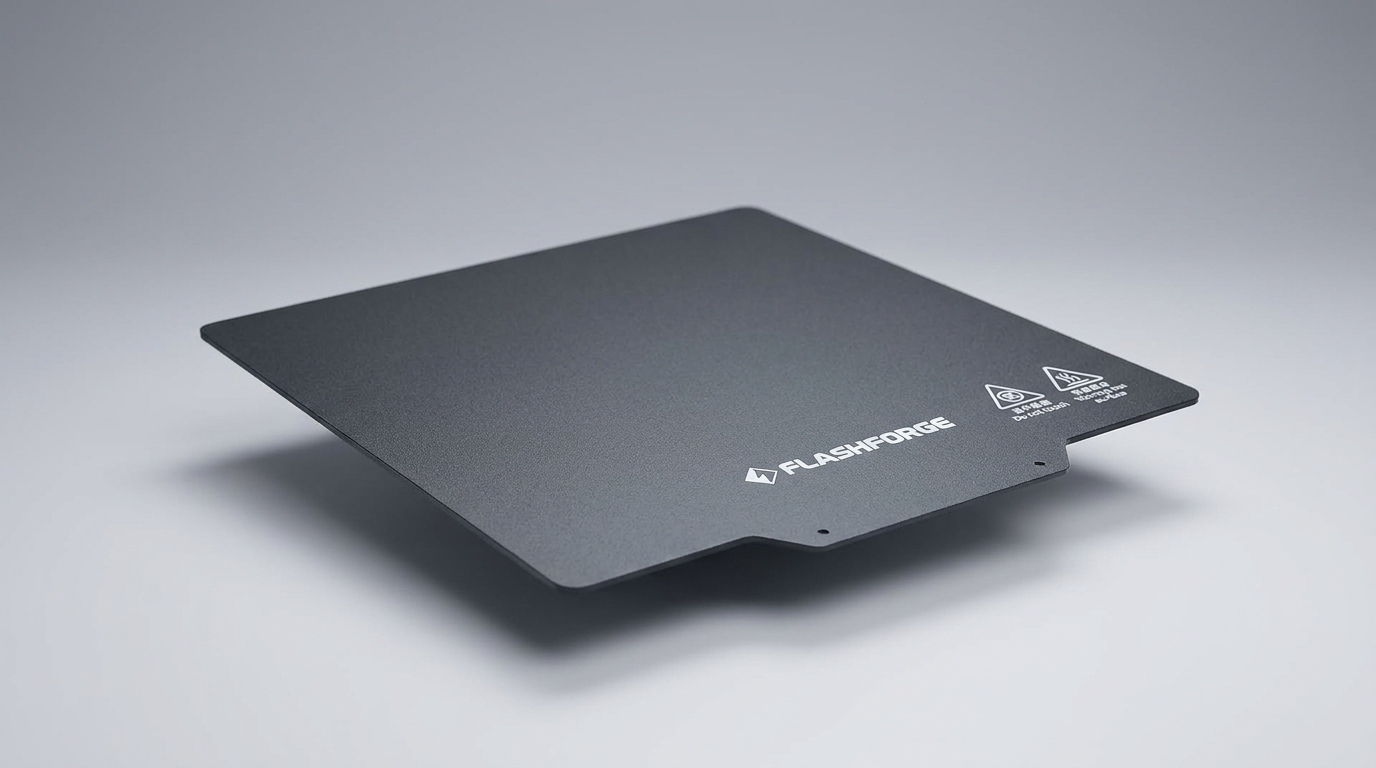
Most 3D printing build sheets promise to solve adhesion failures by gripping hot plastic harder. The Flashforge Smooth PC Plate for the Adventurer 5M series takes that assignment far too literally. Designed primarily as an alternative to textured PEI surfaces for engineering filaments like ABS, ASA, and polycarbonate, this spring-steel sheet produces glass-smooth first layers and virtually eliminates corner warping on medium-sized technical prints. Yet it represents a classic case of what happens when a manufacturer solves one engineering challenge by driving directly into another.
The sheet introduces what can be called the chemical weld trap. Polycarbonate surfaces share an aggressive chemical affinity with common printing materials, turning bed adhesion into an existential hazard for both the print and the plate itself. Instead of releasing naturally upon cooling, parts frequently bond permanently to the top film. When combined with an unadvertised physical thickness variance that confounds automated printer routines, this platform transforms a routine consumable upgrade into a minefield for the unprepared.
For makers running dedicated technical enclosures, the plate has utility. For everyone else looking for a plug-and-play smooth bottom finish, it operates closer to a disposable surface that risks destroying your nozzle on the very first calibration cycle.
What owners love
- + Delivers a flat, glossy bottom layer on technical filaments
- + Stops bottom-corner warping on ABS and ASA prints
- + Flexible spring steel allows mechanical popping of small parts
- + Requires zero glue to initiate initial layer grip
Common complaints
- − Extreme adhesion can fuse prints permanently to the plate
- − Noticeably thicker than stock sheets, risking nozzle crashes
- − Firmware nozzle wipe routines can burn holes into the coating
- − PETG and PLA Pro easily tear the top layer during removal
Design & Build
At first glance, the Flashforge Smooth PC Plate looks like any standard flexible build sheet, utilizing a spring-steel core topped with a matte-to-semi-gloss polycarbonate film. However, its physical construction hides what can be termed the gauge mismatch. Owners who measure the sheet discover it sits around 1.0mm thick, roughly double the 0.5mm thickness of the standard textured PEI plate shipped with the Adventurer 5M series. This extra half-millimeter creates an immediate mechanical dilemma. Because spring steel flexes, users expect quick part removal, but the bonded PC film is surprisingly fragile when subjected to sharp scraper blades or violent pulling forces. Several owners report surface pitting, gouges, and complete film delamination after a single extraction cycle.
Setup & Ease of Use
Installing the plate is mechanically straightforward thanks to the magnetic bed base, but user experience drops sharply during calibration. Because of the gauge mismatch, you cannot safely swap between Flashforge textured PEI and this smooth PC sheet without performing a fresh bed calibration before any heating or wiping occurs. The Adventurer 5M firmware complicates this further. On stock print start profiles, the machine executes a hard nozzle-wipe routine at fixed coordinates before running mesh bed leveling. Multiple owners note that during this blind sequence, the heated nozzle presses directly into the thicker sheet, melting indents or cutting deep grooves across the perimeter. Manual Z-offset compensation and modified start G-code are practically mandatory to keep the hardware intact.
Performance in Real Use
Performance splits cleanly depending on the polymer fed through the hotend. With standard ABS, ASA, and nylon composites like PA6, the PC surface provides exceptional first-layer stability. Prints that normally curl off textured PEI beds remain locked down flat, yielding pristine bottom surfaces. The problem is that the plate often refuses to let go. Bending the plate after cooling does not always break the bond, creating scenarios where users rip chunks of plastic apart or strip the PC coating right off the steel core. Attempting to run standard PETG or aggressive PLA blends on bare PC is almost always catastrophic. The plastic fuses to the bed, demanding what experienced operators recognize as the sacrificial interface principle: you must apply glue stick or liquid release agents not to make parts stick, but to ensure they can eventually be separated.
Software & Ecosystem
Flashforge's closed-loop software ecosystem does little to bridge the gap between this accessory and the printer hardware. The Adventurer 5M, 5M Pro, and AD5X slicing presets lack granular built-in protections for the physical differences between plate styles. If the slicer profile sends a stock start sequence, the machine treats the smooth PC sheet identically to the thinner PEI platform. Without automated sheet identification or firmware logic that runs leveling before the hot nozzle docks for a purge wipe, the ecosystem offloads the margin of error entirely onto the operator. Third-party slicers like OrcaSlicer offer workarounds via customized start macros, but within the native Flashforge workflow, the plate feels like an uncalibrated third-party component rather than an official accessory.
Value & Reliability
Priced in the budget range under $30, this plate seems inexpensive on paper, but its real cost depends on how many cycles it survives. For several owners, it becomes a single-use consumable because an unreleased ABS print or an over-squished first layer renders the coating unusable within hours. Replacing nozzles damaged by bed collisions further erodes its value proposition. When treated strictly as a dedicated, sacrificial platform for warp-prone technical materials, and managed with strict release-agent protocols, the plate can earn its keep. As a general-purpose smooth build plate, however, the reliability record is heavily compromised by rapid cosmetic wear, micro-tears, and structural failure under standard detachment loads.
Verdict
Hold Off - A dangerously aggressive build surface that risks nozzle damage and ruined prints unless you heavily modify your workflow.
Buy this plate only if you exclusively print ABS, ASA, or PA6, suffer from severe corner-lifting on textured PEI, and are willing to use glue stick strictly as a release barrier while rewriting your start G-code to prevent nozzle gouging.
Skip this plate if you want an easy, mirror-smooth bottom finish for PLA, PETG, or TPU. It will bond destructively to standard filaments, and the physical thickness discrepancy makes it an operational hazard for novice users reliant on automated leveling.
The smooth PC plate exposes a fundamental truth about modern 3D printer hardware: adhesion is no longer the real problem to solve. The industry has mastered making molten plastic stick, but Flashforge neglected the second half of the physics equation, turning clean model release into a destructive gamble.
FAQ
More 3D Printers reviews

QIDI Q2 3D Printer Review: High-Temp Power at a Consumer Price

FLASHFORGE Creator 5 Pro Review: Multi-Toolhead Efficiency
HP OfficeJet Pro 9135 Review: Two Trays and a Tight Leash
Flashforge Creator 5 Pro Review: Multi-Material Toolchanger
Bambu Lab P2S Combo Review: The 3D Printer Appliance
Hephi3d Tina2C Review: An Entry-Level 3D Printer for Kids
This review is based on real experiences shared by owners in online communities.