
ELEGOO Jupiter 2 16K: A Large-Format Resin Printer for Patient Pros
By AValidReview. An AI-assisted summary of customer feedback, not a hands-on test.
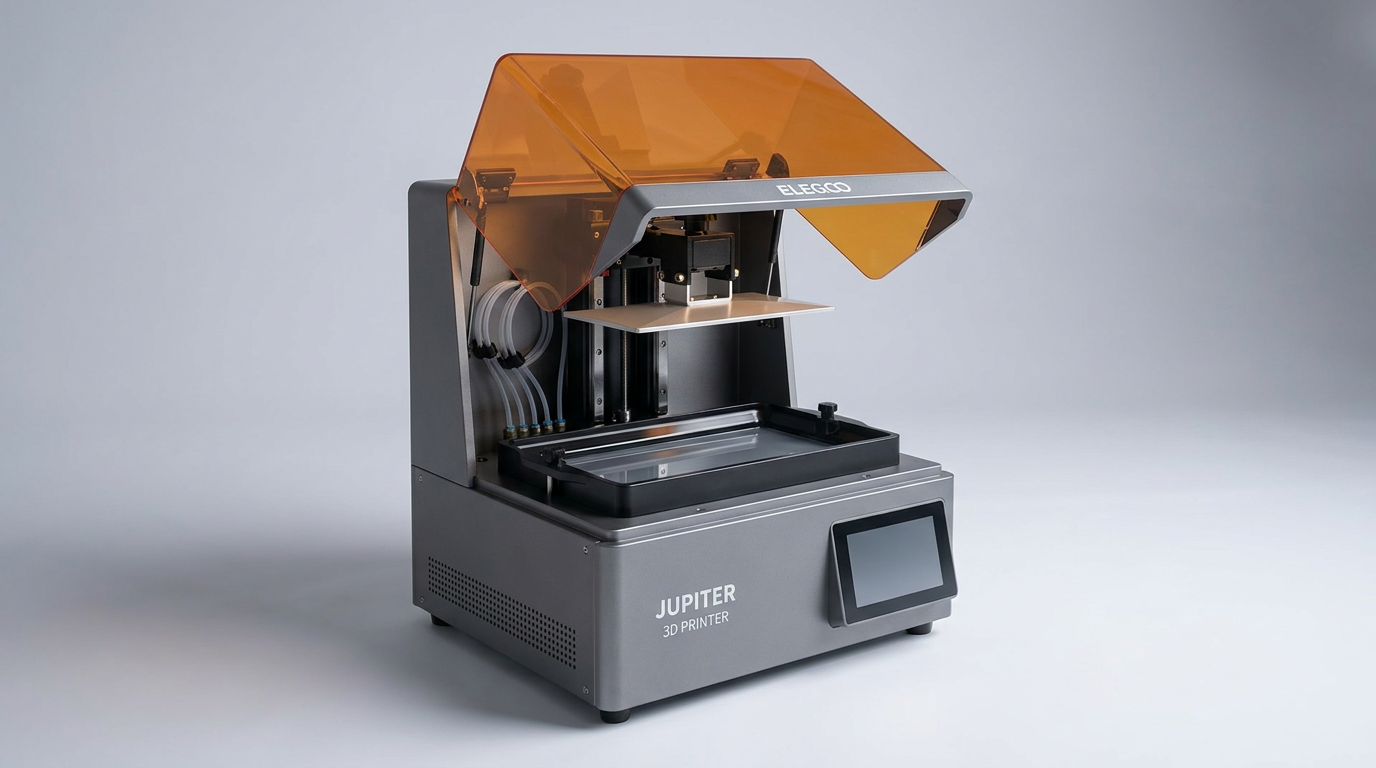
In the evolving landscape of resin 3D printing, the ELEGOO Jupiter 2 16K positions itself not as a category disruptor, but as a scaled-up workhorse designed for the dedicated hobbyist or small workshop. While many printers chase smaller footprints and faster cycles, the Jupiter 2 commits to sheer volume, offering a build area that fundamentally shifts the scale of projects achievable at home. This printer is less about groundbreaking innovation and more about extending the familiar ELEGOO experience to truly substantial builds, a proposition that carries both significant advantages and unique operational challenges.
This review navigates the Jupiter 2's promise of large-scale, high-resolution output against its real-world implementation. Owners frequently praise its print quality and expansive build plate, suggesting it fills a specific niche for large models and batch production. However, recurring themes of setup intricacies and feature inconsistencies emerge, indicating that its "smart" capabilities sometimes introduce more complexity than convenience. The Jupiter 2 isn't for the faint of heart or the impatient; it’s a demanding machine that rewards persistence and experience with its considerable capacity.
Ultimately, the Jupiter 2 offers a clear trade-off: unparalleled build volume and resolution within its price segment, offset by a higher bar for user intervention and troubleshooting. It demands a particular kind of user-one willing to master its eccentricities for the payoff of massive, detailed prints. For those accustomed to ELEGOO's ecosystem and ready to invest time in optimization, the Jupiter 2 represents a powerful tool. For others, its promise of automated sophistication might lead to unexpected friction.
What owners love
- + Massive build volume enables large-scale or batch printing
- + Exceptional 16K resolution yields highly detailed models
- + Generally good print quality once calibrated
- + Robust build and physical footprint for stability
- + Availability of replacement parts from common retailers
Common complaints
- − Automatic features (leveling, resin feeding) are inconsistent
- − Steep learning curve and frequent troubleshooting required
- − Software (slicer, app, firmware) can be buggy or underdeveloped
- − Significant resin odor, even with plant-based options
- − Fragile LCD screen prone to damage, with variable QC
Design & Build
The ELEGOO Jupiter 2 presents a commanding physical presence, a common observation among owners who often note its unexpectedly large dimensions upon arrival. Its substantial build volume-302.4 × 161.98 × 300 mm-is its defining characteristic, enabling the production of sizable objects or numerous smaller parts concurrently. This scale, while beneficial for output, introduces what we might call the “Environmental Burden Tax”: the practical challenges of accommodating such a large printer, managing resin fumes in a domestic or small workshop setting, and finding appropriately sized post-processing equipment. Owners praise the durable LED and solid construction, describing the machine as robust. However, the double-door design, while providing broad access, means removing the entire top lid to interact with the build plate, which some find ungainly given the printer's height. The integrated resin drip tray is a thoughtful addition for spill management, though its effectiveness is tied to the reliability of the auto-feed system.
Setup & Ease of Use
Setting up the Jupiter 2 proves to be a significant hurdle for many, contrasting sharply with its stated “easy to use” marketing. While some experienced users find it straightforward, a recurring complaint centers on the auto-leveling system. Many owners report that the automatic process fails to achieve adequate calibration, necessitating manual adjustments that are often described as delicate and time-consuming. This creates a "Calibration Conundrum" where an advertised smart feature frequently defaults to a manual, expert-level task. The automated resin feeding system also draws criticism, with reports of it failing to dispense resin, or conversely, overflowing the vat and causing damage to the LCD. Even basic connectivity issues, such as Wi-Fi failure and unsupported software, complicate the initial experience. This suggests that while ELEGOO aimed for a user-friendly setup, the implementation often falls short, particularly for those new to large-format resin printing or expecting plug-and-play operation.
Performance in Real Use
When operating correctly, the Jupiter 2 delivers on its promise of high-quality prints and impressive detail, largely attributed to its 16K resolution. Experienced users, once they navigate the initial setup and dial in print settings, consistently achieve flawless results. The fast speed, when parameters are optimized for nesting parts, is also a noted positive. However, consistent operation requires vigilance. The issue of resin overflow, often linked to the malfunctioning auto-filler, frequently leads to cured resin on the LCD screen, a costly and frustrating problem. The build plate adhesion receives mixed reviews; some report good adherence, while others struggle with prints detaching. Furthermore, owners highlight the substantial resin fumes, even with less aggressive plant-based resins, underscoring the necessity for robust ventilation. This creates a "Reliability Roulette" where print success depends heavily on continuous user oversight and pre-emptive troubleshooting rather than consistent automated performance.
Software & Ecosystem
The software experience for the Jupiter 2 appears to be a significant weakness, creating friction points for many users. The bundled slicer software is frequently described as underdeveloped, lacking the robustness or intuitive features expected from a premium machine. Connectivity is another concern, with multiple reports of failures to connect to Wi-Fi or unstable network transfers. Owners also note buggy firmware and an unstable companion application, which detract from the potential for a cohesive smart printing ecosystem. The resin auto-filler's compatibility is also limited, primarily functioning with ELEGOO-branded resin bottles unless users adapt lids from other brands. This restrictive interoperability and underperforming software ecosystem introduce an unexpected "Compatibility Tax," forcing users to work within narrow parameters or develop their own workarounds, undermining the supposed convenience of smart features and modern connectivity.
Value & Reliability
The value proposition of the Jupiter 2 is contentious, largely due to its fluctuating reliability. While some owners consider it the best large-format printer in its class for its price-point (around $1300), others contend it offers poor value due to persistent issues and the high cost of wasted resin and replacement parts. The LCD screen emerges as a critical vulnerability; issues range from initial defects, such as bubbling film or scratches, to premature failure. Several owners report needing multiple screen replacements, often within a short period, with concerns raised about quality control. The printer’s reliability is further compromised by the inconsistent auto-leveling and resin feeding systems, which can lead to print failures and material waste. This high rate of component failure and the necessity for frequent intervention or part replacement contribute to a hidden "Ownership Overhead," making the total cost of reliable operation significantly higher than the initial purchase price suggests. For a machine marketed with smart features, the need for constant vigilance and replacement parts reduces its long-term appeal for many.
Verdict
Consider - The ELEGOO Jupiter 2 16K offers a massive print volume and high resolution that can deliver exceptional results, but it demands significant user commitment to overcome its automation and reliability issues.
This printer is suitable for experienced resin printing enthusiasts or small workshops prioritizing large-scale projects and possessing a high tolerance for troubleshooting. Users who understand the intricacies of resin printing, are comfortable with manual calibration, and are prepared to address potential component failures will find its sheer capacity invaluable. Its value shines brightest for those who need to print big or in batches and are willing to invest time in dialing in settings and performing maintenance, especially considering its price point compared to industrial alternatives.
Those seeking a seamless, plug-and-play experience, or who are new to resin printing, should hold off. The inconsistent smart features, buggy software, and reported fragility of critical components like the LCD screen mean it is not a set-it-and-forget-it machine. Its promise of advanced automation often clashes with a real-world experience that requires a more hands-on, almost experimental approach. The Jupiter 2 exemplifies the "Prosumer Paradox": it offers professional-grade capability but without the professional-grade reliability and support, expecting its users to bridge that gap with their own expertise.
FAQ
More 3D Printers reviews

Anycubic Kobra S1 ACE 2 Pro Combo Review: Enclosed Multicolor Value

FLASHFORGE AD5M Pro Review: High Speed Enclosure on a Budget

FLASHFORGE Creator 5 Pro Review: Multi-Toolhead Utility

QIDI Q2 3D Printer Review: High-Temp Power at a Consumer Price
Flashforge Adventurer 5M Smooth PC Plate Review

FLASHFORGE Creator 5 Pro Review: Multi-Toolhead Efficiency
This review is based on real experiences shared by owners in online communities.