
EINSTAR Rockit Wireless 3D Scanner Review: High-End Fidelity
This review is based on real experiences shared by owners in online communities.
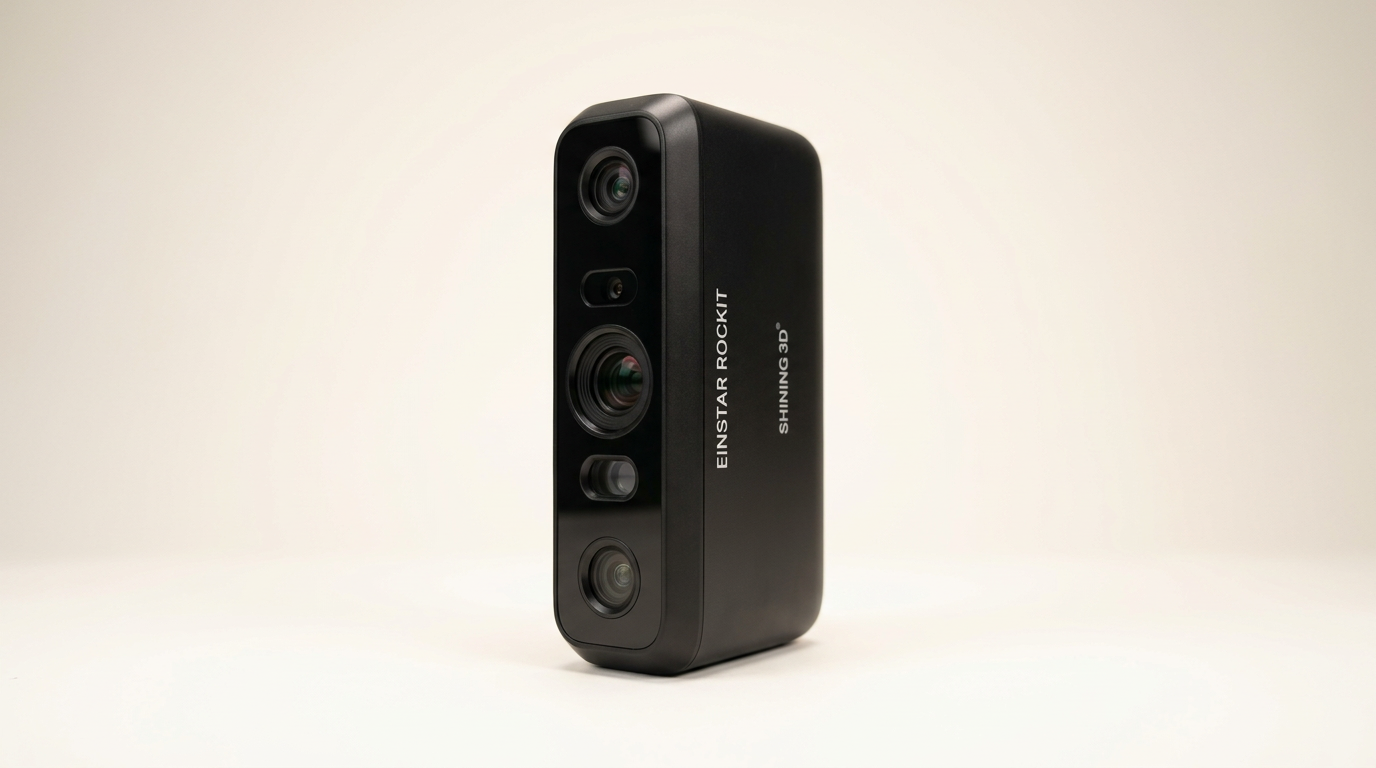
The EINSTAR Rockit enters a professional 3D scanning market increasingly bifurcated: affordable, entry-level devices prioritizing ease of use, and high-end industrial solutions focused on precision and material handling. The Rockit attempts to bridge this gap, offering advanced features like dual laser sources and wireless operation in a package positioned for serious enthusiasts and small businesses. Its success hinges on delivering consistent, high-fidelity scans without the typical industrial price tag, a challenge many devices in this segment often struggle to meet.
While marketing emphasizes its "wireless 3D scanning" and "dual light sources," the critical test for the Rockit lies in its ability to reliably track complex geometries and varied surface types, especially black or reflective materials, tasks that historically demand significant user expertise or specialized equipment. This review will assess whether the Rockit truly expands the practical reach of advanced 3D scanning or if its sophisticated feature set introduces a new layer of complexity.
Most buyers in this category are driven by output quality and workflow efficiency. The Rockit’s promise is not just high resolution, but also a more fluid scanning experience, particularly with challenging objects. Understanding its actual performance requires moving beyond feature lists to examine its operational realities in diverse scenarios.
What owners love
- + Delivers superior detail and tracking compared to entry-level scanners
- + Effective at scanning dark or reflective surfaces using laser mode
- + Wireless connectivity functions reliably without latency for many users
- + High resolution and texture capture for professional applications
- + Build quality is solid and accessories are comprehensive
- + EXStar Hub software offers an intuitive workflow
Common complaints
- − High dependency on markers for laser mode tracking
- − Requires significant practice for consistent, optimal results
- − Software and support can be inconsistent, leading to setup frustrations
- − Some units exhibit connectivity issues or arrive non-functional
- − Demands a high-spec PC; can report insufficient memory on powerful systems
- − Markerless scanning is unreliable for objects lacking distinct features
Design & Build
The EINSTAR Rockit presents a robust physical design, a clear step up from more consumer-grade alternatives. Owners consistently report a solid build quality, indicating that the device feels substantial in hand. Its form factor integrates both blue laser lines and an IR VCSEL array, providing versatile scanning options. One owner noted the laser sensor is physically smaller than in previous Einstar models. This compact sensor design, while enabling greater precision for fine details and deep holes, inadvertently influences tracking mechanics, creating what we can term the 'feature alignment deficit' where smaller sensors require more distinct reference points.
The inclusion of a swappable internal battery is a practical design choice, offering up to three hours of untethered operation. This enables true wireless flexibility, a key differentiator. The provision for a wired connection also wisely acknowledges environments prone to Wi-Fi interference. Overall, the physical construction supports the device’s professional aspirations, offering durability and thoughtful ergonomic considerations for extended use.
Setup & Ease of Use
Initial setup for the Rockit involves a wired connection for firmware updates and calibration, a common procedure for professional-grade peripherals. For many users, this process is straightforward, leading to successful wireless operation. However, a significant number of owners report substantial setup hurdles, ranging from connection failures on high-end Macs and PCs to non-functional units directly out of the box. The software, while described as basic and comprehensible by some, presents activation challenges for others, particularly with the Exmodel license. This inconsistency suggests a 'first-layer cliff' phenomenon, where the initial setup barrier is disproportionately high for a subset of users, preventing them from even reaching the operational phase. The expectation for a device in this price bracket is a more universally smooth onboarding experience.
Once connected and calibrated, the Rockit's wireless mode generally performs well, with owners praising its latency-free connection. However, the learning curve for achieving optimal scans remains steep. Owners coming from prior 3D scanning experience report a more manageable transition, but new users find the process demanding, especially when attempting advanced techniques like markerless scanning. The device’s reliance on markers for consistent tracking in laser mode further underscores that 'ease of use' in this context is relative to technical proficiency rather than absolute simplicity.
Performance in Real Use
The Rockit's scanning performance is a tale of two modes. Its dual light sources are the core of its utility: the 38 blue laser lines excel at capturing geometry on challenging surfaces like black or reflective materials, and within deep holes. Owners consistently highlight this capability as a primary advantage over devices lacking dedicated laser scanning. The 7 parallel laser lines contribute to its 0.05 mm HD resolution, producing detailed models suitable for industrial parts or automotive components.
However, a recurring theme is the device's marked reliance on tracking markers when operating in laser mode, even for objects advertised as suitable for marker-free scanning. While the 5 MP color camera captures vivid textures, achieving consistent markerless tracking requires objects with sufficient distinct features. For smooth or simple geometries, the 'marker dependency tax' becomes evident, requiring additional preparation and limiting the spontaneity of the workflow. Some owners report experiencing intermittent tracking loss and system crashes, even on high-specification workstations, suggesting that the software's processing demands or stability still need refinement. While capable of impressive results, consistently attaining them demands careful technique and understanding of its limitations.
Software & Ecosystem
The EINSTAR Rockit leverages the EXStar Hub software, which aims to streamline workflows and reduce system load. Owners describe the software interface as intuitive, especially for those familiar with 3D scanning tools. It supports real-time capture up to 90 fps and aims for consistent point cloud output, features crucial for efficient post-processing.
However, the software ecosystem is also a source of frustration. Multiple reports detail software crashes during scans, activation issues with bundled licenses, and a general lack of responsive support. These challenges indicate that while the core scanning algorithms may be robust, the surrounding software stability and customer service infrastructure require improvement. The contrast between the device's advanced hardware capabilities and the reported software inconsistencies creates a 'workflow bottleneck' that can undermine the overall user experience. Effective 3D scanning relies as much on stable software and timely support as it does on hardware precision, an area where the Rockit's current ecosystem sometimes falls short.
Value & Reliability
Priced around $1500, the EINSTAR Rockit sits in a competitive segment, promising industrial-grade features at a more accessible price point than many professional systems. Many owners perceive it as offering excellent value, particularly those who have upgraded from more basic scanners and found its performance significantly superior. It excels in delivering high-resolution data on challenging surfaces, a capability typically found in more expensive devices.
However, the device's reliability presents a mixed picture. While some users report a flawless experience, others encounter critical issues such as non-functional units on arrival or persistent software instability. The reported challenges with customer support further exacerbate these reliability concerns. For a product aimed at professional or prosumer use, consistent performance and robust support are paramount. The 'reliability lottery' observed in owner feedback means that while the Rockit offers compelling value when it works as intended, the risk of encountering significant operational roadblocks is higher than ideal, impacting its overall long-term utility.
Verdict
Consider - The EINSTAR Rockit offers robust scanning capabilities for challenging surfaces, but inconsistent software and support warrant caution.
This scanner is best suited for experienced 3D scanning enthusiasts or small businesses with a high tolerance for technical troubleshooting, especially those needing to capture dark, reflective, or deeply recessed objects. Its superior laser performance over entry-level IR-only scanners makes it a strong contender for specific applications like automotive parts or industrial design, assuming the user is prepared for a learning curve and potential software quirks. Buyers upgrading from basic handheld scanners will find its resolution and material handling a significant improvement in the mid-range price band, around $1500.
Individuals new to 3D scanning or those expecting a plug-and-play experience should hold off. The Rockit's current software and support inconsistencies, coupled with its dependency on tracking markers and powerful PC hardware, make it a potentially frustrating investment for casual users. Look for alternatives that prioritize ease of use and offer more consistent customer support in the under $1000 range. The Rockit exemplifies the "professional-grade paradox": it delivers high-end results, but demands a professional level of patience and technical acumen to consistently unlock its potential, exposing the friction points when advanced hardware meets an evolving software ecosystem.
FAQ
More 3D Scanners reviews

Revopoint INSPIRE 2 3D Scanner Review: Unpacking the Accessory Echo Chamber

Creality 6mm 3D Scanning Markers Review: Essential Tracking Aid

TOSUKKI 6mm Positioning Targets Review: The Refined Generic Choice

AESUB 3DTOOLS 3D Scanner Spray Review: The 'Evaporative Enabler'

Creality 8-inch Rotating Turntable: A Solid Scanner Accessory

Generic 12 Piece Multi-Angle Markers Review: Essential 3D Scanning Dots
This review is based on real experiences shared by owners in online communities.