
EinScan SE V2 Review: Precision for Dedicated 3D Modelers
This review is based on real experiences shared by owners in online communities.
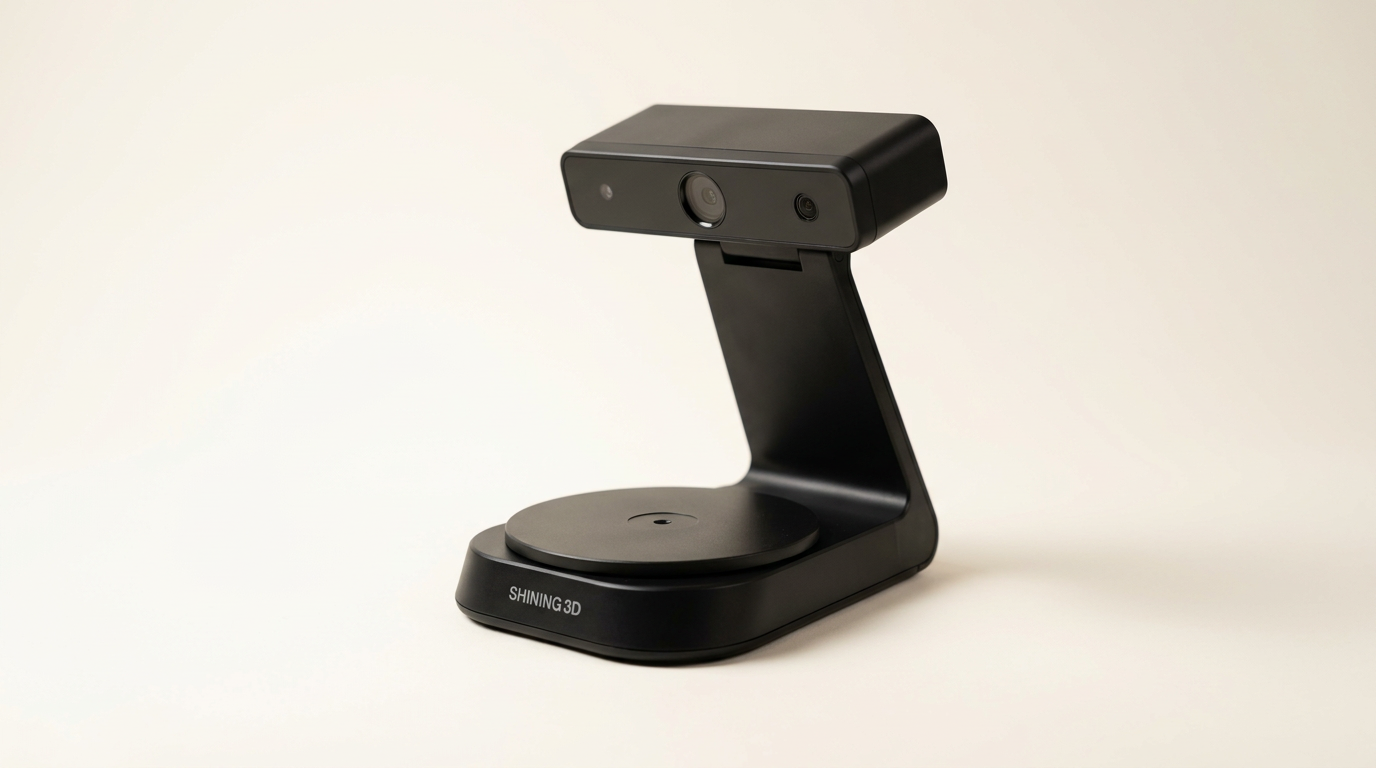
The EinScan SE V2 3D scanner occupies a distinct niche in the rapidly expanding world of consumer and prosumer 3D digitization. While the market pushes for increasing ease of use and broad accessibility, this device maintains a focus that demands operator engagement for optimal results. It isn't a point-and-shoot solution, but rather a tool that rewards methodical application and an understanding of its inherent process.
Unlike many general-purpose scanners, the SE V2 positions itself as a stepping stone for those moving beyond rudimentary scanning into more precise, repeatable capture for specific applications like rapid prototyping, reverse engineering, or archival work. Its dual-mode functionality suggests a versatility that, in practice, hinges on user proficiency and patience, offering a "power user's entry point" into accuracy that belies its desktop form factor.
This review unpacks how the EinScan SE V2 performs when these demands are met, examining its tangible output, software experience, and overall value proposition for those willing to learn its nuances and adapt their workflow.
What owners love
- + Delivers excellent accuracy and detail for its price bracket
- + Effective for digitizing medium-sized objects and parts
- + Software is generally intuitive once initial setup is mastered
- + Valuable for specific professional applications like reproduction or archiving
- + Strong performance with optimal object preparation
Common complaints
- − Significant learning curve for consistent, high-quality results
- − Struggles with small, black, or shiny objects without prep
- − Software can exhibit bugs and compatibility issues, especially on Windows
- − Customer support is difficult to access and slow to respond
- − Less effective for larger objects or human scanning due to fixed mode limitations
Design & Build
The EinScan SE V2 presents a compact and unobtrusive desktop design, which owners frequently appreciate as it integrates well into workspace environments. Its physical construction is described as robust, with some users even receiving units advertised as 'open box' that appeared brand new. The inclusion of a turntable for automated scanning underscores its desktop orientation. However, a recurring issue involves the physical assembly; some owners report difficulty connecting the USB cable for the turntable due to fitment problems under the connection bar, indicating a potential manufacturing tolerance issue that can impede initial setup.
Setup & Ease of Use
Initial setup for the EinScan SE V2 often requires a dedicated effort. While the manufacturer advertises automatic calibration and one-click scanning, owners consistently report a significant learning curve. Getting the scanner 'dialed in' is a common phrase, suggesting that optimal performance is not plug-and-play. This includes understanding the impact of object placement, lighting, and surface preparation. A notable observation is the 'calibration commitment' required: the unit may need recalibration every time the base or scanner is moved, which can disrupt workflow. Despite these hurdles, once proficiency is gained, many users find the process straightforward and the software intuitive, praising the overall user experience.
Performance in Real Use
The SE V2 demonstrates commendable scanning quality and accuracy, particularly for objects within a medium size range. Owners report achieving resolutions close to the advertised 0.1mm, outperforming some competitors in its price class. It excels at tasks like digitizing intricate crown molding for CNC reproduction or recovering designs for small, obsolete parts. This device exhibits what could be termed the 'surface texture sensitivity' paradox: while it thrives on matte, detailed surfaces, it struggles significantly with shiny, black, or very small objects. Users consistently employ workarounds like applying athlete's foot spray to matte surfaces or using markers for alignment on larger, smoother items. This often overlooked preparation step is crucial for unlocking the scanner's full potential and represents a 'hidden workflow tax' on achieving high-quality data.
Software & Ecosystem
The bundled ExScan software is a focal point of owner feedback, presenting a dichotomy of praise and frustration. Many users find it powerful and easy to use once mastered, appreciating features like automatic meshing and direct upload capabilities. The software's ability to simplify post-processing, such as filling holes, is also a positive. However, a significant number of complaints revolve around software stability and compatibility. Issues include installation errors, inability to launch on Windows 10, non-functional menus, and interface scaling problems. The lack of a native macOS version or multilingual support (beyond English) also limits its accessibility. These software inconsistencies represent a 'reliability lottery' that can severely hinder the user experience, irrespective of the hardware's capabilities. Some owners even suggest the need for additional third-party software to achieve desired results, indicating perceived gaps in the native offering.
Value & Reliability
The EinScan SE V2 is largely considered a strong value within its price segment, which typically falls in the range of around $800 to $1000. Owners often cite its accuracy and feature set as superior to cheaper alternatives. Its reliability, however, is a mixed bag, primarily due to the aforementioned software issues and occasional hardware connection problems. Customer support, located overseas and reliant on typeform submissions, is a consistent point of dissatisfaction, with many users reporting unreturned calls or difficulty resolving technical problems. This lack of responsive support introduces a 'support lottery' where successful troubleshooting often falls to the user. Despite these challenges, many who overcome the initial learning curve and software hurdles express high satisfaction, viewing it as a sound investment for professional-grade results without a significantly higher cost.
Verdict
Consider - This scanner offers exceptional value and precision for dedicated users willing to invest time in learning its operation and managing its software quirks.
The EinScan SE V2 is an appropriate choice for makers, small businesses, and educational institutions focused on digitizing medium-sized, matte objects for 3D printing, reverse engineering, or archival purposes. It suits users who prioritize accuracy and are prepared to engage in meticulous object preparation and a structured workflow. Those seeking a high-value tool that, once mastered, performs reliably for specific tasks will find it a compelling option in its mid-range price bracket.
Conversely, hobbyists or casual users expecting an instant, trouble-free scanning experience should likely look elsewhere. Individuals requiring consistent performance with shiny, black, or very small objects without extensive pre-treatment, or those needing robust, responsive customer support, will find its limitations frustrating. If your primary need is for large object or human scanning, or if you cannot tolerate software instability, this model will likely disappoint.
The EinScan SE V2 embodies the "prosumer paradox" of 3D scanning: it promises professional-grade results at an accessible price, but only if the user provides the missing 'pro' element of expertise and patience. It's not a technological marvel that transcends physical limitations, but rather a capable instrument that reveals the artistry still required in a supposedly automated process.
FAQ
More 3D Scanners reviews

Revopoint INSPIRE 2 3D Scanner Review: Unpacking the Accessory Echo Chamber

Creality 6mm 3D Scanning Markers Review: Essential Tracking Aid

TOSUKKI 6mm Positioning Targets Review: The Refined Generic Choice

AESUB 3DTOOLS 3D Scanner Spray Review: The 'Evaporative Enabler'

Creality 8-inch Rotating Turntable: A Solid Scanner Accessory

Generic 12 Piece Multi-Angle Markers Review: Essential 3D Scanning Dots
This review is based on real experiences shared by owners in online communities.