
Creality SPARKX i7 Review: A Budget Multi-Color Contender
By AValidReview. An AI-assisted summary of customer feedback, not a hands-on test.
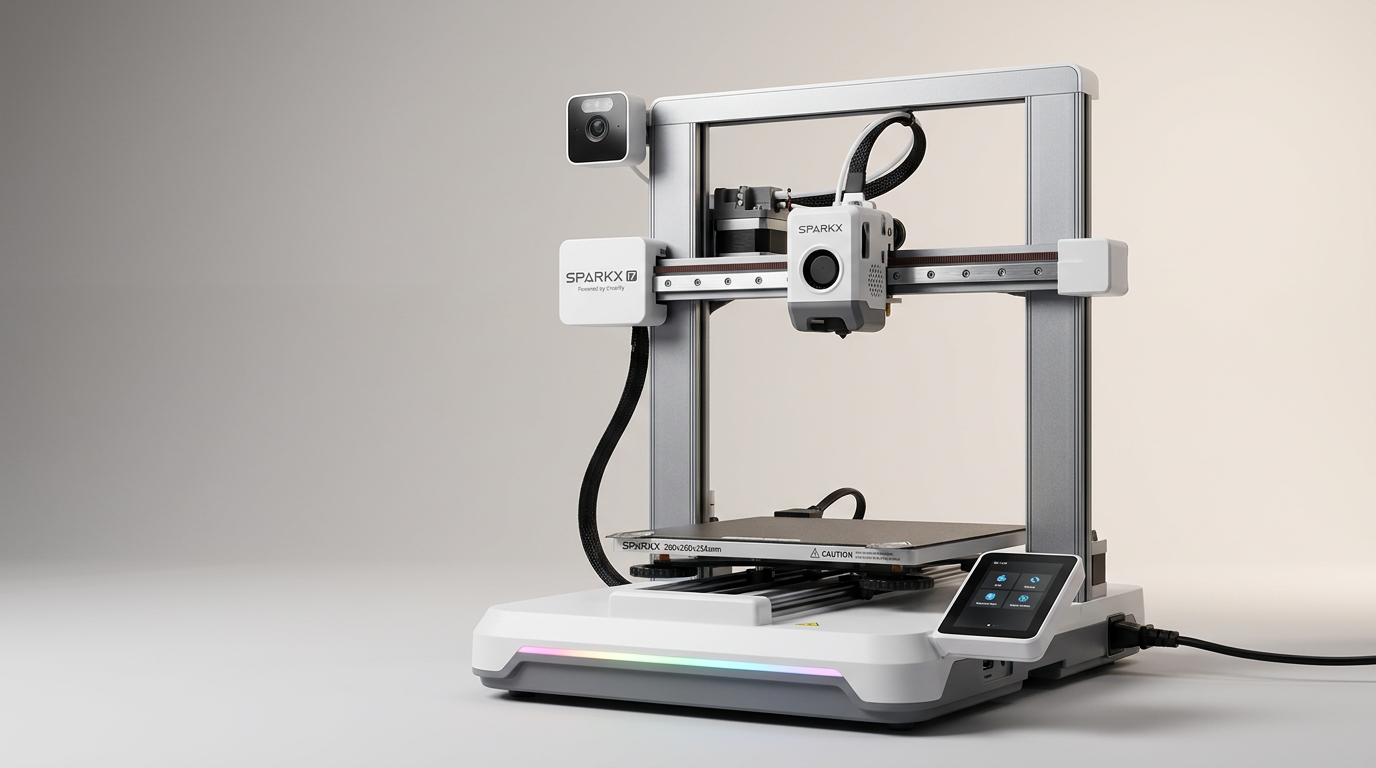
The 3D printing landscape is increasingly bifurcated: on one side, highly integrated, premium machines deliver consistent results out of the box; on the other, budget-friendly options require more user intervention. The Creality SPARKX i7 aims to blur these lines, positioning itself as an affordable, high-speed solution that even offers multi-color printing capabilities with an optional add-on. This strategy places it in direct competition with more established, higher-priced models, offering a compelling feature set for its asking price.
However, this ambition introduces a distinct set of trade-offs. While the SPARKX i7 appears to deliver on core print performance, its integrated software and advanced features, particularly those involving AI and multi-color filament management, present a steeper learning curve or outright frustration for some users. This review examines whether the SPARKX i7 achieves its stated goal of democratizing advanced 3D printing, or if it falls into the common trap of promising more than its underlying ecosystem can reliably deliver.
What emerges is a product caught between two worlds: capable hardware constrained by an inconsistent software experience. It is a machine that demands user engagement to unlock its potential, offering high reward for those willing to navigate its idiosyncrasies.
What owners love
- + Delivers fast, high-quality prints for its price
- + Easy initial setup and quick to begin printing
- + Optional multi-color system offers creative versatility
- + Compact footprint suitable for desktop use
- + Responsive touchscreen interface
Common complaints
- − Bundled software and AI features are often buggy or unintuitive
- − Camera monitoring quality is frequently reported as poor
- − Customer service and warranty support can be challenging
- − The multi-color system requires significant desk space
- − Magnetic build plate needs careful alignment
Design & Build
The Creality SPARKX i7 distinguishes itself with a compact, open-frame design that conserves desk space, a feature many owners appreciate, particularly when adding the optional multi-color system. Owners consistently praise its aesthetic and the initial impression of build quality. The machine's footprint facilitates placement on a mobile desk or shelf, making it suitable for smaller workspaces. However, the multi-color attachment significantly expands the overall footprint, creating what we term the 'system sprawl' effect: the sum of the parts requires more space than the core printer suggests. The flexible PEI build plate generally performs well for print adhesion and removal, although its magnetic attachment system draws some criticism for requiring precise alignment, feeling less robust than other solutions.
Setup & Ease of Use
Initial setup of the SPARKX i7 is a standout positive, with numerous reports of users getting the printer operational within a few hours, even those new to 3D printing. The machine comes largely pre-assembled, and automatic bed leveling streamlines the calibration process. The included quick start guide is basic but effective, and the printer connects easily to networks. This rapid path to first print marks a significant improvement over earlier generations of budget printers. This 'first-layer cliff' a common hurdle for new users, is largely mitigated here, allowing beginners to focus on the creative aspects rather than wrestling with initial calibration. However, this ease primarily applies to the core printing function; integrating the multi-color system and navigating advanced software settings introduces new complexities.
Performance in Real Use
Owners consistently report impressive print speeds and quality from the SPARKX i7, often comparing it favorably to more expensive, enclosed machines from other brands. The printer averages speeds around 300mm/s without sacrificing print fidelity, making it a strong performer for desktop projects and longer print sessions. The optional multi-color system, while not as sophisticated as true tool-changer setups, serves as an effective entry point into multi-material printing. It capably manages multiple filament changes, allowing for complex, multi-color models. The trade-off for higher speed is noise; while a 'quiet mode' exists, it reduces print speed, leading most users to tolerate standard operating volumes for faster output. Over 500 hours of continuous printing and 10kg of filament have been reported without issue, suggesting robust mechanical reliability for core functions.
Software & Ecosystem
This is where the SPARKX i7 experience often diverges from its hardware promise. While the touchscreen interface is generally responsive, the integrated software, including the AI camera monitoring, receives consistent criticism. Owners describe the camera quality as blurry and the AI features as buggy or difficult to use, sometimes requiring deactivation for basic operations like filament changes. The desktop slicer software, while functional, can be unintuitive, especially regarding filament selection for multi-color prints. This 'software tax' means that while the hardware is capable, unlocking its full potential often requires navigating an underdeveloped digital environment. The advertised 'smart camera monitoring' does not reliably deliver the remote viewing or print status detection it promises, diminishing a key selling point for reliability and remote management.
Value & Reliability
Priced around $200, the Creality SPARKX i7 offers significant value, particularly given its speed, print quality, and optional multi-color capabilities. Many owners see it as a strong competitor to machines costing $100 more or more, delivering comparable results for routine printing tasks. However, this value proposition is tempered by concerns about long-term reliability and customer support. Reports of units being defective out of the box, combined with difficult experiences with Creality's customer service, particularly regarding warranty claims for optional accessories, introduce a 'reliability roulette.' While many users experience uninterrupted printing for hundreds of hours, others encounter significant issues that are poorly resolved. This variability means the perceived value can fluctuate wildly based on individual experience.
Verdict
Consider - The Creality SPARKX i7 offers strong core printing performance and multi-color capability for a budget price.
The SPARKX i7 is an ideal purchase for an enthusiastic hobbyist or an experienced maker seeking an affordable secondary machine. Those willing to engage with its software quirks and potentially navigate customer service challenges will find a highly capable printer for around $200. It excels at fast, quality prints and opens the door to multi-color projects without the higher investment typically required. It represents a compelling proposition for someone who values hardware performance over a polished, integrated user experience.
Conversely, newcomers to 3D printing who prioritize a frictionless, "it just works" experience should hold off. The inconsistent software, unreliable camera, and potential support frustrations can quickly sour the learning process. Those who expect a completely hands-off printing experience, akin to higher-priced, more mature ecosystems, will likely find its rough edges frustrating.
The SPARKX i7 is a testament to the idea of the 'prosumer compromise': it delivers impressive raw performance for its cost, but demands that its owners become actively involved in its care and feeding. It illustrates the ongoing tension in the 3D printing market between aspirational feature sets and the underlying software and support infrastructure needed to sustain them reliably.
FAQ
More 3D Printers reviews
ugee Funbox 3D Printer Review: Safe Household Making
Original Prusa CORE One+ Kit Review: The Maker's CoreXY
ANYCUBIC Photon P1 Max Review: Scale Meets Detail
Anycubic Kobra S1 ACE 2 Pro Combo 3D Printer Review
Toybox Alpha Two 3D Printer Review: The Zero-Fuss Toy Factory
Creality K2 SE 4C Review: Budget Multicolor CoreXY
This review is based on real experiences shared by owners in online communities.