
Creality K2 SE 4C Review: Budget Multicolor CoreXY
By AValidReview. An AI-assisted summary of customer feedback, not a hands-on test.
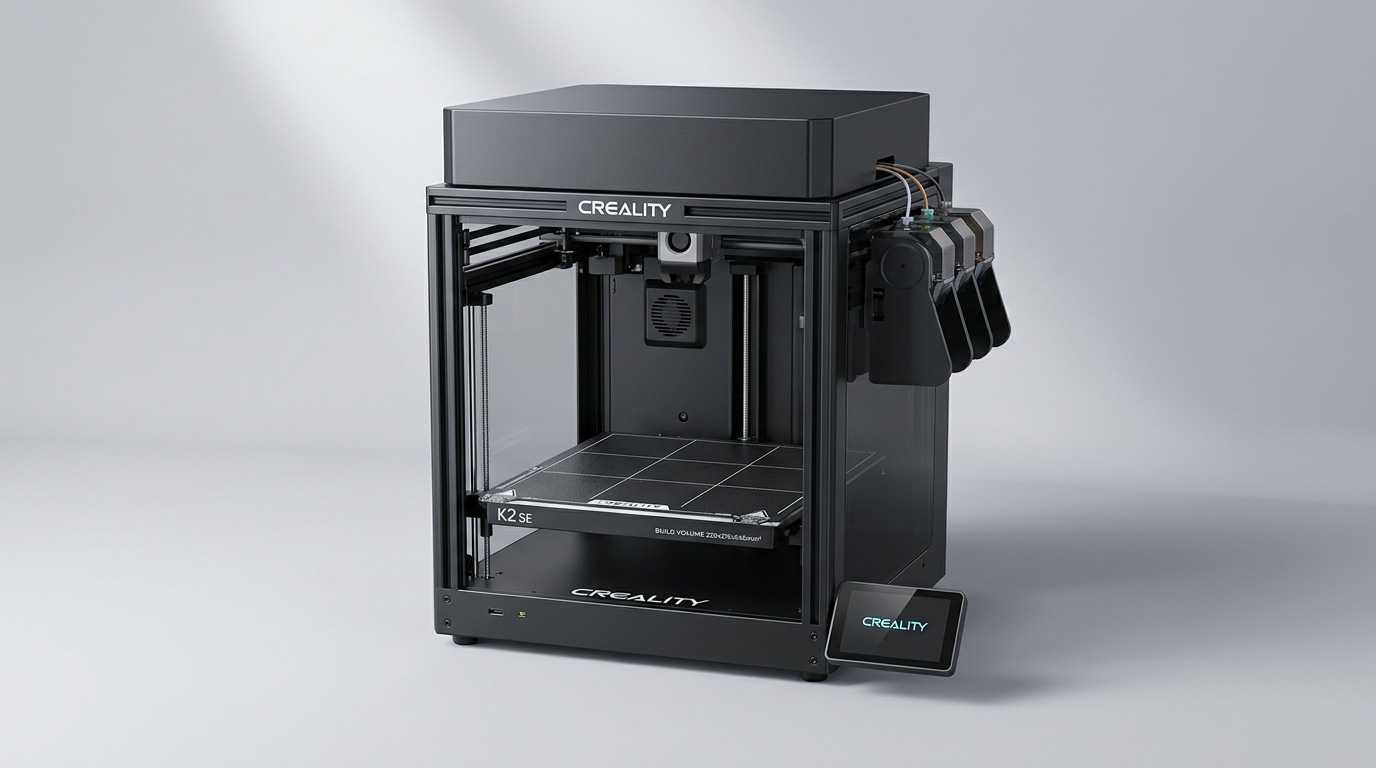
The consumer 3D printing market has reached a point where multicolor output is no longer a luxury tier reserved for thousand-dollar flagships. The Creality K2 SE 4C exemplifies what we call the Open-Core Paradox: it grafts high-speed CoreXY kinematics and a multi-material system onto an unenclosed, budget-conscious chassis. Rather than shielding newcomers inside a quiet, climate-controlled box, Creality strips away the side panels to shave down cost, betting that users care far more about four-color prints than high-temperature engineering filaments.
That architectural bet defines the entire ownership experience. By mounting its four-spool feeder, the CFS Nano, directly to the side of an open aluminum frame, Creality reduces the physical footprint and cuts down Bowden tube travel distance. Yet it also keeps the machine anchored squarely in PLA and PETG territory while exposing every mechanical sound to the room.
For makers hunting for a multi-material workhorse in the mid-$300 range, the K2 SE 4C makes an aggressive pitch. But reaching that low entry point introduces distinct friction points, from manual voltage checks to noticeable material purging, that separate an appliance from an ambitious desktop tool.
What owners love
- + Rigid die-cast aluminum frame with stable CoreXY motion
- + Side-mounted CFS Nano unit minimizes footprint and Bowden tube travel
- + Fast initial setup with reliable automated bed leveling
- + Extensive hardware upgrade path shared with the K1 ecosystem
- + Native root access and Fluidd UI support for advanced users
Common complaints
- − Ships preset to 220V, risking failure if US users do not flip the switch
- − Unenclosed frame limits printing to low-temp materials like PLA and PETG
- − Significant filament waste during multi-color purge cycles
- − No starter filament included in the box
- − Operating noise is louder than enclosed competitors
Design & Build
The K2 SE 4C is built around a die-cast aluminum alloy frame with bilateral crossbeams, essentially adopting the structural DNA of Creality's K1 platform. This rigidity is critical for a machine claiming peak accelerations of 20,000 mm/s squared. Owners consistently praise the structural heft; there is minimal flex or wobble during rapid directional shifts, which keeps layer registration clean.
The defining design choice is the CFS Nano unit mounted to the side of the machine. Placing the four spools alongside the gantry rather than atop the frame lowers the center of gravity and shortens the PTFE guide tubes. Users report that these shorter runs reduce tube jams and speed up filament retractions compared to top-mounted multi-material setups. However, the design makes the Open-Core Paradox immediately visible. Without an enclosure, drafts and ambient temperature shifts rule out ABS, ASA, or nylon out of the box. You are paying for flagship CoreXY mechanics purely to push PLA and PETG.
Setup & Ease of Use
Unboxing reveals careful protective packaging, with most core subassemblies pre-fitted. Getting the machine operational requires removing transit screws, securing the touchscreen, clipping on the spool mounts, and connecting the CFS Nano. Most users report being ready to run calibration within 15 to 30 minutes. The automated bed leveling routines inspect only the active print area, streamlining initial pre-flight checks and laying down consistent first layers without manual paper tests.
Yet the out-of-box experience is undermined by what we term Voltage Switch Roulette. Creality repeatedly ships North American units with the internal power supply toggle preset to 220V rather than 115V. While warning labels exist, shipping a modern machine with a mechanical power selector invites user error. Beginners must also note that Creality does not provide any starter filament in the box. If you do not have spools on hand, you cannot even run the initial test Benchy. Minor quality control snags, such as kinked PTFE tubes from tight packing, also require occasional user remediation.
Performance in Real Use
In everyday printing, the CoreXY motion system delivers swift, precise motion. Single-color prototypes emerge with crisp overhangs and uniform sidewalls, easily completing standard speed benchmarks in a fraction of the time required by traditional bedslingers. The targeted auto-leveling effectively eliminates first-layer adhesion issues on the textured build plate.
The multicolor functionality works reliably once dialed in, but it brings the inescapable Purge Tax. Multi-color prints cycle through frequent retractions, cuts, and nozzle flushes, generating piles of purged filament waste and prolonging job runtimes substantially. While the CFS Nano handles filament feeds smoothly in most runs, a few owners note intermittent extruder feed disconnects when switching between certain spool types. Furthermore, the lack of an enclosure means cooling fans and high-speed stepper chatter run unchecked, making the K2 SE 4C noticeably loud in quiet office environments.
Software & Ecosystem
Creality provides a dual-track software experience: a consumer-facing cloud app and slicer workflow alongside native open-source access. For casual users, the Creality app connects quickly for remote monitoring and simple print dispatching, though owners describe the mobile interface as occasionally wonky and prone to minor notification glitches.
For technical operators, the machine offers built-in root access with Fluidd UI compatibility under Creality OS. This flexibility is a significant asset. Rather than being trapped in a closed garden, users can inspect Klipper macros, tune rotational distances, and integrate third-party slicer profiles directly. It gives the printer a split personality: approachable enough for home hobbyists via default profiles, yet open enough for experienced operators to treat it as an unconstrained production node.
Value & Reliability
Occupying a price point in the mid-$300 bracket, the K2 SE 4C targets an aggressive niche. Its direct rivals in budget multi-material printing are frequently open-frame bed-slingers. By delivering CoreXY kinematics alongside a four-spool feeder at this cost, Creality offers strong hardware capability per dollar. Reliability over the initial 30 to 50 operating hours is widely reported as solid, with few mechanical failures beyond routine multi-color tuning.
The real value calculation depends on your upgrade intentions. Because the chassis shares structural dimensions with the K1 series, owners can add third-party or OEM enclosures, upgraded toolhead components, and cameras over time. However, buyers who demand an appliance-grade, quiet, enclosed experience out of the box may find the machine caught between two camps: more complex than basic entry-level bedslingers, but less polished than fully enclosed premium alternatives.
Verdict
Buy - A capable, cost-effective entry into four-color CoreXY printing for makers who value speed and open software over quiet operation.
FAQ
More 3D Printers reviews
Anycubic Kobra S1 Max Combo Review: High-Volume Ambition
Anycubic ACE 2 Pro Review: Heated Multi-Material Feeding
Magic Jimmy AI 3D Printer for Kids Review
Bambu Lab AMS lite Review: The Multi-Color Upgrade Dilemma
AOSEED AI 3D Printer for Kids Review: Capable Fun

Anycubic Kobra S1 ACE 2 Pro Combo Review: Enclosed Multicolor Value
This review is based on real experiences shared by owners in online communities.