
Anycubic Kobra S1 ACE 2 Pro Combo 3D Printer Review
By AValidReview. An AI-assisted summary of customer feedback, not a hands-on test.
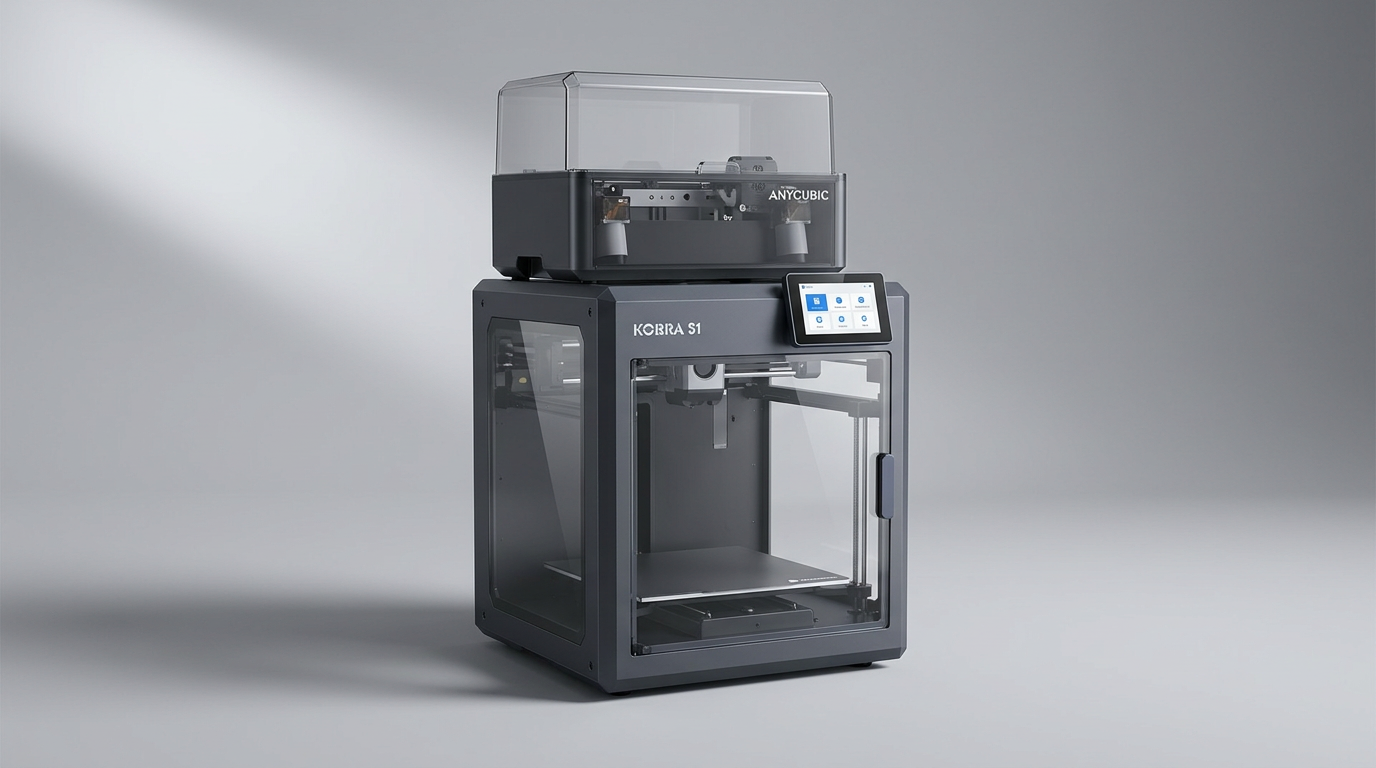
The consumer 3D printing market has largely solved raw acceleration. Enclosed CoreXY chassis, high-temperature hotends, and automatic resonance compensation are now standard expectations rather than luxury specs. Yet most multi-color setups still suffer from what we call the material conditioning gap: multi-spool prints routinely run for twenty to forty hours, leaving exposed spools to absorb ambient humidity until filament brittleness causes mid-print feeder failures. Anycubic takes direct aim at this problem with the Kobra S1 ACE 2 Pro Combo by combining an enclosed CoreXY printer with a four-spool feeder that actively dries filament at 65 degrees Celsius during live jobs.
Positioned in the $600 to $700 price territory, this bundle does not try to reinvent motion mechanics. Instead, it pairs an iterative revision of the Kobra S1 chassis with the heavily updated ACE 2 Pro module. While earlier iterations of Anycubic multi-color hardware drew mixed reactions, this pairing addresses the primary physical bottlenecks of multi-material printing without requiring a stack of external dry boxes.
What buyers actually get is a capable, production-minded machine that prioritizes material health and quiet operation over cloud polish. It challenges the premium segment by making active drying standard equipment, even if its software companion and filament-change cycle times remind you where cost compromises were made.
What owners love
- + Integrated active drying in the ACE 2 Pro heats up to 65C during live prints
- + Fully enclosed CoreXY chassis runs quietly and handles ABS reliably
- + Triple leadscrew bed carriage provides strong physical leveling stability
- + Rapid unboxing workflow with minimal mechanical assembly required
- + High-temperature 320C hotend handles engineering-grade polymers easily
Common complaints
- − Filament retraction and color-swapping cycles are noticeably slow
- − Slicer software and online model library trail behind market leaders
- − Rear single-spool feed port is awkward to reach without the ACE unit
- − Purge chute occasionally requires maintenance to prevent waste buildup
Design & Build
The Kobra S1 presents as a compact, utilitarian enclosure with clean aesthetic lines and sensible physical proportions. Beneath the outer casing sits a dual-motor CoreXY motion system engineered to keep moving mass low and head speeds high. One of the best mechanical decisions on this chassis lives under the build surface: Anycubic utilizes three independent leadscrews to lift the Z-axis, with two screws anchoring the front corners and one supporting the rear. This three-point kinematic foundation prevents the cantilevering sag common on dual-screw competitors, maintaining mechanical squareness before auto-leveling algorithms ever run their calibration sweep. The integrated 320-degree hotend gives the toolhead thermal headroom for difficult polymers, and the enclosed environment traps heat well enough to yield solid layer adhesion on temperature-sensitive materials like ABS. The standalone machine does feature an inconvenient rear filament inlet, which makes loading single spools directly a frustrating exercise in tight workspaces. In practice, the chassis design assumes you will route all materials through the companion multi-spool box sitting beside or above it.
Setup & Ease of Use
Unboxing the combo involves dealing with substantial packaging, but the physical preparation takes under half an hour for most users. Anycubic ships the machine mostly assembled, requiring only the installation of the touchscreen, external PTFE guide tubes, cable management clips, and the ACE 2 Pro communication bridge. The built-in touchscreen interface walks you through initial Wi-Fi pairing and sensor self-checks with clear graphical prompts. While the printed quick-start documentation has minor blind spots regarding box removal and occasional discrepancies with video guides, the machine software smooths over the rough patches. Automatic bed leveling performs its induction routine without manual knob adjustments, producing consistent first layers on textured PEI sheets right away. For newcomers intimidated by multi-material routing, the ACE 2 Pro identifies spool slots logically, turning what used to be a high-friction hobbyist ritual into an approachable consumer appliance workflow.
Performance in Real Use
In daily operation, the Kobra S1 generates clean external surfaces, tight corner definitions, and crisp mechanical clearances at standard velocity profiles. The enclosure deadens motor whine effectively, keeping working decibels low enough for a home office or bedroom workshop. The true headliner of this system, however, is the dry-feed advantage delivered by the ACE 2 Pro. Rather than merely storing filament in a passive desiccated container, the unit actively circulates heated air up to 65 degrees Celsius while the extruder pulls material. This completely eliminates the moisture-induced popping, stringing, and brittle breaks that ruin extended multi-day prints. The trade-off is what we term the purge tax. Every time the machine swaps colors, the sequence of retracting, cutting, flushing, and priming takes several minutes. Across a four-color miniature with hundreds of layer swaps, that mechanical cycle time adds hours to the overall job. Furthermore, the internal purge waste chute can occasionally trap ejected filament coils if it is not kept slick and clean, requiring periodic operator checks during intensive multi-color runs.
Software & Ecosystem
Software remains the most obvious area where Anycubic trails the category benchmark. The proprietary slicer and companion smartphone application handle everyday tasks, wireless job dispatching, and remote temperature monitoring without fatal errors. However, the ecosystem feels fragmented. Cloud integrations can be sluggish to update print statuses, and the integrated community model repository lacks the depth, curation, and profile optimization found on rival platforms. Experienced users can migrate to open-source alternatives like OrcaSlicer for finer control over flow dynamics and custom purge volumes, but beginners will encounter an ecosystem deficit when trying to find pre-tuned print profiles for third-party filaments. Anycubic delivers the hardware capability, but leaves more of the software legwork on the user's plate.
Value & Reliability
In the $600 to $700 tier, hardware value is where the Kobra S1 ACE 2 Pro Combo establishes its footprint. Replicating this capability on competing systems often requires purchasing an enclosed CoreXY printer and an external multi-filament box, then adding a separate heated drying station to condition water-sensitive spools. Anycubic bundles active thermal conditioning straight out of the box. Reliability over extended spool counts is solid, helped substantially by the bed's rigid three-screw support and consistent hotend thermal output. A few veteran users report localized bed heating variations that require careful bed layout for high-warp parts, but general mechanical durability is convincing. It bridges the gap between bargain open-frame bedslingers and four-figure industrial systems with an honest balance of utility and price.
Verdict
Buy - A capable, quiet enclosed CoreXY printer whose active-drying multi-color unit outclasses rivals on material handling, even if its software remains utilitarian.
This combo is an ideal fit for hobbyists and practical fabricators who want to print engineering filaments like ABS and PETG alongside multi-color decorative models without buying separate drying appliances. If your priority is quiet workshop operation, physical bed stability, and pristine filament condition during marathon jobs, it delivers outstanding mechanical value for its price range.
Buyers who demand a frictionless, app-driven social printing ecosystem with lightning-fast color changeovers should look elsewhere. The Kobra S1 ACE 2 Pro Combo requires you to tolerate a mediocre cloud platform and lengthy toolhead purge intervals to reap its hardware benefits.
Most reviews focus entirely on nozzle travel speed, but this machine reveals a deeper category truth: raw print head velocity is meaningless if your multi-color feeder is pushing wet, brittle filament through a twenty-hour job. By solving the material conditioning problem at the feeder rather than leaving it as an aftermarket chore, Anycubic made the single smartest design compromise in the mid-tier market.
FAQ
More 3D Printers reviews
Toybox Alpha Two 3D Printer Review: The Zero-Fuss Toy Factory
Creality K2 SE 4C Review: Budget Multicolor CoreXY
Anycubic Kobra S1 Max Combo Review: High-Volume Ambition
Anycubic ACE 2 Pro Review: Heated Multi-Material Feeding
Magic Jimmy AI 3D Printer for Kids Review
Bambu Lab AMS lite Review: The Multi-Color Upgrade Dilemma
This review is based on real experiences shared by owners in online communities.