
Creality SPARKX i7 Nano Combo Review: Multi-Color Printing for Novices
This review is based on real experiences shared by owners in online communities.
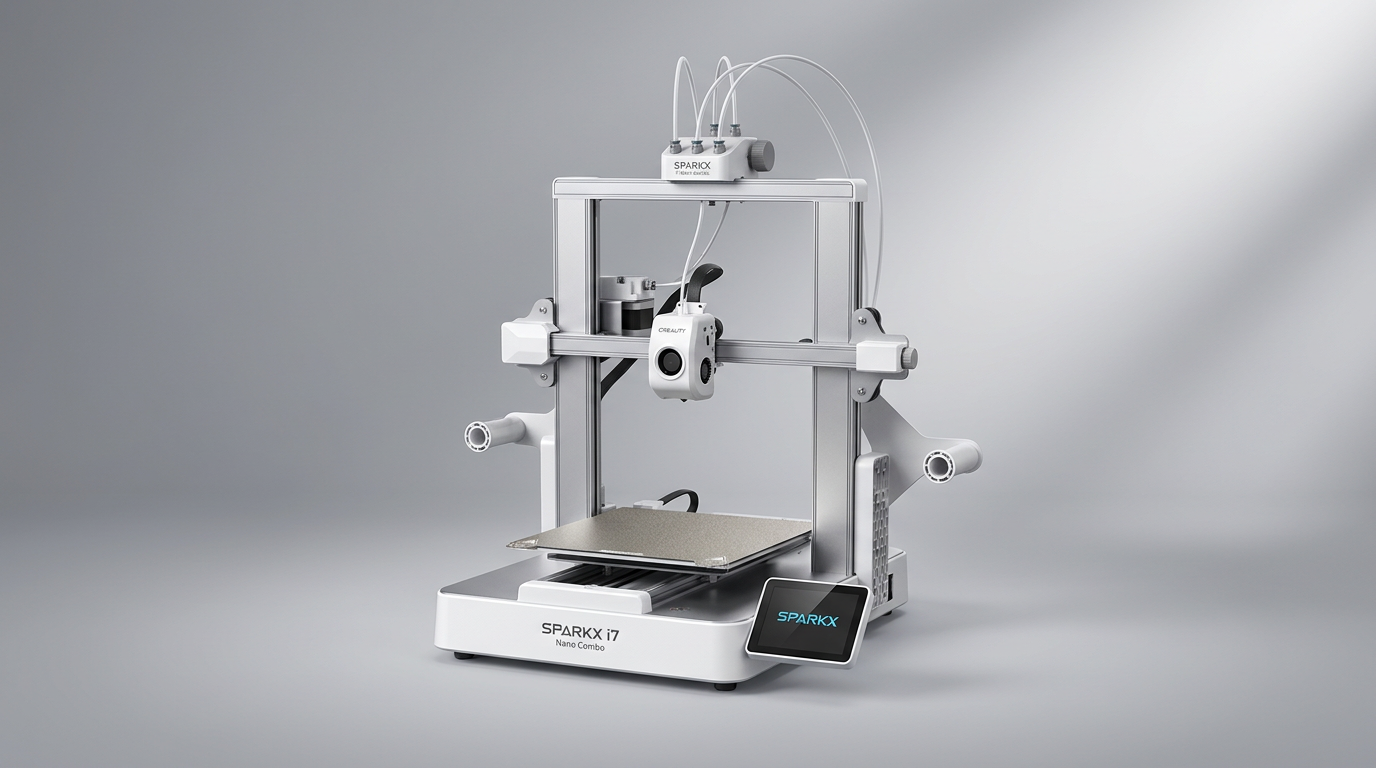
The 3D printing landscape is often bifurcated: entry-level machines demand significant user intervention, while high-end systems deliver automation at a premium. The Creality SPARKX i7 Nano Combo attempts to bridge this divide, offering multi-color capabilities and smart features typically found in more expensive printers, but targeted squarely at beginners.
Creality positions the SPARKX i7 Nano as a compact, multi-color solution designed for immediate productivity. However, true beginner-friendly operation in 3D printing rarely means zero learning curve. This review examines whether the Nano Combo genuinely streamlines the complex process of multi-color FDM printing for new users, or if its advertised simplicity masks the inherent challenges of the hobby.
While marketing emphasizes ease of use, owner feedback consistently highlights a critical distinction: the printer provides *assistance* in common areas like leveling and filament management, but it does not *eliminate* the need for fundamental understanding and occasional troubleshooting. This creates a hidden cost for beginners, requiring them to invest time in learning beyond the initial setup, a factor often overlooked in the rush to produce colorful prints.
What owners love
- + Integrated multi-color system enhances creative output
- + Generally good print quality out of the box
- + Compact footprint suits various workspaces
- + Automated features like auto-feed and auto-level assist new users
- + Modular design simplifies maintenance tasks
- + Strong community support and online resources
Common complaints
- − Initial setup and calibration can be challenging for true novices
- − Auto-leveling function may require manual fine-tuning
- − Some mechanical components, like bed axis tension, need periodic adjustment
- − Parts cooling fan reliability concerns emerge over time
- − Print speed is not a standout feature compared to faster machines
Design & Build
The Creality SPARKX i7 Nano Combo presents a robust, compact form factor, making it suitable for smaller spaces like home offices or workshops. Owners describe the build as solid, with clean lines and a contemporary aesthetic. The printer's primary chassis feels well-constructed, a characteristic noted by long-term users. The modular design, facilitating tool-free hotend and extruder swaps, earns commendation for simplifying routine maintenance, a significant benefit in a category where component access can be cumbersome.
However, some owners note that initial assembly can reveal minor fit-and-finish issues, particularly with stamped sheet-metal parts having sharp edges. While the overall impression remains positive, these details suggest that while Creality targets a polished user experience, the manufacturing still retains elements common to the budget segment. The integrated multi-color unit, while a core feature, adds to the physical complexity, requiring careful attachment and cable management during the initial build.
Setup & Ease of Use
The SPARKX i7 Nano Combo is marketed heavily on its ease of setup, featuring pre-assembly and guided instructions. Many owners confirm a relatively quick path to the first print, often within an hour of unboxing. Auto-leveling and auto-feed mechanisms are intended to reduce friction for beginners, and for many, they succeed in providing a smoother initial experience than traditional manual methods. The touch screen interface is described as simple and intuitive, further contributing to accessibility.
However, the narrative of absolute simplicity faces the 'First Layer Fallacy' for many users. While auto-leveling provides a baseline, numerous owners report that precise first-layer adhesion often requires additional manual auxiliary leveling or Z-offset adjustments. This is not a complete failure of the automated system but rather a reality check for beginners expecting plug-and-play perfection. The Z-offset, in particular, proves to be a recurring learning point, with several users reporting issues like digging into the print bed until they mastered its proper calibration, especially after power cycles. The expectation of 'auto-level and go' is often met with the need for persistent fine-tuning.
Performance in Real Use
Once calibrated, the SPARKX i7 Nano delivers consistent print quality, with owners expressing satisfaction across a range of projects, from DND tiles to functional prototypes. It handles common filaments well, though dialing in settings for materials like PETG requires some trial and error, a standard aspect of 3D printing. The multi-color functionality, driven by the Nano unit, is a significant draw and generally performs as expected, allowing for more visually complex models without manual filament swaps.
Print speed is noted as acceptable but not exceptional. While the machine is not overtly slow, it does not compete with the rapid printing capabilities of some newer, higher-end systems. Noise levels are generally low, with the printing mechanism itself running quietly, though some owners report that cooling fans, particularly the parts cooling fan, can be louder than the machine's movement. There are also isolated reports of parts cooling fan failures within a few months, indicating a potential long-term reliability concern that could necessitate user intervention and upgrades.
Software & Ecosystem
The SPARKX i7 Nano integrates into the broader Creality ecosystem, providing access to Creality Cloud for models and remote print management via Wi-Fi. This connectivity offers convenience, allowing users to monitor prints remotely with the built-in AI camera. The printer also reportedly supports Klipper firmware, a feature appreciated by more advanced users seeking greater control and optimization.
For beginners, the learning curve extends beyond the hardware to the slicing software. While the printer performs well with recommended settings, owners frequently mention consulting YouTube tutorials for programs like Cura and TinkerCad to achieve optimal results. This external reliance underscores the 'ecosystem' not just as a branded platform, but as the wider community and knowledge base essential for mastering the printer's capabilities. The AI monitoring, while beneficial for catching some print issues, does not replace the need for an understanding of common failure modes and preventative measures.
Value & Reliability
Priced around $300, the Creality SPARKX i7 Nano Combo positions itself as a strong value proposition, especially for a multi-color enabled machine. Many owners, particularly those new to the hobby, view it as an excellent first printer, offering capabilities that exceed its price point compared to some competitors. Its reliability is generally high, with numerous reports of hundreds of hours of printing with few major issues, assuming proper initial setup and maintenance.
However, reliability is not absolute. Some users have encountered issues like persistent warping despite adjustments, or the need to replace components like print beds due to wear. The occasional need to adjust bed axis tension after extended use, or the reported failures of parts cooling fans, highlight that while the core machine is solid, certain components may demand user attention or replacement over time. The 'Creality Tax' here is the occasional, small investment of time or a minor component replacement to maintain optimal performance, an expectation users should carry into ownership.
Verdict
Buy - This printer offers an accessible entry point into multi-color 3D printing with a compact design.
The Creality SPARKX i7 Nano Combo is an excellent choice for beginners who are eager to explore multi-color FDM printing without investing in a significantly more expensive system. It suits users who appreciate automated assistance but are willing to engage with the learning curve inherent in 3D printing, including fine-tuning settings and performing basic maintenance. Individuals seeking a reliable workhorse for hobby projects, functional prints, or educational use will find strong value here, especially given its price point around $300.
Those who expect a truly 'set it and forget it' experience with zero calibration or troubleshooting will find its initial demands frustrating. Users prioritizing absolute print speed for large batch production, or those requiring extremely fine detail for intricate miniatures (who would likely benefit more from a resin printer), might find this machine's performance or resolution limitations a mismatch for their needs. If you are extremely time-constrained and unwilling to learn, even a well-featured beginner printer will present hurdles.
The SPARKX i7 Nano Combo represents the 'Assisted Learning' model of 3D printing. It doesn't eliminate the need to understand fundamental principles or perform occasional manual adjustments, but it significantly lowers the barrier to entry for more complex operations like multi-color printing. This makes it a powerful educational tool and a rewarding experience for those who view 3D printing as a journey of continuous learning, rather than merely a push-button utility. It democratizes advanced features for the curious novice, offering a foundation to grow from, rather than a perfected, maintenance-free appliance.
FAQ
More 3D Printers reviews
Entina Tina2 Plus Review: A Gateway to 3D Printing for Beginners
Creality SPARKX i7 Combo Review: A Streamlined Path to 3D Printing
Creality K2 SE 4C Review: Speed, Simplicity, and a Shifting Market
FLASHFORGE AD5X Review: Multi-Color Printing at Speed
FLASHFORGE Adventurer 5M Review: Speed and Simplicity for the Novice
Bambu Lab P1S Combo Review: The 3D Printer for the Making Generation
This review is based on real experiences shared by owners in online communities.