
Creality SPARKX i7 Review: A New Baseline for Approachable 3D Printing
By AValidReview. An AI-assisted summary of customer feedback, not a hands-on test.
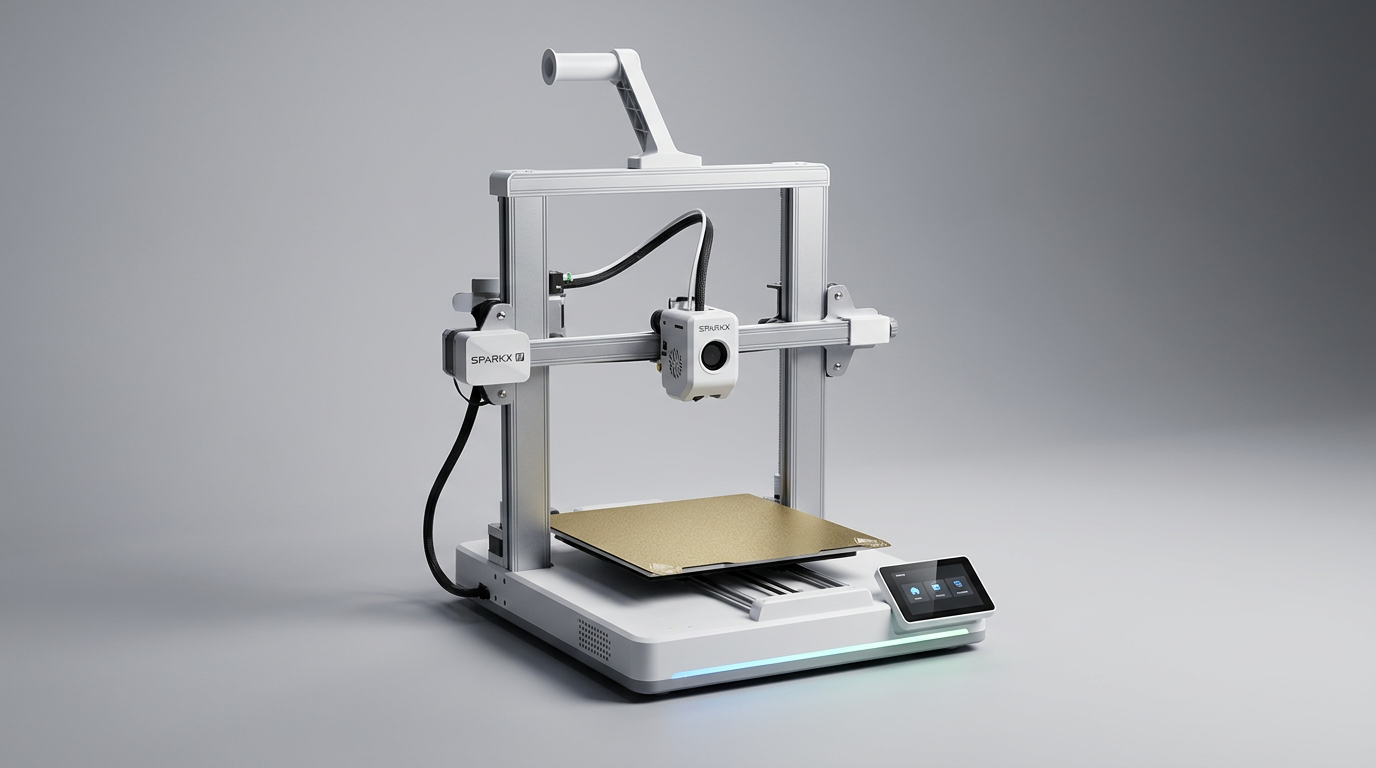
The Creality SPARKX i7 arrives at a peculiar inflection point in consumer 3D printing. For years, Creality’s reputation hinged on affordability and an expectation of user-driven modification, fostering a community of tinkerers. The i7 represents a significant pivot, embracing the "appliance model" pioneered by competitors, where ease of use and out-of-the-box reliability take precedence over deep customization. This shift suggests Creality is acutely aware of the growing segment of users who want results, not a new hobby maintaining their printer.
This printer isn't just about offering convenience; it aims to reset expectations for what a Creality machine can deliver, particularly in the multi-color space. Its design philosophy prioritizes a streamlined experience from unboxing to finished print, positioning it as a direct challenge to the modern incumbents that have elevated user experience. The critical question for the i7 is whether it delivers on this promise consistently, moving beyond Creality's past reputation for requiring significant user intervention.
The SPARKX i7 aims to capture the evolving mainstream buyer-someone who values consistent output and minimal fuss. It addresses the 'friction tax' of traditional 3D printing-the cumulative effort and troubleshooting required for basic operation. By largely eliminating this, the i7 makes a compelling case for itself, particularly for those new to the hobby or experienced users seeking a more hands-off experience.
What owners love
- + Extremely easy and fast setup, often under 5 minutes to first print
- + Impressive beginner-friendliness with extensive automation
- + Strong print quality and speed for its class
- + Effective multi-color printing with reduced filament waste via CFS
- + Quiet operation, suitable for shared living spaces
- + Responsive customer service reported by owners
Common complaints
- − Slicer software (Creality Print) reports occasional bugs and lack of updates
- − Limited Klipper access, restricting advanced user customization
- − Some difficulty navigating the app or Wi-Fi settings reported by a few users
- − Potential long-term durability concerns, given Creality's past track record
- − Build plate cleaning needed to maintain adhesion long-term
Design & Build
The SPARKX i7 presents a clean, modern aesthetic with an aluminum alloy body, a departure from Creality’s more industrial, open-frame designs. Owners consistently praise its visual appeal and refined finish. The inclusion of customizable RGB lighting provides practical status indicators while allowing personalization, addressing a common desire for both utility and style. Its nearly fully assembled state upon arrival is a core design choice, directly targeting the initial friction points for new users. This approach signals a maturity in Creality’s product development, moving towards a more integrated, 'appliance-like' user experience rather than a kit-building hobby. The physical design underscores the 'instant gratification engine' concept, where the hardware itself is optimized for immediate operational readiness.
Setup & Ease of Use
This printer's most frequently cited strength is its straightforward setup. Many owners report transitioning from unboxing to printing in under 15 minutes, with some achieving it in under five. This rapid deployment capability directly counteracts the 'first-print cliff' that often deters new entrants to 3D printing. Automatic calibration, auto-leveling, and Z-offset adjustments remove significant manual hurdles, making the process accessible even for a 14-year-old on their first attempt, as one owner noted. The absence of physical adjustment wheels on the build plate further emphasizes this hands-off approach. While some users mention brief waits for firmware updates, the overall setup process establishes the i7 as a truly beginner-friendly machine, redefining expectations for an entry-level Creality product.
Performance in Real Use
The SPARKX i7 delivers on its promise of efficient printing. Owners report impressive speeds without compromising print quality, particularly when compared to previous Creality models or older-generation printers. The multi-color functionality, enabled by the CFS Lite system, stands out for its reduced purging waste and smoother filament switching, a notable improvement over prior multi-material solutions. AI features like real-time print monitoring for common failures (spaghetti, air printing) contribute to a higher success rate, actively mitigating common points of frustration. The resume-after-power-outage function is a valuable reliability feature. While most feedback is positive regarding print quality, consistent build plate cleaning with isopropyl alcohol is recommended by owners to maintain optimal adhesion, preventing potential print failures over time.
Software & Ecosystem
The SPARKX i7 leverages a smart ecosystem to enhance user experience. Auto filament recognition streamlines multi-color printing by syncing filament data with the slicer, reducing manual input errors. The built-in AI camera provides real-time monitoring and proactive alerts, a significant step toward autonomous operation. The accompanying Creality Print slicer software, while generally functional and designed to work seamlessly with the printer, receives mixed feedback. Some users report it works 'so good with it when selecting colors,' while others note it 'has flaws' and is 'not updated,' suggesting inconsistencies or areas for improvement. The Klipper-enabled nature of the printer offers advanced functionality, but some owners imply limited direct user access, indicating a balance between user control and simplified operation that might not satisfy every enthusiast.
Value & Reliability
Priced around $200, or closer to $400 for the combo package with multi-color capabilities, the Creality SPARKX i7 delivers significant value, especially for new users. Experienced owners, including those with Bambu Lab printers, attest to its competitive performance, describing the experience as 'surprisingly close to the Bambu A1.' This positions the i7 as a strong contender in the market for accessible, high-performance printers. While reliability is overwhelmingly positive in initial weeks, with reports of up to 90 hours of flawless printing, one long-term owner voiced past 'design shortcomings and poor quality parts' with Creality, expressing hope the Sparkx 'lasts.' This underlines a historical 'reputation debt' Creality is working to overcome, but current feedback indicates a substantial improvement in initial quality control and user experience.
Verdict
Buy - The Creality SPARKX i7 delivers a remarkably polished and user-friendly 3D printing experience, especially for its price bracket.
This printer is an excellent choice for first-time 3D printer owners or experienced users seeking a 'set it and forget it' machine for rapid prototyping and reliable output. Its automated features, fast setup, and multi-color capability make it a strong value proposition in the under $500 range. Those who enjoy tinkering, deep customization, or require full, unfettered access to Klipper's underlying system might find its streamlined approach somewhat restrictive. While the base unit is an attractive option around $200, the full combo package around $400 is where its multi-color capabilities truly shine.
The SPARKX i7 represents Creality's strategic play in the 'post-tinker' era of 3D printing. It is not just another incremental update; it signifies a conscious effort to shed the brand's 'hobbyist-only' image and aggressively compete on user experience, setting a new baseline for what an accessible 3D printer can achieve right out of the box.
FAQ
More 3D Printers reviews
Anycubic ACE 2 Pro Review: Heated Multi-Material Feeding
Magic Jimmy AI 3D Printer for Kids Review
Bambu Lab AMS lite Review: The Multi-Color Upgrade Dilemma
AOSEED AI 3D Printer for Kids Review: Capable Fun

Anycubic Kobra S1 ACE 2 Pro Combo Review: Enclosed Multicolor Value

FLASHFORGE AD5M Pro Review: High Speed Enclosure on a Budget
This review is based on real experiences shared by owners in online communities.