
Creality Sonic Pad Klipper Review: Klipper's Easier Entry Point
This review is based on real experiences shared by owners in online communities.
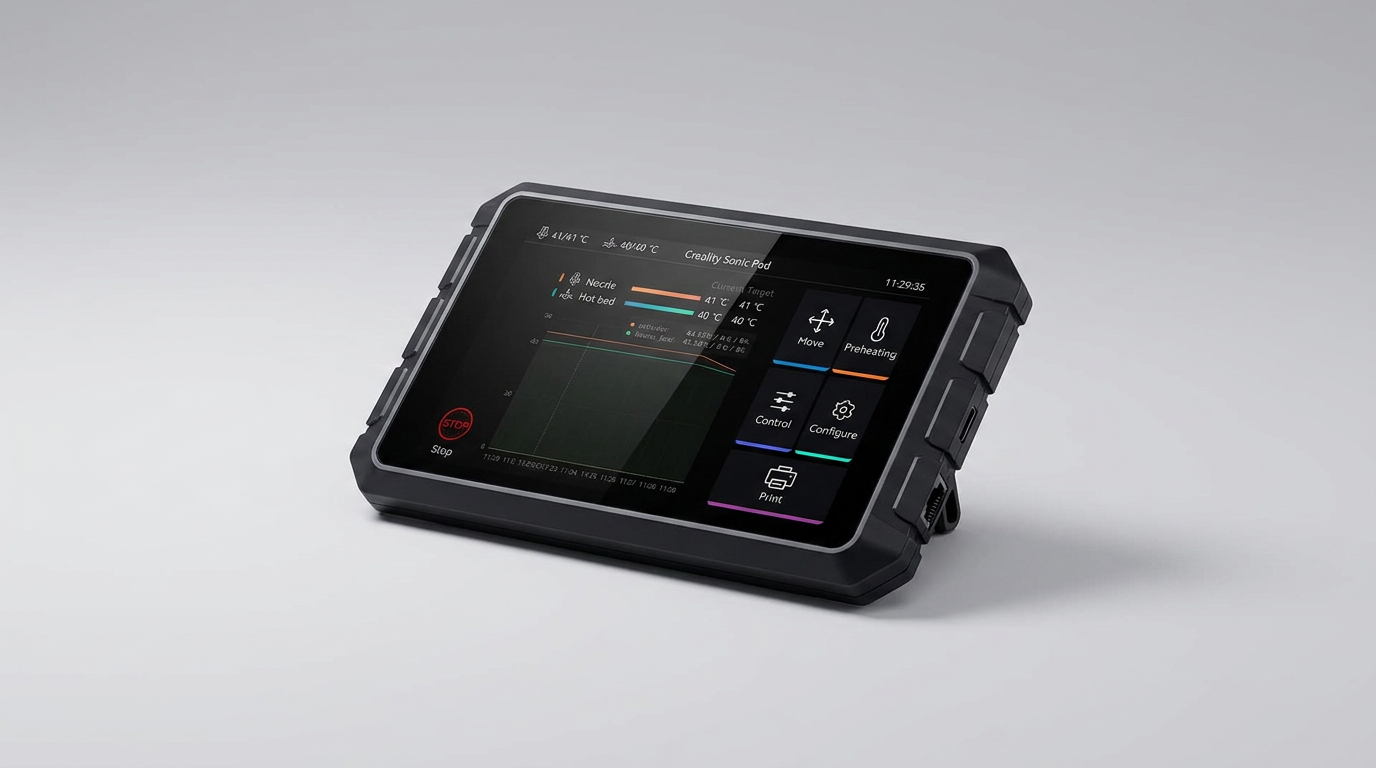
In the evolving landscape of 3D printing, the pursuit of speed without sacrificing quality often leads to Klipper firmware. Traditionally, adopting Klipper involved DIY solutions, typically a Raspberry Pi, extensive configuration, and a degree of technical comfort. Creality aims to simplify this transition with the Sonic Pad, presenting an all-in-one hardware and software package designed to bring Klipper's advantages to its printer ecosystem.
However, this simplification carries a nuance. While the Sonic Pad streamlines the *hardware* aspect of Klipper adoption, it does not fully eliminate the underlying technical demands of Klipper itself. It offers a pre-configured conduit, not a complete abstraction layer. This positions the Sonic Pad less as a 'Klipper for Dummies' solution and more as a 'Klipper with Training Wheels' offering, beneficial for those willing to engage with Klipper's learning curve but wanting to bypass the initial hardware assembly and software compilation.
This review evaluates whether the Sonic Pad successfully navigates this balance, providing genuine enhancements to the 3D printing experience for its target audience, or if it merely repackages Klipper's complexity within a proprietary shell.
What owners love
- + Significantly increases print speed and quality for compatible printers
- + Pre-loaded Klipper firmware simplifies initial setup compared to DIY
- + Supports control of multiple printers from a single unit
- + Intuitive touch screen and remote web UI access
- + Integrated input shaping and model preview features
- + Receives regular software updates and adds printer compatibility
Common complaints
- − Setup can still be challenging for novice users
- − Requires flashing new firmware to the printer's motherboard
- − Reliability concerns with USB ports and SD card recognition
- − Adds cable clutter to the print setup
- − Not a fix for underlying printer mechanical issues
- − Can disable the printer's original control screen
Design & Build
The Creality Sonic Pad presents as a 7-inch touch screen device, housing a 64-bit computing platform. Owners consistently describe the hardware as robust, noting the display's responsiveness and overall build quality. It features a rich set of expansion interfaces, including four USB ports, an RJ45 Ethernet port, and built-in Wi-Fi, facilitating connectivity for cameras and other peripherals. Despite its all-in-one nature, the device necessitates additional cabling for its connection to the printer, which some users identify as an aesthetic drawback. This design prioritizes functionality and connectivity, creating a self-contained Klipper control hub rather than a minimalist add-on.
Setup & Ease of Use
The Sonic Pad markets itself on easy Klipper adoption, a claim that garners mixed reactions from owners. For supported Creality printers, the initial setup is generally straightforward, leveraging pre-configured firmware and on-screen instructions. Owners report that the process typically takes around an hour. However, the path deviates for less common or unsupported models, requiring more manual configuration and consulting external guides, which users describe as a 'pain' but still achievable. A significant hurdle involves the necessity of flashing new firmware onto the printer's motherboard, a task some beginners find daunting. The recurring theme of the 'Klipper Threshold' emerges here; while the Sonic Pad lowers the barrier of entry for hardware setup, it does not eliminate the need for users to understand Klipper's operational principles or troubleshoot configuration issues. Several users point out that the initial firmware flash can be problematic, and one common complaint involves USB port reliability, which can complicate printer recognition or data transfer.
Performance in Real Use
The primary objective of the Sonic Pad is to unlock higher print speeds and improve output quality through Klipper's advanced motion control. Owners widely confirm that the device delivers on this promise. Print times are reportedly cut significantly, often by half, while maintaining or even improving model quality. Features like input shaper calibration are frequently cited as crucial for mitigating artifacts like ringing during high-speed operation. However, a critical caveat surfaces repeatedly: the Sonic Pad will not compensate for underlying mechanical deficiencies of the 3D printer itself. A poorly maintained or misaligned printer will only exacerbate existing issues at higher speeds. This highlights the 'Printer Integrity Tax': the true performance gains are proportional to the base mechanical soundness of the printer it controls. The pad enhances, but does not repair. Wireless connectivity and remote control via web UI are consistently praised features, offering greater flexibility in managing print jobs.
Software & Ecosystem
Running Klipper firmware on a dedicated 64-bit platform, the Sonic Pad offers a responsive and intuitive user interface both on its touch screen and through a web UI. It supports G-code model preview with major slicers like Creality Print, Cura, and PrusaSlicer. Creality provides OTA (Over-The-Air) updates, and owners report that the software has matured since its initial release, addressing early bugs and expanding printer compatibility. The ability to control multiple printers from a single Sonic Pad is a significant advantage for those with print farms. However, some users still report occasional software quirks, such as needing restarts after minor changes or difficulties recognizing SD cards for file transfer. The open-source nature of Klipper and the commitment to allowing user-defined macros are welcomed by more advanced users, fostering a degree of customization typically associated with DIY Klipper setups.
Value & Reliability
Priced around $100-$150, the Sonic Pad offers a compelling value proposition compared to assembling a Raspberry Pi-based Klipper solution, especially given the current cost and scarcity of Raspberry Pi units. It includes all necessary accessories, such as an accelerometer for input shaping. The reliability, however, is a point of contention. While many users report consistent, positive experiences, a subset notes issues like unreliable USB ports, which lead to disconnects, or difficulties with initial firmware flashing. The 'Paperweight Risk' is a real concern for some who struggled with setup, effectively rendering their printer inoperable until correct firmware is loaded. For multi-printer owners or those heavily invested in the Creality ecosystem, the value of centralized Klipper control is high, mitigating some of the reliability frustrations. Overall, it's considered a worthwhile investment for the performance gains, provided one is prepared for potential setup challenges.
Verdict
Buy - The Creality Sonic Pad offers the most streamlined path to Klipper for owners of compatible Creality 3D printers.
This device is ideal for experienced hobbyists or those with a solid understanding of their printer's mechanics who are ready to engage with Klipper's advanced features but want to avoid the full DIY effort of a Raspberry Pi setup. It provides significant print speed and quality improvements and centralizes control for multiple machines. Buyers should be prepared for a learning curve beyond basic plug-and-play and understand that the device enhances, rather than fixes, a printer's underlying issues.
Conversely, true beginners or those unwilling to troubleshoot should hold off. If your primary goal is effortless, zero-config printing, or if you already struggle with basic printer maintenance, the Sonic Pad may introduce more frustration than benefit. Similarly, if your printer is mechanically unsound, this upgrade will only amplify its flaws. It's an investment in optimization, not problem resolution.
The Sonic Pad represents Klipper's 'mainstream moment' for Creality users, not by eliminating complexity, but by productizing the initial barrier to entry. Its true genius lies in being a stepping stone, providing a guided tour through Klipper's advantages, rather than a fully automated solution. It's a pragmatic bridge for the technically curious, acknowledging that Klipper's power still demands a degree of user engagement.
FAQ
More 3D Printers reviews

QIDI Q2 3D Printer Review: High-Temp Power at a Consumer Price
Flashforge Adventurer 5M Smooth PC Plate Review

FLASHFORGE Creator 5 Pro Review: Multi-Toolhead Efficiency
HP OfficeJet Pro 9135 Review: Two Trays and a Tight Leash
Flashforge Creator 5 Pro Review: Multi-Material Toolchanger
Bambu Lab P2S Combo Review: The 3D Printer Appliance
This review is based on real experiences shared by owners in online communities.