
Creality Scan Bridge Review: Untethering Your CR-Scan Otter
This review is based on real experiences shared by owners in online communities.
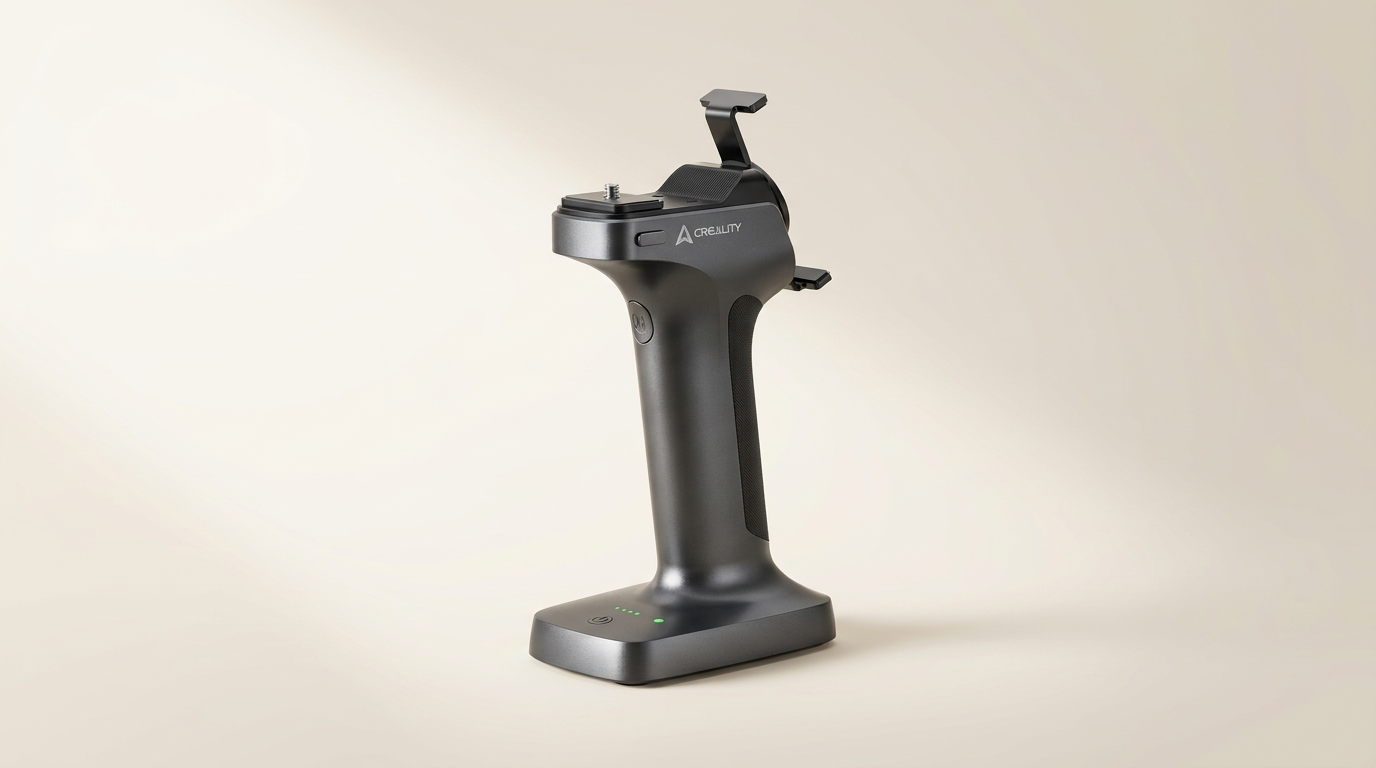
The Creality Scan Bridge arrives as a critical component in the ongoing shift towards more portable and less tethered 3D scanning workflows. As scanners themselves become more capable, the peripheral hardware often dictates the practical limits of their application. This accessory aims to sever the CR-Scan Otter's dependence on a dedicated PC, promising a streamlined, on-the-go experience through direct smartphone connectivity and an integrated power source.
However, its true value lies not just in cutting cords, but in fundamentally altering the user's interaction with the scanner. Many accessory purchases fall into the category of 'convenience additions,' but the Scan Bridge positions itself as an enabler of entirely new use-cases, particularly for field work or complex object capture where a workstation is impractical. Its success hinges on whether it delivers this freedom without introducing new forms of friction or compromising the scan quality that users expect from the Otter.
This review evaluates the Scan Bridge beyond its bullet points, examining its practical impact on workflow, ergonomics, and overall scanning efficacy. We consider if this accessory truly expands the CR-Scan Otter's utility or merely shifts its constraints, ultimately defining its place within a growing ecosystem of portable 3D capture solutions.
What owners love
- + Enables completely wireless scanning with CR-Scan Otter
- + Integrates an internal battery for untethered operation
- + Allows direct smartphone connection for real-time viewing
- + Facilitates faster data transfer via Wi-Fi 6 to computer
- + Reduces reliance on a dedicated PC during scanning
Common complaints
- − Adds noticeable weight and bulk to the scanning setup
- − Potential for user confusion regarding Wi-Fi password setup
- − Requires an additional investment beyond the scanner itself
- − Does not inherently improve scanner performance, only portability
- − Durability for outdoor use is not explicitly detailed by owners
Design & Build
The Creality Scan Bridge integrates directly with the CR-Scan Otter, designed as an ergonomic extension rather than a separate device. Its form factor suggests a deliberate attempt to maintain balance during handheld operation, though owners report it adds noticeable heft. This is the 'portable payload' dynamic at play: the accessory grants freedom from tethers, but at the cost of increased physical load during extended use. The internal battery capacity, rated at 36000 mWh, allows for up to four hours of continuous scanning, addressing a major pain point for users who frequently operate away from power outlets. However, this battery contributes to the overall weight, necessitating breaks during long scanning sessions. The construction feels robust enough for typical indoor use, though its resilience to outdoor elements, given its intended mobile use, remains an area without explicit owner feedback.
Setup & Ease of Use
Setting up the Scan Bridge involves connecting it to the CR-Scan Otter and pairing it with a smartphone. Owners consistently report that the device "works as intended," indicating a relatively straightforward initial configuration. One specific point of contention, however, is the Wi-Fi password prompt during setup. While some users initially find this confusing, it clarifies that the Wi-Fi network being secured is the Scan Bridge itself, not an external network it's connecting to. This self-contained Wi-Fi broadcast is central to its wireless operation, enabling direct communication with mobile devices. The process streamlines the scanning workflow by removing the PC as an intermediate step, which represents a significant ergonomic uplift for field or constrained environments. The 'direct connect' architecture minimizes setup steps once understood, simplifying the path from power-on to scanning.
Performance in Real Use
In operation, the Scan Bridge fulfills its promise of untethered scanning. Owners value the ability to move freely around subjects without a PC or power cable restricting movement. The device supports wireless screen mirroring, projecting scanned images to mobile devices in real-time. This capability enables on-the-spot inspection and multi-terminal collaboration, a feature beneficial for team-based projects or client demonstrations. The data transmission rate, rated up to 4.7Gbps via Wi-Fi 6, is a critical component for maintaining a smooth workflow, as it minimizes delays when transferring scan data from the bridge to a computer for post-processing. This rapid transfer capability avoids the 'post-scan bottleneck,' ensuring that the gains in scanning mobility aren't lost in data offloading. The accessory maintains the CR-Scan Otter's existing scan quality; its role is solely to enhance the operational flexibility, not the optical performance.
Software & Ecosystem
The Creality Scan Bridge operates within the existing CR-Scan Otter ecosystem, leveraging the scanner's native software for data capture and processing. Its primary function is to facilitate the connection between the scanner and mobile devices, effectively extending the ecosystem's reach beyond a desktop environment. The wireless mirroring feature is a crucial software integration point, allowing the mobile app to display real-time scan data. This 'mobile-first monitoring' paradigm is a significant user experience improvement, allowing for immediate feedback during the scanning process without needing a bulky laptop. The bridge acts as an intelligent intermediary, handling data compression and transmission with minimal user intervention once configured. Compatibility with the existing Creality scanning application on smartphones is essential for this workflow to succeed, and owners indicate this integration functions as expected.
Value & Reliability
Priced in the mid-hundreds range, the Scan Bridge represents an additional investment atop the CR-Scan Otter itself. Its value proposition is directly tied to the user's need for mobility and untethered operation. For those who frequently scan large objects, operate outdoors, or require maximum freedom of movement, this accessory can transform their workflow from cumbersome to efficient. Owners report it "works as intended," suggesting a reliable core function. The large internal battery, which recharges to 80% in 1.5 hours, contributes significantly to its practicality, minimizing downtime. While its reliability in harsh outdoor conditions is not yet broadly attested, for its core function of enabling wireless power and data, it appears to be a solid performer. The 'freedom dividend' it offers, in terms of time saved and logistical simplification, justifies its cost for specific user profiles, especially if acquired during a sale event.
Verdict
Buy - This accessory significantly enhances the CR-Scan Otter's portability and operational flexibility for specific use cases.
This is a smart purchase for CR-Scan Otter owners who frequently conduct scans away from a desktop PC, whether in a workshop, on location, or when working with objects that demand dynamic movement. The integrated battery and wireless smartphone connectivity unlock a new level of freedom, making it an essential tool for users seeking to maximize the scanner's potential in varied environments. However, if your scanning is primarily stationary, tethered to a computer, or infrequent, the additional cost, typically in the mid-hundreds range, may not justify the benefits. Those sensitive to added weight during handheld operation should also factor this into their decision.
The Creality Scan Bridge is more than an add-on; it represents the 'operational unbundling' of the 3D scanning process. It acknowledges that the real-world constraints of 3D capture often lie not in the scanner's optical performance, but in the logistical overhead of power and data connections. For the right user, it's not about better scans, but about enabling scans that were previously impractical, pushing the CR-Scan Otter from a desktop peripheral to a genuinely mobile instrument.
FAQ
More 3D Scanners reviews

Revopoint INSPIRE 2 3D Scanner Review: Unpacking the Accessory Echo Chamber

Creality 6mm 3D Scanning Markers Review: Essential Tracking Aid

TOSUKKI 6mm Positioning Targets Review: The Refined Generic Choice

AESUB 3DTOOLS 3D Scanner Spray Review: The 'Evaporative Enabler'

Creality 8-inch Rotating Turntable: A Solid Scanner Accessory

Generic 12 Piece Multi-Angle Markers Review: Essential 3D Scanning Dots
This review is based on real experiences shared by owners in online communities.