
Creality Raptor 3D Scanner Review: Precision for Patient Users
By AValidReview. An AI-assisted summary of customer feedback, not a hands-on test.
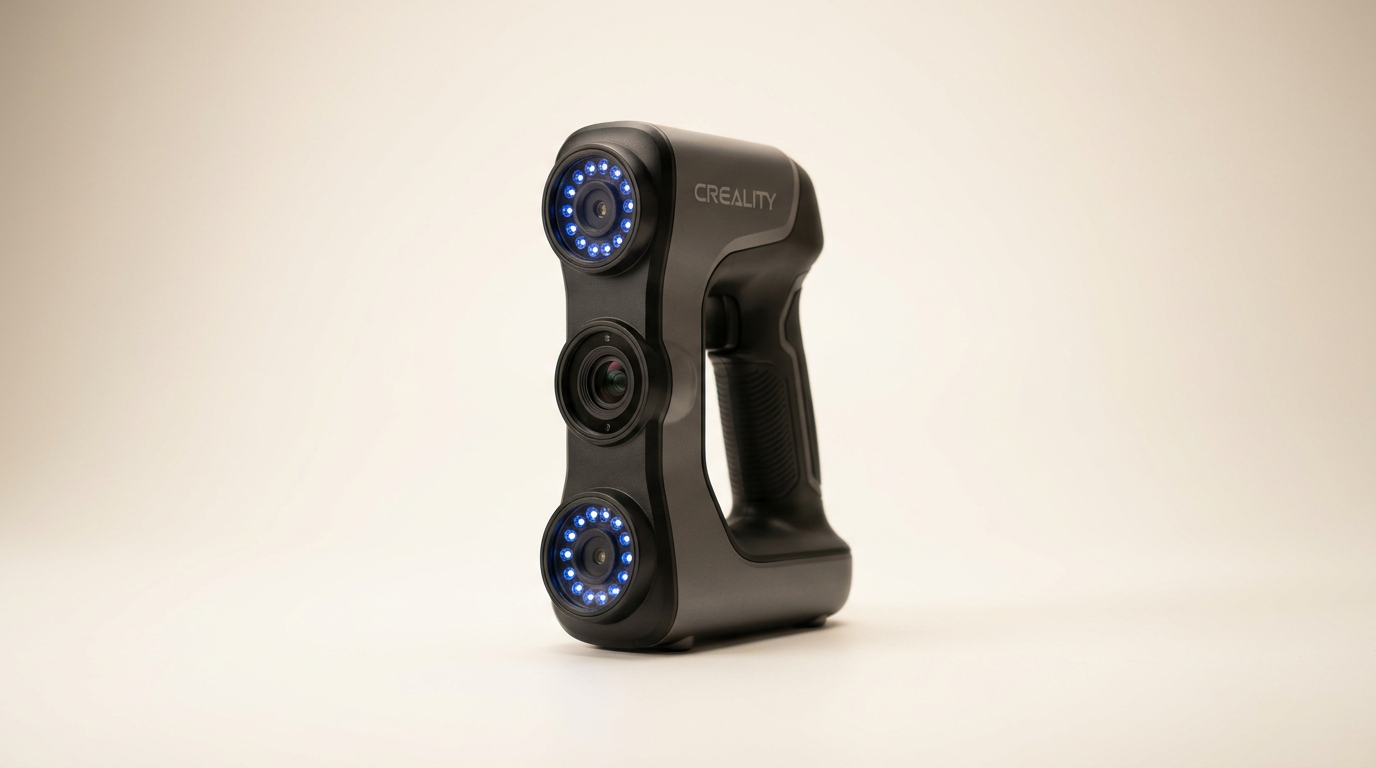
The Creality Raptor 3D Scanner arrives in a market saturated with accessible 3D scanning solutions, yet it stakes a claim for industrial-grade precision at a prosumer price point. While many handheld scanners prioritize speed and ease of use for general object capture, the Raptor leans into detail retrieval, promising metrological accuracy down to 0.02mm. This positioning attempts to bridge the gap between hobbyist convenience and professional demands, a difficult line to walk effectively.
What most buyers miss is that the Raptor operates on a principle we call the "Precision Penalty." Achieving its advertised microscopic accuracy requires more than just advanced hardware; it demands a significant investment of user time, meticulous preparation, and robust computational resources. This scanner is not a casual point-and-shoot device; it's a tool for those willing to engage with its particular demands to unlock its potential for intricate detail, often at the cost of a smooth, immediate workflow.
This review evaluates whether the Raptor delivers on its high-accuracy promise while navigating the practical realities of its operational requirements, separating marketing claims from the lived experience of its users. We examine where its detailed output truly shines and where its demanding nature creates friction, ultimately defining its place for specific professional workflows rather than broad appeal.
What owners love
- + Delivers exceptional detail and high scanning accuracy
- + Effective blue laser technology for precise captures
- + Robust storage and transport case included
- + Capable of full-color texture mapping
- + Excellent for small to medium-sized objects
Common complaints
- − Significant hardware requirements for stable operation
- − Inconsistent software stability, especially with AMD GPUs
- − Calibration and connectivity issues reported by some users
- − Requires substantial use of tracking markers for best results
- − Smaller field of view limits its suitability for very large objects
Design & Build
The Creality Raptor presents a robust physical design. Owners frequently commend the solid build quality of the scanner itself and specifically highlight the included storage and transport box as a valuable addition, suggesting thoughtful consideration for professional use and portability. The blue laser technology, a core component, is consistently cited by users as a distinguishing factor that contributes to superior scan quality compared to other scanners they have experienced. This choice of illumination method aligns with the Raptor's focus on fine detail capture, as blue lasers generally offer better resolution for surface texture and geometry. The physical form factor, while not explicitly detailed in feedback, appears to facilitate handheld operation, though its precision orientation implies a need for steady handling.
Setup & Ease of Use
Initial setup and ongoing ease of use present a mixed picture for the Raptor. While some owners describe the device as "easy to use" for freehand scanning, this ease appears conditional. A significant hurdle is the demanding hardware requirement; the scanner necessitates a powerful computer with a dedicated graphics card. Some users reported needing to upgrade to gaming-grade PCs to meet these demands. Crucially, a recurring theme is the reliance on tracking markers. Achieving optimal results, particularly for intricate details, often requires placing numerous dots on the object, indicating a methodical, rather than spontaneous, scanning process. This dependency on markers creates a 'preparation overhead,' where the scanning itself might be straightforward, but the pre-scan work can be extensive. Furthermore, some users experienced critical setup failures, struggling with calibration or persistent disconnections, even on high-spec systems, pointing to potential hardware or driver sensitivities that complicate the initial user experience.
Performance in Real Use
When operating as intended, the Creality Raptor delivers on its promise of high-quality, detailed scans. Owners consistently praise the fantastic quality and fine detail capture, with one noting it restores the 3D morphology of objects accurately. The scanner excels with small to medium-sized objects, where its smaller field of view is less of a limitation and its precision can truly shine. The 24-bit full-color scanning capability further enhances the utility for applications requiring accurate texture reproduction. However, this high performance is not without its operational caveats. The need for ample tracking markers is a consistent observation, underscoring that achieving metrological precision is an active process involving user input and preparation, rather than a fully automated one. This indicates a design philosophy optimized for precision-critical applications where meticulous workflow is an expectation, not an anomaly.
Software & Ecosystem
The software experience with the Creality Raptor is a notable point of contention. While the manufacturer touts intelligent workflows and automatic repair features, real-world usage reveals significant stability issues, particularly concerning GPU compatibility. One user detailed persistent software crashes when using recent AMD GPU drivers, necessitating a downgrade to older versions, which then conflicted with other essential CAD software. Another user reported complete inability to get the software to recognize the scanner, despite the PC detecting it. These software-related challenges introduce a 'driver lottery' scenario, where stable operation can depend on a specific, often outdated, combination of drivers and operating system components. This instability undermines the hardware's capabilities and can significantly impede productivity, marking a clear area for improvement in Creality's ecosystem support.
Value & Reliability
The Creality Raptor occupies a challenging price segment, positioned well above entry-level consumer scanners but below dedicated industrial solutions. At its price point, generally in the upper hundreds, it offers a compelling package of features, particularly its claimed 0.02mm accuracy and full-color scanning. Owners who achieve stable operation find the quality worth the investment. However, the reliability aspect is where the product presents a dichotomy. For some, it works "like it should" and is a "solid scanner." For others, especially those encountering software and calibration issues, the device proves frustratingly unreliable, leading to significant disappointment and wasted time. This inconsistency in user experience suggests that while the hardware has strong potential, the overall product reliability is hampered by software maturity and driver compatibility, creating a higher risk for some buyers. This makes the product a 'two-tier value proposition' - excellent value for those who get it working flawlessly, but poor value for those who struggle with fundamental operational hurdles.
Verdict
Consider - The Creality Raptor offers exceptional scanning precision for those with the patience and technical resources to overcome its software and setup challenges.
This scanner is best suited for experienced users or small businesses engaged in reverse engineering, quality control, or intricate 3D model creation who prioritize metrological accuracy. If your workflow demands sub-millimeter detail and you possess a robust PC (preferably with NVIDIA graphics to mitigate reported AMD issues) and are comfortable troubleshooting drivers and relying on tracking markers, the Raptor delivers impressive results for objects up to two meters. Those frequently scanning small to medium items, like mechanical parts or artistic miniatures, will find its strengths align well with their needs.
However, individuals seeking a plug-and-play solution, those with less powerful systems, or those operating exclusively on newer AMD GPU architectures should exercise caution. The reported software instabilities and calibration frustrations can make the Raptor a significant time sink. If ease of use and immediate functionality are paramount, particularly for larger objects or quick general scans, alternative solutions might offer a smoother experience, even if they sacrifice some of the Raptor's extreme precision.
The Creality Raptor embodies the 'Advanced User Tax.' Its marketing highlights impressive specifications, but unlocking them requires a willingness to invest beyond the purchase price, through extensive system optimization and a methodical, patient approach to scanning. It is a capable instrument for precision-focused work, provided the user accepts the operational friction as part of the price of its detailed output.
FAQ
More 3D Scanners reviews

Revopoint INSPIRE 2 3D Scanner Review: Unpacking the Accessory Echo Chamber

Creality 6mm 3D Scanning Markers Review: Essential Tracking Aid

TOSUKKI 6mm Positioning Targets Review: The Refined Generic Choice

AESUB 3DTOOLS 3D Scanner Spray Review: The 'Evaporative Enabler'

Creality 8-inch Rotating Turntable: A Solid Scanner Accessory

Generic 12 Piece Multi-Angle Markers Review: Essential 3D Scanning Dots
This review is based on real experiences shared by owners in online communities.