
Creality K2 SE Review: Fast, Reliable 3D Printing for Beginners and Beyond
By AValidReview. An AI-assisted summary of customer feedback, not a hands-on test.
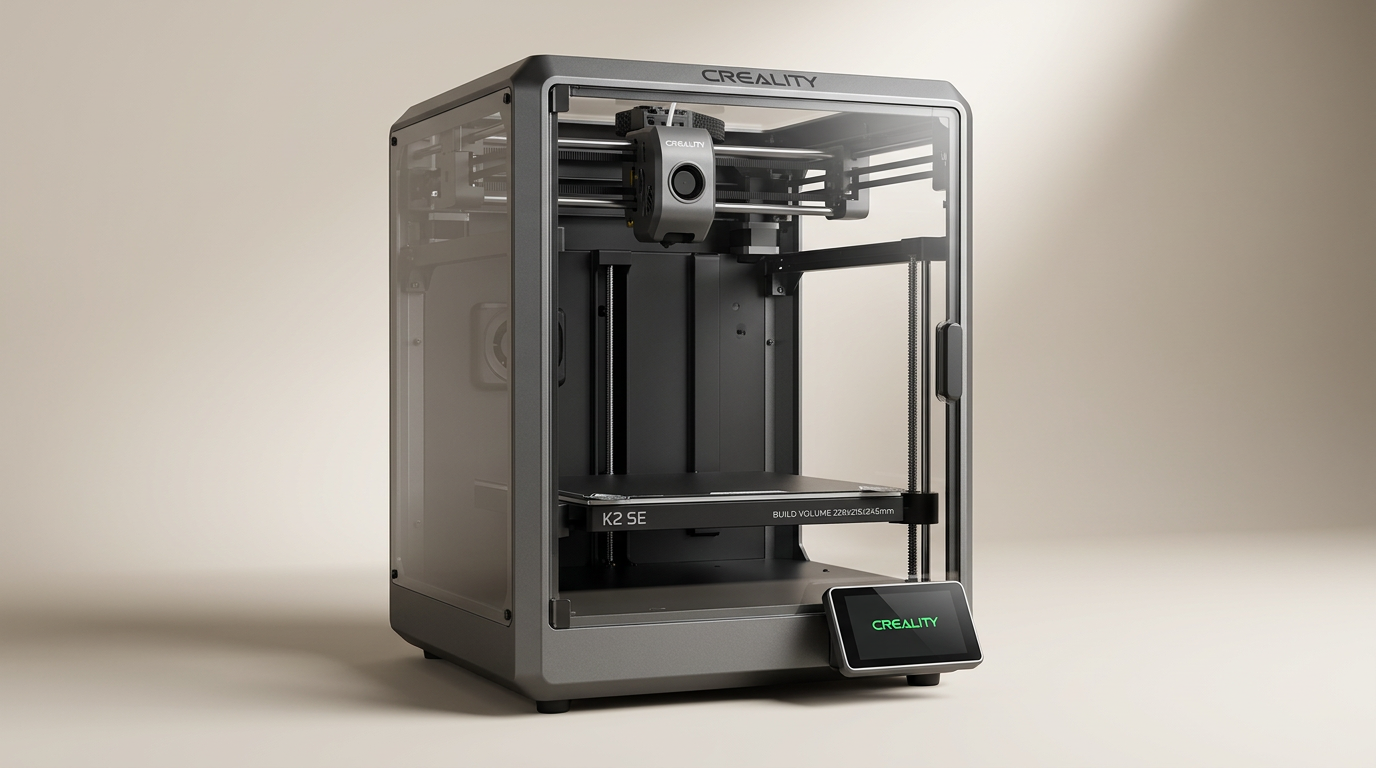
The Creality K2 SE 3D printer positions itself as a high-speed, user-friendly option for both newcomers and experienced makers. Marketed with features like 500 mm/s printing, auto-leveling, and robust construction, it aims to streamline the 3D printing process.
This review evaluates the K2 SE based on comprehensive feedback from owners, focusing on its real-world performance, setup experience, output quality, and overall value. The goal is to provide an objective assessment for those considering this desktop 3D printer.
What owners love
- + High print speeds significantly reduce project times
- + Excellent print quality, often surpassing expectations
- + Easy setup, making it accessible for beginners
- + Reliable performance with minimal failed prints reported
- + Robust build quality provides stability and durability
Common complaints
- − Can be louder than some alternatives, particularly at high speeds
- − Creality Cloud integration is not as refined as competitors
- − Some units may arrive with minor manufacturing or transit-related issues
- − Initial setup instructions can be fragmented across resources
- − Can be particular about filament choice; cheap filaments may perform poorly
Design & Build
The K2 SE features a design that owners describe as solid and well-built. Its die-cast aerospace-grade aluminum alloy frame is reinforced to minimize vibration, contributing to print accuracy. The compact desktop footprint belies a generous build volume of 220 x 215 x 245 mm. Several users migrating from older Creality models, like the Ender 3, highlight a noticeable upgrade in construction quality. The printer includes a magnetically attached build plate with alignment notches and a wiper pad, which are considered thoughtful design elements. While mostly positive, some reports indicate that units can arrive with loose internal connections, suggesting occasional quality control oversights that require user intervention.
Setup & Ease of Use
A significant strength of the K2 SE, frequently noted by owners, is its straightforward setup process. Many describe it as "plug and play," requiring minimal assembly beyond attaching the touchscreen and spool holder. The auto-leveling feature and guided auto-calibration contribute to a fast initial operational state. However, new users should be aware of a few nuances: some packing foam pieces can be difficult to locate and remove, and the power switch for voltage selection (US vs. EU) may require adjustment on arrival. While the general consensus points to an easy setup, some beginners find the instructions less than fully comprehensive, sometimes necessitating consultation of both videos and manuals. Post-setup, the interface is generally found to be clean and responsive.
Performance in Real Use
The K2 SE consistently delivers on its promise of high-speed printing without compromising quality. Owners report substantial reductions in print times compared to previous printers, with some tests showing prints completing up to four times faster. Print quality is frequently described as "super high" and "fantastic," even at elevated speeds. The direct-drive extruder contributes to reliable extrusion and supports a wide range of filaments, including PETG and TPU, in addition to Hyper PLA. Input shaping actively reduces ringing, resulting in smoother surfaces. While the printer is described as surprisingly quiet for its speed by some, others note that it can be loud, particularly when operating at peak performance. The integrated AI (for specific models) and power-loss resume functions enhance reliability and user convenience, automatically stopping prints in case of failure.
Software & Ecosystem
The K2 SE integrates with the Creality Cloud app, enabling Wi-Fi printing and remote monitoring. Owners appreciate the convenience of printing from a phone and receiving notifications upon print completion. The Creality slicer software is noted for its extensive tunable settings and built-in calibration tests. However, some users transitioning from other ecosystems find the Creality Cloud experience not as refined or smooth as competitor platforms. While many praise the software functions, the overall user experience with the software and accompanying apps receives less universal acclaim than the hardware performance itself. The printer does come with pre-sliced files, such as a Benchy, but some users have difficulty identifying the purpose of other bundled files, like one labeled "accessory."
Value & Reliability
Owners frequently praise the K2 SE as an excellent value, particularly given its performance and feature set. Many consider it a significant upgrade from entry-level printers like the Ender 3, often highlighting that it provides superior results for a comparable or lower cost than some alternatives. The printer's reliability is a common theme, with numerous reports of continuous, trouble-free operation over several months. However, there are isolated instances of units developing issues, such as internal component damage from shipping or a need for replacement parts over time. While most experiences point to a robust and dependable machine, potential buyers should be aware that basic servicing or troubleshooting might be required, typical for 3D printers, even advanced ones.
Verdict
Buy - The Creality K2 SE offers exceptional speed, print quality, and ease of use for its price point.
This printer is an excellent choice for beginners seeking a hassle-free introduction to 3D printing, especially those coming from more tinkering-intensive machines. Its high-speed capabilities and reliable operation also make it a strong contender for hobbyists and professionals who need rapid prototyping or consistent output without spending well north of $500. Users who prioritize print quality and speed above all else, and are willing to engage with some basic troubleshooting if initial issues arise, will find significant value.
Those who require the most refined software ecosystems or demand absolute silence from their printer might consider other options. While generally reliable, individuals unwilling to perform minor adjustments or address rare initial manufacturing quirks might be frustrated. However, for most users in the under $300 price range, the K2 SE represents a compelling package.
FAQ
More 3D Printers reviews
Anycubic ACE 2 Pro Review: Heated Multi-Material Feeding
Magic Jimmy AI 3D Printer for Kids Review
Bambu Lab AMS lite Review: The Multi-Color Upgrade Dilemma
AOSEED AI 3D Printer for Kids Review: Capable Fun

Anycubic Kobra S1 ACE 2 Pro Combo Review: Enclosed Multicolor Value

FLASHFORGE AD5M Pro Review: High Speed Enclosure on a Budget
This review is based on real experiences shared by owners in online communities.