
Creality K2 Pro Combo: High-Speed Multicolor 3D Printing for All
This review is based on real experiences shared by owners in online communities.
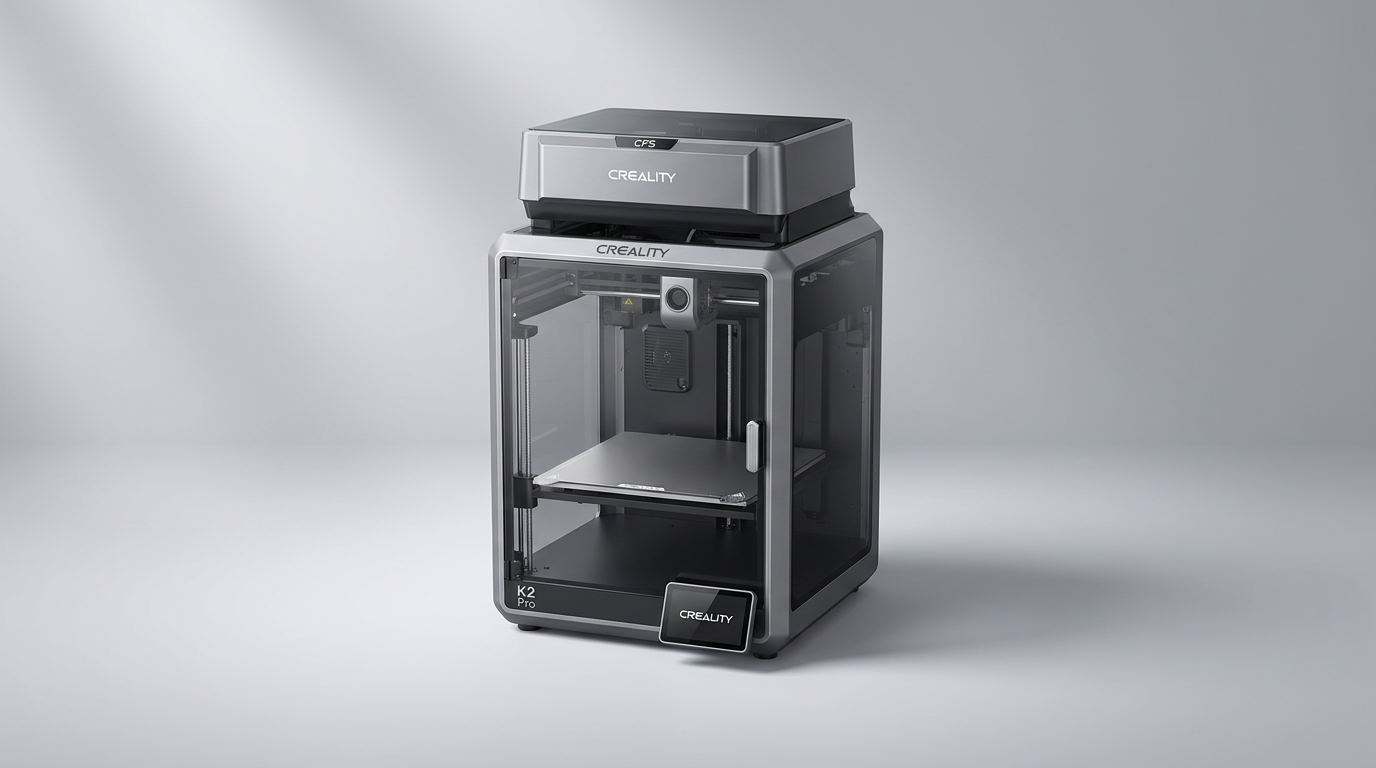
The Creality K2 Pro Combo enters a crowded 3D printing market not by pushing extreme boundaries, but by refining the mid-to-high end experience for a broader audience. While many advanced printers often demand a steep learning curve, the K2 Pro positions itself as an accessible gateway to high-speed, multi-color production, aiming to democratize features once reserved for more intricate or significantly more expensive machines.
This isn't just another spec-sheet champion; it's a platform designed to smooth the transition for hobbyists upgrading from more basic models, or even for motivated newcomers. The recurring theme among owners is a surprising degree of plug-and-play functionality for a printer of its capabilities. Yet, beneath the polished surface, even user-friendly systems introduce their own unique considerations, particularly when balancing advanced features with everyday reliability.
This review unpacks the K2 Pro's performance and ownership experience, examining whether its blend of speed, multi-color capability, and intelligence truly delivers on its promise of a premium, yet approachable, 3D printing journey.
What owners love
- + Exceptional print speed and quality noted by many users
- + Multi-color capability with CFS is a significant draw
- + User-friendly setup and auto-leveling streamlines operation
- + Large build volume accommodates substantial projects
- + Reliable performance with consistent, successful prints
Common complaints
- − Creality software can present a learning curve for some
- − CFS (filament system) can be particular with certain spool types
- − Customer service response is reportedly inconsistent
- − Reliance on cloud connectivity for some features creates dependency
- − Default settings for non-Creality filaments require manual adjustment
Design & Build
The Creality K2 Pro features a robust aerospace-grade aluminum alloy exoskeleton, a design choice that contributes to its perceived durability. Owners frequently praise the machine's substantial construction, often noting its weight and overall feeling of quality upon unboxing. The 300x300x300mm build volume provides ample space for larger projects, addressing a common limitation of many home-use printers. The internal mechanics, including precision steel X-axis rail and dual Z-axis with four linear rods, aim to provide stability during high-speed operation. While one user reported a pre-assembled component being incorrect, this appears to be an isolated incident, with the majority finding the build quality confidence-inspiring. This 'built-to-last' impression is crucial for a device that encourages continuous, high-volume operation, embodying what we call the 'Workhorse Ethos' - a design philosophy prioritizing enduring reliability alongside performance.
Setup & Ease of Use
A significant number of owners highlight the K2 Pro's ease of initial setup, with many reporting successful first prints within a couple of hours of unboxing. The 95% pre-assembled design is a major factor, reducing the common hurdle of complex assembly for new users. Auto-leveling is consistently praised as a 'godsend,' effectively removing a frequent source of frustration in 3D printing. The inclusion of an AI camera for monitoring and flow rate tuning further simplifies the process, making it less intimidating for those new to the hobby. However, this simplified startup often masks a deeper learning curve for advanced settings. New users, while quickly printing basic items, still need to invest time understanding slicing software and filament properties, a phenomenon we term the 'First-Layer Cliff' - the initial barrier to entry is low, but mastery requires significant engagement with the underlying mechanics and software.
Performance in Real Use
The K2 Pro consistently delivers on its promise of speed and print quality, with many users reporting speeds up to 600mm/s without compromising detail. Compared to older Creality models or other general-purpose printers, the K2 Pro is described as significantly faster and more precise. The multi-color functionality, enabled by the Creality Filament System (CFS), is a major draw, allowing for complex, visually engaging prints. Owners successfully produce items ranging from functional parts like a cold air box to decorative items and toys for children. The enclosed chamber with heating up to 60 °C proves beneficial for engineering filaments like ABS and PA, mitigating warping. While the CFS is lauded for its capability, some owners note it can be 'finicky' with cardboard spools, suggesting a preference for plastic rolls to ensure smooth operation. The machine's consistent output, even after hundreds of hours of printing, indicates a robust performance profile.
Software & Ecosystem
The Creality K2 Pro relies on Creality OS and Creality Print for its operational ecosystem. While the slicing software is described as powerful and user-friendly by some, others identify it as a significant learning curve, particularly for beginners. The integration of cloud services for features like multi-printer control and model libraries is convenient for some, but the dependency on a cloud environment is a drawback for others who prefer local control or have concerns about data privacy. The RFID reader, designed to auto-configure settings for Creality filaments, streamlines the process for proprietary materials but necessitates manual adjustments for generic filament brands, leading to what we might call the 'Proprietary Tax'-convenience for first-party supplies, but additional effort for alternatives. The dual AI cameras provide advanced monitoring and error detection, enhancing the remote management experience and contributing to higher print success rates.
Value & Reliability
The Creality K2 Pro is consistently regarded as a strong value proposition by its owners, especially when considering its feature set of high speed, large build volume, and multi-color capability for its price band, which is typically well under $1000. Many view it as a substantial upgrade from previous machines, representing how much 3D printing technology has advanced in recent years. Reliability is a strong point, with numerous reports of continuous, trouble-free printing over extended periods. The primary area of concern regarding reliability surfaces with customer support; a few owners recount frustrating experiences with unresponsive or disconnecting service, a common challenge for manufacturers scaling rapidly. This suggests that while the machine itself is robust, recourse for advanced issues might be less dependable than the hardware. This highlights the 'Support Lottery' - while the product is excellent, the post-purchase assistance can be inconsistent.
Verdict
Buy - The Creality K2 Pro Combo offers an accessible entry point to high-speed, multicolor 3D printing with a strong feature set and reliable performance.
This printer is an excellent choice for experienced hobbyists looking to upgrade to a faster, larger, and multi-color capable machine without venturing into significantly higher price tiers. It also suits new users who are technically inclined and prepared for a slight learning curve with the software, but value a streamlined hardware setup and advanced features. Those who prioritize high print speeds, significant build volume, and the aesthetic possibilities of multi-color prints will find strong value.
Conversely, users who demand flawless, immediate software intuitiveness without any troubleshooting, or those who prioritize top-tier, responsive customer service above all else, might consider alternatives. If your workflow relies heavily on non-Creality filaments and you are unwilling to manually adjust print settings, the 'Proprietary Tax' might prove frustrating. The K2 Pro Combo ultimately stands as a testament to the category's maturation, offering advanced capabilities not as a niche, but as a surprisingly attainable standard for the enthusiast, signaling a pivotal shift from bespoke craft to refined consumer technology.
FAQ
More 3D Printers reviews

QIDI Q2 3D Printer Review: High-Temp Power at a Consumer Price
Flashforge Adventurer 5M Smooth PC Plate Review

FLASHFORGE Creator 5 Pro Review: Multi-Toolhead Efficiency
HP OfficeJet Pro 9135 Review: Two Trays and a Tight Leash
Flashforge Creator 5 Pro Review: Multi-Material Toolchanger
Bambu Lab P2S Combo Review: The 3D Printer Appliance
This review is based on real experiences shared by owners in online communities.