
Creality K2 Plus Combo Review: High-Speed, Large-Format 3D Printing
By AValidReview. An AI-assisted summary of customer feedback, not a hands-on test.
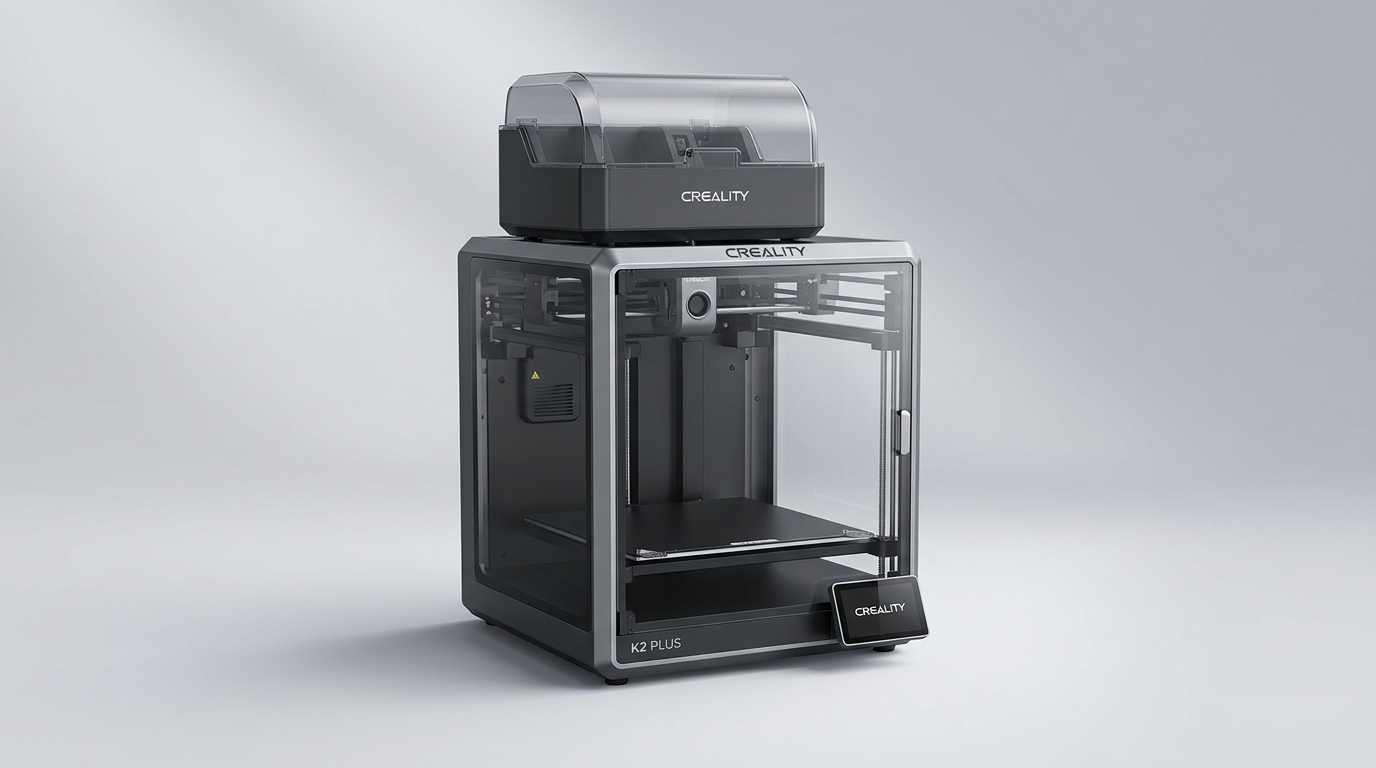
The 3D printing landscape is increasingly bifurcated: on one side, highly accessible entry-level machines, and on the other, sophisticated systems catering to advanced users. The Creality K2 Plus Combo attempts to bridge this gap, offering a significant build volume and advertised speeds typically reserved for industrial machines, yet with a design philosophy aimed at user-friendliness. It promises a "nearly out of the box" experience, challenging the traditional trade-off between scale, speed, and ease of setup in consumer-grade additive manufacturing.
Historically, large-format 3D printers have demanded considerable technical expertise for calibration and consistent operation. The K2 Plus Combo, however, presents itself as an ambitious attempt to democratize high-volume, multi-color printing. Owners consistently highlight its rapid performance and relatively straightforward initial setup, suggesting a shift in how manufacturers approach advanced consumer 3D printers.
This review evaluates whether the K2 Plus Combo truly delivers on its promise of a high-performance, user-friendly experience, or if its advancements introduce a new set of compromises for the enthusiastic hobbyist or small business.
What owners love
- + Significantly faster printing speeds compared to previous generations
- + Generous 350x350x350mm build volume supports large projects
- + Multi-color printing with the CFS system is effective for complex designs
- + Generally easy initial setup, often under two hours to first print
- + Robust, heavy construction contributes to print stability
Common complaints
- − Substantial size and weight require careful placement and handling
- − Some users report bed warping at higher temperatures, requiring calibration
- − Occasional filament clogs and extruder issues are noted
- − Creality's mobile app and proprietary slicer can be inconsistent
- − AI features are not consistently reliable or fully functional
Design & Build
The Creality K2 Plus Combo distinguishes itself immediately through its physical presence. It is a large, heavy machine, frequently described as a 'beast' by owners, often necessitating two people for unboxing and placement. This substantial weight, while posing a logistical challenge during setup, contributes to a perception of robustness. Owners frequently praise the 'Matrix' frame and dual Z-axis with linear rods for stability, noting minimal vibration and virtually no layer shift during operation. The clear glass enclosure provides good visibility of ongoing prints, a detail appreciated by users who enjoy monitoring their work. This design emphasizes a 'set it and forget it' operational stability, provided the initial handling is managed correctly. The physical footprint, however, demands dedicated space, placing it outside the casual desktop category and into the realm of more serious workshop equipment. This printer embodies a design philosophy of structural over-engineering to achieve performance, an approach often missing in less expensive alternatives.
Setup & Ease of Use
One of the K2 Plus Combo's most compelling features is its relative ease of setup for a machine of its capability. Several owners report going from unboxing to a successful first print in approximately two hours, a testament to simplified assembly and automated calibration routines. The 'Ingenious Anti-tilt Auto Leveling' system, featuring motorized Z-axes and strain gauge compensation, effectively delivers a reliable first layer without manual intervention. This 'zero-hassle' setup is a significant departure from older Creality models, which often required extensive tweaking. The primary setup hurdle is the machine's sheer mass. The user experience is further enhanced by intuitive interfaces and pre-sets for various filament types, reducing the learning curve for beginners. However, the initial setup still requires attention to detail, particularly with connection points, and some users note a learning curve for advanced features or alternative slicers. The product exhibits a 'guided initiation' rather than a fully autonomous experience, demanding some mechanical aptitude if issues arise, such as a filament clog.
Performance in Real Use
Performance is a central pillar of the K2 Plus Combo's appeal, particularly its high-speed printing. Owners consistently report print times significantly reduced compared to previous machines, with some noting it is six times faster for certain models. The 600mm/s print speed, coupled with 30000mm/s² acceleration, translates into rapid prototyping capabilities. However, a common observation is the 'speed-detail trade-off': while fast for robust parts, fine details may require reducing the print speed to around 50% for optimal quality. The multi-material capability, supported by the actively heated chamber and high-temp nozzle, extends its utility to a wider range of engineering filaments like PA-CF and PPA-CF. The CFS (Creality Filament System) for multi-color printing is generally well-received, enabling complex designs without post-processing. Yet, some users have experienced filament clogs, especially with multi-color operations, indicating that while the system is functional, it is not entirely foolproof. The 'thermal management challenge' also surfaces, with a few owners needing to crack the top cover or open the door during prints to prevent shutdowns, suggesting the heated chamber's design could benefit from refinement for prolonged, high-temperature operations.
Software & Ecosystem
The K2 Plus Combo integrates with Creality's software ecosystem, including the Creality Print slicer and a mobile application. Owners find Creality Print generally functional, though some, accustomed to alternative slicers like Cura, noted a period of adjustment for customization. The mobile app, while offering remote monitoring and printing capabilities, receives mixed feedback, with some users reporting connectivity issues and a need for further development. The dual AI cameras, intended for spaghetti detection, foreign object monitoring, and time-lapse, are cited as a feature that does not consistently meet expectations. Several users express disappointment with the AI's reliability, suggesting it is not a primary reason to purchase the machine. This highlights a 'feature parity gap,' where advertised advanced functionalities do not always translate into robust, real-world utility, pushing users to rely on manual checks or established workflows rather than automated safeguards. The ecosystem is adequate but does not yet represent a significant competitive advantage over more mature platforms.
Value & Reliability
Priced in the higher end of consumer-grade 3D printers, the K2 Plus Combo is seen by many as a worthwhile investment, especially for those upgrading from entry-level machines or needing its specific capabilities. Owners moving from models like the Ender 3 or Ender 5 Pro describe it as a 'game-changer,' offering professional-grade features and quality for a fraction of the cost of industrial alternatives. Reliability is generally high, with many users reporting consistent, flawless prints for extended periods. However, the recurring issues of filament clogs, particularly when using the CFS, and the occasional need to address thermal management, suggest that while robust, it is not entirely maintenance-free. The printer demands a degree of user engagement to maintain optimal performance. The 'longevity paradox' here is that its high performance potentially leads to more frequent use, which in turn might expose minor design quirks or require more proactive maintenance than anticipated by a new user expecting a fully automated experience. For those with a large build volume requirement and a desire for faster output, the K2 Plus Combo offers significant value, provided they understand its nuances.
Verdict
Buy - The Creality K2 Plus Combo offers significant speed, build volume, and multi-color capability for serious hobbyists and prosumers.
This printer is an excellent choice for users upgrading from smaller, slower machines who require a large build volume and faster throughput. It caters to those producing prototypes, large functional parts, or multi-color models, and who are comfortable with occasional troubleshooting. Its robust construction and automated setup features make it accessible, despite its size. Beginners with a strong desire to learn and a budget in the around $1000 range may also find it suitable, but they should be prepared for its mechanical intricacies.
However, those seeking a completely hands-off experience or relying heavily on advanced AI features may find the K2 Plus Combo falls short. Users on a tighter budget or those primarily printing small, monochrome objects will find more cost-effective options. This machine embodies the 'prosumer inflection point' in 3D printing, offering a powerful blend of professional capability and hobbyist accessibility, but it implicitly requires users to develop a working knowledge of its systems. It's a tool for creators ready to leverage its speed and scale, not merely a passive appliance.
FAQ
More 3D Printers reviews

Anycubic Kobra S1 ACE 2 Pro Combo Review: Enclosed Multicolor Value

FLASHFORGE AD5M Pro Review: High Speed Enclosure on a Budget

FLASHFORGE Creator 5 Pro Review: Multi-Toolhead Utility

QIDI Q2 3D Printer Review: High-Temp Power at a Consumer Price
Flashforge Adventurer 5M Smooth PC Plate Review

FLASHFORGE Creator 5 Pro Review: Multi-Toolhead Efficiency
This review is based on real experiences shared by owners in online communities.