
Creality K2 Combo 3D Printer Review: Multicolor Power for the Masses
By AValidReview. An AI-assisted summary of customer feedback, not a hands-on test.
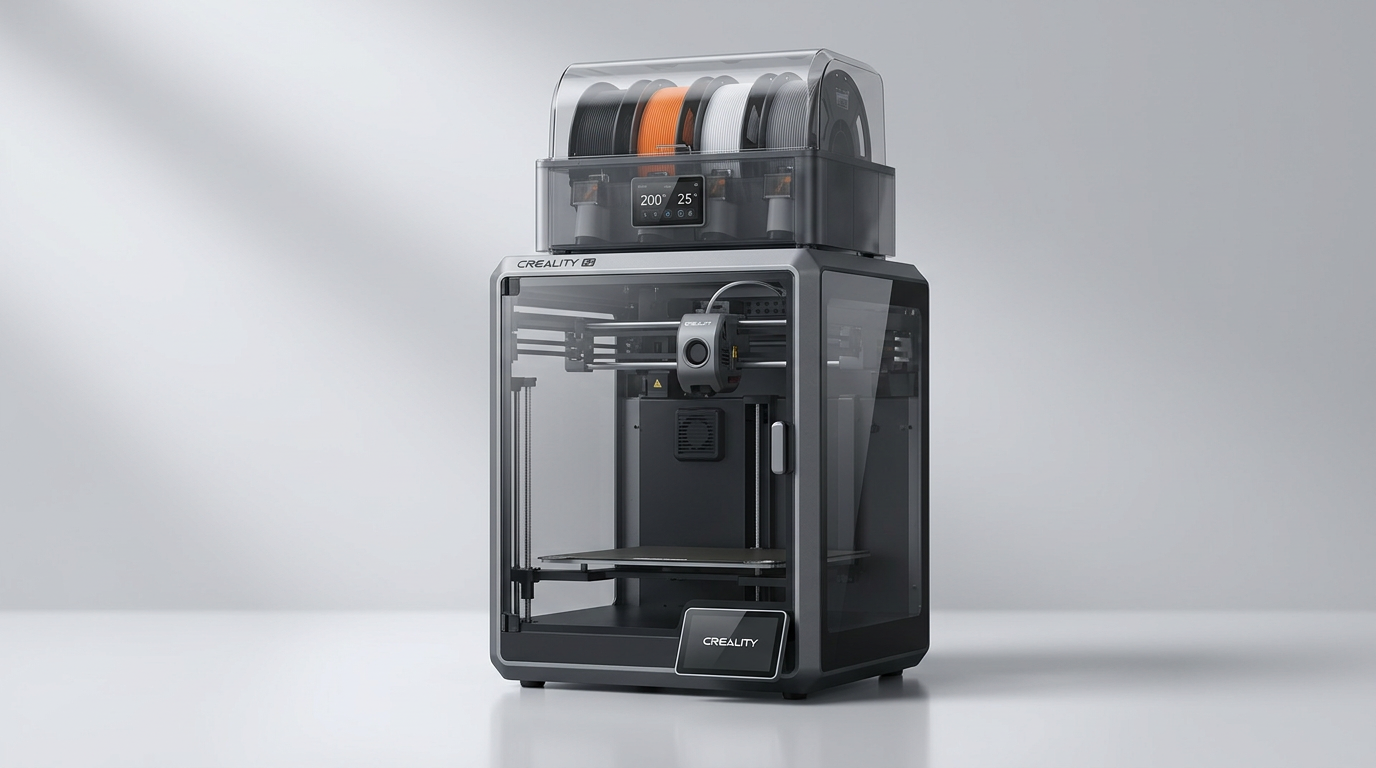
The Creality K2 Combo enters a 3D printing landscape increasingly dominated by speed and convenience. While many manufacturers tout fast print times, the true differentiator often lies in how smoothly a machine integrates into a user's workflow, especially when introducing more complex features like multicolor printing. The K2 Combo attempts to bridge this gap, promising advanced capabilities without a steep learning curve. The critical question for such a device is whether it can deliver on both the aspirational features and the practical, day-to-day reliability that defines a truly useful tool.
Historically, multicolor 3D printing has been a niche, requiring significant investment in time and often specialized, fiddly hardware. Creality's approach with the K2 Combo and its Color Filament System (CFS) aims to democratize this segment. By offering a pre-assembled, integrated package, it targets users who want vibrant, multi-material prints without becoming experts in a complex ecosystem. This review will assess whether the K2 Combo successfully navigates the trade-offs inherent in this ambition, focusing on what actual owners experience rather than marketing claims.
We examine its build, setup process, day-to-day performance, and the underlying software to determine if it truly delivers an 'out-of-the-box' advanced printing experience. A central theme emerging from user feedback is what we call the "beginner's luxury" factor: a device that feels premium and capable to those new to the hobby, even if seasoned users might identify areas for refinement. This K2 Combo embodies that concept, offering a user experience designed to impress and simplify.
What owners love
- + Delivers high-quality, clean multicolor prints
- + Easy setup and user-friendly operation for beginners
- + Notably quiet during operation, improving the user environment
- + Reliable auto-leveling and functional Wi-Fi connectivity
- + Integrated camera for remote monitoring and print observation
Common complaints
- − CFS unit requires larger 1kg filament spools, not smaller ones
- − Multicolor printing generates significant filament waste
- − Some owners find initial CFS setup or additional units challenging
- − Included filament spool is often too small for CFS use
- − Higher price point compared to entry-level printers
Design & Build
The Creality K2 Combo features a sturdy frame, reflecting a design philosophy focused on stability and print quality. Owners frequently commend the robust packaging, suggesting a careful consideration for product transit. The printer arrives largely pre-assembled, requiring minimal installation steps. This contributes to the immediate impression of a premium, well-engineered device. The step-servo motors are a key component, mentioned by the manufacturer and validated by user experience in terms of precision and noise reduction. The physical integration of the Color Filament System (CFS) is central to its appeal, promising expanded creative possibilities without complex external modifications. While the core printer's build quality receives consistent praise, some of the peripheral elements, such as the initial filament spool size, reveal minor design inconsistencies that can impact the immediate 'out-of-box' convenience.
Setup & Ease of Use
A recurring positive theme among owners is the K2 Combo's straightforward setup process. Many report being able to commence printing within an hour of unboxing, which is a significant achievement for a device with multicolor capabilities. The 95% pre-assembly is a key enabler here, contrasting sharply with the often-involved build processes of other 3D printers. The automatic bed leveling system is particularly valued, eliminating a common point of frustration for both new and experienced users. While the initial setup of the core printer is praised, integrating additional CFS units can present a slight learning curve, as some owners note relying on external resources like YouTube videos for guidance. This points to a slight documentation gap for advanced configurations, yet the overall consensus is that the machine is highly accessible for those new to the hobby, embodying the "beginner's luxury" concept by simplifying complex operations.
Performance in Real Use
The K2 Combo generally delivers on its promise of quality and speed. Prints are consistently described as clean, with vibrant colors when using the CFS. The advertised 600mm/s print speed is supported by owner feedback, who note its efficiency compared to older models. The inclusion of an AI camera is a functional addition, allowing for remote monitoring and providing a layer of security against common printing failures like 'spaghetti' detection. A standout feature is the printer's quiet operation; owners frequently report it being quiet enough to operate in shared living spaces without significant disturbance. This 'quiet-hours tax' feature is an unexpected upside, making the printer more versatile for home use. However, the multicolor system, while effective, does come with a notable trade-off: filament waste. Owners observe that the printer generates a substantial amount of purge material during color changes, which fills the 'poop chute' quickly. This is an inherent characteristic of most multi-material systems, but it’s a factor for users to consider in terms of material cost and disposal.
Software & Ecosystem
The Creality Print slicing software and the associated Creality app are highlighted as user-friendly and effective. Owners appreciate the intuitive interface, which simplifies the process of preparing models for printing and monitoring ongoing jobs. The Wi-Fi connectivity is consistently reported as reliable, a stark contrast to the connectivity issues often encountered with other printers. This robust digital ecosystem, including the ability to monitor prints remotely via the built-in camera, contributes significantly to the printer's overall ease of use and 'plug and play' appeal. The software's integration with the CFS unit appears seamless, managing filament swaps automatically and contributing to the K2 Combo's approachable multicolor printing experience. The ecosystem supports a wide range of filament types, including PLA, PETG, ABS, and TPU, expanding the machine's utility for various projects.
Value & Reliability
Owners perceive the K2 Combo as offering strong value, particularly given its multicolor capabilities and overall performance. The initial investment is considered worthwhile for the quality of prints and the convenience it provides. The printer demonstrates good reliability, with many users reporting consistent successful prints across various filament types and print durations. While minor issues like the included filament spool size or the waste generated by multicolor printing are noted, they do not detract significantly from the overall positive experience. The perceived durability of the machine also contributes to its value proposition. For users stepping up from more basic printers, the K2 Combo represents a substantial upgrade in terms of features and operational smoothness, positioning it as a strong contender in the mid-range to upper-mid-range 3D printer market, especially for those prioritizing an integrated multicolor solution.
Verdict
Buy - The Creality K2 Combo delivers a highly accessible and high-performing multicolor 3D printing experience, especially for beginners.
This printer is an excellent choice for individuals new to 3D printing or those looking to upgrade from a basic single-color machine who prioritize ease of use, quiet operation, and the ability to produce vibrant multicolor prints without extensive technical knowledge. Its pre-assembled nature and effective auto-leveling simplify the entry barrier. Those who require multicolor functionality for creative projects or functional parts will find its integrated CFS system a significant advantage, assuming they account for filament waste. This is for users willing to invest in the around $500 to $600 range for a premium, convenient experience.
Conversely, experienced users prioritizing absolute cost efficiency, minimal filament waste, or who prefer a fully open-source, tinkerer-friendly platform might consider alternatives. If your primary concern is the lowest possible per-print cost or if you are comfortable with more complex, DIY multi-material solutions, the K2 Combo's inherent waste and integrated ecosystem might not align perfectly with your needs. Similarly, users on a tight budget under $300 for a single-color printer should explore other options.
The Creality K2 Combo represents a pivotal moment in the consumer 3D printing market: the democratization of multicolor printing. It's not just another fast printer; it’s a design statement that prioritizes the user experience over raw technical dominance. Its true innovation isn't just the 16 colors, but how it lowers the 'complexity tax' of advanced features, offering a "first-layer cliff" experience where novices can quickly achieve professional-looking results, thereby expanding the mainstream appeal of 3D printing itself.
FAQ
More 3D Printers reviews
Bambu Lab AMS lite Review: The Multi-Color Upgrade Dilemma
AOSEED AI 3D Printer for Kids Review: Capable Fun

Anycubic Kobra S1 ACE 2 Pro Combo Review: Enclosed Multicolor Value

FLASHFORGE AD5M Pro Review: High Speed Enclosure on a Budget

FLASHFORGE Creator 5 Pro Review: Multi-Toolhead Utility

QIDI Q2 3D Printer Review: High-Temp Power at a Consumer Price
This review is based on real experiences shared by owners in online communities.