
Creality K2 Combo Review: Fast, Multicolor 3D Printing for All Skill Levels
By AValidReview. An AI-assisted summary of customer feedback, not a hands-on test.
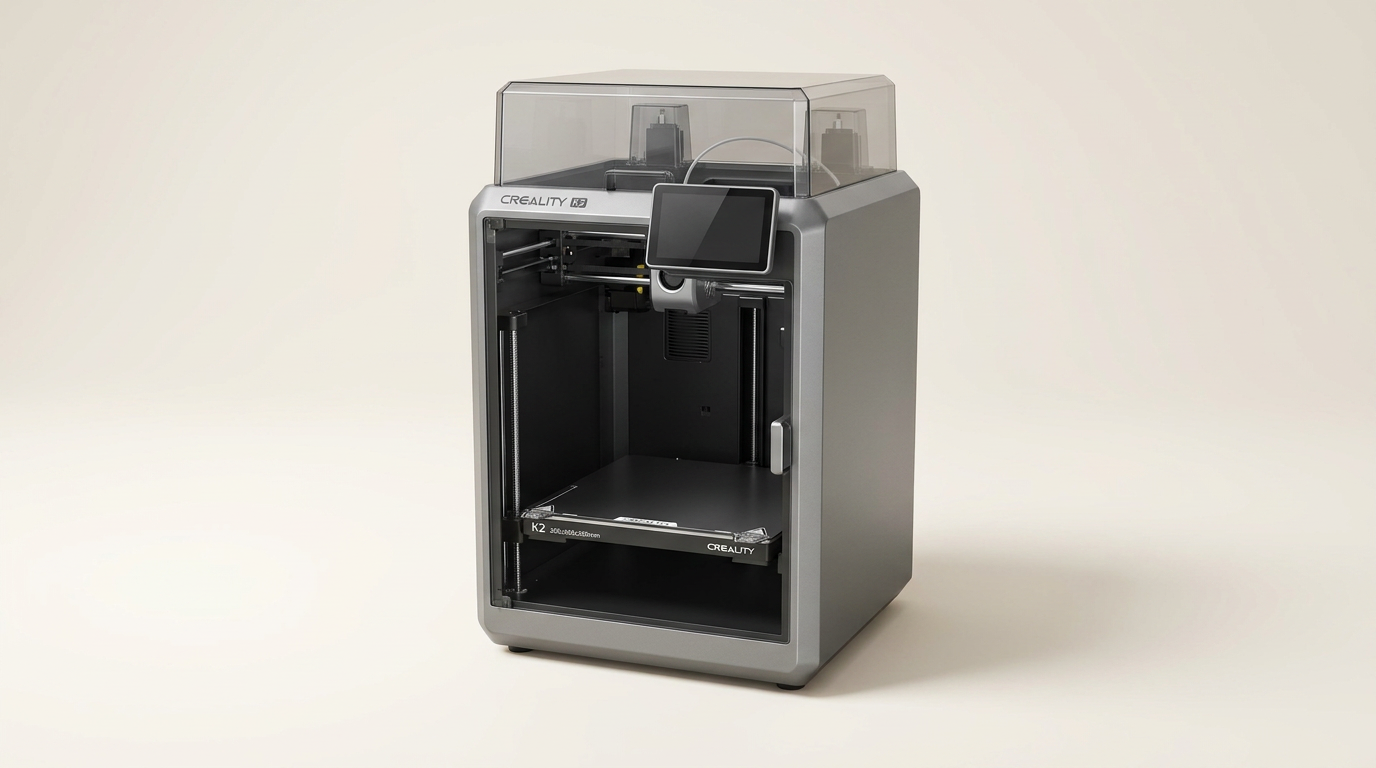
The Creality K2 Combo enters a competitive 3D printer market promising high-speed operation, impressive multicolor capabilities, and a user experience designed for both novices and experienced makers. Its feature set, including a smart filament system, rapid print speeds, and AI monitoring, aims to address common pain points in 3D printing.
Creality positions the K2 Combo as a versatile tool capable of handling a range of projects from artistic multi-material objects to functional prototypes. With a build volume of 260x260x260mm and a robust direct drive extruder, it suggests suitability for engineering-grade filaments alongside standard PLA and PETG.
We scrutinized owner feedback on the K2 Combo to determine if its ambitious feature list translates into reliable, high-quality output and a straightforward user experience in daily operation.
What owners love
- + Delivers consistently high print quality across various materials.
- + Fast print speeds significantly reduce project completion times.
- + Multi-color printing with expansion options using the CFS system.
- + Easy setup and user-friendly operation, suitable for beginners.
- + Quiet operation maintains a peaceful workspace.
- + Robust build and dependable performance for continuous use.
Common complaints
- − CFS system, while functional, can waste a noticeable amount of filament during color changes.
- − AI failure detection and print interruption feature does not always function as expected.
- − Interface and software may present a learning curve for some users.
- − Initial deliveries occasionally missed the included CFS unit.
- − Print adhesion can be an issue if the build plate is not properly prepared.
Design & Build
The Creality K2 Combo features an aerospace-grade aluminum frame and a steel X-axis rail, contributing to its reported stability. Owners describe the unit as robust and solid, noting its ability to withstand continuous operation. The hinged cover is appreciated for maintaining cleanliness and minimizing drips, particularly for those with experience with resin printers. While generally sturdy, some owners suggest placing the printer on a very stable surface due to potential vibrations from high-speed movements, although the overall noise levels are characterized as quiet.
Setup & Ease of Use
A significant point of praise for the K2 Combo is its straightforward setup. Many describe it as "easy" and "quick," with several reporting being able to print within an hour of unboxing. The printer arrives largely pre-assembled, reducing the burden on the user. Features like smart auto-leveling and guided calibration simplify the initial configuration. Even first-time 3D printer users attest to its beginner-friendly nature, finding it easy to operate consistently after initial setup. However, the accompanying setup videos could benefit from slower pacing and more detailed explanations for absolute novices.
Performance in Real Use
The K2 Combo consistently produces high-quality prints, with owners reporting minimal stringing and smooth layer consistency. Its advertised 600 mm/s print speed is confirmed by users, who highlight its efficiency in completing projects. It handles various materials including PLA, PETG, and even more demanding engineering-grade filaments without issues. The CFS (Creality Filament System) for multicolor printing is a popular feature, enabling convenient multi-material projects. While effective, some users observe that the CFS incurs a fair amount of filament waste during color changes. The AI Chamber Camera provides remote monitoring and time-lapse recording, although some owners find the AI failure detection inconsistent in preventing failed prints.
Software & Ecosystem
The K2 Combo integrates with Creality Print software, which owners find functional; however, it has a learning curve. Users note the effort required to configure settings, particularly for filaments without RFID chips. The Creality app allows remote monitoring and control, though some feedback indicates room for improvement in overall app functionality and customer service responsiveness. The built-in air purifier is a welcome addition, addressing VOC emissions, and Wi-Fi connectivity streamlines device management.
Value & Reliability
Owners frequently commend the K2 Combo as a good value, especially considering its performance and feature set compared to other printers in its price range, which can fall around the mid-hundreds. Its reliability is a recurring theme, with many reporting consistent, issue-free printing even with near-continuous use. While isolated incidents of part failure (e.g., an extruder kit replacement) or issues with print adhesion occur, these are not widespread, and the overall consensus points to a dependable machine for its cost. The customer support from Creality receives mixed feedback, with some positive experiences regarding parts and assistance, and other calls for improvement in communication.
Verdict
Buy - The Creality K2 Combo offers an excellent blend of speed, print quality, and innovative features for its price point.
This printer is an ideal choice for enthusiasts and beginners seeking a dependable machine capable of fast, high-quality, and multicolor prints. Those who prioritize ease of setup, consistent performance, and features like AI monitoring and quiet operation will find strong value here. It performs well across common filament types and supports more advanced materials. For users upgrading from older machines or entering 3D printing at an intermediate level, the K2 Combo delivers.
However, users sensitive to filament waste during multicolor changes or expecting flawless AI print failure detection might find minor frustrations. Individuals with extremely limited technical patience for software configuration may encounter a slight learning curve, although the overall hardware setup is straightforward.
FAQ
More 3D Printers reviews

Anycubic Kobra S1 ACE 2 Pro Combo Review: Enclosed Multicolor Value

FLASHFORGE AD5M Pro Review: High Speed Enclosure on a Budget

FLASHFORGE Creator 5 Pro Review: Multi-Toolhead Utility

QIDI Q2 3D Printer Review: High-Temp Power at a Consumer Price
Flashforge Adventurer 5M Smooth PC Plate Review

FLASHFORGE Creator 5 Pro Review: Multi-Toolhead Efficiency
This review is based on real experiences shared by owners in online communities.