
Creality Ender 3 V3 SE Review: Ideal Entry-Level 3D Printing?
By AValidReview. An AI-assisted summary of customer feedback, not a hands-on test.
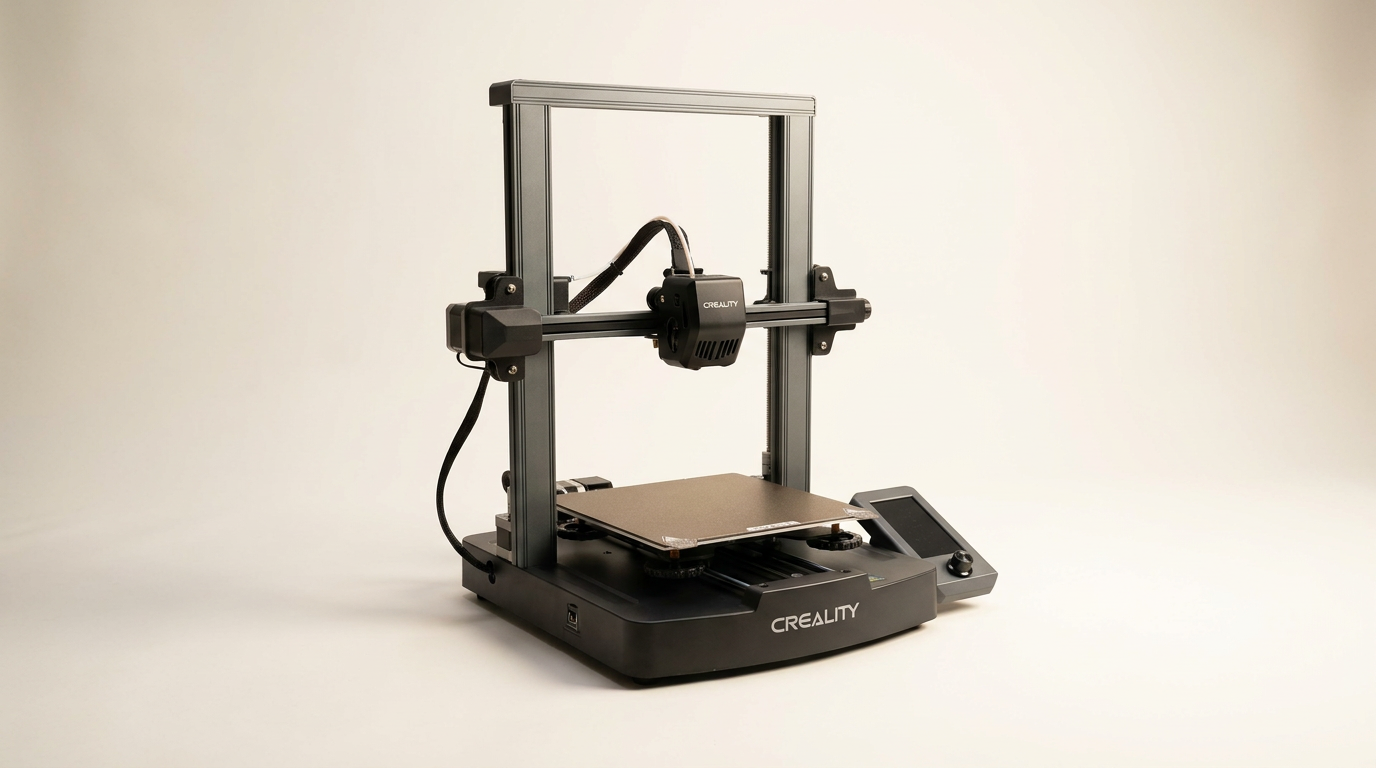
The Creality Ender 3 V3 SE enters a crowded market, positioning itself as an accessible yet capable 3D printer. Designed to simplify the often-intimidating setup process characteristic of earlier models, this iteration promises high-speed performance and user-friendly features.
Creality aims to address common pain points for newcomers and experienced hobbyists alike, incorporating automatic leveling and a direct extruder system. This review examines how well the Ender 3 V3 SE delivers on those promises, drawing insights directly from individuals who have integrated it into their workshops.
What owners love
- + Simple assembly, often ready to print within 30 minutes
- + Significantly faster print speeds compared to predecessors
- + Effective CR Touch auto-leveling and Z-offset
- + Strong direct drive extruder handles various filaments
- + Large, helpful user community and abundant online resources
- + Reliable performance for its price point
Common complaints
- − Occasional bed adhesion issues require manual intervention
- − Firmware and software experience can be confusing for new users
- − Documentation and support sometimes lack clarity, especially for non-English speakers
- − Fan noise is noticeable for some users
- − USB drives can be unreliable; lacks integrated Wi-Fi for direct sending
Design & Build
The Ender 3 V3 SE adopts a robust dual Z-axis structure, synchronized by a timing belt, which owners report contributes to print stability and reduced Z-wobble. The Y-axis features dual 8mm linear shafts, noted for wear resistance and consistent print platform motion. Several long-term users appreciate the open-frame design for its serviceability, highlighting that components are accessible for maintenance or upgrades. The PC spring steel build plate is consistently praised for its adhesion and flexibility, simplifying model removal. While overall construction is solid for its class, some owners note that critical components, like the extruder harness, require careful handling during initial setup to avoid damage.
Setup & Ease of Use
Creality markets the Ender 3 V3 SE as exceptionally easy to set up, and owner feedback largely corroborates this claim. Many users, including first-time 3D printer owners, report assembly times under 30 minutes, with some ready to print within an hour. The integrated CR Touch auto-leveling and strain sensor for Z-offset are frequently cited as significant improvements, simplifying a process that often frustrates new users. While the initial setup is straightforward, some owners indicate the menu interface can be less intuitive, and official instructions benefit from augmenting with community-created video tutorials. The absence of built-in Wi-Fi and reliance on USB drives is a minor convenience issue for some, although a few users have successfully integrated it with OctoPrint.
Performance in Real Use
Owners consistently highlight the Ender 3 V3 SE's increased print speed, citing significant reductions in print times compared to older Ender 3 models. Many report good print quality after minor tuning. The 'Sprite' direct drive extruder receives praise for its ability to handle a variety of filaments, including PLA, PETG, and TPU, reducing feeding issues. However, bed adhesion is a recurring concern for some users, necessitating manual interventions like using glue sticks or thorough plate cleaning with isopropyl alcohol. While many find ongoing print quality to be excellent, a few experienced occasional nozzle scraping or layer shifting. The printer is generally described as quieter than expected, though the fan noise is a noted drawback for some.
Software & Ecosystem
The Ender 3 V3 SE operates within the broader Creality software ecosystem. While the printer itself is straightforward, some owners find the accompanying software experience, particularly for slicing and file transfer, to be less polished. Lack of an intuitive mobile app for direct printer control (similar to Bambu Labs) is mentioned by experienced users as a feature they miss. However, the enormous community surrounding Creality printers, particularly the Ender series, is a significant advantage. This vibrant user base provides extensive online resources, troubleshooting guides, and modification ideas, which acts as a strong support network for both beginners and those looking to tinker.
Value & Reliability
Positioned in the entry-level to mid-range segment, typically around $200, the Ender 3 V3 SE is widely considered to offer strong value. Owners emphasize its reliability for the price point, particularly for those new to 3D printing. The machine's build quality, combined with its ease of setup and operational improvements, contributes to a positive ownership experience for many. While isolated incidents of hardware issues (e.g., faulty capacitors, thermal runaway) are reported, these appear to be exceptions rather than widespread problems. The overall consensus is that the printer delivers consistent performance over months of use, exceeding expectations for its cost.
Verdict
Buy - The Creality Ender 3 V3 SE offers excellent value and accessibility for new 3D printing enthusiasts.
This printer is an ideal choice for beginners seeking a reliable, fast, and relatively inexpensive entry into 3D printing, especially those who appreciate a supportive community. Its automatic leveling and direct drive extruder significantly reduce common frustrations found in older budget models. Users prepared for occasional software quirks and the need for minor bed adhesion adjustments will find it a rewarding purchase around the $200 mark.
However, users prioritizing advanced features like integrated Wi-Fi for direct file transfer or a completely silent operation might find it lacking. Those with extensive experience on more premium, feature-rich machines priced well north of $500 may also find its capabilities somewhat basic, but it serves its intended market exceptionally well.
FAQ
More 3D Printers reviews

Anycubic Kobra S1 ACE 2 Pro Combo Review: Enclosed Multicolor Value

FLASHFORGE AD5M Pro Review: High Speed Enclosure on a Budget

FLASHFORGE Creator 5 Pro Review: Multi-Toolhead Utility

QIDI Q2 3D Printer Review: High-Temp Power at a Consumer Price
Flashforge Adventurer 5M Smooth PC Plate Review

FLASHFORGE Creator 5 Pro Review: Multi-Toolhead Efficiency
This review is based on real experiences shared by owners in online communities.