
Creality Ender 3 V3 SE Review: A Capable Entry-Level 3D Printer
By AValidReview. An AI-assisted summary of customer feedback, not a hands-on test.
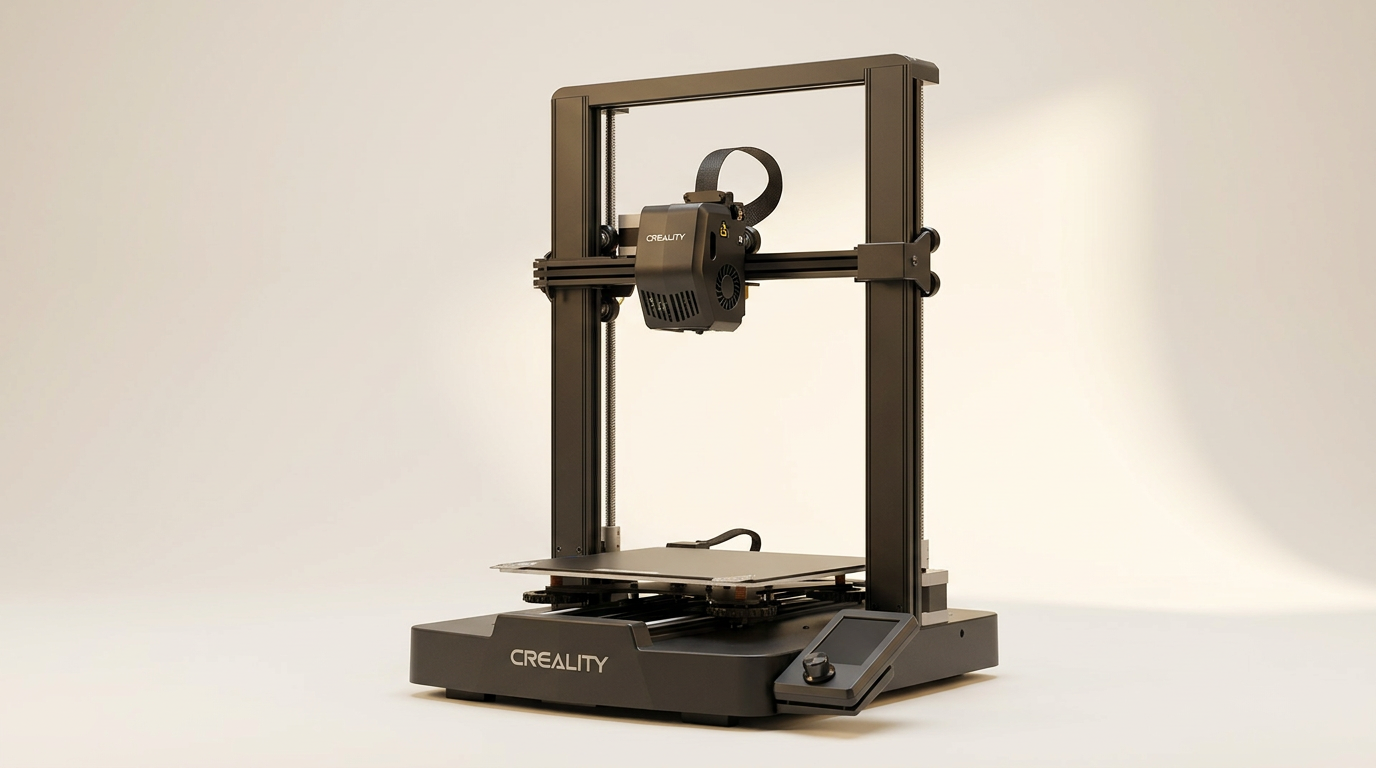
The Creality Ender 3 V3 SE enters a crowded field of entry-level 3D printers, promising a faster printing experience and user-friendly features. Positioned for both novices and those seeking a reliable, low-cost machine, this model aims to simplify the initial hurdles of 3D printing while delivering consistent results. With its claimed 250mm/s print speed, automatic bed leveling, and direct extrusion system, the V3 SE targets users who prioritize efficiency and straightforward operation.
This review evaluates the Ender 3 V3 SE based on extensive user feedback, examining its performance, build quality, and overall value proposition. We cut through the marketing claims to determine how it stands up in daily use, assessing its setup process, print quality consistency, and any common issues reported by owners. Our goal is to provide a clear, evidence-based assessment for potential buyers.
What owners love
- + Beginner-friendly and straightforward for initial use
- + Generates clean and consistent prints for various applications
- + Assembly is manageable, especially with online resources
- + Automatic bed leveling and Z-offset simplify first layer calibration
- + Good value for the features and performance offered
- + Strong support community available for troubleshooting and upgrades
Common complaints
- − Inadequate included assembly instructions; relies heavily on external guides
- − Potential for minor print failures or issues requiring user intervention
- − Users report occasional need for fine-tuning or minor adjustments
- − No Wi-Fi or Ethernet connectivity, requiring SD card for basic file transfer
- − Some owners note the bed springs may require early replacement for optimal stability
Design & Build
The Ender 3 V3 SE features a dual Z-axis system, synchronized by a timing belt, which owners report contributes to high print quality and reduces Z-wobbling. The Y-axis incorporates two 8mm linear shafts, noted for their robust and wear-proof steel construction, providing stable and accurate motion for the build platform over time. Owners frequently praise the machine's solid construction, considering its price point. The included PC spring steel build plate is consistently described as effective for model adhesion and easy removal. While the overall build quality is positive, some reviewers suggest minor components, such as the bed springs, could benefit from upgrading for enhanced stability.
Setup & Ease of Use
The V3 SE is designed for quick assembly, with many owners confirming a relatively straightforward process. However, a significant recurring point of feedback is the inadequacy of the provided assembly instructions. Users universally recommend consulting online video guides or community resources for clearer, more detailed steps. The CR Touch auto-leveling and strain sensor for auto Z-offset are frequently cited as key features that simplify the initial calibration and contribute to consistent first layers, making the printer highly accessible for beginners. The automatic filament loading and unloading function also adds to the ease of use, particularly for new users.
Performance in Real Use
Owners consistently report that the Ender 3 V3 SE produces clean and consistent prints, even for those new to 3D printing. The 'Sprite' Direct Extruder receives positive mentions for its ability to handle various filaments, including PLA, PETG, and TPU, with smooth feeding. The advertised print speed of 250 mm/s is achievable, allowing for efficient model completion. Print quality is generally high for a printer in its price class, with many users expressing satisfaction with the detail and accuracy of their output. Some advanced users note that while it performs well out of the box, fine-tuning and minor adjustments can further enhance print results, typical for this category of printer.
Software & Ecosystem
The Ender 3 V3 SE uses a 32-bit silent mainboard, which owners appreciate for its reduced operation noise during prints. The printer's fundamental operations are handled via its intuitive UI, which includes motion graphics for leveling feedback. A key limitation noted by several owners is the absence of Wi-Fi or Ethernet connectivity. This means basic job transfer relies on physically moving an SD card between a computer and the printer. While a USB-C port is present, intended for data transfer, it only enables basic functionality, and some users highlight that the printer does not natively integrate with the Creality Print software for advanced features, requiring alternative slicing solutions like Cura.
Value & Reliability
The Creality Ender 3 V3 SE consistently earns high marks for its overall value, particularly given its price point, which typically falls under $250. Many owners consider it a strong entry-level option, offering solid performance and features usually found in more expensive models. While it is generally reliable, some users experienced early issues requiring minor troubleshooting, such as a warped print bed appearing after numerous prints, or occasional belt slipping. However, the manufacturer's customer service receives positive mentions, with quick responses and replacement part offers. The large and active community surrounding the Ender 3 series also contributes significantly to its long-term value, providing abundant resources for problem-solving and optimization.
Verdict
Buy - The Creality Ender 3 V3 SE delivers exceptional value and a solid printing experience for its price.
This printer is an excellent choice for beginners entering the 3D printing hobby or small businesses needing a reliable machine for functional prints. Its automated features, like CR Touch leveling and auto Z-offset, significantly ease setup and daily operation, minimizing common frustrations. Those willing to engage with a strong online community for occasional troubleshooting and fine-tuning will find this machine incredibly rewarding for its price, which typically sells in the low hundreds.
However, individuals seeking a completely plug-and-play experience with extensive software integration, Wi-Fi connectivity, or minimal need for community support might consider other options. Users uninterested in learning basic 3D printer mechanics or performing minor maintenance may find its occasional need for adjustment challenging, despite its overall user-friendliness for the segment.
FAQ
More 3D Printers reviews
Bambu Lab AMS lite Review: The Multi-Color Upgrade Dilemma
AOSEED AI 3D Printer for Kids Review: Capable Fun

Anycubic Kobra S1 ACE 2 Pro Combo Review: Enclosed Multicolor Value

FLASHFORGE AD5M Pro Review: High Speed Enclosure on a Budget

FLASHFORGE Creator 5 Pro Review: Multi-Toolhead Utility

QIDI Q2 3D Printer Review: High-Temp Power at a Consumer Price
This review is based on real experiences shared by owners in online communities.