
Creality CR-Scan Raptor Pro Review: Precision Scanning, Challenging Setup
This review is based on real experiences shared by owners in online communities.
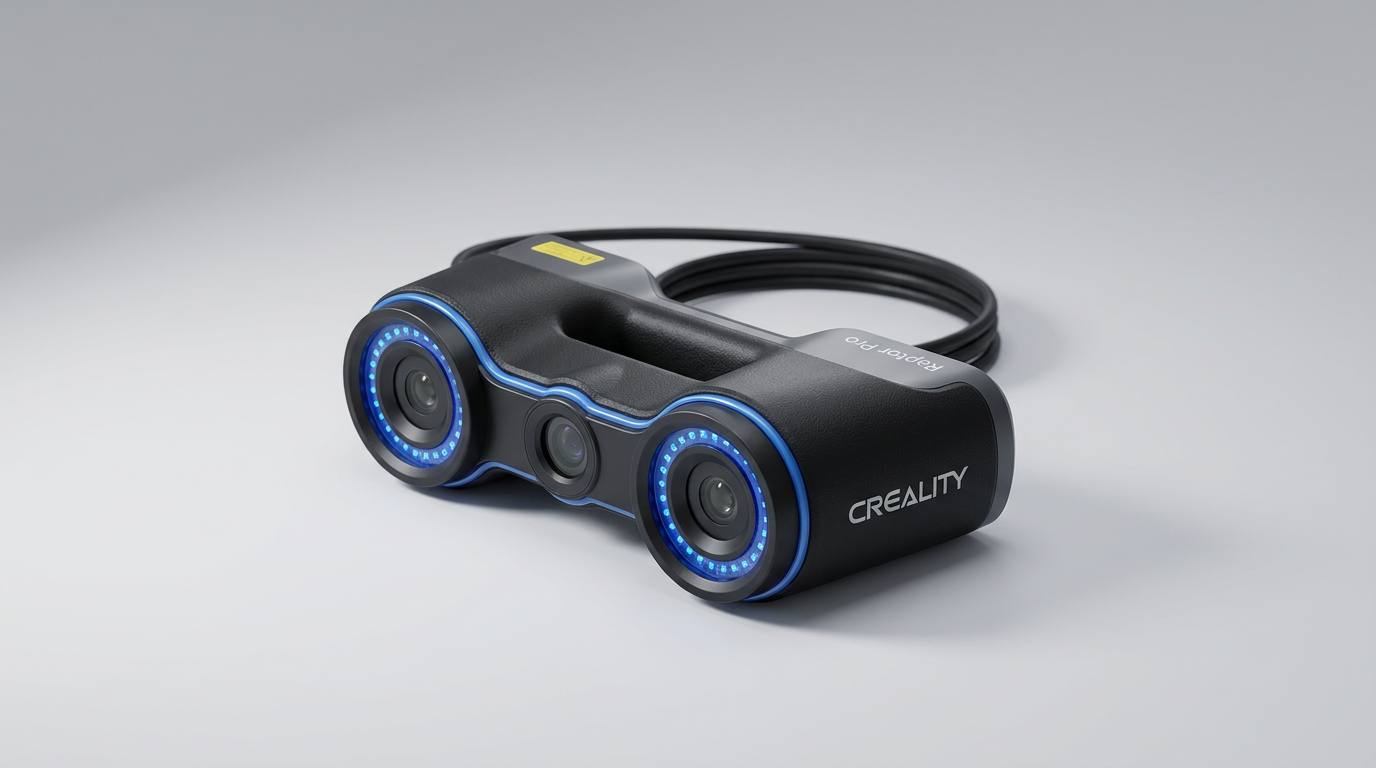
The Creality CR-Scan Raptor Pro enters a niche segment of 3D scanning, promising measurement-grade accuracy and broad material compatibility. Unlike many consumer-grade handheld scanners that prioritize ease of use, the Raptor Pro aims for professional utility across varied object sizes, from small components to automotive parts. It positions itself as a robust tool for reverse engineering, industrial design, and even medical applications, leveraging a sophisticated array of blue lasers and infrared structured light.
However, its ambition introduces a critical friction point: the significant technical hurdle required for initial operation. Owners consistently report an arduous setup experience, often involving extensive troubleshooting and system adjustments. This friction point creates what we term the "first-scan gauntlet"-a demanding initial phase that tests user patience and technical aptitude before the device's advertised capabilities can be accessed.
This review will examine whether the Raptor Pro's impressive scanning performance justifies its demanding setup and software ecosystem, assessing its true value for users seeking advanced 3D capture without industrial-level budgets.
What owners love
- + Delivers high-precision scans with exceptional detail capture (0.02mm accuracy)
- + Offers fast scanning speeds at 60fps for efficient data acquisition
- + Capable of scanning a wide range of object sizes, from 5mm to 4 meters
- + Effective at capturing challenging materials like black, metallic, or transparent surfaces without powder
- + Produces vibrant, true-color textures through its 24-bit RGB camera
- + Hardware is robust and performs consistently once operational
Common complaints
- − Initial setup and connectivity are frequently complex and time-consuming
- − Requires specific PC configurations and system adjustments (e.g., uninstalling Windows updates, disabling integrated graphics)
- − Bundled software is often described as immature or buggy, with regressions in newer versions
- − Customer support response times are lengthy due to time zone differences
- − Inconsistent performance reported on macOS, with jumping laser lines
Design & Build
The Creality CR-Scan Raptor Pro presents as a professionally built device. Owners frequently describe the hardware itself as robust and capable. Its physical design integrates multiple laser lines and infrared structured light, a complex optical system built to achieve the promised 0.02mm accuracy. This construction suggests a focus on the precision engineering necessary for its wide material and object size versatility. The device's substantial feel and optical array align with its stated industrial-adjacent applications, projecting durability suitable for frequent use.
Setup & Ease of Use
The setup process for the Raptor Pro is a significant barrier, establishing a high "technical toll" for entry. Multiple owners report spending weeks troubleshooting connectivity issues, primarily on Windows systems. This often involves specific, non-obvious steps like plugging the USB into rear ports, uninstalling Windows security updates (e.g., KB5049981), and disabling integrated graphics adapters. While the scanning operation itself becomes straightforward once configured, the initial integration demands advanced computer literacy and patience. This steep initial learning curve contrasts sharply with the "easy to use" claims found in some positive reviews, highlighting a clear divergence between the device's operational simplicity and its foundational setup complexity.
Performance in Real Use
Once successfully configured, the Raptor Pro consistently delivers on its core promise of high-precision scanning. Owners report excellent results on both small, intricate objects and larger items, with the 0.02mm accuracy and 60fps capture rate living up to expectations. The ability to scan challenging materials-including black, metallic, and transparent surfaces-without requiring scanning spray is a frequently praised attribute, streamlining workflows significantly. The device also accurately renders full 24-bit color textures, adding realism to the captured models. However, some macOS users report inconsistent laser tracking, suggesting platform-specific performance variations.
Software & Ecosystem
The software accompanying the Raptor Pro represents a critical area for improvement. While the hardware garners praise, the software is consistently described as "mediocre" at best, with some users labeling it "trash." A recurring theme is that while the software is 'workable,' it often 'leaves a lot to be desired.' Some owners even advise using older software versions (e.g., V3 over V4) due to perceived regressions in functionality or stability. The meshing process is cited as prone to errors, which can undermine the precision achieved during scanning. This dichotomy between excellent hardware and underdeveloped software creates a workflow bottleneck, requiring users to invest extra effort into post-processing or navigating software quirks to achieve final results.
Value & Reliability
The Raptor Pro occupies a pricing tier well north of $1000, placing it beyond casual hobbyist equipment. Its value proposition is tied directly to its high accuracy and material versatility. For users who successfully navigate the demanding setup and can tolerate software imperfections, the device offers capabilities typically found in significantly more expensive industrial scanners. However, the high incidence of setup failures and software issues, combined with slow customer support response times, introduces a notable reliability risk. This creates a "support lottery" scenario, where the long-term value is heavily dependent on individual troubleshooting capability or a benign system configuration.
Verdict
Consider - The Creality CR-Scan Raptor Pro delivers exceptional scanning accuracy and versatility once operational, but its challenging setup demands significant technical acumen.
This device is a strong fit for experienced 3D artists, engineers, or hobbyists with advanced technical skills and a high tolerance for troubleshooting. If your projects require precise capture of diverse materials and object sizes, and you possess the expertise to navigate complex system configurations, the Raptor Pro offers capabilities that punch above its price class. Those seeking an out-of-the-box, seamless experience or lacking deep technical knowledge should hold off, as the initial setup friction can easily negate its performance advantages.
The Raptor Pro exemplifies the 'prosumer paradox' in tech: powerful hardware crippled by an immature software and support ecosystem. It's a testament to the fact that raw technical specifications, while impressive, do not guarantee a smooth user experience. This product serves as an early-adopter test for what advanced scanning capabilities can be made available at a more accessible price, provided users are willing to shoulder the integration burden themselves.
FAQ
More 3D Scanners reviews

Revopoint INSPIRE 2 3D Scanner Review: Unpacking the Accessory Echo Chamber

Creality 6mm 3D Scanning Markers Review: Essential Tracking Aid

TOSUKKI 6mm Positioning Targets Review: The Refined Generic Choice

AESUB 3DTOOLS 3D Scanner Spray Review: The 'Evaporative Enabler'

Creality 8-inch Rotating Turntable: A Solid Scanner Accessory

Generic 12 Piece Multi-Angle Markers Review: Essential 3D Scanning Dots
This review is based on real experiences shared by owners in online communities.