
Asani Mini 3D Printer Review: An Accessible Entry to 3D Printing
By AValidReview. An AI-assisted summary of customer feedback, not a hands-on test.
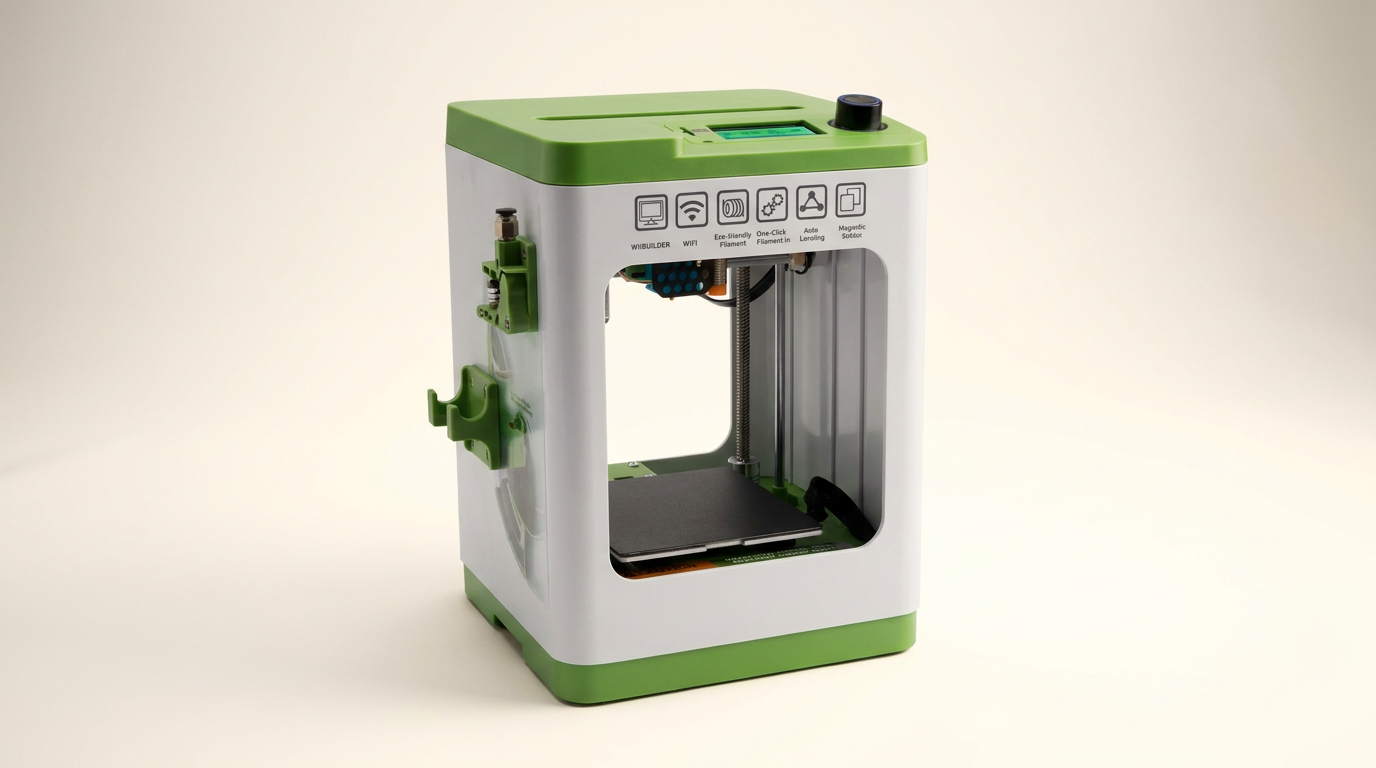
The world of 3D printing, once a niche for hobbyists and professionals, continues to become more accessible. Brands now target new users, offering simplified machines designed for quick setup and operation. The Asani Mini 3D Printer positions itself in this beginner-friendly segment, arriving fully assembled with a promise of immediate usability.
This review assesses the Asani Mini 3D Printer's performance, focusing on its design, ease of use, print quality, and overall value. We examine whether its features genuinely cater to children and first-time users, delivering on the promise of an uncomplicated entry into additive manufacturing.
What owners love
- + Arrives fully assembled, requiring minimal setup
- + Auto-leveling simplifies bed calibration for beginners
- + Magnetic, flexible build plate simplifies print removal
- + Wireless connectivity and mobile app streamline operation
- + Generates good print quality for its price segment
- + Compact footprint suits small spaces like desks or classrooms
Common complaints
- − Small build volume limits object size
- − External filament spools may not fit standard sizes
- − Some models show slower print speeds than advertised
- − Requires adult assistance for younger children
- − Reliance on an app for extensive features may not suit all users
Design & Build
The Asani Mini 3D printer features a compact and lightweight design, ideal for placement in residences or educational settings where space is limited. Its 8.3” x 8.3” x 11.4” dimensions and low weight facilitate portability. Owners consistently highlight its solid construction, noting that it feels robust despite its small form factor. The machine arrives fully assembled, a significant advantage for new users. Key design elements include a dual Z-axis rail for print stability, a 2.4” LCD screen for navigation, and a flexible magnetic build plate. This plate simplifies print removal, a common point of frustration with traditional fixed beds. A point of consideration is the integrated filament holder, which some users report may not accommodate standard-sized spools, potentially requiring mini spools.
Setup & Ease of Use
Setup is a primary strength of the Asani Mini 3D Printer. Owners consistently report being able to begin printing within minutes of unboxing. The printer's fully assembled state eliminates complex build processes. Auto-leveling is a frequently praised feature, removing a significant hurdle for beginners. The inclusion of a pre-loaded microSD card with model designs allows immediate printing without initial design work. Filament loading is streamlined via a one-touch button, contributing to the user-friendly experience. The Wi-Fi capability further simplifies operation, enabling wireless printing from multiple devices.
Performance in Real Use
For its price and target audience, the Asani Mini 3D Printer delivers consistent print quality. Owners frequently express surprise at the level of detail the machine achieves, particularly for an entry-level device. Adhesion issues are rare, and the flexible build plate consistently aids in object removal without damage. While the build volume is small (100mm height x 120mm x 100mm), it accommodates many common beginner projects and small functional prints. Some users note that particular models of the printer may operate at slower speeds than advertised specifications. The cooling fan is often cited for its effective operation, contributing to print quality.
Software & Ecosystem
The printer supports open-source software, making it compatible with WiiBuilder, Cura, Simplify3D, and Slicr3D across Windows, macOS, and Linux platforms. This versatility allows users to grow into more advanced slicing as their skills develop. For immediate use, the included microSD card contains pre-installed designs and splicing software. The mobile application receives positive feedback for its user-friendliness, allowing wireless connectivity and printing directly from phones or tablets. This app simplifies model selection and initiation, making it accessible even for children using their devices.
Value & Reliability
Priced around $180, the Asani Mini 3D Printer offers considerable value for its feature set. The combination of full assembly, auto-leveling, Wi-Fi, and a magnetic build plate places it competitively in the beginner market. Owners report minimal operational problems, with consistent performance over time. The machine's reliability, particularly its lack of clogging and bed adhesion issues, demonstrates robustness for a consumer-grade printer. While the print volume is constrained, its consistent output and ease of use justify the investment for those new to 3D printing.
Verdict
Buy - This printer offers an exceptionally low barrier to entry for 3D printing.
This Asani Mini is ideal for first-time 3D printer owners, children showing interest in STEM, and educators seeking a straightforward, reliable machine for classroom use. Its fully assembled nature, auto-leveling, and wireless connectivity remove common starting frustrations. Those needing to print large objects or aiming for professional-grade detail should consider more advanced, larger-format printers, typically costing well north of $500.
FAQ
More 3D Printers reviews

Anycubic Kobra S1 ACE 2 Pro Combo Review: Enclosed Multicolor Value

FLASHFORGE AD5M Pro Review: High Speed Enclosure on a Budget

FLASHFORGE Creator 5 Pro Review: Multi-Toolhead Utility

QIDI Q2 3D Printer Review: High-Temp Power at a Consumer Price
Flashforge Adventurer 5M Smooth PC Plate Review

FLASHFORGE Creator 5 Pro Review: Multi-Toolhead Efficiency
This review is based on real experiences shared by owners in online communities.