
AOSEED 3D Printer for Kids Review: Beginner-Friendly Printing?
By AValidReview. An AI-assisted summary of customer feedback, not a hands-on test.
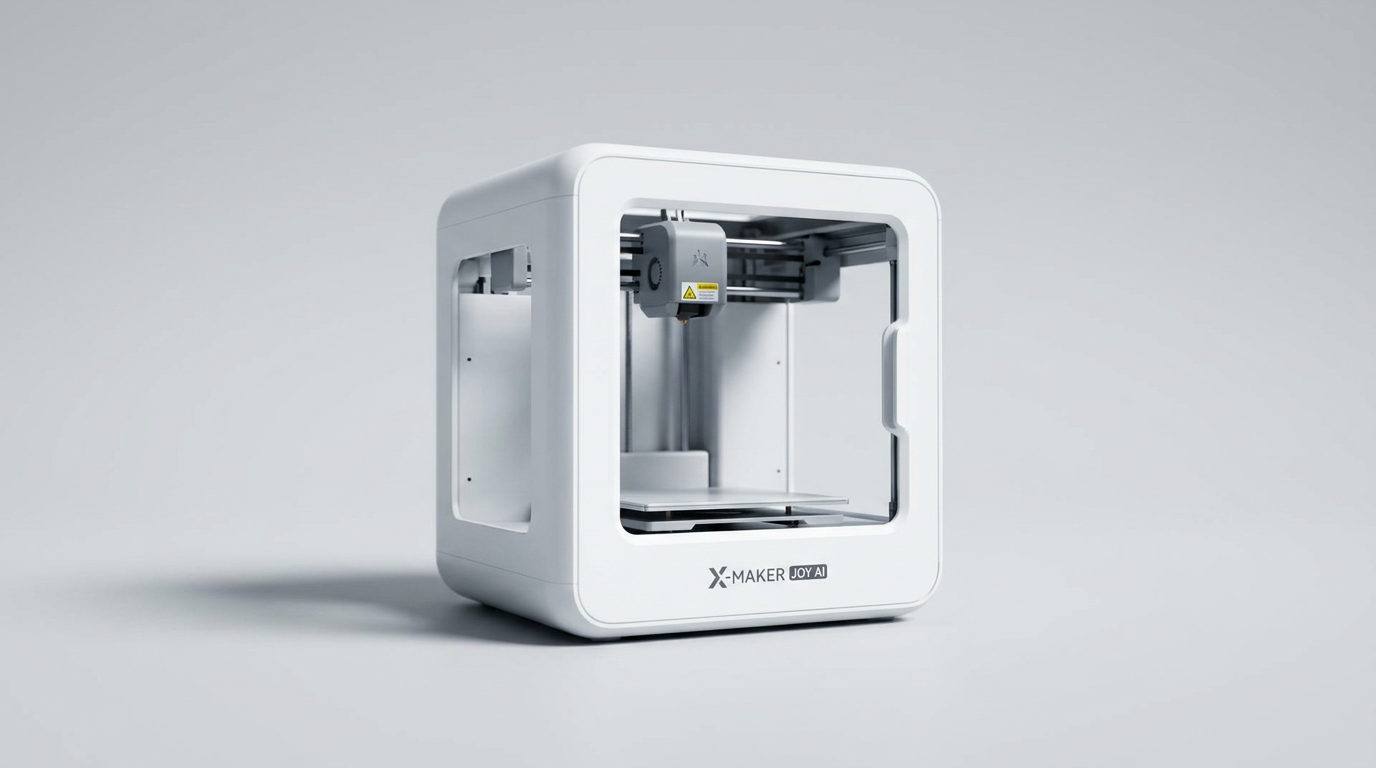
The AOSEED 3D Printer for Kids positions itself as an accessible entry point into additive manufacturing for young users, touting AI-driven creative tools and a simplified printing experience. Aimed at making 3D printing intuitive and engaging for children, this device emphasizes safety, ease of use, and a robust content library.
Its target audience-children and their parents seeking a plug-and-play creative outlet-suggests a strong focus on convenience and immediate gratification, departing from the more technical demands of traditional 3D printers. The manufacturer highlights features like AI Doodle, AI MiniMe, and MINIMAKIE as catalysts for imagination, suggesting a significant reliance on its integrated software ecosystem.
This review examines how the AOSEED 3D Printer performs in real-world scenarios, assessing its design, setup process, day-to-day operation, output quality, and overall reliability based on extensive user feedback. We evaluate whether its advertised simplicity translates into a genuinely positive experience for beginners and families.
What owners love
- + Simple setup and intuitive app operation for children
- + Fully enclosed design ensures user safety and quiet operation
- + Fast print speeds for smaller projects
- + Auto-leveling bed simplifies initial calibration
- + Includes sufficient filament and tools to begin printing immediately
Common complaints
- − Frequent app disconnects and printer errors reported
- − Filament often breaks or prints detach easily from the print bed
- − Single-color printing limits creative output
- − Prints can exhibit rough edges and stringing
- − Significant filament waste due to support structures
Design & Build
The AOSEED 3D Printer features a compact, fully enclosed design, a consistent highlight among owners who prioritize safety for younger users. The enclosure keeps high-temperature components inaccessible and contributes to a notably low operating noise level, making it suitable for bedrooms or shared family spaces without causing disturbance. The machine's build quality receives positive remarks, with multiple users describing it as solid and well-made. Owners appreciate the aesthetic, frequently noting its cute and modern appearance. The built-in LED light and internal camera are also valued features, allowing for observation of the printing process and remote monitoring via the companion app. Filament loading is generally considered straightforward, although some observe its single-color operation as a limitation.
Setup & Ease of Use
Setup is a primary strength of the AOSEED printer. Owners consistently report an easy, plug-and-play experience, with the device arriving pre-assembled. The auto-leveling print bed eliminates a common complexity of 3D printing, enabling users to begin printing quickly after unboxing. The accompanying app is widely praised for its user-friendliness and intuitive interface, allowing even young children to operate the printer independently. Connecting to Wi-Fi can present minor challenges for some. Despite initial enthusiasm for its simplicity, some users find the initial learning curve to be complicated, noting that getting it to work consistently requires some persistence.
Performance in Real Use
Print speed is generally perceived as good, particularly for smaller objects, which helps maintain children's engagement. Initial print quality is often described as impressive, with clean output, smooth layers, and good detail. However, this success is not universal; some experienced prints with rough edges, errant filament strings, or fuzz. A recurring issue involves prints with moving parts, which frequently fail to articulate correctly due to these imperfections. A more significant and widespread concern is the brittleness of the filament once printed; many creations reportedly break easily when being removed from the print mat, leading to frustration. The need for extensive support structures and rafts is noted, which contributes to significant filament waste and can make print removal difficult, sometimes damaging the object itself.
Software & Ecosystem
The AOSEED app and its integrated AI tools are central to the product's appeal. Owners highlight its kid-friendly design, extensive library of over 1,500 ready-to-print models, and features like AI Doodle for generating custom models from prompts. The AI Assistant and real-time print monitoring via the app camera further enhance the user experience. However, the software ecosystem is also a significant source of frustration for a notable number of users. Frequent app disconnects, glitches, and persistent errors are common complaints. Some owners report the app ceasing to function altogether after a month, displaying a 'white screen of death' even after reinstallation. This unreliability often leads to interrupted prints and considerable troubleshooting, undermining the printer's advertised ease of use.
Value & Reliability
The AOSEED 3D Printer aims to deliver an accessible 3D printing experience for children, offering a convenient, pre-assembled solution at a price point under $300. While many initially commend its ease of setup and the potential for creative engagement, long-term reliability and consistent performance emerge as critical issues. A notable segment of the user base reports persistent problems, including frequent print stalls, random error messages, and significant app instability. These issues often lead to wasted filament and considerable frustration, contradicting the expectation of a 'kid-friendly' device. For some, the printer became unreliable or stopped working entirely shortly after purchase, raising concerns about its overall longevity and justifying the investment.
Verdict
Hold Off - Persistent app issues and print reliability problems undermine an otherwise well-designed product.
This printer is suitable for families seeking an extremely simple entry into 3D printing, particularly if they prioritize a safe, enclosed design and a user-friendly app for basic, non-functional toy creation. Its quick setup and extensive model library offer immediate engagement for young children. Prepare for potential software frustrations and brittle finished prints if you decide to purchase in the under $300 range.
However, those seeking consistent print quality, reliable software performance, or the ability to create durable, functional objects should consider alternatives. The reported instability of the app and frequent printing errors indicate that this device may not generate a consistently positive experience. Owners requiring a robust and trouble-free 3D printing solution will likely find long-term satisfaction elsewhere, even if it means investing more.
FAQ
More 3D Printers reviews

Anycubic Kobra S1 ACE 2 Pro Combo Review: Enclosed Multicolor Value

FLASHFORGE AD5M Pro Review: High Speed Enclosure on a Budget

FLASHFORGE Creator 5 Pro Review: Multi-Toolhead Utility

QIDI Q2 3D Printer Review: High-Temp Power at a Consumer Price
Flashforge Adventurer 5M Smooth PC Plate Review

FLASHFORGE Creator 5 Pro Review: Multi-Toolhead Efficiency
This review is based on real experiences shared by owners in online communities.