
ANYCUBIC Photon Mono M7 PRO 14K Review: Fast, Detailed Resin Printing
By AValidReview. An AI-assisted summary of customer feedback, not a hands-on test.
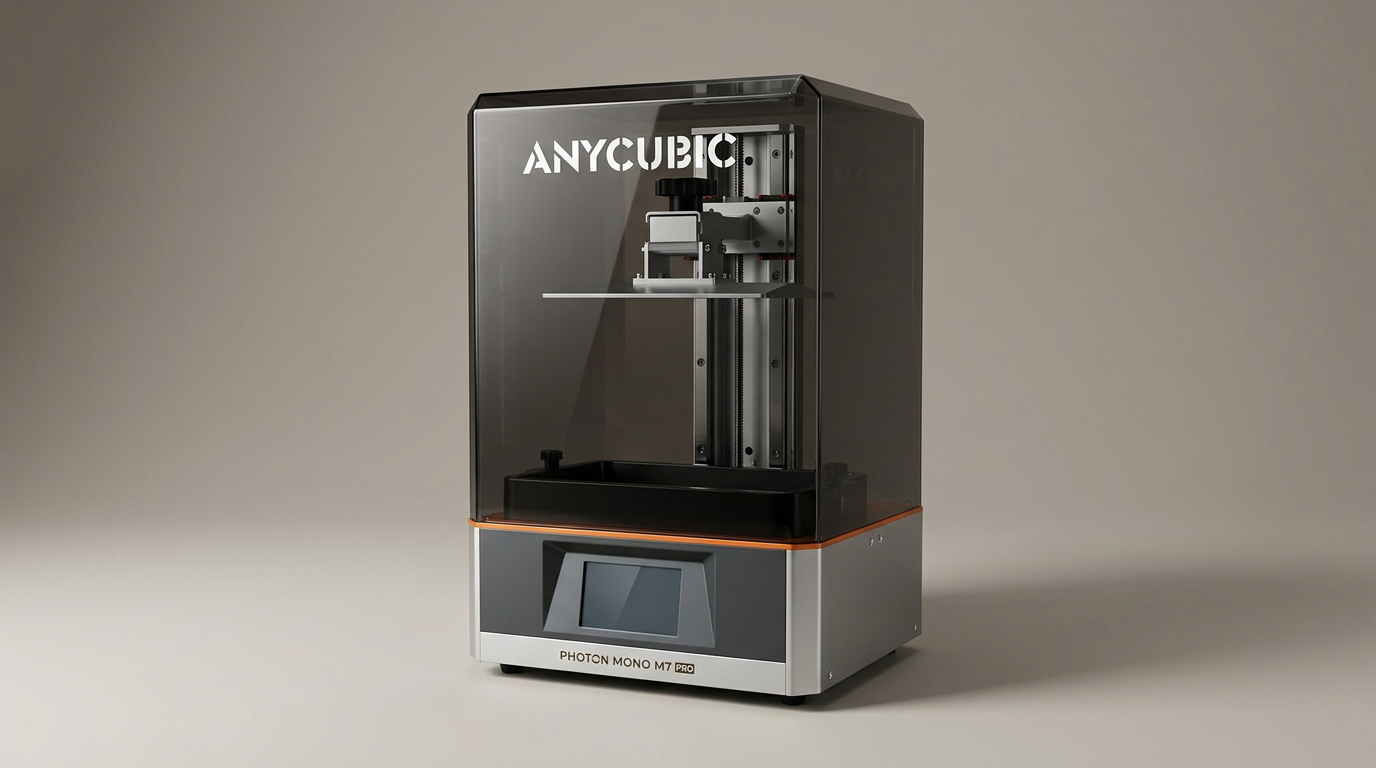
The ANYCUBIC Photon Mono M7 PRO 14K resin 3D printer arrives with substantial promises: ultra-fast speeds, a high-resolution 14K screen, and a suite of intelligent features designed to streamline the printing process. Positioned as a significant upgrade for both new and experienced users, the M7 PRO aims to deliver detailed models with improved efficiency. This review evaluates whether the printer lives up to these claims, examining its performance, usability, and long-term reliability through the lens of real-world user experiences.
What owners love
- + High print speed, reducing job completion times
- + Exceptional print detail and quality from 14K resolution
- + User-friendly for beginners, with simplified setup
- + Features like resin warming, auto-fill, and Wi-Fi improve workflow
- + Large build volume compared to smaller models
Common complaints
- − Frequent component failures reported by some long-term users
- − Auto-fill and heating features do not always function as expected
- − Customer service for parts and repairs can be slow
- − Claims of 'true 14K' resolution questioned by some users
- − Screen protector not pre-installed, raising cleanliness concerns
Design & Build
The ANYCUBIC Photon Mono M7 PRO presents a notably larger footprint compared to previous Anycubic models, reflecting its generous build volume. Owners consistently describe the overall build quality as robust, often noting it feels like a substantial upgrade from earlier, more basic printers. The design includes a dynamic temperature-controlled resin vat, an auto-fill and recycling mechanism, and an expanded array of intelligent detection features, such as residue and resin level monitoring. However, a recurring observation is that the top cover is somewhat heavy and bulky, which can be an inconvenience during access. Some users also report issues with the quality of the non-stick coating in the vat flaking off, prompting returns.
Setup & Ease of Use
A significant strength of the M7 PRO, frequently highlighted by users, is its ease of setup and operation. Many first-time 3D printer owners and beginners have found it intuitive, describing it as 'dummy proof' and 'plug and play.' Initial setup involves applying a screen protector, installing the vat, attaching accessories like the air purifier or auto pump, and filling the resin. The included software, often Anycubic's Photon Workshop or compatible third-party slicers like Chitubox, assists with file repairs and support generation, simplifying the pre-printing workflow. Auto-leveling is also a praised feature, with users reporting little need for manual adjustment. However, some instructions provided by the manufacturer are noted as lacking clarity or being outdated, referring to components like Allen screws when thumb screws are present.
Performance in Real Use
The M7 PRO generally delivers on its promise of fast and high-quality prints. Owners commend the rapid print speeds, citing significant reductions in job completion times compared to older models. The 14K monochrome LCD screen contributes to excellent detail and precision, with models exhibiting very fine features. While some users question whether the printer achieves a 'true 14K' in all practical applications, the consensus is that the output quality is superior. Features like Wi-Fi connectivity for remote printing from a PC or phone are considered significant improvements, though limitations to 2.4G networks are noted. The dynamic temperature-controlled resin vat and auto-fill functions are intended to optimize printing, but feedback indicates these features do not always work reliably or consistently. The resin warmer often only activates at the start of a print, and the auto-fill mechanism is occasionally slow or fails entirely, requiring manual intervention or replacement parts.
Software & Ecosystem
The M7 PRO leverages Anycubic's Photon Workshop software, which users generally find user-friendly, especially for beginners. The software provides tools for model repair and support generation. Integration with the Anycubic app and AI support is also available, assisting users with troubleshooting. However, some users have encountered connectivity issues, particularly with 5G networks, requiring reliance on 2.4G hotspots for remote printing. A recurring criticism relates to manufacturer support resources. While direct customer service receives mixed reviews, with some users reporting helpful assistance and others detailing slow responses and difficult part replacement processes, the quality of instructional videos is frequently cited as poor, lacking clarity, running too fast, and making assumptions about user expertise.
Value & Reliability
Priced in the mid-range for high-resolution resin printers, the M7 PRO offers strong value for its speed and print quality, especially for hobbyists and those needing prototypes. Many users consider it a worthwhile investment for high-quality output. However, long-term reliability is a significant concern. Multiple owners report recurring hardware failures, including power button malfunctions, leveling errors, FEP tears, and, most critically, UV LED component failures, sometimes occurring within months of purchase. The process of obtaining replacement parts and performing repairs is often described as challenging, with parts taking months to arrive from overseas and the expectation that users will perform complex disassembly themselves. This impacts the overall value proposition, as frequent downtime and the need for self-repair can diminish the user experience and increase true cost of ownership.
Verdict
Consider - The ANYCUBIC Photon Mono M7 PRO offers excellent print quality and speed, but its long-term reliability is a notable concern. It is a suitable option for active hobbyists or small businesses needing high-detail prototypes who are comfortable with potential self-repair and maintenance. Its ease of use makes it accessible for resin printing newcomers, provided they research pre-printing requirements. However, those seeking a truly set-and-forget experience or without technical aptitude should exercise caution, particularly given the reports of component failures and the sometimes-involved repair process.
FAQ
More 3D Printers reviews
Bambu Lab AMS lite Review: The Multi-Color Upgrade Dilemma
AOSEED AI 3D Printer for Kids Review: Capable Fun

Anycubic Kobra S1 ACE 2 Pro Combo Review: Enclosed Multicolor Value

FLASHFORGE AD5M Pro Review: High Speed Enclosure on a Budget

FLASHFORGE Creator 5 Pro Review: Multi-Toolhead Utility

QIDI Q2 3D Printer Review: High-Temp Power at a Consumer Price
This review is based on real experiences shared by owners in online communities.