
ANYCUBIC Photon Mono 4 Ultra Review: Speed Meets Detail
By AValidReview. An AI-assisted summary of customer feedback, not a hands-on test.
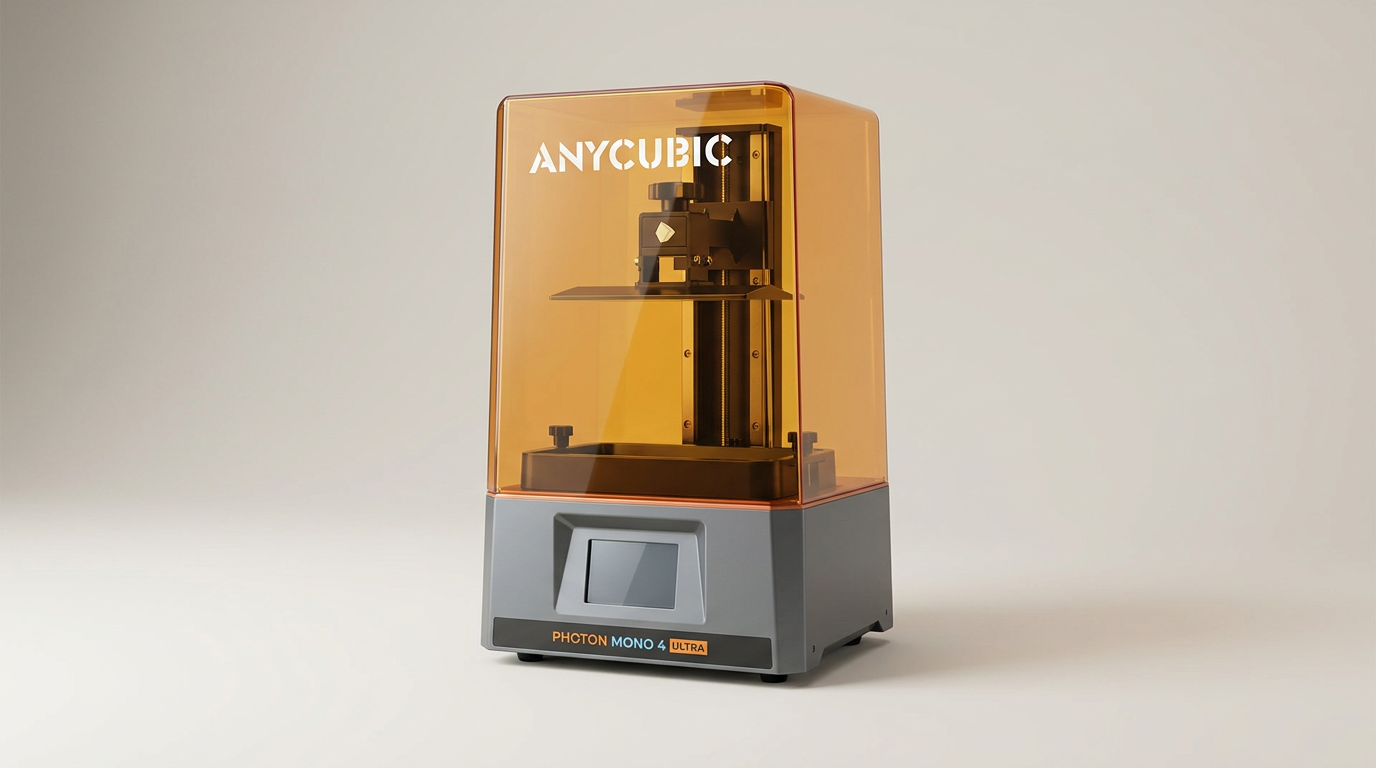
Resin 3D printing has long occupied a specific niche, prized for its intricate detail but often criticized for its slower operational speeds and messier workflows. The ANYCUBIC Photon Mono 4 Ultra steps into this arena with a clear mandate: deliver on precision while significantly accelerating the printing process. This is not merely an incremental update; it signals a market shift where high-resolution performance no longer demands a trade-off in printing velocity.
Traditionally, buyers had to choose between ultra-fine detail and production throughput. The Mono 4 Ultra challenges this dichotomy by integrating a 10K monochrome LCD with advanced film technology and intelligent release algorithms. Its primary appeal lies in this convergence, aiming to bridge the gap for users who need both minute accuracy for models like miniatures and the efficiency for larger batches or quicker iterations.
However, as with any device pushing boundaries, the real-world experience often uncovers nuances beyond the spec sheet. We examine whether the Mono 4 Ultra truly redefines the resin printing experience or if its innovations introduce new considerations for prospective owners.
What owners love
- + Delivers exceptional print detail and smooth surface finishes
- + Significantly faster print speeds compared to previous generations
- + User-friendly setup and operation, ideal for new users
- + Cloud printing and app control enhance workflow convenience
- + Strong build plate adhesion for consistent print success
Common complaints
- − Proprietary slicer software limits advanced functionality
- − Small build volume compared to some competitors
- − Some owners report issues with the specialized ACF film
- − Quality control issues, including premature screen failure, occur
- − Support responsiveness can be slow for critical issues
Design & Build
The Photon Mono 4 Ultra presents a familiar form factor within Anycubic's resin printer lineup, prioritizing a compact footprint. Its construction feels robust, with owners frequently noting its durability, which contributes to consistent performance. The inclusion of an 8mm T-type screw rod and precision guide rails underpins its mechanical stability, a critical factor for maintaining resolution across print layers. However, this focus on a smaller build volume is a trade-off. While the device excels at detailed, smaller objects, it mandates a "miniature-first" design philosophy that limits its utility for larger projects without significant model segmentation. This design choice, while practical for desktop use, defines its functional scope from the outset.
Setup & Ease of Use
Setting up the Photon Mono 4 Ultra is straightforward, aligning with Anycubic's reputation for accessibility. Owners report quick initial configuration, often stating the machine arrives pre-leveled or requires minimal adjustment to the build plate. The 4.3-inch touchscreen with its updated UI receives praise for intuitive navigation, making the initial learning curve gentle for beginners. This plug-and-play approach, sometimes referred to by owners as "Ez Pz first printer," contrasts with the more demanding calibration processes of some competitors, significantly lowering the barrier to entry for resin printing. The seamless setup experience is a cornerstone of its appeal, facilitating a rapid transition from unboxing to successful first prints.
Performance in Real Use
The Mono 4 Ultra consistently delivers on its promise of high-definition output. Its 10K LCD screen and COB light source achieve remarkable detail, rendering models with smooth surfaces and sharp features. Owners printing miniatures, gears, and terrain pieces report exceptional quality, often comparing it favorably to more expensive units. The advertised speed improvements are also borne out in practice; the combination of the ACF film and intelligent release algorithms enables significantly faster print times than previous generations, a notable achievement in a category often characterized by slow iteration. However, this "speed-detail dividend" is not without its operational caveats. Some users observe that while speed is improved, the specialized ACF film can be prone to issues, with reports of stretching or premature failure, which directly impacts print reliability and introduces a consumable cost consideration.
Software & Ecosystem
Anycubic aims to create a cohesive ecosystem around the Mono 4 Ultra, particularly through its app and cloud printing capabilities. The ability to monitor prints and initiate jobs remotely via Wi-Fi or Bluetooth is a frequently praised convenience, freeing users from direct tethering to the printer. This remote functionality, dubbed by some as the "untethered advantage," enhances workflow flexibility, especially for busy individuals. However, the proprietary nature of Anycubic's slicer software draws criticism. While functional for basic operations, it lacks advanced features found in third-party alternatives and is required for remote access, creating a potential vendor lock-in scenario. This limitation means users trade some software versatility for the convenience of the integrated app experience.
Value & Reliability
Priced in the upper-$200 to lower-$300 range, the Mono 4 Ultra offers strong value given its 10K resolution and speed capabilities. Many owners consider it an excellent purchase for the quality delivered. However, reliability presents a more mixed picture. While many units perform flawlessly, a minority of owners report significant issues, including defective units upon arrival or critical component failures, such as LCD screens breaking after minimal use. These instances, sometimes referred to as the "silicon lottery," highlight inconsistencies in manufacturing quality control. Furthermore, when issues arise, the manufacturer's support response is reportedly slow and can involve extensive troubleshooting demands on the user, affecting the overall ownership experience. The reliance on proprietary ACF films, while contributing to speed, also means higher replacement costs and limits user choice compared to standard FEP films.
Verdict
Buy - This printer delivers exceptional detail and speed for its class, making it a strong choice for miniature hobbyists.
This unit is best suited for users who prioritize fine detail in small to medium-sized prints, such as tabletop gaming enthusiasts, jewelry designers, or model makers. Its intuitive setup and integrated app make it a compelling option for beginners venturing into resin printing, or existing users seeking a speed and resolution upgrade without significant investment, especially in the sub-$350 segment. Those needing a larger build volume for industrial parts or large-scale prototyping should look elsewhere, as should users who demand fully open-source software control.
The Anycubic Photon Mono 4 Ultra represents a crucial inflection point, where the category's traditional trade-offs between speed and detail begin to dissolve. It establishes a new baseline for what affordable resin printers can achieve, pushing competitors to integrate similar innovations. However, the implicit "support tax" on the occasional hardware flaw or proprietary consumable is a quiet, ongoing cost that savvy buyers should factor into the equation, understanding that bleeding-edge performance at a lower price point sometimes comes with less robust after-sale assurances.
FAQ
More 3D Printers reviews
Anycubic ACE 2 Pro Review: Heated Multi-Material Feeding
Magic Jimmy AI 3D Printer for Kids Review
Bambu Lab AMS lite Review: The Multi-Color Upgrade Dilemma
AOSEED AI 3D Printer for Kids Review: Capable Fun

Anycubic Kobra S1 ACE 2 Pro Combo Review: Enclosed Multicolor Value

FLASHFORGE AD5M Pro Review: High Speed Enclosure on a Budget
This review is based on real experiences shared by owners in online communities.