
Anycubic Kobra X Combo Review: A Multicolor Speed Demon for All Skill Levels
By AValidReview. An AI-assisted summary of customer feedback, not a hands-on test.
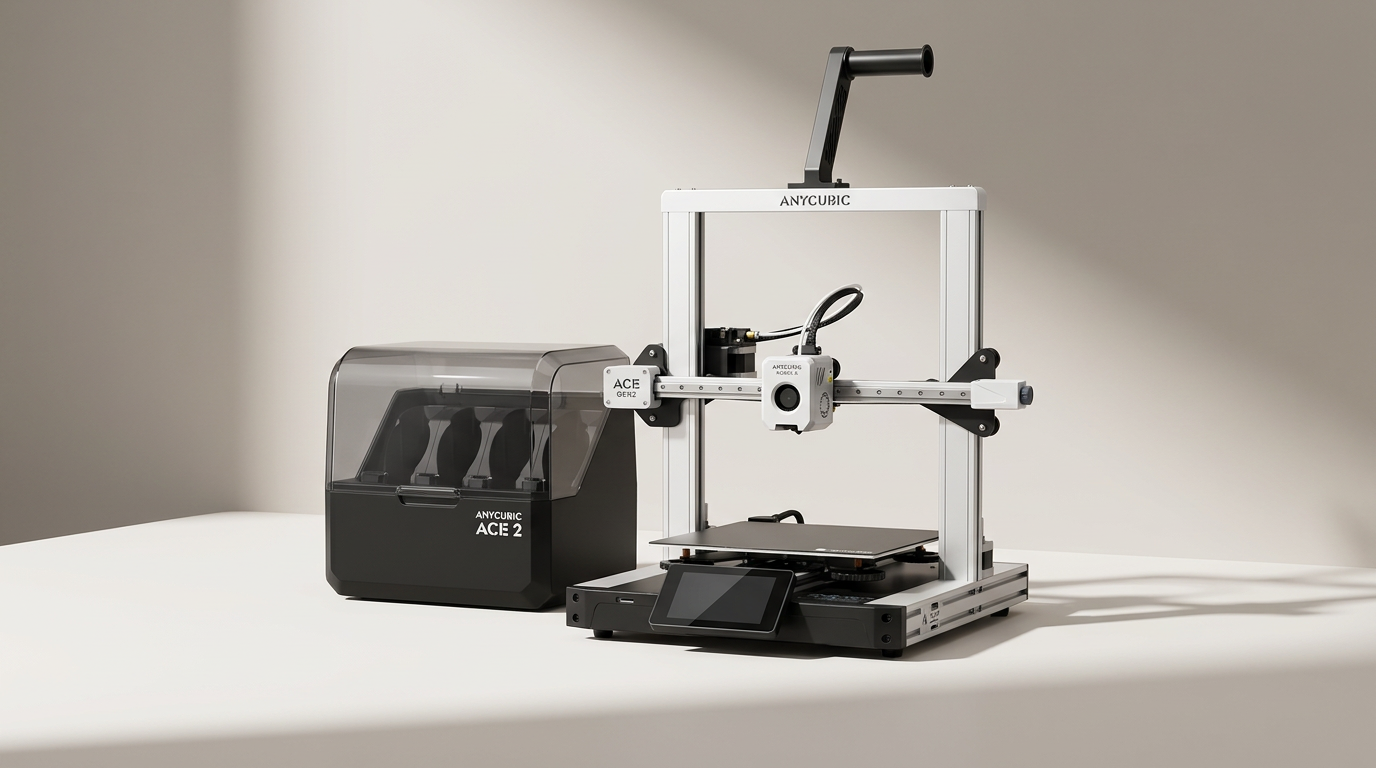
In a 3D printing landscape increasingly dominated by single-color high-speed workhorses, the Anycubic Kobra X Combo attempts a difficult balancing act: delivering fast, reliable multicolor printing without the typical steep learning curve or excessive material waste. Many manufacturers offer modular multicolor solutions that add complexity and cost, but Anycubic aims for a more integrated, 'out of the box' experience.
Historically, multi-material 3D printing has been the domain of dedicated enthusiasts, often requiring significant tuning and tolerating considerable filament purging. The Kobra X Combo with its ACE GEN 2 system promises to disrupt this by minimizing one of the core inefficiencies. This printer doesn't just chase speed benchmarks; it seeks to democratize advanced multi-color capabilities for a broader audience, from first-time users to print farm operators looking for efficiency.
What owners love
- + Native 7-color support with significant expansion potential
- + Greatly reduced purge waste via ACE GEN 2 technology
- + Impressive print speed and surface quality
- + Straightforward assembly and automatic calibration
- + Solid build quality and integrated AI monitoring
Common complaints
- − AI camera clarity receives mixed feedback
- − Requires significant clearance around the unit for operation
- − Support communication can sometimes end up in spam folders
- − Sensitivity to bed cleanliness for consistent adhesion
- − Occasional reports of filament jamming requiring intervention
Design & Build
The Anycubic Kobra X Combo presents a robust physical design, noted by owners for its solid, non-plastic feel. The grey metal frame provides a reassuring weight and stability, a departure from the perceived flimsiness of some competitors. This translates into confidence in the machine's durability during high-speed operations. The printer's footprint is substantial, however; users report it consumes nearly half of a 48x24 inch workshop table, necessitating ample clearance on all sides. This 'Desktop Dominance' means prospective buyers must account for a dedicated, spacious area for optimal operation and maintenance, a consideration often overlooked in initial purchasing decisions.
Setup & Ease of Use
A recurring theme among owners is the Kobra X Combo's accessible setup. Many report assembly times under 30 minutes, followed by an automated calibration process. The LeviQ 3.0 auto-leveling system, with its 49-point surface mapping, largely eliminates manual bed adjustments, a frequent hurdle for new users. This push-button readiness allows even first-time 3D printer owners to achieve successful prints quickly. While some minor confusion with connector types during assembly is noted, the overall experience positions the Kobra X Combo as a highly approachable machine, bridging the gap between hobbyist-grade assembly and commercial-grade 'out-of-box' functionality.
Performance in Real Use
The Kobra X Combo delivers on its promise of high-speed printing, with users consistently remarking on its rapid output compared to older or budget machines. The inclusion of dynamic flow calibration and vibration compensation contributes to impressive surface quality, even at elevated speeds. A standout feature is the ACE GEN 2 technology, which owners confirm drastically reduces filament purge waste- a significant cost and time saver in multicolor projects. The active drying function within the ACE 2 Pro further enhances reliability, particularly for hygroscopic filaments, helping to mitigate print failures related to moisture. This combination of speed, material efficiency, and drying represents a 'Multi-material Momentum' that sets it apart from many bed-slinger designs.
Software & Ecosystem
The printer integrates a comprehensive software suite and smart features. The 720P AI Camera offers spaghetti detection and foreign object alerts, providing a layer of security for unattended prints, though some users desire better image clarity. Remote management via the Anycubic App and Slicer, coupled with dual-band Wi-Fi, facilitates a connected workflow. Owners appreciate features like 'Part Skipping' for batch printing and power loss recovery, which add resilience to the printing process. The ecosystem fosters a modern, connected printing experience, allowing users to monitor and control jobs without constant physical oversight.
Value & Reliability
Many owners perceive the Kobra X Combo as offering strong value, especially for its feature set in the multi-color segment, positioning it as a contender against more established, expensive brands. While the vast majority report reliable operation, some instances of filament jamming have occurred, necessitating troubleshooting, often mitigated by consulting the Anycubic Wiki or adjusting settings. Customer support, while responsive, sometimes requires checking spam folders for replies. The product's overall reliability, paired with its advanced capabilities at a mid-range price point, suggests a strategic play by Anycubic to offer 'Advanced Affordability' in a category often associated with premium costs.
Verdict
Buy - The Anycubic Kobra X Combo offers exceptional value and multi-color capability for its price band, making advanced printing accessible.
This printer is an excellent choice for both experienced users seeking an efficient multi-color machine and beginners who want to bypass the steeper learning curve of older models. Its automated features and reduced purge waste make it particularly appealing for those looking to expand into multi-material projects without incurring significant filament cost or operational complexity. Those with limited workspace or an aversion to occasional troubleshooting may find its footprint and maintenance demands less ideal.
The Kobra X Combo represents a significant step in the "Integrated Utility" trend within 3D printing. Rather than just bolting on features, it aims to seamlessly blend high-speed, multicolor, and AI monitoring into a coherent, user-friendly package. This approach anticipates a market where advanced functionality isn't just an add-on, but an expected baseline for a truly productive desktop fabrication tool.
FAQ
More 3D Printers reviews

Anycubic Kobra S1 ACE 2 Pro Combo Review: Enclosed Multicolor Value

FLASHFORGE AD5M Pro Review: High Speed Enclosure on a Budget

FLASHFORGE Creator 5 Pro Review: Multi-Toolhead Utility

QIDI Q2 3D Printer Review: High-Temp Power at a Consumer Price
Flashforge Adventurer 5M Smooth PC Plate Review

FLASHFORGE Creator 5 Pro Review: Multi-Toolhead Efficiency
This review is based on real experiences shared by owners in online communities.