
Anycubic Kobra S1 Combo Review: Speed, Color, and a Steep Learning Curve
By AValidReview. An AI-assisted summary of customer feedback, not a hands-on test.
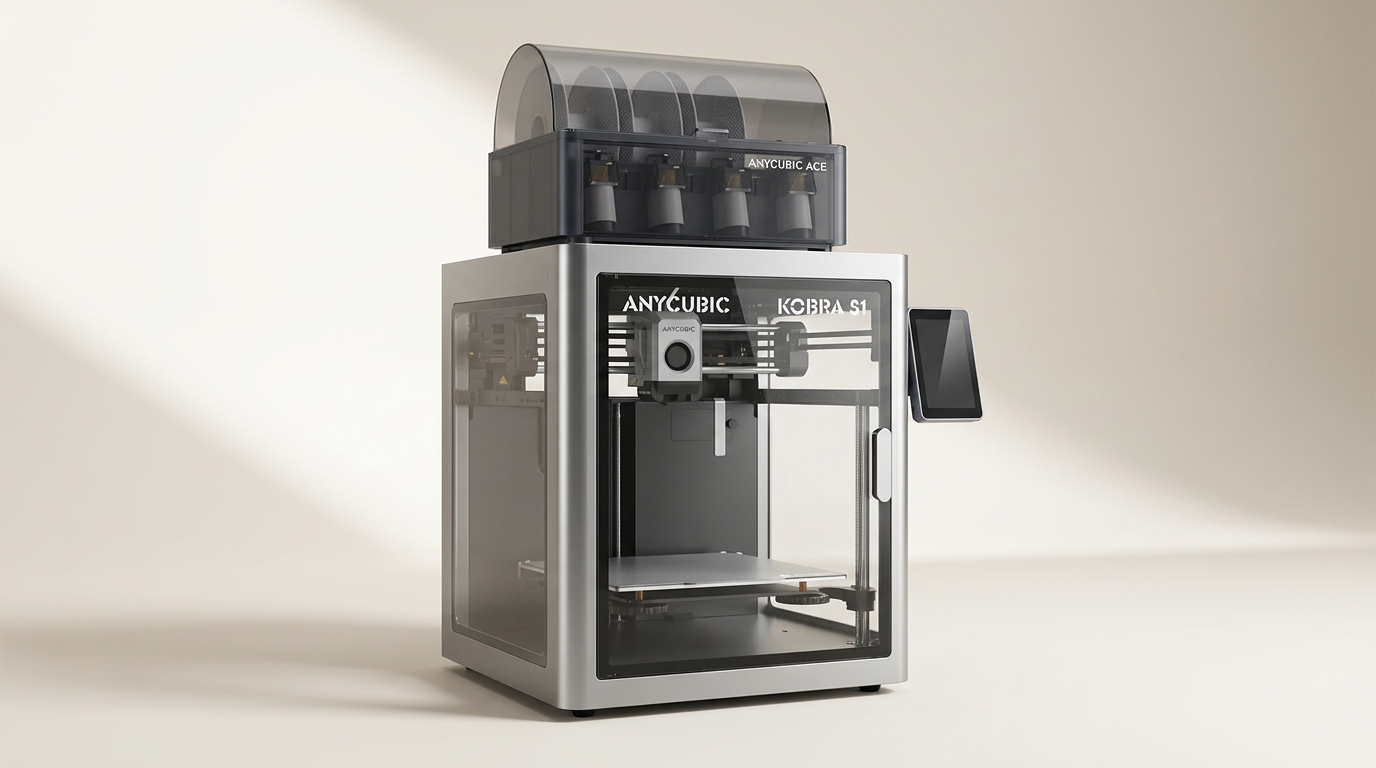
The Anycubic Kobra S1 Combo enters a competitive 3D printing landscape, offering high-speed, multicolor capabilities at a price point that undercuts many dedicated multi-material systems. It positions itself as an all-in-one solution for both novices and seasoned hobbyists looking to expand their creative output beyond single-color prints.
Yet, the true promise of this machine lies not just in its specifications, but in its ability to deliver consistent results across its complex feature set. Buyers are often drawn to the theoretical simplicity of its integrated ACE PRO filament dryer and multi-material system, anticipating a "plug and play" experience.
However, owner feedback suggests that while the Kobra S1 Combo can achieve impressive outcomes, it often demands a significant investment of time and troubleshooting, embodying the principle of "performance at a price"- not just financially, but in effort and patience.
What owners love
- + High print speeds dramatically reduce completion times
- + Multi-color printing with ACE PRO is effective when calibrated
- + Enclosed design maintains stable temperatures and reduces noise
- + Easy initial setup and auto-leveling streamlines first prints
- + Integrated filament dryer improves material handling and print quality
- + Responsive and helpful customer support for issue resolution
Common complaints
- − Notably loud during operation, despite enclosure
- − Proprietary slicer initially lacked full multi-color support
- − ACE PRO can be finicky with filament loading and smaller spools
- − Inconsistent dimensional accuracy reported by some users
- − Reliability concerns and component failures surfaced by long-term users
Design & Build
The Kobra S1 Combo presents as a well-appointed machine, featuring a Core XY stable structure and an enclosed print chamber. Owners frequently commend its aesthetic and robust feel, comparing it favorably to premium brands. The packaging receives consistent praise for its protective design, ensuring components arrive intact. The inclusion of quality tools for assembly further enhances the initial impression. However, the enclosure, while beneficial for thermal management and print consistency, does not entirely mitigate noise. Several users report that the printer operates loudly, which can be a significant factor in shared living or working spaces.
Setup & Ease of Use
Initial setup for the Kobra S1 Combo is generally described as straightforward. Many new owners, even those with limited 3D printing experience, report printing successfully within an hour of unboxing. The auto-leveling system and automatic Z-offset calibration are frequently cited as key features simplifying the pre-print process, though a few users noted the need for manual bed shimming due to significant initial variations. The integrated ACE PRO unit, designed for multi-color printing and filament drying, is often highlighted for its convenience. However, the multi-material system introduces a concept we term "the filament gate"- a point of frequent friction where proper filament trimming and firm insertion are critical to avoid feeding errors, despite its intended ease of use. This highlights a common tension between automated convenience and the nuanced requirements of advanced functions.
Performance in Real Use
The Kobra S1 Combo's headline feature-its speed-is consistently validated by owners. Prints complete significantly faster than on older FDM machines, often without a noticeable degradation in quality. The integrated filament dryer (ACE PRO) receives accolades for improving print reliability, especially with hygroscopic materials. Multi-color functionality, once properly configured, yields impressive results, with users producing complex, multi-material objects. However, this performance is not universally consistent. Some owners report issues with dimensional accuracy, rendering the machine less suitable for parts requiring precise tolerances. Additionally, the advertised AI detection features are often described as immature or non-functional, suggesting a gap between marketing claims and current real-world utility.
Software & Ecosystem
The software experience with the Kobra S1 Combo has been a point of evolution. Early adopters noted a lack of full multi-color support in the proprietary slicer, a significant impediment for a multi-material printer. Anycubic has since addressed this, releasing updated slicer versions that enable full multi-color model slicing. The Anycubic app offers remote control and monitoring, enhancing workflow for many users. However, network configuration can pose a challenge, particularly for routers with combined 2.4GHz and 5GHz WiFi channels. The ecosystem, while improving, still carries some hallmarks of a developing platform, requiring users to adapt to ongoing updates and occasionally navigate technical support channels for solutions. This reflects a common pattern in the rapidly iterating 3D printer market, where hardware often outpaces immediate software polish.
Value & Reliability
Positioned in the mid-range of enthusiast 3D printers, typically in the $500 to $600 range, the Kobra S1 Combo offers substantial features for its price, particularly the integrated multi-color system and filament dryer. Many owners view it as a strong value proposition, especially for those upgrading from entry-level single-color machines. Reliability, however, presents a more varied picture. While many users report hundreds of hours of flawless printing, a subset has encountered significant issues, including component failures (hot ends, extruders) and persistent error codes, sometimes within weeks of purchase. Anycubic's customer support is frequently praised for its responsiveness and willingness to replace parts or entire units, which mitigates some of these concerns. This creates what we call "the support lottery"- where product longevity can depend as much on post-purchase service as initial build quality, a common variable in this segment.
Verdict
Consider - The Anycubic Kobra S1 Combo delivers a compelling feature set for its price, but demands user engagement for consistent results.
This printer is suitable for hobbyists seeking high-speed, multi-color capabilities without investing in premium brands, provided they possess a willingness to troubleshoot and learn. It offers a significant upgrade path for those moving beyond basic single-extruder machines. Individuals who prioritize extensive features at a competitive price, and are comfortable with a developing software ecosystem, will find value here.
Conversely, buyers expecting a perfectly polished, plug-and-play experience with zero learning curve should look elsewhere. Those who require absolute dimensional accuracy for critical functional parts, or who prioritize whisper-quiet operation, may find this machine falls short. Its "performance-by-tinkering" nature means it's not for users seeking an appliance-like experience.
The Kobra S1 Combo epitomizes the "prosumer paradox" in 3D printing: it provides advanced features at an accessible price, but often translates the cost savings from hardware into an increased investment of user time and technical literacy. This makes it an ideal fit for the enthusiastic tinkerer, rather than the casual operator, distinguishing it as a tool that truly rewards active participation.
FAQ
More 3D Printers reviews
Anycubic Kobra S1 Max Combo Review: Industrial Scale for Less
ugee Funbox 3D Printer Review: Safe Household Making
Original Prusa CORE One+ Kit Review: The Maker's CoreXY
ANYCUBIC Photon P1 Max Review: Scale Meets Detail
Anycubic Kobra S1 ACE 2 Pro Combo 3D Printer Review
Toybox Alpha Two 3D Printer Review: The Zero-Fuss Toy Factory
This review is based on real experiences shared by owners in online communities.