
Anycubic Kobra S1 Combo Review: A Multi-Color Entry Point
By AValidReview. An AI-assisted summary of customer feedback, not a hands-on test.
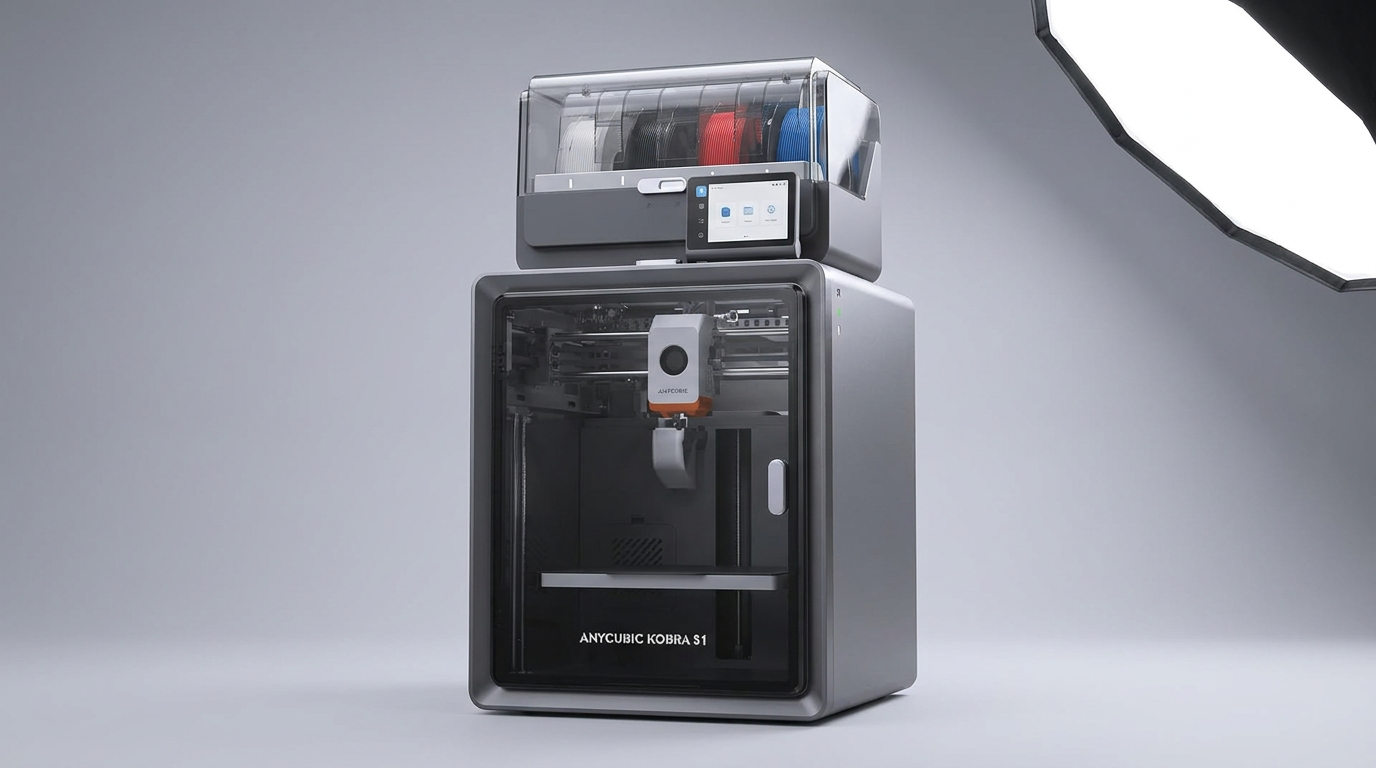
The 3D printing landscape is experiencing a new acceleration, with manufacturers pushing for higher speeds and multi-color capabilities at more accessible price points. The Anycubic Kobra S1 Combo enters this evolving arena, aiming to democratize multi-color printing with its integrated Anycubic ACE Pro system and a claimed 600mm/s print speed. This combination positions it as a direct challenge to more established, and often more expensive, multi-material solutions.
Yet, the pursuit of advanced features at a competitive price often introduces trade-offs. The Kobra S1 Combo presents an intriguing proposition for those seeking to expand beyond single-color prints without a significant financial leap. Its success hinges on balancing the ambition of multi-color production with the realities of day-to-day reliability and user experience. This review evaluates whether the Kobra S1 Combo delivers on its promise, or if its feature set introduces an unseen friction cost to the user experience.
What owners love
- + Delivers consistent, high-quality prints for single and multi-color jobs.
- + User-friendly setup and operation, suitable for beginners.
- + Integrated ACE Pro filament dryer significantly improves material handling.
- + Capable of printing diverse materials including PLA, PETG, ABS, ASA, Nylon, and CF-PLA.
- + Strong value proposition compared to other multi-color systems.
Common complaints
- − Multi-color printing generates significant filament waste.
- − ACE Pro system can be finicky with filament feeding and specific materials like TPU.
- − Software experience requires patience, particularly with non-PLA filaments.
- − Some units experience persistent mechanical issues like hotend drops or jamming.
- − Customer support response times and effectiveness are inconsistent.
Design & Build
The Anycubic Kobra S1 Combo arrives as a substantial, enclosed unit. Owners frequently commend its robust build quality, noting a significant improvement over older machines. The internal layout, which secures the multi-color add-on inside, is efficient but extends unboxing and initial setup time beyond what a quick-start guide might suggest. The machine's weight and the vibration during high-speed printing suggest a need for a stable foundation. While the design facilitates a quieter operation than many open-frame printers, it is not entirely silent, particularly when in a hobby room. The enclosure, a core design choice, helps maintain thermal stability for challenging materials like ABS and ASA, and owners report successful prints with these materials.
Setup & Ease of Use
Initial setup of the Kobra S1 Combo is generally straightforward, provided users meticulously follow instructions, which often means dedicating several hours. Many owners, even those new to 3D printing, report successfully getting the machine to print reliably out of the box. The auto-leveling system receives praise for contributing to nearly foolproof initial prints. However, a recurring point of friction is the lack of immediate Z-height adjustment on the fly, forcing adjustments within the slicer and requiring new print starts. While the integrated ACE Pro unit is appreciated for its drying capabilities, some users find it occasionally finicky with filament feeding, especially when troubleshooting jams or working with materials like TPU. This suggests a "first-layer cliff" dynamic where the initial successful prints are easy, but deeper troubleshooting requires more effort.
Performance in Real Use
The Kobra S1 Combo generally performs well across a range of filaments, including PLA, PETG, ABS, ASA, Nylon, and carbon fiber-infused PLA. Many owners report consistent, high-quality prints with strong layer adhesion and clean lines, often surpassing expectations for its price bracket. The ACE Pro's active drying function is a significant advantage, ensuring filaments remain in optimal condition, particularly for multi-material prints. However, multi-color printing, while effective, incurs a noticeable "purge cost" in filament waste. Some users encounter initial software issues or filament feeding problems, but often resolve them through firmware updates or basic troubleshooting. The high-temperature hotend (320°C) and heated bed (120°C) are key enablers for printing engineering-grade materials, broadening the printer's utility beyond hobbyist applications.
Software & Ecosystem
The Anycubic Slicer Next is the recommended software, offering pre-configured parameters for various filaments. While it supports basic PLA printing effectively, owners note that for other materials, users often need to employ the generic AnycubicSlicer to gain finer control over temperature, supports, and speeds. The Anycubic App provides remote control and time-lapse recording, adding convenience. However, a limitation for some users is the slicer's platform compatibility, with official support for Ubuntu, Windows, and Mac, but not other Linux distributions. The printer's camera enables AI monitoring and belt tension monitoring, contributing to print precision and reducing disruptions. This integrated ecosystem, while functional, occasionally demands user intervention and external knowledge, reflecting a "developer's footprint" in its design rather than a fully polished, turnkey experience.
Value & Reliability
The Anycubic Kobra S1 Combo consistently receives praise for its strong value, particularly when factoring in its multi-color capabilities and speed at a price point around $500. Owners frequently compare it favorably to more expensive competitors, asserting it delivers comparable quality. Long-term reliability reports are mixed but generally positive, with several users logging hundreds of hours without major mechanical failures. When issues do arise, particularly for newer users, they often stem from operator error, incorrect settings, or old filament. However, some owners report significant problems like persistent jamming, hotend drops, or filament sensor failures, leading to frustrating downtime. Anycubic's support team is described as responsive in some instances, providing replacement parts and guidance, but other users experience delays or unaddressed tickets, indicating inconsistency in the support experience.
Verdict
Buy - The Anycubic Kobra S1 Combo offers compelling multi-color capabilities and high-speed printing at a value-driven price point.
This printer is an excellent choice for experienced hobbyists or small businesses seeking to explore multi-color 3D printing without committing to the premium price of some competitors. Its robust build, integrated filament drying, and ability to handle diverse materials make it a powerful tool for those willing to invest time in learning its nuances. New users should proceed with a willingness to learn about slicing software and material properties, as the Kobra S1 Combo provides a rich but not entirely automated experience.
The Kobra S1 Combo represents a significant step towards the mainstreaming of multi-color 3D printing. Its core strength lies in establishing a new "price-performance frontier" for multi-material systems. While it may demand a small amount of user patience to fully unlock its potential, its ability to deliver complex prints at speed, without the typical cost penalty, fundamentally shifts expectations for what an enthusiast-grade machine can achieve.
FAQ
More 3D Printers reviews
Anycubic Kobra S1 Max Combo Review: Industrial Scale for Less
ugee Funbox 3D Printer Review: Safe Household Making
Original Prusa CORE One+ Kit Review: The Maker's CoreXY
ANYCUBIC Photon P1 Max Review: Scale Meets Detail
Anycubic Kobra S1 ACE 2 Pro Combo 3D Printer Review
Toybox Alpha Two 3D Printer Review: The Zero-Fuss Toy Factory
This review is based on real experiences shared by owners in online communities.