
Anycubic ACE 2 Pro Review: Heated Multi-Material Feeding
By AValidReview. An AI-assisted summary of customer feedback, not a hands-on test.
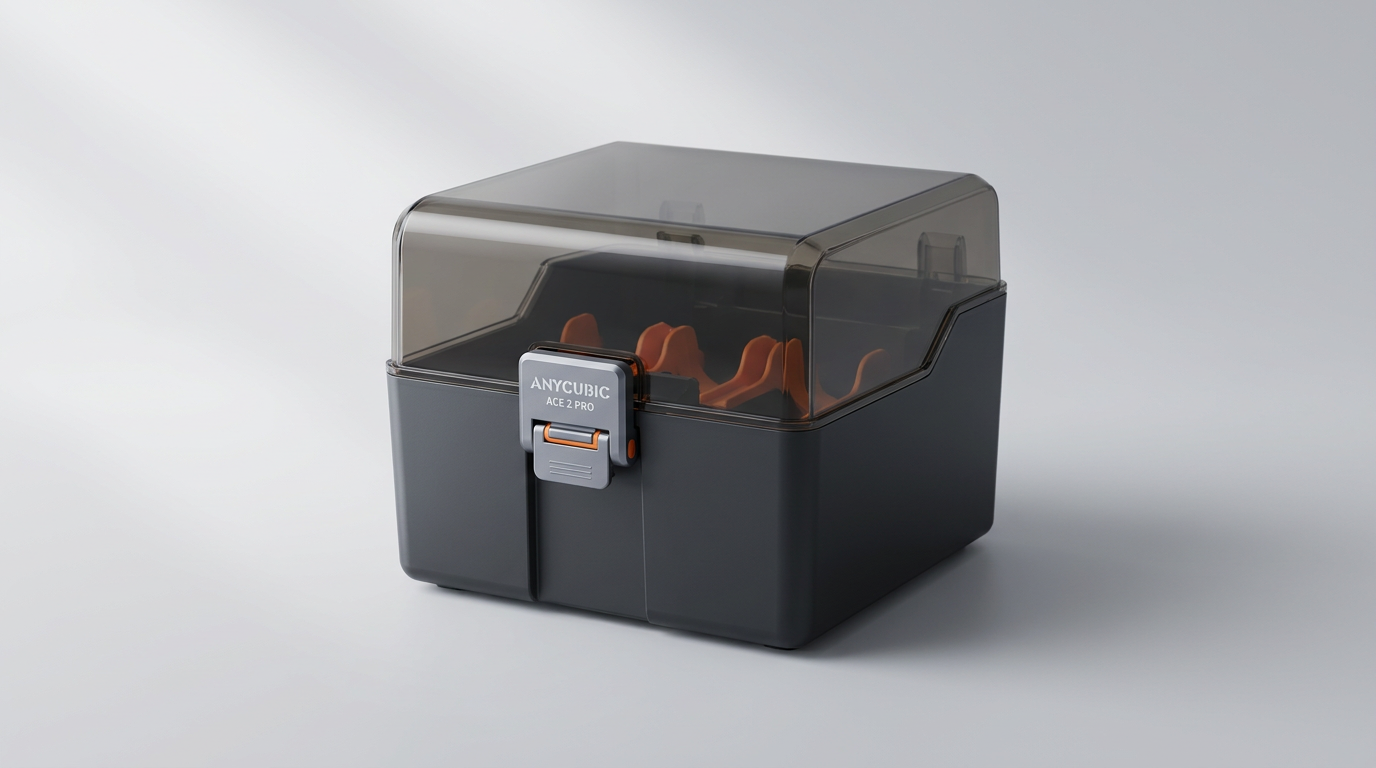
Multi-material 3D printing has spent years trapped between two flawed options: unheated automated feeders that let hygroscopic filament turn brittle mid-spool, or standalone dry boxes that demand manual reloading for every color swap. The Anycubic ACE 2 Pro attempts to bridge that divide. Rather than treating spool storage as passive buffering, this four-bay unit acts as an active conditioning chamber, baking spools at up to 65 degrees Celsius while running multi-color prints. On paper, it addresses the single largest operational headache in desktop printing.
Yet bridging thermal management with mechanical feeding introduces friction of its own. Second-generation hardware often fixes old sins while revealing new bottlenecks, and the ACE 2 Pro is no exception. While it runs circles around the original ACE Pro in feeder smoothness and motor authority, it encounters what we call the spool tax: an unforgiving mechanical tolerance that balks at cardboard spools and third-party geometries.
For owners of the Kobra X and Kobra S1, the ACE 2 Pro represents Anycubic's bid for ecosystem parity against rival automated material systems. The hardware leap is real, but the operational realities demand a clear-eyed look at what this box actually delivers once the spool begins to unwind.
What owners love
- + Effective active drying down to low ambient humidity during live printing
- + Noticeable motor torque and feeding improvements over the first-generation unit
- + Reliable automated color switching on clean, compatible spools
- + Tight seal prevents ambient moisture ingress between print jobs
Common complaints
- − Cardboard and non-standard third-party spools frequently catch on roller tracks
- − Included paper setup documentation is sparse and unhelpful
- − Customer support responsiveness and replacement part sourcing remain weak
- − Noticeable cooling and heating fan noise during sustained drying cycles
Design & Build
The Anycubic ACE 2 Pro is built around an integrated active heating core and four brushless feeder motors. Unlike basic passive enclosures that rely on desiccant packs, this chassis features dedicated internal heating and circulation fans capable of reaching 65 degrees Celsius. The enclosure seals shut with authority, keeping hygroscopic materials like PETG and TPU shielded from ambient shop humidity. However, the internal roller tracks reveal a distinct design compromise. Anycubic engineered the internal bay around smooth, standard plastic spools. Owners using cardboard spools consistently run into edge deformation and dragging along the internal tracks, which triggers false resistance warnings or outright stalls. The unit also requires proprietary communication cabling that can be difficult to reroute or replace if damaged.
Setup & Ease of Use
Getting the ACE 2 Pro out of the packaging is straightforward, but the included physical instructions are virtually useless. Owners routinely report that bypassing the printed booklet and relying on online community diagrams is the only way to avoid misrouting the PTFE tubes and communication harness. Once connected to a Kobra X or Kobra S1, the machine recognizes the unit cleanly. The physical loading mechanism is far simpler than older multi-material accessories, relying on motorized pre-feeders that draw filament into the hub with minimal manual push. The interface on the host printer handles slot assignment reasonably well, though the physical spacing around the feed funnels can feel cramped when clearing filament tips.
Performance in Real Use
In daily operation, the active conditioning makes an immediate impact on print quality. By dropping internal spool moisture from typical room levels above 50 percent down below 25 percent in just a few hours, stringing and surface bubbling disappear on long PETG runs. Filament retractions and color swaps happen cleanly thanks to the upgraded brushless drive motors, which completely outclass the underpowered feed mechanisms of the original ACE Pro. The trade-off is acoustic. The chamber fan produces an audible, constant hum that rules out whisper-quiet office operation. Furthermore, false clog errors occasionally surface when the tension sensors misinterpret spool drag as a toolhead jam, interrupting multi-hour print queues without cause.
Software & Ecosystem
The ecosystem experience is where Anycubic's marketing runs into what we call the palette lock. Anycubic promotes complex setups reaching 7 or more colors when paired with specific printers, but users quickly discover that bridging external spools with the ACE 2 Pro feeder requires explicit routing compromises that the slicer software does not always handle gracefully. Slicing multi-color files through the Anycubic app is serviceable, offering standard purge calibration and color painting tools that outpace budget competitors. However, error recovery logic remains unpolished. When a feeding fault occurs, the software often leaves the user guessing whether the issue is a genuine nozzle backup or a spool snag inside the dryer bay.
Value & Reliability
Priced in the $300 to $350 range, the ACE 2 Pro represents a serious financial investment relative to the cost of the base printer. The hardware improvements over the original generation are genuine: the motors do not overheat, the shell retains heat well, and print success rates on supported spools are respectable. Reliability over extended months is more mixed. Multiple users report internal fan degradation within the first four months of ownership, followed by silence from official support channels. When a proprietary sensor adapter or feed motor fails, the lack of immediate spare part availability turns an otherwise functional production tool into dead desk weight.
Verdict
Consider - Active drying solves wet filament headaches, but spool pickiness and customer support voids temper the overall value.
Buy the ACE 2 Pro if you already own a Kobra X or Kobra S1, print extensively with moisture-sensitive filaments like PETG or TPU, and standard plastic spools dominate your material rack. For this workflow, having active 65-degree drying paired with automated color changes eliminates an entire stage of manual prep work.
Skip it if your inventory relies on cardboard spools from third-party manufacturers, or if you expect immediate turnarounds from customer service when components fail. If you only print dry PLA in short single-color batches, the mechanical complexity and fan noise will outweigh the benefits.
The ACE 2 Pro proves that combining active thermal dehydration with motorized filament routing is the correct trajectory for desktop 3D printing. However, Anycubic has treated the mechanical feed tolerances as an afterthought, shifting the burden onto owners to respool third-party materials. It is a capable upgrade for disciplined users, but far from the universal filament appliance it claims to be.
FAQ
More 3D Printers reviews
Magic Jimmy AI 3D Printer for Kids Review
Bambu Lab AMS lite Review: The Multi-Color Upgrade Dilemma
AOSEED AI 3D Printer for Kids Review: Capable Fun

Anycubic Kobra S1 ACE 2 Pro Combo Review: Enclosed Multicolor Value

FLASHFORGE AD5M Pro Review: High Speed Enclosure on a Budget

FLASHFORGE Creator 5 Pro Review: Multi-Toolhead Utility
This review is based on real experiences shared by owners in online communities.