
SUNLU Filament Dryer S2 Review: A Smart Upgrade for 3D Printing
This review is based on real experiences shared by owners in online communities.
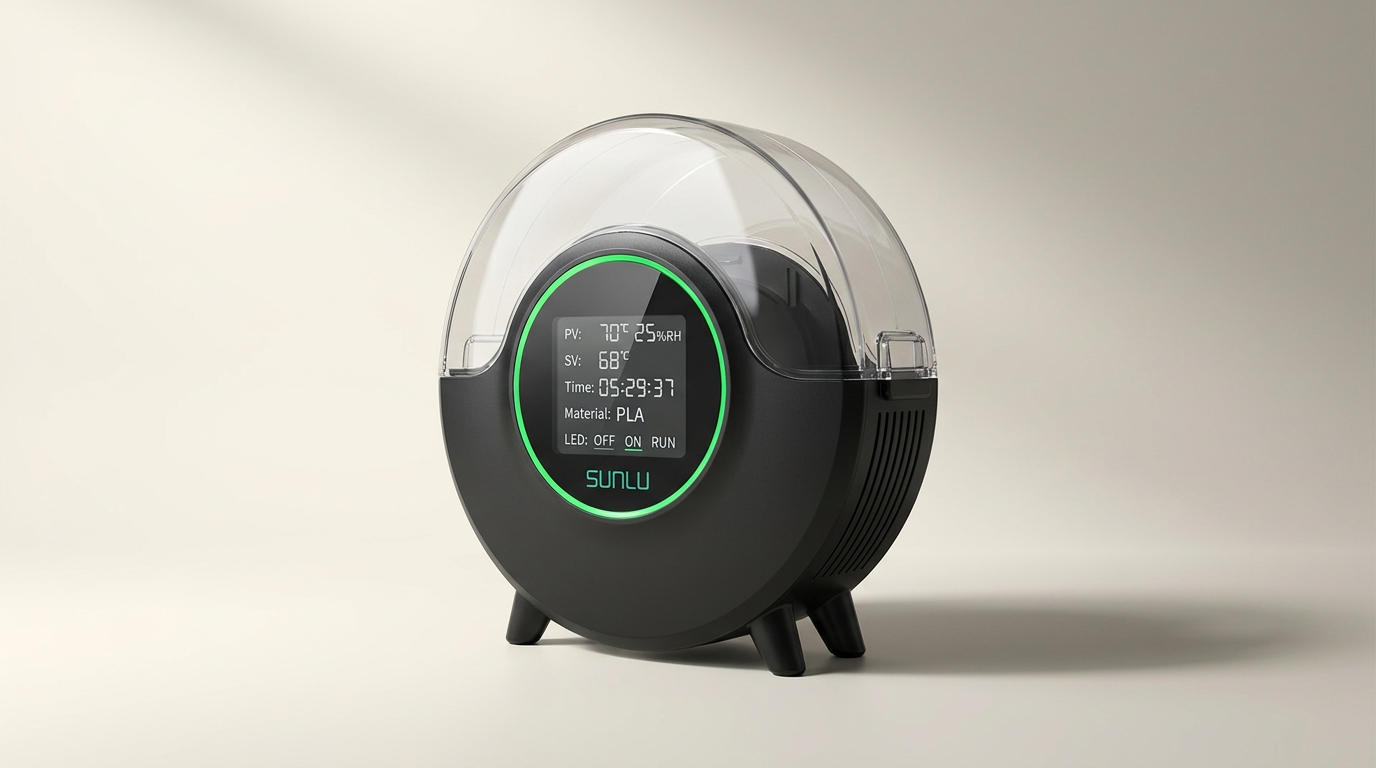
The 3D printing landscape has gradually shifted from focusing solely on printer hardware to optimizing the material itself. While high-end printers command attention, the humble filament dryer, often seen as an accessory, has become a critical tool for print quality. The SUNLU S2 enters this evolved market not as a revolutionary device, but as a refinement of an essential one, acknowledging that consistent material conditions are as vital as precise extrusion.
Moisture absorption is the silent killer of print quality, manifesting as stringing, clogs, and poor layer adhesion. Many users initially blame printer settings or component failures, overlooking the filament's hydration level. The S2, with its dual heating elements and integrated fan, targets this fundamental problem directly, aiming to restore compromised filament to optimal printing condition, even for challenging materials like nylon.
This review evaluates whether the S2 delivers on its promise of consistent, reliable filament drying, and if its iterative improvements over previous generations genuinely address the practical needs of a diverse 3D printing community, from hobbyists to those tackling engineering-grade resins.
What owners love
- + Effective at reviving old, moisture-laden filament
- + Intuitive 4.6-inch LCD touchscreen with real-time data
- + 360-degree heating and integrated fan for even drying
- + Quiet operation suitable for continuous use
- + Accommodates various filament types, including nylon
- + Allows printing directly from the unit
Common complaints
- − Power cord length is restrictive for some setups
- − Tinted lid obstructs visibility of remaining filament
- − Top-only filament feed holes limit placement options
- − Lack of adequate venting requires user-made modifications
- − Temperature limited to 70C for some demanding materials
Design & Build
The SUNLU S2 presents a clean, modern aesthetic, a noted improvement over its predecessor, the S1. Its compact form factor is generally well-received, allowing it to integrate into various printing enclosures or workstations without occupying excessive space. The primary design feature is the 4.6-inch LCD touchscreen, which provides clear, immediate feedback on temperature, humidity, and remaining drying time. While owners praise its functionality, some note the capacitive screen is not as responsive as contemporary smartphone displays, presenting a minor interface friction. A recurring design compromise is the tinted plastic lid. While it contributes to the unit's sleek appearance, it significantly hinders visibility of the filament spool, forcing users to interrupt drying cycles to check material levels. This oversight, common in many filament dryers, creates an unnecessary point of interaction and undermines the 'set-it-and-forget-it' ideal.
Setup & Ease of Use
Owners report a straightforward setup experience for the S2, though a common initial hurdle involves powering the unit on, which requires a double-tap of the button, a detail often missed in quick-start guides. Once powered, the touchscreen interface is largely intuitive, allowing for easy adjustment of temperature and time settings. The device accommodates single spools up to 210x85mm, covering standard filament sizes. Its compatibility with various filament types, from PLA to TPU and nylon, makes it a versatile tool. Owners particularly appreciate the real-time humidity readings, which reduce guesswork and provide confidence that filament is adequately dried. This real-time metric acts as a crucial feedback loop, signifying the true end of a drying cycle rather than relying solely on pre-set timers. However, the short power cord presents a practical challenge for placement, often necessitating an extension. This detail, while minor, impacts workstation organization and flexibility.
Performance in Real Use
The S2 consistently delivers on its core promise: effectively removing moisture from filament. Users frequently report a dramatic improvement in print quality, citing the elimination of stringing, clogs, and improved layer adhesion. Its dual heating sheets and 360-degree heating fan contribute to even temperature distribution, which is critical for consistent drying across the entire spool. This is particularly evident with challenging materials like nylon and older, poorly stored filament, which the S2 revives to 'pearly-clear' print quality. The unit's ability to reach 70C is sufficient for most common filaments, although some engineering-grade materials, such as specific nylon formulations, recommend drying at higher temperatures (e.g., 100C). For these materials, users compensate by extending drying times, accepting a trade-off in efficiency. A significant point of friction is what we call the 'humidity retention tax': the internal design's tendency to retain released moisture. Many owners find they need to either print or create a vent piece to crack the lid to allow humidity to escape effectively, before sealing it for a final drying phase. Without this modification, the internal humidity can stabilize at higher levels, negating some of the drying effort.
Software & Ecosystem
The S2's embedded software, primarily managed through its touchscreen, is designed for simplicity and direct control. It provides essential data points: temperature, humidity, filament type, and countdown time. While not a complex operating system, its clear display and responsive controls are a significant upgrade from button-driven interfaces. The lack of detailed online instructions is a minor complaint, though most functions are self-explanatory. The S2 operates as a standalone unit, without external connectivity or integration into broader smart home or 3D printing ecosystems. Its value proposition is in its dedicated function as a reliable filament dryer rather than as a networked peripheral. The 'one-click operation' marketing refers to its ease of setting basic parameters, not advanced automation. For users with multiple dryers, like the SUNLU S1 or S4, the S2 fits into a common operational pattern, serving as a robust single-spool solution.
Value & Reliability
Priced in the upper $30 range, the SUNLU S2 represents a strong value proposition within the filament dryer market. Its ability to revive otherwise unusable filament quickly offsets its initial cost by preventing material waste and failed prints. Owners consistently praise its reliability, noting that it performs its intended function without issue over extended periods. The build quality feels substantial, and the quiet operation contributes to a positive user experience, particularly when running for long drying cycles. The S2's focus on essential features, coupled with effective execution, ensures it remains a worthwhile investment. Its core reliability is its most compelling feature, turning what was once a source of print frustration into a predictable, manageable variable. The 'set and forget' ideal is largely achieved, provided users address the minor humidity venting issue.
Verdict
Buy - The SUNLU S2 effectively resolves common moisture-related printing issues, offering significant value for its price.
This dryer is ideal for any 3D printer owner experiencing inconsistent print quality, especially those working with hygroscopic materials like PETG, Nylon, or older filament spools. It serves both casual hobbyists looking for a reliable solution and advanced users seeking to optimize engineering resins. Those who prioritize a streamlined workflow and a clear display will appreciate its intuitive touchscreen. However, users who require higher drying temperatures (above 70C) for specialized filaments, or those with complex multi-printer setups demanding integrated filament paths, might need to consider more advanced or specialized drying solutions, which typically cost well north of $100.
The SUNLU S2 solidifies the filament dryer's place as a non-negotiable component in any serious 3D printing workflow, illustrating a category's maturation. No longer a niche accessory, the S2 embodies the 'material-first' paradigm shift, demonstrating that perfecting the input can yield greater returns than endlessly tweaking machine parameters. Its enduring appeal lies not in innovation, but in its robust competence at a fundamental task.
FAQ
More 3D Printing Supplies reviews
ANYCUBIC PLA Filament Refill Review: Smart Spooling
ALECPEA 3D Print Glue Review: Precision Bonding for Makers
EONO3D Matte 95A TPU Review: The Layer-Hiding Flexible
SUNLU Matte Bone White PLA Filament Review: A Budget Workhorse
Fuitnerd Filament Storage Box: An Accessible Dry Storage Solution
SUNLU PLA+2.0 Filament Refill: An Unspooled Advantage for 3D Printing
This review is based on real experiences shared by owners in online communities.