
Shining 3D Einstar: A Capable Handheld 3D Scanner for Enthusiasts
By AValidReview. An AI-assisted summary of customer feedback, not a hands-on test.
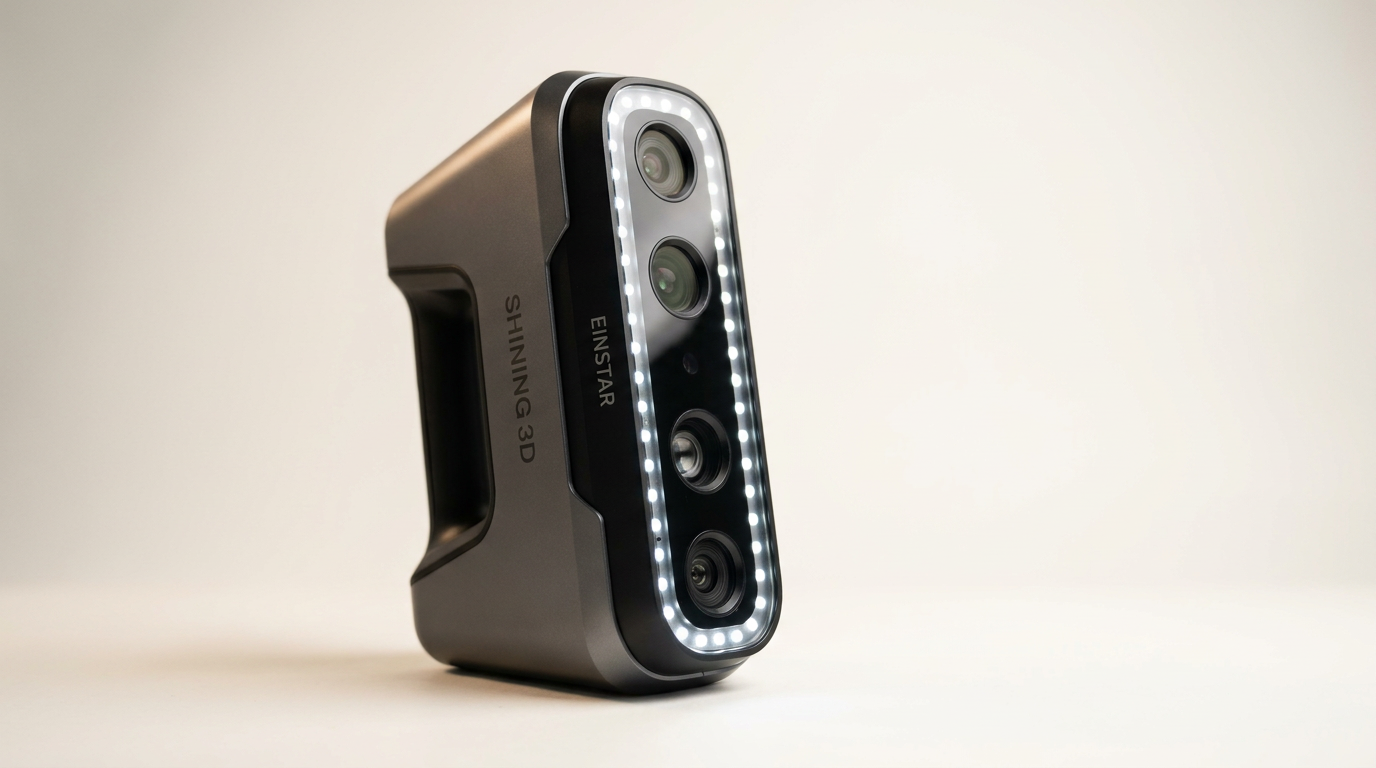
The Shining 3D Einstar handheld 3D scanner aims to bridge the gap between amateur and professional-grade scanning, offering robust capabilities at a price point accessible to serious hobbyists and small businesses. Positioned for users who require precision beyond entry-level devices but are not prepared for multi-thousand dollar investments, the Einstar promises detailed scans for a range of applications, from automotive parts to large statues.
Equipped with infrared VCSEL projectors and stereo depth cameras, it boasts a claimed point distance of up to 0.1mm and an integrated RGB camera for color data. The manufacturer highlights features like hair scanning mode, outdoor stability, and a streamlined workflow. But how does this translate into real-world use for reverse engineering, archival, and 3D printing tasks?
This review evaluates the Einstar based on extensive owner feedback, focusing on its build quality, scanning performance, software experience, and overall value. We examine where the device excels and where it encounters limitations, helping potential buyers determine if it meets their specific project demands.
What owners love
- + Delivers high-quality, dense point cloud data
- + Effective for scanning large objects like vehicles and statues
- + Intuitive and stable software, improving tracking over competitors
- + Impressive accuracy for its price class
- + Capable of scanning black and reflective surfaces with preparation
- + Excellent build quality and fit-and-finish
Common complaints
- − Not suitable for small, intricate objects (under 5-10 inches)
- − Significant learning curve for optimal results
- − Demands a powerful computer with specific GPU and RAM requirements
- − Can lose tracking, especially with challenging surfaces
- − Software updates may introduce instability or invalidate previous scans
Design & Build
The Einstar arrives with a build quality often described as exceeding expectations for its price. Owners consistently report a high standard of fit and finish, suggesting a durable and well-engineered device. While some note it feels substantial in hand, this heft contributes to the perception of a professional-grade tool. The design integrates multiple infrared projectors and cameras, enabling its stated capabilities. The inclusion of a transport bag is a practical touch, facilitating portability and protecting the scanner.
Setup & Ease of Use
Setting up the Einstar is generally straightforward, with clear instructions for hardware and software installation. However, users frequently highlight a considerable learning curve to master the scanning process. While the device is easy to begin using, achieving consistent, high-quality results requires patience and practice. Understanding how to manage tracking, optimize brightness settings, and prepare surfaces (e.g., using scanning spray or tracking dots on black/reflective items) is critical. Some initial reports of defective units were later resolved by firmware updates, indicating that initial troubleshooting might be necessary for some users.
Performance in Real Use
The Einstar excels at scanning medium to large objects. Users successfully captured interiors of SUVs, entire car undersides, fenders, bumpers, and even large statues. The accuracy for these larger scans is impressive, with reports of dimensional checks confirming precision within +/- 0.5mm, suitable for reverse engineering car parts. The specified 14 FPS scanning speed contributes to a fluid scanning experience. However, its performance on small, intricate objects is poor. Owners find it struggles with items under 5-10 inches, often losing tracking and producing incomplete data. While capable of scanning challenging surfaces like black or chrome, it often requires the use of scanning spray and tracking dots, adding setup time. The 'Hair Mode' feature is specifically cited for its effectiveness in human scanning, capturing sufficient detail.
Software & Ecosystem
The accompanying EXstar software receives significant praise. Many users consider it a standout feature, particularly compared to software from competing brands. Owners report stable tracking, efficient stitching of multiple scans, and clean model generation. The intelligent algorithm and automatic alignment functions contribute to a largely positive user experience. Its output formats (OBJ, STL, PLY, ASC, 3MF, P3) ensure compatibility with common 3D printers and design software. However, the software is computationally intensive; a robust PC with an Nvidia graphics card (RTX 2060 or better), ample RAM (32GB recommended), and a fast CPU is essential for optimal performance. Some users critique the UI/UX as less intuitive or modern than expected, and recent updates have occasionally introduced bugs or compatibility issues with previous scan data, sometimes linked to an account requirement.
Value & Reliability
The Einstar represents strong value within its price segment, which sits well under $1000. Owners repeatedly state that it outperforms other scanners in a similar range. Its capability to generate usable data for applications like automotive customization and reverse engineering positions it favorably against more expensive professional solutions. Reliability is generally high, though a learning curve and powerful hardware requirements are prerequisites for consistent success. Support is responsive, with some users reporting quick remote assistance for issues. While it performs well for its target applications, owners emphasize it is not a "plug and play" device and requires dedication to master, but the payoff can be substantial for those invested in the ecosystem.
Verdict
Buy - The Shining 3D Einstar offers exceptional performance and capability for its price point.
This scanner is an excellent choice for serious hobbyists, small businesses, and enthusiasts engaged in projects involving medium to large object scanning-such as automotive components, industrial design, or digital archiving of art and cultural artifacts. Its robust software, high data quality, and ability to handle challenging surfaces (with preparation) make it a powerful tool for reverse engineering and 3D printing. If your projects involve objects larger than five to ten inches and you possess a powerful computer, the Einstar delivers professional-grade results without the multi-thousand dollar investment.
However, users seeking a simple, out-of-the-box solution or those primarily focused on scanning small, highly intricate items should look elsewhere. The significant learning curve, the need for a high-spec PC, and the potential for tracking issues on very small details mean it demands patience and effort. It is not suitable for precision-based work requiring metrology-grade accuracy on small components, or for users unwilling to invest time in mastering the process.
FAQ
More 3D Scanners reviews
Creality CR-Scan Ferret Pro Review: Budget Reality Check
3DMakerpro Fox Review: Budget 3D Scanning with Real Trade-offs

Revopoint INSPIRE 2 3D Scanner Review: Unpacking the Accessory Echo Chamber

Creality 6mm 3D Scanning Markers Review: Essential Tracking Aid

TOSUKKI 6mm Positioning Targets Review: The Refined Generic Choice

AESUB 3DTOOLS 3D Scanner Spray Review: The 'Evaporative Enabler'
This review is based on real experiences shared by owners in online communities.