
Creality 3D Scanning Markers Review: Essential Tracking Dots?
By AValidReview. An AI-assisted summary of customer feedback, not a hands-on test.
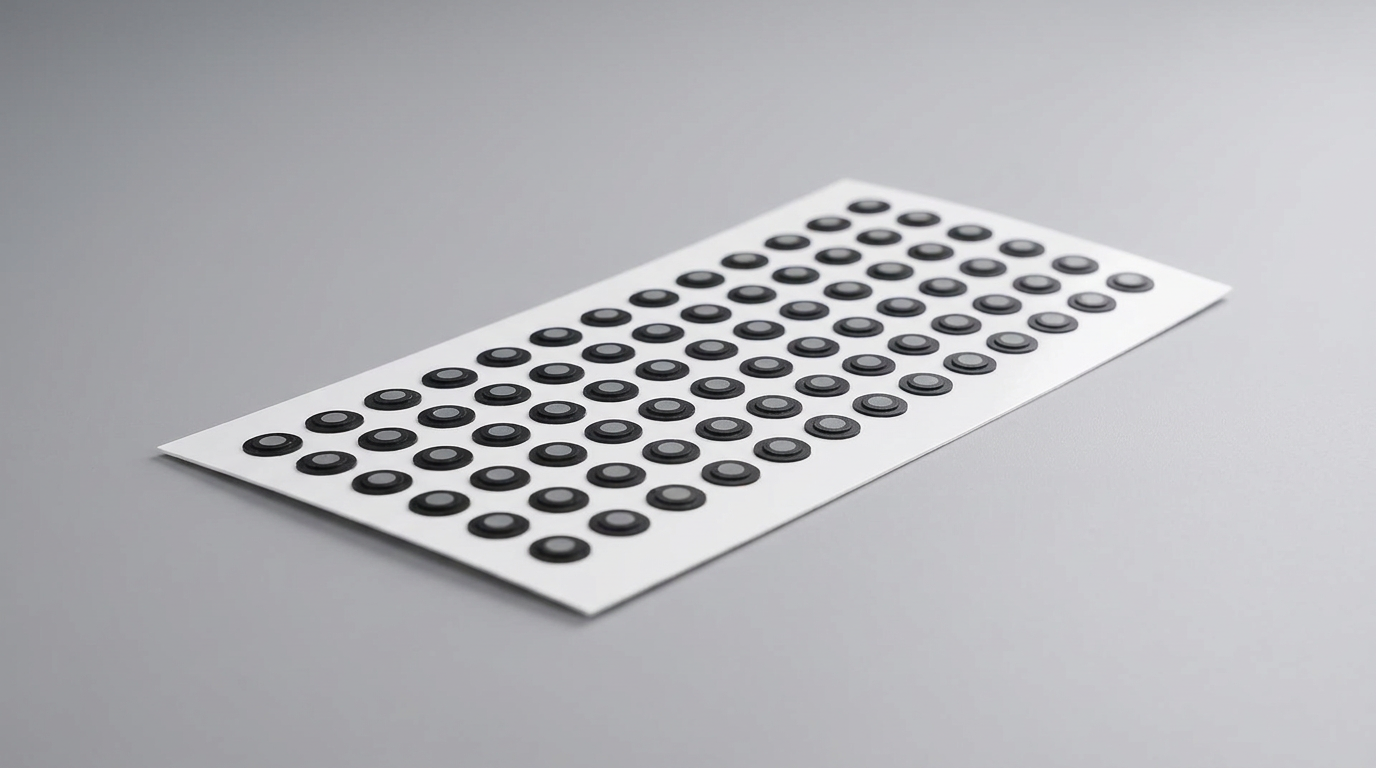
3D scanning relies on precise data capture, and for many systems, this precision hinges on tracking markers. These small, adhesive dots provide reference points for scanners, particularly when working with featureless surfaces or complex geometries. Creality offers its own brand of 3.0 mm diffuse reflection markers, designed to work with their scanners and other brands.
We examined owner feedback on the Creality 3D Scanning Markers to assess their effectiveness, build quality, and overall value. The aim was to determine if these markers reliably enhance scanning accuracy or introduce new challenges into the workflow.
What owners love
- + Generally works as expected for many users
- + Compatible with various 3D scanner brands
- + Reported easy to apply and remove
- + Provides good value for the cost
- + Supports accurate tracking for some setups
Common complaints
- − Difficult to remove scanning spray from markers
- − Some users report poor adhesion to sprayed surfaces
- − Not consistently reflective with all scanners
- − Perceived as cheap material by some dissenters
- − Can negatively impact scan quality in certain scenarios
Design & Build
The Creality 3D Scanning Markers are 3.0 mm diffuse reflection dots, supplied in sheets. Owners consistently describe them as easy to apply and remove. However, some dissenters highlight perceived issues with the material quality, describing it as 'cheap.' The primary design challenge, according to users, involves interaction with scanning spray. While a core function of diffuse markers is to assist with scanning challenging surfaces, owners report difficulty getting scanning spray off the markers, and that the markers themselves struggle with adhesion once a surface is sprayed.
Setup & Ease of Use
Setup for these markers is straightforward: users peel and stick them onto the object to be scanned. Many owners confirm the markers are easy to affix and later remove without residue. This simple application is a consistent point of praise. However, the ease of use is compromised when scanning spray is introduced to the workflow, as markers may not adhere effectively to a sprayed surface, forcing users to apply them after prep work or contend with poor tracking conditions.
Performance in Real Use
Performance evaluations are mixed, indicating varying success depending on the user's specific scanner and application. Numerous owners state that the markers 'work as they should' and provide 'top results,' especially with Creality's own Raptor Pro scanner. These users found the markers instrumental for laser scanning. Conversely, a notable minority reported significant issues, finding the markers 'useless' with certain scanners, including the Creality Ferret Pro. These users found the markers did not aid tracking and instead appeared as 'big blobs' in the scan data, suggesting inconsistent reflectivity or tracking compatibility across different scanner models or software interpretations.
Software & Ecosystem
Creality markets these markers for compatibility with their own 3D scanners, including the Raptor Pro and Ferret Pro, and explicitly states support for other brands like Shining 3D, Creaform, Peel3D, and Revopoint. While many users confirm good performance with their specific Creality scanners, the inconsistent results with the Ferret Pro suggest that software interpretation or specific scanning algorithms might play a crucial role in marker effectiveness. The claim of broad compatibility appears to hold true for some setups but falters for others, indicating that scanner firmware and software configuration are likely critical factors.
Value & Reliability
Priced around $15-$20 for a pack of 840 dots across ten sheets, these markers are considered to offer good value by many owners. The perceived cost-effectiveness is a common theme among positive feedback. Reliability, however, is a point of contention. While many users find them consistently reliable for tracking, a segment encountered significant reliability issues related to adhesion on sprayed surfaces and the markers' ability to be effectively picked up by their scanners, leading to failed tracking or distorted scan data. This variability suggests that while inexpensive, consistent performance is not guaranteed across all scanning scenarios.
Verdict
Consider - These markers serve their intended purpose for many users, offering basic functionality at a low price.
These Creality 3D scanning markers are suitable for users with compatible scanners, particularly Creality's Raptor Pro, who require an affordable solution for tracking. They deliver sufficient performance for generating effective scan data in many scenarios. Users who rely on scanning sprays might encounter adhesion issues, which can complicate their workflow.
Those utilizing scanners that struggle with marker reflectivity or who have encountered issues with other Creality markers, such as the Ferret Pro users reporting 'blobs,' should hold off. Investigate markers with a proven track record for your specific scanner model, rather than assuming broad compatibility or consistent reflectivity from this budget offering.
FAQ
More 3D Scanners reviews
Creality CR-Scan Ferret Pro Review: Budget Reality Check
3DMakerpro Fox Review: Budget 3D Scanning with Real Trade-offs

Revopoint INSPIRE 2 3D Scanner Review: Unpacking the Accessory Echo Chamber

Creality 6mm 3D Scanning Markers Review: Essential Tracking Aid

TOSUKKI 6mm Positioning Targets Review: The Refined Generic Choice

AESUB 3DTOOLS 3D Scanner Spray Review: The 'Evaporative Enabler'
This review is based on real experiences shared by owners in online communities.