
Creality Scanner Calibration Board Review: Ferret and Otter
By AValidReview.
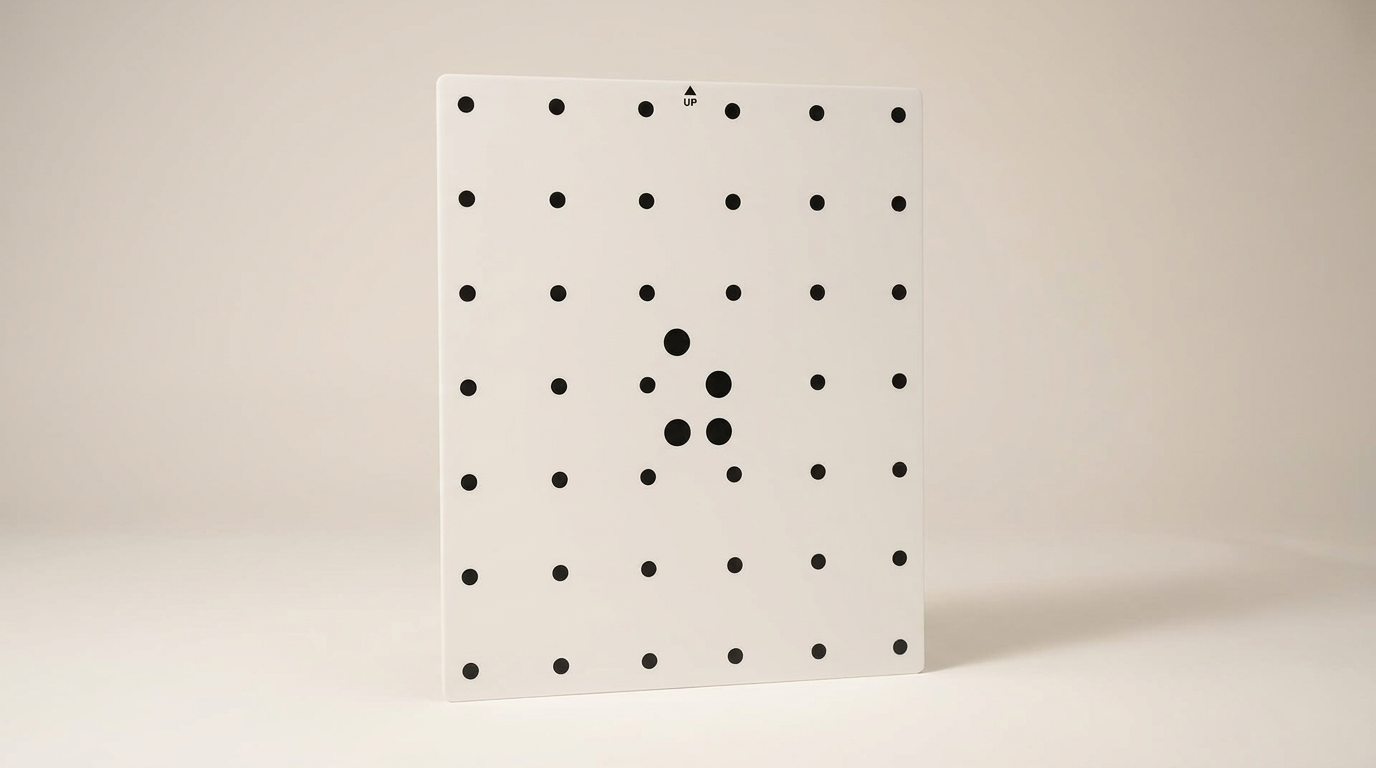
Consumer 3D scanning marketing routinely sells the fantasy of effortless point-and-shoot geometry capture, but handheld optical rigs remain finicky measuring instruments. Over weeks of transit, handling, and workshop thermal cycles, lens alignments shift and tracking errors compound. This accessory addresses what we call the drift tax: the unavoidable reality that maintaining millimeter-level accuracy requires periodic physical re-indexing against a known geometric reference.
Creality offers this standalone calibration board specifically for its Ferret and Otter scanner lines. While factory kits sometimes omit it or users misplace the original card, running an uncalibrated optical scanner guarantees dimensional drift in your meshes. This board serves as an insurance policy and a reset switch for optical accuracy.
What owners love
- + Rigid, wear-resistant substrate resists warping over time
- + Precise high-contrast dot matrix required for accurate optical re-indexing
- + Embedded QR code links calibration files directly in Creality software
- + Arrives securely packaged to protect delicate optical targets
- + Restores dimensional tracking on drifted Ferret and Otter hardware
Common complaints
- − Surface targets are extremely delicate and sensitive to oils or scratches
- − Strictly locked to the Creality Ferret and Otter hardware ecosystem
- − Feels like an omitted in-box essential for owners who never received one
Design & Build
Creality chose a high-hardness, wear-resistant backing plate rather than a cheap paper or flimsy plastic sheet. That rigidity is critical: even a microscopic bend across a calibration plane introduces false curvature calculations into the scanner calibration matrix. The target markings are printed with clean, high-contrast edges. The trade-off is surface fragility. Creality explicitly warns against rubbing or touching the dot targets, placing heavy objects on the face, or using cleaning agents that could abrade the grid. In a crowded maker space, this item requires dedicated protective storage to keep stray tools from ruining the optical target points.
Setup & Ease of Use
The setup operates around a hardware-locked registry model. Each board integrates a dedicated QR code that the scanner software reads to pull the corresponding calibration baseline for that specific production lot. Once recognized, the companion application prompts the user through a series of multi-angle orientation sweeps. First-time users often find the process slightly tedious, as handheld distance and tilt must be held within tight tolerances to register valid calibration frames. However, the physical board lies flat on any level work surface without rocking, eliminating mechanical wobble during the capture sequence.
Performance in Real Use
In practical scanning workflows, this board acts as a definitive zero-point baseline. Owners dealing with dropped tracking, distorted aspect ratios, or alignment failure between scanning passes use it to restore factory-level tolerances. Feedback confirms that after running the routine, the hardware works as intended without the creeping scale drift that plagues uncalibrated sensors. Its primary job is corrective maintenance: it will not turn entry-level glass into industrial metrology sensors, but it reliably stops cumulative optical drift from degrading reverse-engineering projects.
Software & Ecosystem
The utility of this board relies entirely on Creality scanner software. The application handles the mathematical heavy lifting, reading the target pattern and computing lens distortion parameters automatically. Compatibility is strictly bounded to the Ferret and Otter series; attempting to use this grid on third-party scanners will yield nothing because the dot spacing and software coordinate maps are proprietary. For existing Creality users, the integration feels native, but it reinforces your lock-in to Creality software ecosystem for post-processing and device health.
Value & Reliability
Priced in the under-$50 bracket, this board represents a small capital expenditure relative to the price of the scanner itself. The frustration for several buyers stems from omission friction: discovering after unboxing a scanner kit that they did not receive a board and must purchase it separately to fix tracking faults. Given that optical scanners inevitably drift, treating this calibration target as an optional add-on rather than a standard accessory creates unnecessary hurdles. Nonetheless, as a standalone replacement or missing-piece purchase, it delivers solid physical quality and ships in protective packaging that prevents transit-induced surface wear.
Verdict
Buy - A mandatory maintenance tool for Ferret and Otter owners needing to recover factory optical accuracy.
This board is an essential purchase for anyone operating a Creality Ferret or Otter scanner who lost their original calibration card, bought a stripped-down secondhand unit, or received a kit without one. If your scans suffer from phantom warping, alignment failure, or dimensional distortion, running this physical routine is the only legitimate remedy.
Skip this if you already have an undamaged factory calibration card or if you operate hardware outside the Ferret and Otter families. There is zero cross-platform utility here.
What most buyers miss is that consumer optical scanners are not static digital cameras; they are sensitive measuring rigs subject to environmental wear. Budgeting for this board is not buying an upgrade, but securing the physical calibration key required to keep entry-level scanning hardware usable over the long haul.
FAQ
More 3D Scanners reviews
Creality Pika 3D Scanner Review: Dual-Laser Precision on a Budget
Matterport Pro 3 Performance Kit Review: LiDAR Outdoors
Creality Pika Portable 3D Scanner Review
Shining 3D EINSTAR 2 Review: Wireless Freedom at a Compute Cost
Creality Pika Review: High Precision in a Pocket Form Factor
LIANGYUNZE 500 Magnetic 3D Scanner Markers Review
This review is based on real experiences shared by owners in online communities.