
Creality Pika 3D Scanner Review: Dual-Laser Precision on a Budget
By AValidReview.
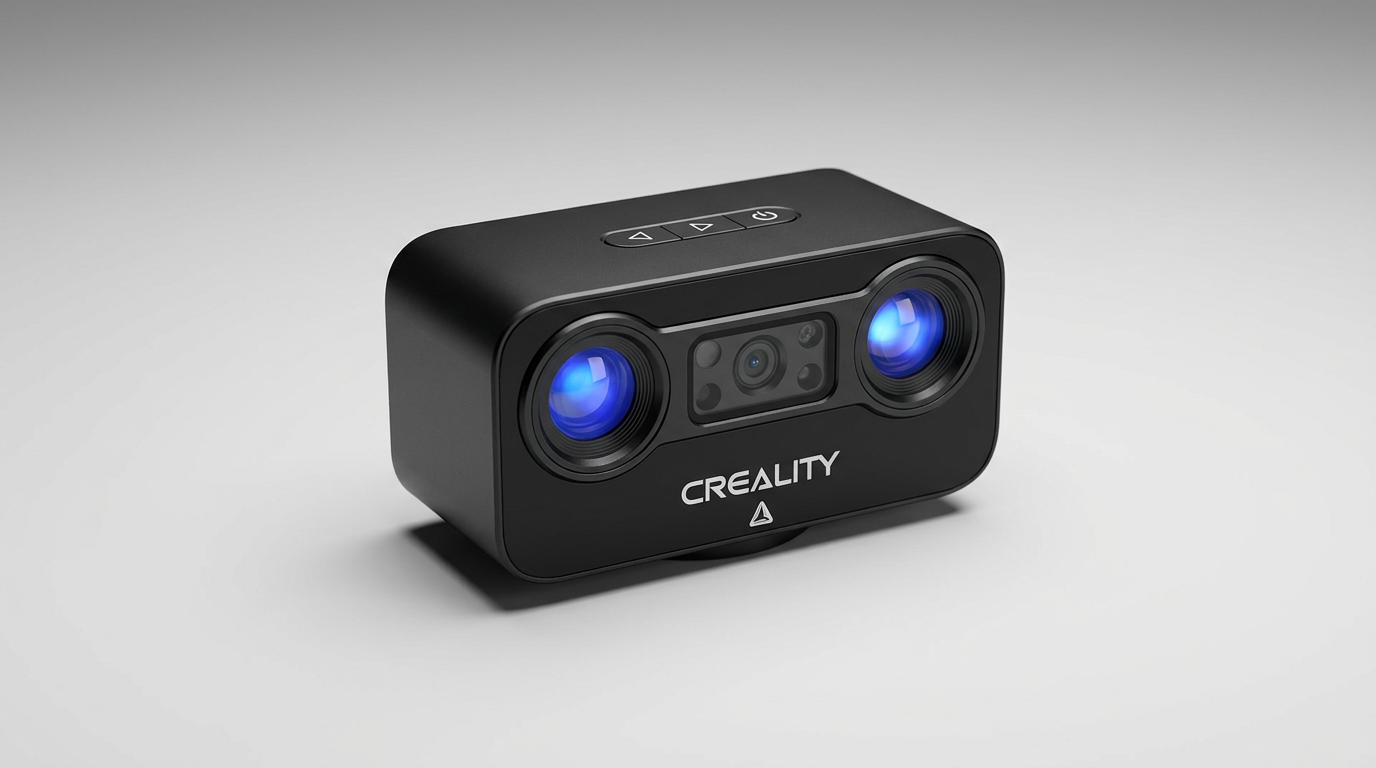
For years, desktop 3D scanning forced buyers into a rigid compromise: spend thousands on metrology-grade laser rigs for machined parts, or settle for budget infrared hardware that melts mechanical edges into mush. The Creality Pika attempts to dismantle that divide. By cramming a seven-line blue laser array alongside an infrared projector into a handheld unit priced in the $600 to $800 range, it introduces what we call the dual-spectrum bridge. This design gives hobbyists and small job shops access to marker-free metal capture without the traditional industrial price tag.
Yet the promise of affordable laser scanning brings its own structural frictions. While the optical hardware represents a major step forward for Creality, it creates what we term the compute mismatch: the scanner captures dense surface data faster than modest PC hardware can digest it. Real-world feedback shows that while the Pika can generate impressive meshes straight out of the box, your success hinges less on your hand technique and far more on your processing pipeline.
For fabricators, CNC machinists, and reverse engineers tired of spraying matte powder on reflective aluminum, the Pika looks compelling on paper. We looked closely at real-world deployments to determine whether this hybrid tool delivers practical shop utility or simply shifts the frustration from the physical workpiece to the computer screen.
What owners love
- + Dual-light system handles both shiny mechanical parts and organic shapes
- + Reliable blue laser tracking without requiring adhesive marker dots
- + Integrated three-inch touch screen reduces reliance on external monitors
- + Fast out-of-box setup delivers usable dimensional meshes on day one
- + Solid mobile app performance on current flagship smartphones
Common complaints
- − Demands significant host computing power, struggling on modest AMD rigs
- − Steep initial learning curve for fine-tuning scan exposure settings
- − Higher-end industrial competitors still edge it out on ultimate accuracy
Design & Build
The Pika departs from the flimsy plastic wands typical of consumer structured-light cameras. It houses a dual-emitter optical engine featuring a seven-line blue laser array, a near-infrared projector, and an integrated RGB sensor for texture mapping. Creality also embedded a three-inch high-brightness touch display directly on the chassis. This screen provides direct visual feedback on tracking distance and exposure, meaning you are not constantly craning your neck toward a laptop screen while balancing an awkward part in your hands. At this price point, providing on-device telemetry alongside Wi-Fi 6 connectivity addresses a classic ergonomic flaw of handheld digitizers: cord tangle and visual distraction.
Setup & Ease of Use
Getting the Pika running reveals the first-hour payoff: even novices with no prior optical scanning experience report producing clean, dimensional STL files within an hour or two of unboxing. However, configuring the digital pipeline exposes the compute mismatch. Operators running mid-tier PC hardware, particularly setups relying on AMD Ryzen processors paired with Radeon graphics cards, report severe performance bottlenecks and processing stumbles. Curiously, several users found smoother performance by pivoting entirely away from their desktops and tethering the Pika to flagship Android phones like modern Samsung Galaxy devices. The mobile client offloads frame processing effectively, though dialed-in parameter management still requires patience.
Performance in Real Use
Where the Pika earns its keep is on raw metal and machined assemblies. Traditional structured-light scanners turn black plastics and bare aluminum into tracking voids unless you coat them in messy developer spray. The Pika's blue laser lines bite into untreated, dark surfaces with minimal scatter, successfully resolving bolt holes, flange profiles, and sheet-metal transitions without requiring physical tracking stickers. In comparative shop testing against established tools like the Revopoint POP series and higher-end industrial digitizers, the Pika sits firmly in the sweet spot. It does not match the micron-level repeatability of dedicated four-figure metrology heads like the EinScan Rigil Lite, but it comfortably outperforms consumer-grade infrared scanners on mechanical geometries.
Software & Ecosystem
Creality software has historically lagged behind its hardware, and while the Pika software suite is improved, quirks remain. The toolset includes automated hole-filling and texture alignment, but fine control over point-cloud decimation requires some trial and error. Field use indicates that the desktop application expects robust Nvidia CUDA support for optimal processing rates, which explains why non-Nvidia laptops choke on dense laser passes. Conversely, the mobile software bridge proves surprisingly competent for capturing scans in the field, allowing operators to digitize car engine bays or workshop machinery directly to a phone before exporting clean meshes to CAD packages on a workstation.
Value & Reliability
Priced well south of enterprise inspection tools, the Pika shifts expectations for what a small fabrication shop can tackle. For reverse engineering brackets, verifying 3D prints against physical prototypes, or replacing broken equipment linkages, the hardware pays for itself quickly. The build shows none of the early thermal drifting issues that plagued early budget scanners. You are trading off the dedicated technical support and turn-key metrology certifications of five-figure systems, but for self-reliant makers and machinists, the dimensional fidelity per dollar is exceptionally strong.
Verdict
Buy - A capable hybrid scanner that brings legitimate reverse-engineering utility to independent workshops without the typical industrial price barrier.
The Creality Pika is an ideal fit for machinists, 3D printing hobbyists, and automotive fabricators who need to digitize bare metal components, engine compartments, or custom brackets. If you already own a flagship modern smartphone or a PC workstation equipped with a dedicated Nvidia graphics card, the hardware delivers rapid, satisfying results that leave purely infrared competitors behind.
Skip this unit if you lack robust processing hardware or if your work demands legally certified metrology reports with certified micron tolerances. If your PC relies on entry-level integrated graphics or budget AMD mobile chips, you will face processing bottlenecks unless you are willing to use your phone as the primary compute module.
What most prospective buyers miss is that the Creality Pika is not really an entry-level scanner: it is an industrial tool disguised by consumer pricing. Its real strength lies in breaking the spray-powder tax on reflective metal, making it the most practical workshop digitizer available short of commercial inspection hardware.
FAQ
More 3D Scanners reviews
Creality Scanner Calibration Board Review: Ferret and Otter
Matterport Pro 3 Performance Kit Review: LiDAR Outdoors
Creality Pika Portable 3D Scanner Review
Shining 3D EINSTAR 2 Review: Wireless Freedom at a Compute Cost
Creality Pika Review: High Precision in a Pocket Form Factor
LIANGYUNZE 500 Magnetic 3D Scanner Markers Review
This review is based on real experiences shared by owners in online communities.