
Creality CR-Scan Ferret Pro Review: Accessible 3D Scanning?
By AValidReview. An AI-assisted summary of customer feedback, not a hands-on test.
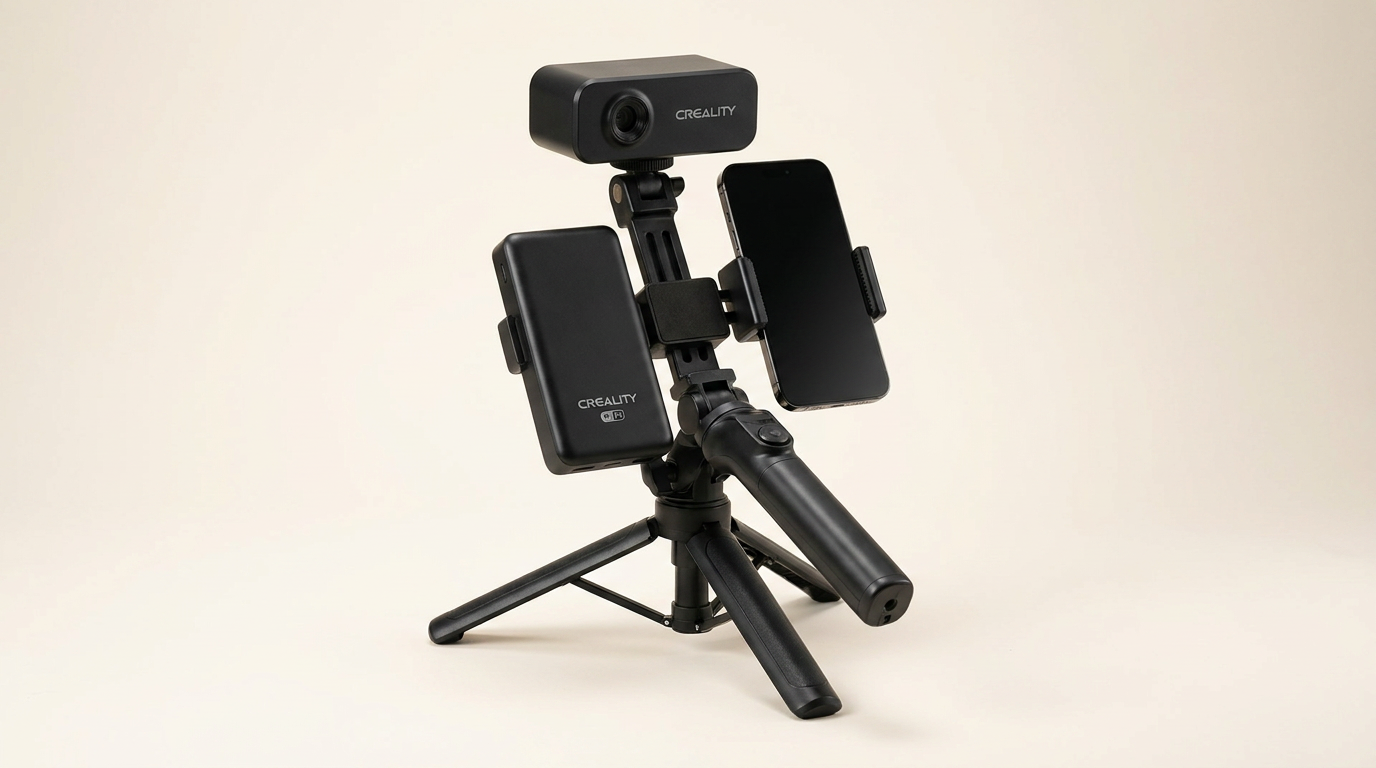
The Creality CR-Scan Ferret Pro positions itself as an accessible entry point into 3D scanning, especially for hobbyists and 3D printing users. This handheld device promises wireless operation, full-color scanning, and accuracy tailored for a range of object sizes. Its appeal lies in bridging the gap between basic phone-based apps and professional-grade industrial scanners.
However, the reality of 3D scanning often involves a significant learning curve. Does the Ferret Pro deliver on its promise of ease for beginners while maintaining sufficient performance? We analyze owner feedback to determine if this scanner provides a valuable tool for its target audience or falls short in practical application.
Our assessment focuses on how the Ferret Pro performs in day-to-day use, its software experience, and overall value. We examine its ability to generate usable 3D models and identify its limitations, providing a clear picture for prospective buyers.
What owners love
- + Good value for an entry-level 3D scanner
- + Effective wireless operation with phone and PC
- + Capable of capturing fine details on suitable objects
- + Includes a comprehensive kit with accessories
- + Relatively easy setup for experienced users
Common complaints
- − Steep learning curve, requires patience and practice
- − Frequent loss of tracking, particularly on complex objects
- − Software stability and compatibility issues reported (AMD, iOS)
- − Output quality is sensitive to object color and texture
- − Scanning can be slow, especially for larger objects
Design & Build
The Creality CR-Scan Ferret Pro is designed for portability, weighing just 105g. Owners appreciate its compact form factor, making it suitable for use in various locations. The comprehensive kit includes a WiFi box, tripod, power bank, phone holder, and carrying case, providing all necessary components for immediate use. Several users commend the construction quality, noting it feels well-built. However, one owner found the camera and scanner holder flimsy, expressing concern about its durability during assembly. The included charging cable is described as too short by some, and a charging brick is not consistently provided, despite the device's price point.
Setup & Ease of Use
For many, setting up the Ferret Pro for wireless use with a phone or PC is straightforward, often taking minutes. The device's multi-platform compatibility (Windows, macOS, Android, iOS) is a key advantage, with wireless connectivity frequently highlighted as a favored feature. Despite this initial ease, owners consistently report a significant learning curve to achieve optimal scan results. Patience and practice are frequently cited as prerequisites for effective operation. New users often find themselves watching multiple online tutorials to master tracking and positioning techniques. The device relies on specific lighting conditions and object characteristics, requiring users to adapt their approach for successful scans. A common recommendation involves using a turntable and appropriate lighting for improved results, suggesting that handheld scanning, while possible, adds complexity.
Performance in Real Use
When used correctly, the Ferret Pro can produce detailed 3D models with 0.1mm accuracy. Owners have successfully captured fine details, even on textured surfaces and branding on small objects. Its capability for custom prints and models for 3D printing is affirmed by multiple users. However, performance is highly sensitive to scanning technique and object properties. The scanner frequently loses track, particularly with complex shapes, uniform colors, or shiny/transparent surfaces, leading to frustrating scan restarts. Scanning speed is a recurring complaint, with some users noting that capturing even a small section of an object can take significant time. While suitable for objects from 50mm to 2000mm, obtaining high detail on complex geometries presents a considerable challenge, often requiring extensive post-processing with external software like MeshMixer.
Software & Ecosystem
The Creality Scan software is central to the Ferret Pro experience, and owner feedback is mixed. Many find the software relatively easy to learn, particularly its basic functions. However, significant compatibility and stability issues are reported. One user experienced crashes on AMD-based Windows systems, a known issue not widely advertised. Mac users describe software as unusable due to persistent version incompatibility errors that prevent scans from loading or processing. Android phone users with flagship devices have reported the app freezing or crashing, failing to complete scans. The wireless bridge, while enabling flexible use, is criticized for being an open, unsecured network, posing a potential security risk in shared environments. The lack of robust, consistently functional software detracts significantly from the scanner's overall usability, often necessitating workarounds or frustrating troubleshooting.
Value & Reliability
Positioned in the mid-hundreds range, the Ferret Pro is considered a good value for an entry-level 3D scanner, particularly for those on a budget. Owners compare it favorably to much more expensive professional systems, acknowledging its limitations while appreciating its accessible price point. Reliability, however, is inconsistent. While some users report smooth operation after the learning phase, others face ongoing challenges with connectivity, software stability, and tracking, rendering the device difficult or impossible to use. The 1-year warranty and responsive customer support are mentioned, but these do not always alleviate fundamental operational issues. The consensus suggests that while it offers a cost-effective introduction to 3D scanning, potential buyers must be prepared for a substantial commitment of time and effort to overcome its inherent quirks and achieve reliable results.
Verdict
Consider - The Creality CR-Scan Ferret Pro offers an accessible entry point into 3D scanning for the patient hobbyist.
This scanner is suitable for users with 3D scanning or modeling experience, or for beginners willing to invest significant time in learning and troubleshooting. It provides good detail for its price point on suitable objects and offers flexible wireless operation across various devices. Those who plan to scan relatively simple objects and are prepared for post-processing will likely find value. It serves as a strong starting unit for exploration rather than immediate production.
Conversely, those seeking a plug-and-play solution, or who require immediate, consistent results for complex or highly reflective objects, should hold off. Individuals requiring flawless software compatibility, particularly with AMD systems or older iOS/Android devices, may encounter frustration. Budget additional funds for a turntable and potentially other software for cleaning up scans. For critical projects, consider investing in a higher-tier scanner with more robust software and tracking capabilities.
FAQ
More 3D Scanners reviews
Creality CR-Scan Ferret Pro Review: Budget Reality Check
3DMakerpro Fox Review: Budget 3D Scanning with Real Trade-offs

Revopoint INSPIRE 2 3D Scanner Review: Unpacking the Accessory Echo Chamber

Creality 6mm 3D Scanning Markers Review: Essential Tracking Aid

TOSUKKI 6mm Positioning Targets Review: The Refined Generic Choice

AESUB 3DTOOLS 3D Scanner Spray Review: The 'Evaporative Enabler'
This review is based on real experiences shared by owners in online communities.