
Creality CR-Scan Ferret Pro Review: Budget Reality Check
By AValidReview. An AI-assisted summary of customer feedback, not a hands-on test.
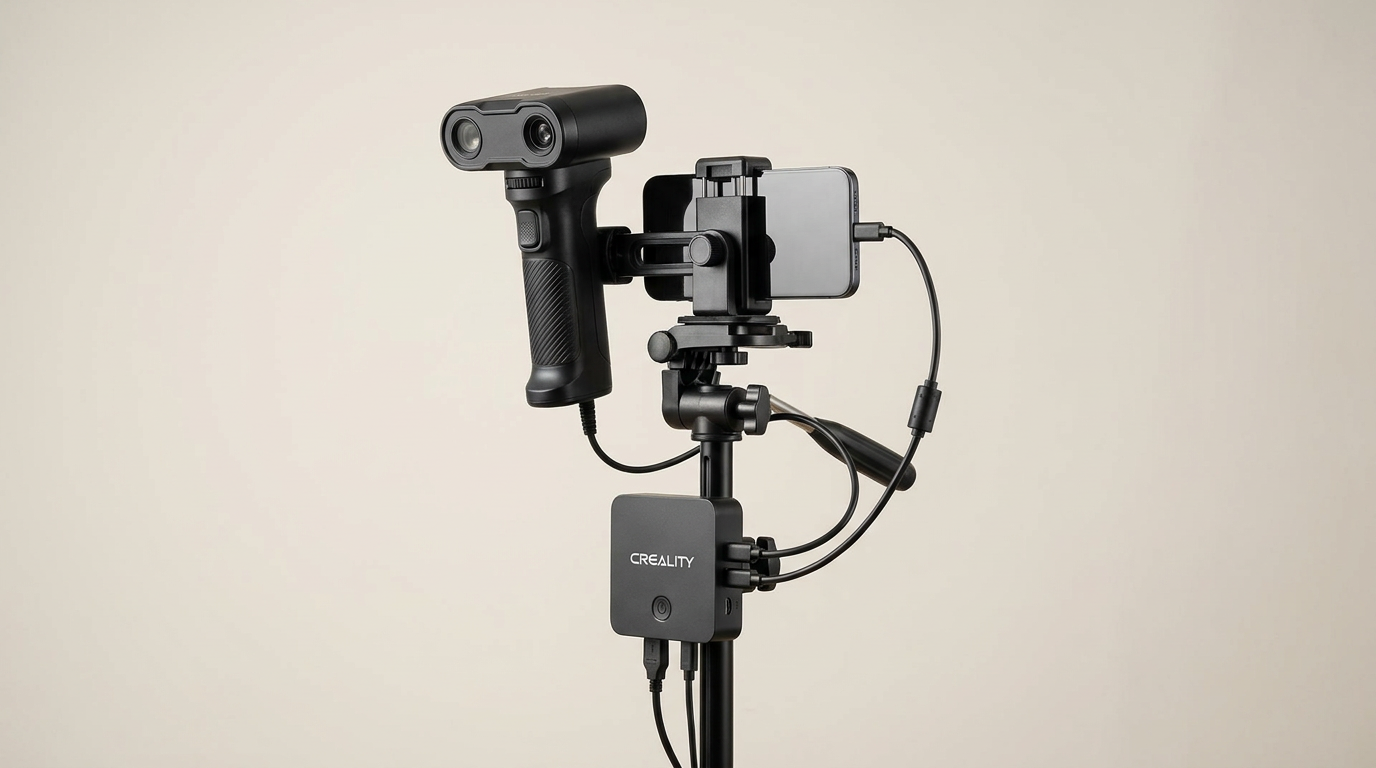
Consumer 3D printing achieved push-button accessibility years ago, but entry-level 3D scanning remains firmly trapped in an earlier era of maker culture. Most buyers approach the Creality CR-Scan Ferret Pro expecting a physical photocopier: wave a wand at an object, send the file to a slicer, and print a duplicate. That mental model is flawed. The Ferret Pro is not an appliance; it is an optical measurement device that demands strict environmental control, steady technique, and substantial digital post-processing.
In the sub-$400 category, Creality promises high-tier capabilities, including wireless scanning over Wi-Fi 6, anti-shake tracking, and full-color capture. The underlying hardware is surprisingly capable for the price, but accessing that performance requires paying what we call the capture tax: the non-negotiable investment of time, physical object preparation, and software troubleshooting required before a single clean polygon appears on screen.
If you understand the physical constraints of structured-light scanning, the Ferret Pro offers real utility for automotive parts, medium sculptures, and larger physical mockups. If you expect effortless point-and-shoot scanning of small mechanical tools right out of the box, this device will quickly test your patience.
What owners love
- + Competitive entry-level pricing for a wireless handheld optical scanner
- + Wi-Fi 6 mobile bridge untethers scans from desktop workstations
- + Capable tracking on medium and large surfaces when using marker dots
- + Decent color texture mapping under controlled ambient lighting
- + Broad device support spanning Windows, macOS, iOS, and Android
Common complaints
- − Desktop software interface has a steep, unintuitive learning curve
- − Does not include a physical calibration board in the standard package
- − Struggles with small mechanical objects, shiny tools, and featureless shapes
- − Bundled four-foot USB tether is too short for comfortable tethered scanning
- − High compute requirements require flagship phones or modern PC hardware
Design & Build
The CR-Scan Ferret Pro is compact and lightweight, designed specifically for one-handed scanning sessions. Creality bundles the scanner head with a rechargeable battery grip, a smartphone mount, and a dedicated Wi-Fi 6 wireless bridge. The physical package is neat and compact, packing into an included carrying case that makes it easy to transport to a garage or workshop.
Where the physical design stumbles is in tethered ergonomics. When you choose not to use the wireless bridge with a phone and instead plug directly into a PC, the included USB cable measures only four feet. That length is entirely inadequate for walking around an object or maneuvering around a turntable without dragging your laptop off the desk. Furthermore, Creality omitted a physical calibration board from the box. For a precision optical instrument claiming 0.1mm accuracy, leaving calibration boards to aftermarket orders or customer support requests is an unforced design compromise that immediately handicaps owners whose units drift out of alignment during transit.
Setup & Ease of Use
Setting up the Ferret Pro introduces what we call the phone-first bifurcation. While desktop computers provide the raw rendering power needed to clean dense polygon meshes, the wireless Wi-Fi 6 bridge is tuned primarily for mobile operating systems like Android and iOS. Several users discover early on that establishing a stable wireless pipeline to a Windows PC is temperamental, with software errors falsely claiming the scanner is already in use. Consequently, the smoothest path to acquisition is pairing the scanner wirelessly with a modern smartphone, then transferring raw project files to a PC for meshing.
Hardware requirements are also stricter than the marketing suggests. The scanner relies heavily on the host device for real-time frame registration. Running the mobile app requires a modern phone with ample memory, while desktop work demands at least an Intel Core i5 eighth-generation equivalent or Apple Silicon Mac paired with 8GB or more of RAM. Linux users are entirely shut out. Beginners who fail to read the fine print often mistake system-level processing bottlenecks for defective hardware.
Performance in Real Use
The Ferret Pro delivers its best results on mid-sized to large items. Owners scanning car panels, large decorative sculptures, and human torsos report impressive dimensional captures, provided they apply tracking marker dots or scan surfaces with varied geometry. Creality claims the scanner functions in up to 30,000 lux of outdoor light, but ambient lighting discipline remains essential. Direct sunlight degrades infrared projection, leading to lost geometry.
Where the scanner falters is on small, feature-sparse objects. Scanning a simple wrench or small bracket frequently fails because the optical sensors lose registration across thin edges. When tracking is lost, the device enters what we call the tracking trap: instead of pausing the scan cleanly, the software continues recording, depositing overlapping ghost meshes on top of existing geometry as the object rotates. Salvaging a scan after a tracking slip is nearly impossible, forcing you to wipe the session and start from scratch. To get reliable output from small or shiny mechanical components, you must coat them in matte scanning spray and surround them with tracking targets.
Software & Ecosystem
Creality's software ecosystem is the primary source of owner frustration. The scanning utility provides minimal automated repair logic, forcing you into manual mesh optimization tools that are poorly translated and inadequately documented. Manufacturer video guides often present an idealized, frictionless process that rarely mirrors real-world capture conditions.
The Creality software does allow file export in industry-standard formats: OBJ, STL, and PLY. Once exported, models transfer cleanly into CAD platforms, Blender, or slicers like OrcaSlicer and Cura. However, getting from raw point cloud to watertight mesh requires persistent experimentation with fusion distance, point removal, and smoothing parameters. The tool suite lacks smart algorithmic hand-holding, which widens the divide between technical operators and casual hobbyists.
Value & Reliability
Priced in the mid-$300 range, the Ferret Pro occupies a distinct tier. It costs significantly less than professional metrology scanners from Revopoint or Shining 3D, while offering far better resolution than free smartphone LiDAR apps. For an enthusiast willing to master scan discipline, the price-to-performance ratio is compelling.
Long-term reliability, however, is dragged down by customer support friction. When software updates break wireless pairing or when units require recalibration, getting prompt technical resolution from the manufacturer is difficult. The scanner's value hinges on user tolerance: if you expect a plug-and-play digitizer, it feels like an unfinished product. If you view it as budget hardware that requires physical prep sprays, manual target placement, and third-party mesh cleanup, it punches above its weight class.
Verdict
Consider - A budget optical scanner with genuine utility for medium-sized projects, but held back by rough software and a steep learning curve.
Buy the CR-Scan Ferret Pro if you are comfortable preparing parts with dulling spray and tracking dots, already own a high-spec smartphone or laptop, and need to digitize medium-to-large objects like automotive panels, furniture, or cosplay props on a strict budget. Skip this device if you want to scan small precision tools, expect automated push-button meshing, or lack the patience to troubleshoot wireless pairing and tracking drift.
The CR-Scan Ferret Pro highlights a recurring reality of modern maker tools: the hardware race has outpaced the software experience. Creality has successfully built an affordable optical sensor array and wireless bridge, but left the cognitive burden of tracking recovery, geometry compensation, and mesh hygiene entirely on the user. It is a capable shop tool disguised as a consumer gadget, and it rewards only those who treat it like one.
FAQ
More 3D Scanners reviews
3DMakerpro Fox Review: Budget 3D Scanning with Real Trade-offs

Revopoint INSPIRE 2 3D Scanner Review: Unpacking the Accessory Echo Chamber

Creality 6mm 3D Scanning Markers Review: Essential Tracking Aid

TOSUKKI 6mm Positioning Targets Review: The Refined Generic Choice

AESUB 3DTOOLS 3D Scanner Spray Review: The 'Evaporative Enabler'

Creality 8-inch Rotating Turntable: A Solid Scanner Accessory
This review is based on real experiences shared by owners in online communities.