
SCRIB3D Advanced 3D Printing Pen Review: Creative Tool for All Ages
By AValidReview. An AI-assisted summary of customer feedback, not a hands-on test.
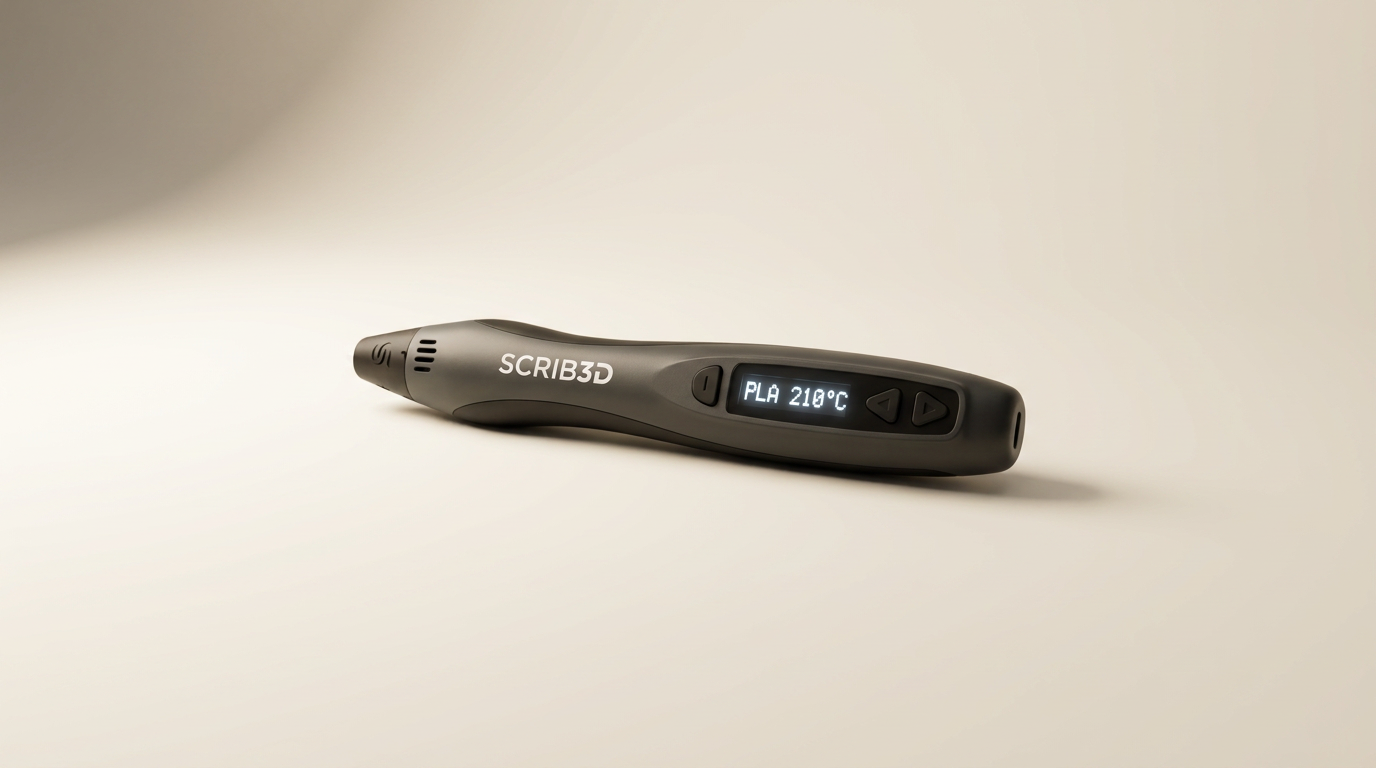
The SCRIB3D Advanced 3D Printing Pen aims to make additive manufacturing accessible, presenting itself as a versatile tool for creative projects and practical repairs. It claims an ergonomic design, variable speed control, and an LCD screen for temperature monitoring. The pen arrives as a complete kit, including filament, a stencil book, and power adapter, positioning it as a ready-to-use option for both novices and experienced users.
This review evaluates the SCRIB3D Advanced 3D Printing Pen by examining real-world owner feedback. We assess its performance, build quality, ease of use, and overall value. The goal is to provide a clear understanding of its capabilities and limitations, helping prospective buyers determine if it meets their needs for artistic creation or functional tasks.
What owners love
- + Comfortable, ergonomic design for extended use
- + Effective for mending existing 3D prints and parts
- + Variable speed and temperature controls offer versatility
- + Generally easy to learn with some practice
- + Good value for its performance at its price point
- + Responsive customer service reported for issues
Common complaints
- − Heats up significantly near the nozzle, requiring caution
- − Included filament quantity is often insufficient for continued use
- − Controls can be finicky; button response sometimes delayed or inconsistent
- − Not ideal for fine detail work due to material thickness
- − Automatic sleep mode activates too quickly for some users
- − Durability concerns and clogging reported in some instances
Design & Build
The SCRIB3D Advanced pen features a sleek, ergonomic design intended for comfortable, prolonged use. Owners frequently commend its comfortable contour and "soft touch" surface. The pen's physical dimensions are described as substantial but manageable, fitting well in hand. An integrated LCD screen displays temperature, a feature appreciated for monitoring settings. However, some users note the physical design results in the tip being obscured by the barrel, which can hinder precise work. The power cable length is sometimes cited as restrictive, prompting some users to suggest portability via a power bank.
Setup & Ease of Use
The pen is designed for quick deployment. Setup involves plugging in the adapter, loading filament, and waiting for warm-up, which typically takes 2-3 minutes. Owners generally report the pen is beginner-friendly, and many find it easy to use after a brief learning period. The provided stencil book and project guide are helpful for initial attempts. However, feedback indicates that buttons for extrusion and retraction can be inconsistent, with some users reporting a delay or requiring specific timing to register commands. The automatic sleep mode, while a safety feature, activates too quickly for some, interrupting workflow.
Performance in Real Use
The SCRIB3D Advanced pen performs effectively for various tasks. It handles both PLA and ABS filaments, with owners successfully creating diverse objects from fashion projects to intricate models. A notable strength is its utility in repairing or 'welding' existing 3D prints, saving otherwise compromised projects. The variable speed control allows for adjusting extrusion flow, although some users perceive the minimum speed as still quite fast, requiring practice for control. A consistent observation is the need for ample practice to achieve desired results, particularly for precision. The nozzle area generates significant heat, prompting warnings for supervised use with children. The pen produces a consistent flow that some describe as too thick for fine detail, leading to 'blobbing' rather than precise lines.
Software & Ecosystem
The SCRIB3D Advanced pen operates largely as a standalone hardware device. Its 'ecosystem' primarily consists of compatibility with standard PLA and ABS filaments, which is a major advantage over systems requiring proprietary materials. The pen includes native controls for temperature and speed directly on the device, eliminating reliance on external software. The included stencil book and project guide serve as rudimentary, physical software for guiding creation. Owners appreciate the lack of a locked ecosystem, allowing them to utilize readily available and often more affordable filament from various sources.
Value & Reliability
Owners frequently categorize the SCRIB3D Advanced pen as a good value, particularly for its price, which is typically under $100. Many describe it as a quality tool that delivers performance comparable to more expensive options. The pen's reliability is generally positive, with several users reporting sustained functionality. However, some instances of clogging and premature failure (after about seven months of use) are reported. Customer service is noted as responsive and helpful in addressing issues like clogs, indicating a commitment to post-purchase support. The primary recurring cost is filament, as the included amount is often used quickly.
Verdict
Buy - This 3D printing pen offers a robust combination of features and performance for most users.
The SCRIB3D Advanced 3D Printing Pen is a compelling choice for hobbyists, educators, and anyone seeking an accessible entry into 3D creation or a versatile tool for mending 3D prints. Its comfortable design, adjustable settings, and compatibility with standard filaments make it a strong option in the under $100 price range. Those needing to perform detailed repair work may appreciate its ability to fuse broken prints. It is particularly suitable for creative projects with children, given appropriate supervision due to tip heat.
However, individuals requiring extremely fine detail for intricate models or those unwilling to commit to a learning curve may find its capabilities limiting. The pen is not a substitute for a full-scale 3D printer for precision manufacturing, nor is it ideal for projects where exact thin lines are paramount. Those who prioritize immediate, effortless precision without any practice should consider other tools or adjust expectations.
FAQ
More 3D Printing Pens reviews
co2CREA Storage Case for 3D Printing Pen Review
Lebakort Storage Case for 3Doodler Start+ Review
SCRIB3D Advanced 3D Printing Pen Review: Beyond the Hobbyist
MYNT3D Super 3D Pen Review: A Low-Cost Creative Gateway
MYNT3D Professional Printing 3D Pen Review: Precision for Play
Lebakort Storage Case Review: An Essential 3Doodler Pen Companion
This review is based on real experiences shared by owners in online communities.