
Einstar 3D Handheld Scanner Review: Pro Hardware, Strict Demands
By AValidReview. An AI-assisted summary of customer feedback, not a hands-on test.
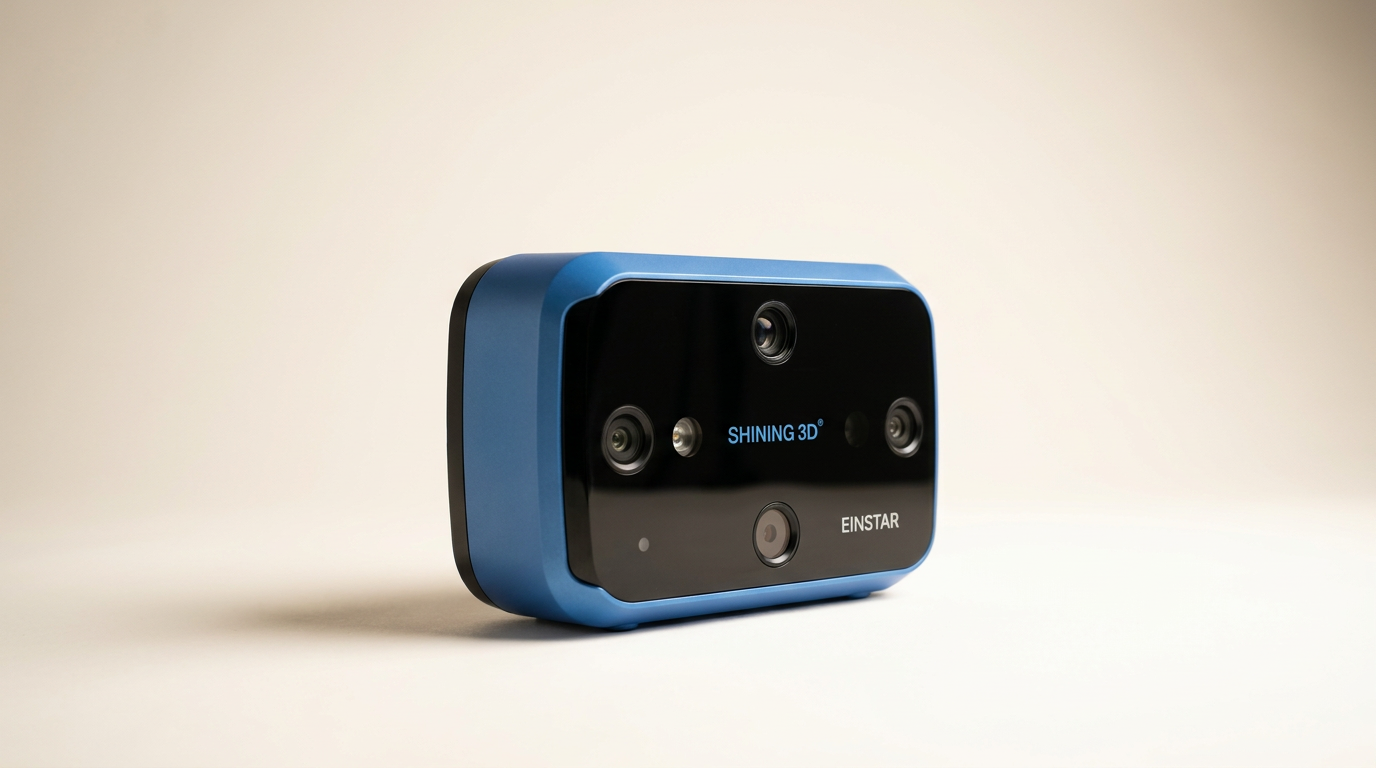
Handheld 3D scanning marketing routinely sells a lightweight fantasy: point a wand at any physical object, pull a trigger, and watch a digital clone materialize on your laptop screen. The Einstar 3D color scanner disrupts that illusion by demonstrating what entry-level metrology actually requires. Built with hardware pedigree inherited from industrial parent brand Shining 3D, this infrared VCSEL structured light device targets enthusiasts and fabricators who have outgrown entry-level hobby toys, yet cannot justify a five-figure commercial rig.
What most prospective buyers miss before unboxing is what can be termed the CUDA Tax. The scanner itself is only half the machine; the other half is the workstation required to power its algorithms. Owners who pair it with low-spec systems or non-NVIDIA GPUs face dropped frames and tracking failures, while those backed by workstation-grade silicon achieve dimensional accuracy that rivals equipment costing multiple times as much.
This dynamic creates an intriguing tension. The Einstar punches far above its weight class in point cloud density and surface capture, but it demands technical patience, physical stamina, and a rigid adherence to specific computing environments.
What owners love
- + High point cloud detail capable of resolving medium car parts down to small fossils
- + Active internal fan cooling prevents thermal throttling during extended sessions
- + Feature-rich software suite derived from high-end industrial scanning platforms
- + Rugged carrying case and complete calibration kit included out of the box
- + True-to-life color reproduction via the dedicated onboard RGB sensor
Common complaints
- − Requires high-end NVIDIA graphics hardware; AMD GPUs and Apple Silicon struggle
- − Noticeable unit weight leads to arm fatigue during prolonged freehand operation
- − Silicone protective sleeve lacks an opening for the tripod mount screw
- − Audible fan noise becomes distracting during multi-hour capture workflows
Design & Build
The Einstar arrives in custom molded packaging and a rigid carrying case that signals serious intent. The scanner chassis feels solid in the hand, housing three infrared VCSEL projectors, dual stereo depth cameras, and an RGB color sensor. Unlike passively cooled consumer alternatives that double as hand warmers before dropping frames, the Einstar incorporates active fan cooling. This thermal management keeps frame rates stable during prolonged sweeps, though it introduces a persistent mechanical whine that becomes grating after an hour of continuous scanning.
Physical ergonomics reveal what we call the Tethered Fatigue Paradox. While marketed for freehand mobility, the scanner has substantial heft. Operators sweeping across a car bumper or engine bay will feel significant forearm strain within ten minutes. Furthermore, a minor but irritating design oversight plagues the protective silicone sleeve: it lacks a pre-cut aperture for the standard tripod mount. To secure the unit to a stand, users must peel the sleeve off or cut their own opening, an unforced error on an otherwise refined exterior.
Setup & Ease of Use
Unboxing to first scan is not an automated plug-and-play experience. Several owners encounter initial USB communication drops, which require downloading dedicated drivers directly from the manufacturer portal rather than relying on automated OS detection. Once configured, the bundled calibration board guides users through a rigid spatial calibration process to align the optical sensors.
In practical handling, keeping tracking lock requires disciplined technique. The scanning interface provides distance and exposure indicator bars that demand constant visual monitoring. Stray too close or tilt too aggressively, and the software loses tracking alignment. Scanning organic, living subjects is particularly grueling: capturing a human head or face requires the subject to remain entirely motionless for minutes at a time. For rigid, inanimate objects, however, the guided distance indicators quickly become second nature once the learning curve is cleared.
Performance in Real Use
When fed optimal lighting and rigid geometry, the Einstar delivers remarkable fidelity. Automotive fabricators report exact dimensional transfer for custom brackets, body panels, and intake runners, generating watertight STL and OBJ meshes with minimal post-cleanup. The detail enhancement algorithms allow the VCSEL array to resolve challenging features, including 60mm paleontological fossils that would confound lesser consumer hardware.
Tracking stability depends heavily on target geometry. Large flat surfaces require positioning targets or auxiliary markers to prevent the software from drifting. The integrated RGB camera produces authentic texture maps, giving digital assets realistic surface color for rendering or digital archiving. The catch lies in the scanning envelope: medium to large objects are the sweet spot, while tiny items demand patience and ideally a motorized turntable paired with an external tripod.
Software & Ecosystem
The software is both the Einstar's greatest asset and its strictest gatekeeper. Because the application pipeline relies heavily on CUDA parallel processing, the host computer must feature a dedicated NVIDIA graphics card. Attempting to run this system on an equivalent AMD GPU results in catastrophic performance drops, frequently dragging frame rates down to 4 FPS and causing endless tracking disconnects. Apple Silicon machines run into severe processing bottlenecks, and high RAM consumption can leave the software churning for several minutes after a capture while meshing.
For operators with capable NVIDIA hardware, the experience shifts dramatically. The software interface shares structural DNA with Shining 3D's high-tier commercial scanners. Users gain access to robust mesh optimization, hole filling, coordinate alignment, and native exports across STL, OBJ, PLY, and 3MF formats. It behaves less like toy software and more like a focused CAD pre-processing utility.
Value & Reliability
Positioned well north of basic hobbyist gadgets but far below five-figure metrology wands, the Einstar occupies a distinct value tier. Compared to rival hardware from Revopoint, owners consistently favor the Einstar for its rigid build, active thermal endurance, and cleaner data processing. It does not throttle, drift due to internal heat, or force users into proprietary cloud environments.
The real value calculation, however, must include the host workstation. If you already own a performant PC equipped with a modern NVIDIA GPU and ample memory, the Einstar represents an unmatched price-to-performance ratio for reverse engineering and 3D printing. If buying this scanner forces a simultaneous workstation upgrade, that hidden overhead reshapes the balance sheet entirely.
Verdict
Consider - Exceptional capture potential hamstrung by severe PC system demands and physical bulk.
FAQ
More 3D Scanners reviews
Marspark 6mm 3D Scanning Markers Review: Smart Consumables
HogarDeco 6mm 3D Scanner Markers Review
Creality CR-Scan Ferret Pro Review: Budget Reality Check
3DMakerpro Fox Review: Budget 3D Scanning with Real Trade-offs

Revopoint INSPIRE 2 3D Scanner Review: Unpacking the Accessory Echo Chamber

Creality 6mm 3D Scanning Markers Review: Essential Tracking Aid
This review is based on real experiences shared by owners in online communities.