
EINSTAR 2 Wireless 3D Scanner Review: Pro-Level Features, Hobbyist Price
By AValidReview. An AI-assisted summary of customer feedback, not a hands-on test.
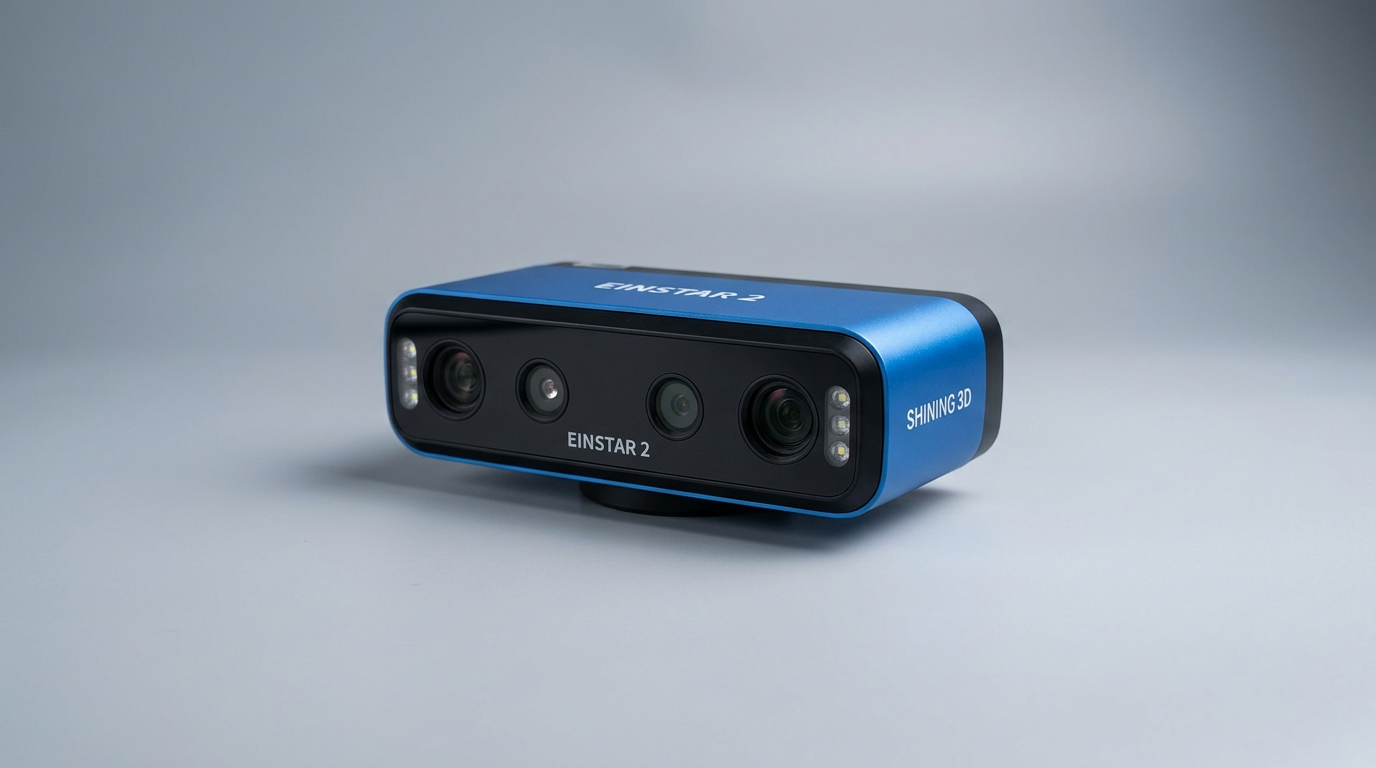
The EINSTAR 2 arrives at a pivotal moment for 3D scanning, bridging the capabilities of more expensive professional units with a price point accessible to serious hobbyists and small businesses. Unlike many devices that specialize in either small detail or large object capture, the EINSTAR 2 attempts to deliver both, integrating distinct laser and infrared scanning modes into a single, untethered package. This dual-mode approach represents a strategic bet on versatility, offering users the flexibility to tackle a wider array of projects without investing in multiple specialized tools.
However, this broad utility introduces a critical dependency on the user's computing infrastructure, a fact often overlooked in the rush to acquire advanced hardware. The scanner's advanced processing demands shift the 'hidden cost' from the scanner itself to the supporting PC, creating a gatekeeper for optimal performance. Understanding this dynamic is key to evaluating whether the EINSTAR 2 truly delivers on its promise of accessible, high-performance scanning.
What owners love
- + High accuracy and detail capture for various object sizes
- + Dual scanning modes (laser and infrared) for material and environment adaptability
- + True wireless operation with long-lasting, swappable batteries
- + Effective on challenging surfaces like black or reflective materials
- + Solid software experience once initial learning curve is overcome
- + Strong value proposition for its feature set
Common complaints
- − Demanding PC hardware requirements are often underestimated
- − Significant learning curve for optimal scanning technique and software use
- − Limited instructional materials provided by the manufacturer
- − Mandatory online activation process for the software
- − Noticeable fan noise during operation
- − Packaging sometimes arrives with a strong chemical odor
Design & Build
The EINSTAR 2 presents a premium, polished feel, a trait frequently highlighted by owners. Its form factor is comfortable for extended handheld use, even for individuals with smaller hands. The device includes a robust carrying case, reinforcing its portable design. One minor but recurring observation pertains to the initial chemical odor emanating from the packaging, which dissipates over time. The inclusion of two swappable batteries, each offering up to three hours of operation, enables continuous wireless scanning, a significant upgrade over previous models. This design choice, termed 'the uninterrupted workflow engine' by some long-term users, eliminates cable management issues during capture sessions, which is critical for dynamic scanning environments like automotive applications.
Setup & Ease of Use
While the EINSTAR 2 offers advanced capabilities, its setup and initial learning phase present a notable barrier. Owners consistently report a steep learning curve, particularly regarding scanning techniques and software navigation. The provided instructions are often deemed insufficient, forcing users to discover optimal tracking and object capture methods through trial and error. This can be frustrating for newcomers to 3D scanning. A more substantial hurdle lies in the required computing power: the EINSTAR 2 operates best with gaming-grade PCs or high-end MacBooks, demanding specific CPU, RAM, and GPU configurations. Failing to meet these 'system synergy thresholds' can lead to poor performance, even with a technically capable scanner. Users attest that the official minimum requirements are often a baseline, with recommended specifications providing a smoother experience. The software also mandates online activation, a point of contention for some who prefer complete offline control.
Performance in Real Use
The EINSTAR 2 demonstrates impressive performance across a range of scanning scenarios. Its dual-mode design, featuring a 17-line blue laser for high-detail small objects and VCSEL infrared for larger, outdoor, or challenging black/reflective surfaces, proves highly effective. Automotive applications, from scanning race car bodies for CFD analysis to general vehicle parts, are frequently cited as successful use cases. Owners note the scanner's ability to handle reflective surfaces without needing scan spray, saving preparation time and reducing mess. The wireless functionality is particularly praised, allowing significant freedom of movement and extended range. While output accuracy is generally high, several long-term users compare it favorably to much more expensive professional equipment, noting its capability for detailed models suitable for VFX, 3D printing, and engineering analysis. The fan noise, while present, is not widely reported as disruptive.
Software & Ecosystem
The EXstar Hub PC software is integral to the EINSTAR 2 experience. Once users overcome the initial learning phase, the software is largely described as functional, intuitive, and polished. It provides tools for model processing and optimization, streamlining the workflow from capture to final output. The software's performance is directly tied to the host PC's specifications; a common theme is that a robust system is necessary to fully leverage the scanner's speed and capabilities. While the software itself earns positive remarks for its utility and ease of use once mastered, the scarcity of comprehensive tutorials or guidance from the manufacturer is a recurring complaint. This gap means users often rely on community resources or self-discovery to unlock the software's full potential, highlighting a 'documentation deficit' that could hinder broader adoption.
Value & Reliability
Considering its feature set and performance, the EINSTAR 2 offers compelling value in its price band, which sits around $1000. Owners generally perceive it as a sound investment for hobbyists, small businesses, and even some professional applications where higher-end equipment is cost-prohibitive. The build quality feels premium, contributing to its perceived reliability. While some users encounter initial difficulties, few report outright product failures. The demanding PC requirements represent a hidden cost that buyers must account for to ensure optimal functionality. For those with appropriate computing infrastructure and a willingness to navigate the learning curve, the EINSTAR 2 delivers professional-grade capabilities at a more accessible price point, positioning it as a strong contender in the prosumer 3D scanning market.
Verdict
Buy - The EINSTAR 2 offers a powerful and versatile 3D scanning solution for users equipped with capable computing hardware.
This scanner is an excellent fit for serious hobbyists, small businesses, and prosumers who require high accuracy and versatility for various object sizes and materials. If you already own a powerful PC or are willing to invest in one, and are prepared for a learning curve, the EINSTAR 2 provides a compelling feature set for around $1000. It is particularly well-suited for automotive scanning, product design, and artistic applications. Those new to 3D scanning without the necessary computing power or who expect a plug-and-play experience might find the initial investment in time and hardware frustrating.
The EINSTAR 2 marks a significant evolution in accessible 3D scanning, demonstrating that advanced dual-mode functionality and wireless freedom are no longer exclusive to the highest price tiers. Its true innovation, however, lies in its strategic decentralization of processing power, shifting the bulk of the computational burden to the user's PC. This 'distributed power model' allows the scanner itself to remain relatively affordable, but it also creates a clear distinction between advertised capability and real-world user experience, a crucial nuance for buyers to consider.
FAQ
More 3D Scanners reviews

AESUB Violet 3D Scanning Spray Review
3DMakerpro Moose Review: Precision Scanning Meets a Real Learning Curve
Creality Otter Lite Basic 3D Scanner Review: Reality Capture
Creality Pika 3D Scanner Review: Precision Meets The Compute Cliff
Revopoint POP 4 Magnetic Outdoor Filter Review
3DMakerpro Moose Lite Premium 3D Scanner Review
This review is based on real experiences shared by owners in online communities.